
1. Entwodiksyon ak souview
The Dio DiOCAMRI01 is an advanced 360° HD WiFi camera designed for indoor surveillance, offering comprehensive monitoring while prioritizing user privacy. This camera features a motorized lens, 1080p resolution, and infrared night vision, ensuring clear visuals day and night. Its unique geo-fencing capability automatically activates a privacy mode when you are home, retracting the lens to ensure your personal space remains private. The camera also includes motion and noise detection, two-way audio communication, and local recording options via a Micro SD card.
This manual provides essential information for the proper installation, operation, and maintenance of your DiOCAMRI01 camera.
2. Enfòmasyon sou Sekirite
- Li tout enstriksyon ak anpil atansyon anvan ou itilize.
- Sèvi ak adaptè pouvwa a sèlman ak aparèy la.
- Pa ekspoze kamera a nan dlo, imidite, oswa tanperati ekstrèm.
- Evite mete kamera a toupre sous chalè oswa anba limyè solèy dirèk.
- Pa eseye demonte oswa repare kamera a tèt ou. Konfye tout antretyen bay pèsonèl kalifye.
- Ensure the camera is securely mounted if using wall or ceiling installation.
3. Pake kontni
Verifye ke tout konpozan yo prezan nan pake ou a:
- DiOCAMRI01 HD WiFi Camera
- Adaptè pouvwa
- Mounting Kit (screws, wall plugs, mounting bracket)
- Manyèl Itilizatè (dokiman sa a)
4. Pwodwi Features
- Siveyans Adistans: Day and night vision (infrared night vision up to 10m).
- Wide-Angle Motorized Lens: Ofri wotasyon 360° orizontal ak 150° vètikal pou yon pwoteksyon konplè.
- Pwoteksyon Konfidansyalite: Geo-fencing feature automatically puts the camera in standby mode and closes the lens when the owner is present. Manual standby mode is also available via the app.
- Motion and Noise Detection: Adjustable sensitivity with 3 levels. Sends direct notifications to your smartphone.
- De-fason Audio: Built-in microphone and intercom function allow you to hear and speak through the camera.
- Anrejistreman lokal: Supports Micro SD card (up to 128GB, not included) for manual or automatic recording upon detection. Remote viewing of recordings is available via the smartphone app.
- Enstalasyon fasil: Quick and intuitive installation via the DiO Cam+ mobile application.
- Montaj fleksib: Designed for discreet integration, can be mounted on a wall, ceiling, or placed on a shelf.
5. Enstalasyon
5.1 Inisyal Enstalasyon
- Koneksyon pouvwa: Connect the camera to a power outlet using the provided power adapter. The camera will power on.
- Download DiO Cam+ App: Chèche pou "DiO Cam+" in your smartphone's app store (iOS or Android) and download the application.
- Enskri/Konekte: Louvri aplikasyon an epi swiv enstriksyon ki sou ekran an pou kreye yon kont oubyen konekte si ou deja genyen youn.
- Ajoute kamera: Within the DiO Cam+ app, select the option to add a new device. Follow the in-app wizard to connect your camera to your Wi-Fi network. This typically involves scanning a QR code on the camera or entering Wi-Fi credentials.
- Plasman: Position the camera in your desired location. It can be placed on a flat surface, or mounted on a wall or ceiling using the included mounting kit. Ensure the camera has a clear line of sight to the area you wish to monitor.
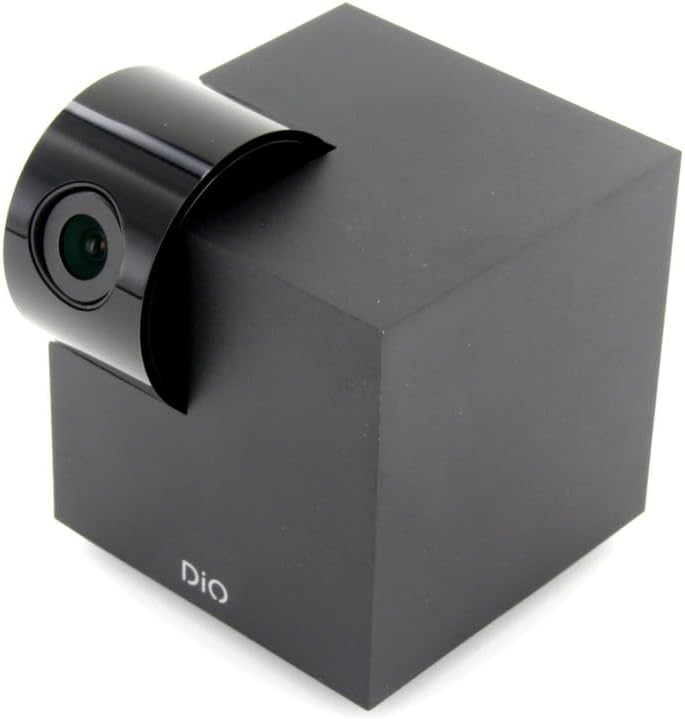
Figure 5.1: The DiOCAMRI01 camera in its standard upright position.

Figure 5.2: Camera placed on a shelf, demonstrating discreet integration.

Figure 5.3: Camera mounted on a ceiling for overhead surveillance.
5.2 Enstalasyon Kat Mikwo SD (Si ou vle)
To enable local video recording, insert a Micro SD card (up to 128GB, not included) into the designated slot on the camera. Ensure the camera is powered off before inserting or removing the card.
5.3 Pataje Aksè Kamera
The DiO Cam+ app allows you to easily share access to your camera with family members or trusted friends. Navigate to the camera settings within the app and select the sharing option to invite others to view emisyon an dirèk ak anrejistreman yo.
6. Operasyon Enstriksyon
6.1 Viv View ak kontwòl remote
Once connected, open the DiO Cam+ app to access the live video feed from your camera. From the live view screen, you can:
- Ajiste View Ang: Use the on-screen controls to remotely rotate the camera lens up to 350° horizontally and 150° vertically to cover all corners of your room.
- De-fason Audio: Tap the microphone icon to speak through the camera's speaker, and listen to audio from the camera's microphone.
- Take Snapshots/Record Video: Capture still images or start manual video recordings directly from the live view.

Figure 6.1: Camera interacting with the DiO Cam+ smartphone application.

Figi 6.2: Side view of the camera, highlighting the rotating lens mechanism.
6.2 Privacy Features (Geo-Fencing and Manual Standby)
The DiOCAMRI01 camera offers advanced privacy protection:
- Jeo-kloti: Configure geo-fencing in the app to automatically switch the camera to privacy mode when your smartphone enters a predefined home zone. In privacy mode, the camera lens will retract, ensuring no recording or live viewing rive.
- Manual Standby: You can manually activate or deactivate the camera's standby mode (privacy mode) at any time through the DiO Cam+ app.
- Scheduled Standby: Set a schedule within the app for the camera to automatically enter or exit standby mode at specific times.

Figure 6.3: Camera with lens retracted, indicating privacy mode.
6.3 Motion and Noise Detection
The camera can detect motion and noise within its field of view. When triggered, it will send a notification to your smartphone and can automatically begin recording to the Micro SD card.
- Ajisteman sansiblite: Adjust the detection sensitivity (3 levels) in the app settings to minimize false alarms.
- Opsyon Anrejistreman: Configure recording duration (1, 3, or 5 minutes per clip) or continuous recording if a Micro SD card is installed.
7. Antretyen
- Netwayaj: Sèvi ak yon twal mou epi sèk pou netwaye kò kamera a ak lantiy la. Pa sèvi ak pwodui netwayaj likid oswa materyèl abrazif.
- Mizajou lojisyèl: Regularly check the DiO Cam+ app for firmware updates to ensure optimal performance and security. Follow the in-app instructions for any available updates.
- Jesyon Kat Mikwo SD: Tanzantan review and manage recordings on your Micro SD card. Format the card through the app if necessary to maintain performance.
NAN. Depanaj
- Kamera Offline: Ensure the camera is powered on and connected to your Wi-Fi network. Check your Wi-Fi router and internet connection. Try restarting the camera and your router.
- Pa ka konekte ak aplikasyon an: Verify your Wi-Fi password. Ensure your smartphone is connected to a 2.4GHz Wi-Fi network during initial setup, as the camera may not support 5GHz networks.
- Kalite videyo pòv: Check your internet connection speed. Ensure the camera lens is clean and free from obstructions. Adjust camera placement for optimal lighting.
- Motion/Noise Detection Not Working: Check the sensitivity settings in the app. Ensure the detection zones are correctly configured.
- No Recording to SD Card: Ensure the Micro SD card is correctly inserted and formatted. Check if the card is full. The camera supports up to 128GB.
- Privacy Mode Not Activating: Verify that geo-fencing is enabled and configured correctly in the app, and that your smartphone's location services are active.
9. Espesifikasyon
| Karakteristik | Spesifikasyon |
|---|---|
| Nimewo Modèl | DIOCAM-RI01 |
| Kalite aliye | Mi mòn |
| Rezolisyon Capture Videyo | 1080p |
| Koulè | Blan |
| Kantite Atik | 1 |
| Konpozan ki enkli | DiOCAMRI01 WiFi HD 360° Rotating 1080P 2MP Camera with Geo-Fencing |
| Teknoloji kominikasyon san fil | Wi-Fi |
| Faktè fòm | Dome (Cube with rotating lens) |
| Rezolisyon Videyo efikas | 1080 |
| Viewing Ang | 360 degre (orizontal) |
| Vizyon lannwit Range | 10 mèt |
| Materyèl | Metal |
| Voltage | 5 Volts |
| Wattage | 5 wat |
| Dimansyon atik (L x W x H) | 9.4 x 4.9 x 31.9 santimèt |
| Manifakti | CHAKON |
| Karakteristik espesyal | Local Recording, Night Vision |
| Batri enkli | Non |
| Batri obligatwa | Non |
| Itilizasyon Rekòmande | Motion Detection, Night Vision |
| Koneksyon Teknoloji | San fil |
| Andedan kay la / Deyò Itilizasyon | Andedan kay la |
| Aparèy konpatib | Smartphone |
| Sous pouvwa | Battery Powered (Note: Product specs indicate 'No batteries required', implying external power) |
| Pwotokòl Koneksyon | Wi-Fi |
| Kalite kontwolè | Android |
10. Garanti ak sipò
For information regarding warranty coverage, technical support, or service, please refer to the official Dio websit la oubyen kontakte kote ou te achte a. Kenbe prèv acha ou a pou reklamasyon garanti.
Manifakti: CHAKON