
1. Entwodiksyon
This manual provides essential instructions for the installation, operation, and maintenance of the CAME ZBX7N Control Board. The ZBX7N is an electronic replacement part designed for CAME BX series sliding gate operators, operating on a 230V single-phase current. It is fully compatible with and replaces older models ZBX74 and ZBX78. Please read this manual thoroughly before proceeding with installation or operation to ensure safe and correct usage.
2. Enfòmasyon sou Sekirite
AVÈTISMAN: Improper installation or use can lead to serious injury or damage.
- Installation and wiring must be performed by qualified personnel in accordance with all local electrical codes and regulations.
- Disconnect power to the gate operator before performing any installation, maintenance, or repair work.
- Asire w ke tout koneksyon yo byen fèm epi byen izole pou anpeche danje elektrik.
- Do not operate the gate if any part of the system is damaged or malfunctioning.
- Keep hands and loose clothing clear of moving gate parts.
- This control board is designed for 230V single-phase current. Verify your power supply matches this requirement.
- Always use original CAME replacement parts and accessories.
3. Pake kontni
Upon opening the package, verify that all components are present and undamaged. The package should contain:
- 1 x CAME ZBX7N Control Board
- Manyèl Enstriksyon (dokiman sa a)
- Any specific mounting hardware or connectors (check your specific product packaging)
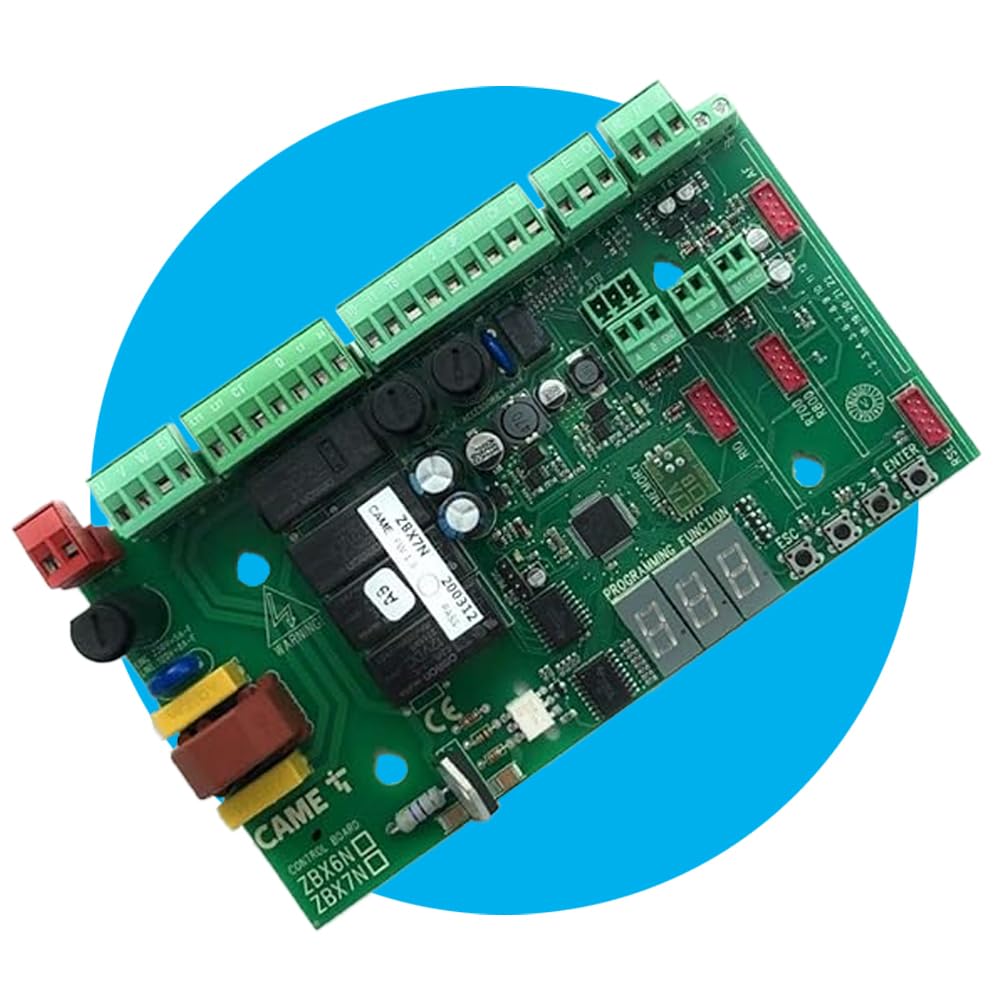
Image 1: The CAME ZBX7N Control Board. This image displays the main electronic board with various connectors and components.
4. Enstalasyon ak Enstalasyon
The CAME ZBX7N control board is designed for easy integration into CAME BX series sliding gate operators. It is a direct replacement for ZBX74 and ZBX78 models.
4.1 Konpatibilite
This control board is specifically compatible with CAME BX series sliding gate operators that utilize a 230V single-phase current supply. It directly replaces the ZBX74 and ZBX78 models, ensuring seamless integration.
4.2 Fil elektrik ak Koneksyon
Refer to the wiring diagram provided with your specific gate operator model for detailed connection instructions. Ensure all electrical connections are made securely and correctly.
- Pwovizyon pou pouvwa: Connect the 230V single-phase power supply to the designated terminals.
- Koneksyon motè: Connect the gate operator motor wires to the appropriate terminals on the ZBX7N board.
- Safety Strips: The board features CX and CY-resistive inputs for 8k2 safety strips, ensuring compliance with safety regulations. Connect these as required.
- Pwodwi pou Telefòn: The ZBX7N supports various CAME accessories, including Rio wireless systems, CAME keyboards, and transponder selectors. Connect these to their respective ports as per their individual manuals.
4.3 CAME Connect Integration
The ZBX7N is ready for CAME Connect, allowing for remote control and monitoring via dedicated gateways. Consult the CAME Connect documentation for setup and configuration of remote access.
5. Operasyon Enstriksyon
Once installed and powered, the CAME ZBX7N control board offers advanced functionalities for gate operation.
- Radio Decoding: Supports rolling code, twin, and key block radio decoding for up to 250 users. Refer to the programming guide for adding and managing remote controls.
- Memory Roll: Utilize the Memory Roll feature to store and recall configurations, simplifying setup for multiple installations or replacements.
- Master/Slave Pairing: The master/slave pairing function allows for synchronized operation of two gate operators.
- Quick Display Menu: Navigate settings and monitor status using the quick display menu on the control board.
- Mode sibstiti: The energy-saving standby mode reduces power consumption when the gate is inactive.
For detailed programming steps and advanced settings, consult the comprehensive programming manual available from CAME.
6. Antretyen
Regular maintenance ensures the longevity and reliable operation of your CAME ZBX7N control board and gate system.
- Enspeksyon vizyèl: Periodically inspect the control board and its connections for any signs of wear, corrosion, or damage.
- Lapwòpte: Keep the control board free from dust, dirt, and moisture. Use a soft, dry cloth for cleaning. Do not use liquid cleaners.
- Entegrite Koneksyon: Ensure all wiring connections remain tight and secure. Loose connections can lead to intermittent operation or electrical issues.
- Pwoteksyon anviwònman: Ensure the control board is housed in a suitable enclosure that protects it from environmental elements such as rain, extreme temperatures, and direct sunlight.
For any complex maintenance or repairs, it is recommended to contact a qualified CAME service technician.
NAN. Depanaj
If you encounter issues with your CAME ZBX7N control board, consider the following basic troubleshooting steps:
- Pa gen pouvwa: Check the main power supply to the gate operator and ensure all circuit breakers are on. Verify the control board's power connections.
- Baryè a pa reponn: Check remote control batteries. Ensure the safety strips (CX/CY inputs) are not triggered or faulty. Inspect motor connections.
- Operasyon iregilye: This could indicate interference or a faulty connection. Check for loose wires or external electrical noise.
- Erè Afichaj: Consult the CAME programming manual for a list of error codes and their meanings displayed on the quick display menu.
If the problem persists after performing these checks, contact CAME technical support or a certified technician for further assistance. Do not attempt to repair the control board yourself.
8. Espesifikasyon
| Karakteristik | Detay |
|---|---|
| Manifakti | Vini |
| Nimewo Pati | 88001-0065 |
| Nimewo Modèl Atik | ZBX7N |
| Konpatibilite | CAME BX series sliding gate operators (replaces ZBX74/78) |
| Pwovizyon pou pouvwa | 230V sèl-faz |
| Dimansyon pwodwi | 10 x 5 x 10 cm |
| Pwa atik | 280 g |
| Batri obligatwa | Non |
| ASIN | B07D18LY77 |
9. Garanti ak sipò
For information regarding the warranty period and terms for your CAME ZBX7N Control Board, please refer to the warranty documentation provided with your purchase or visit the official CAME websit.
For technical support, spare parts, or service inquiries, please contact your authorized CAME dealer or the CAME customer service department. Ensure you have your product model number (ZBX7N) and part number (88001-0065) available when contacting support.