
1. Entwodiksyon
Thank you for choosing the X.Cell M100 Wireless Mouse. This manual provides essential information for setting up, operating, and maintaining your new wireless mouse. Please read these instructions carefully before use to ensure optimal performance and longevity of your device.
2. Pake kontni
Verifye ke tout atik yo prezan nan pakè ou a:
- X.Cell M100 Wireless Mouse
- USB Nano Reseptè
- AA Battery (may be pre-installed or included separately)
- Manyèl Itilizatè (dokiman sa a)
3. Enstalasyon
- Mete batri: Locate the battery compartment on the underside of the mouse. Open the cover and insert the provided AA battery, ensuring correct polarity (+/-). Close the battery compartment cover.
- Konekte reseptè USB: Remove the USB Nano Receiver from its storage slot, usually located inside the battery compartment or near it. Plug the receiver into an available USB port on your computer (PC or Mac).
- Pouvwa sou: Turn on the mouse using the power switch, typically located on the underside. The mouse is designed for plug-and-play functionality, meaning it should automatically connect to your computer within a few seconds.
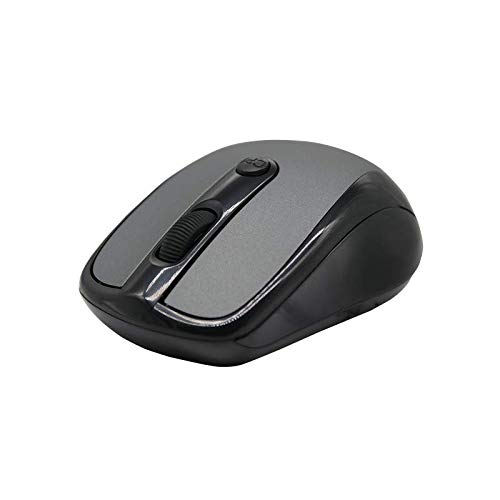
This image shows the X.Cell M100 Wireless Mouse from a top-down perspective, highlighting its ergonomic design and button layout.
4. Operasyon Enstriksyon
The X.Cell M100 Wireless Mouse utilizes 2.4 GHz wireless technology, providing a stable connection with an operating range of up to 10 meters. It is compatible with both PC and Mac systems.
- Bouton Goch: Primary click function for selecting items, opening files, elatriye.
- Dwa bouton: Secondary click function for context menus and additional options.
- wou woulo liv: Woule monte oswa desann pou navige nan dokiman yo ak web paj yo. Rou defile a fonksyone tou kòm yon bouton klike nan mitan an.
- DPI Button (if present): Some models may include a DPI button to adjust cursor sensitivity. Refer to the mouse's physical design for this feature.

A hand demonstrates the comfortable grip and usage of the X.Cell M100 Wireless Mouse during operation.
5. Antretyen
- Netwayaj: Sèvi ak yon twal mou epi sèk pou netwaye sourit la. Pou pousyè tè ki difisil pou retire, siye l yon ti kras.ampRense twal la avèk dlo. Evite itilize pwodui chimik ki agresif oswa materyèl abrazif.
- Ranplasman batri: When the mouse performance degrades or it stops responding, replace the AA battery. Follow the steps in the 'Setup' section for battery insertion. The mouse is designed for approximately 12 months of battery life under typical usage.
- Depo: When not in use for extended periods, turn off the mouse to conserve battery life. Store the USB Nano Receiver in its designated slot to prevent loss.
NAN. Depanaj
| Pwoblèm | Solisyon |
|---|---|
| Sourit pa reponn |
|
| Mouvman kurseur a pa regilye oswa ralanti |
|
| Pwoblèm koneksyon |
|
7. Espesifikasyon
- Modèl: XL-M-100-BLK
- Koneksyon: 2.4 GHz Wireless
- Ranje operasyon: Jiska 10 mèt
- Konpatibilite: PC & Mac
- Sous pouvwa: 1 x batri AA
- Estimasyon lavi batri: 12 mwa
- Dimansyon (L x W x H): 2.4 x 6.4 x 4.6 cm
- Pwa: 80 gram
- Koulè: Nwa
8. Garanti ak sipò
Specific warranty details and direct support contact information are not provided in the product description. Please refer to the product packaging or the official X.Cell website for the most current warranty policy and customer support options. Keep your purchase receipt as proof of purchase for any warranty claims.


