
Entwodiksyon
This manual provides comprehensive instructions for the Sharp EN2A27S TV Remote Control. It covers essential information regarding setup, operation, maintenance, and troubleshooting to ensure optimal performance with your compatible Sharp Smart LCD HDTV Television.
Kontni pake
- Sharp EN2A27S TV Remote Control
Note: Batteries are not included and must be purchased separately. Two AAA batteries are required.
Enstalasyon
Enstalasyon batri
- Jwenn lòj batri a sou do a nan kontwòl remote la.
- Glise kouvèti konpatiman batri a anba pou ouvri li.
- Mete de pil AAA ladan l, asire w ke tèminal pozitif (+) ak negatif (-) yo byen aliyen ak mak ki anndan konpatiman an.
- Glise kouvèti konpatiman batri a tounen nan plas li jiskaske li fè yon klik byen fèm.
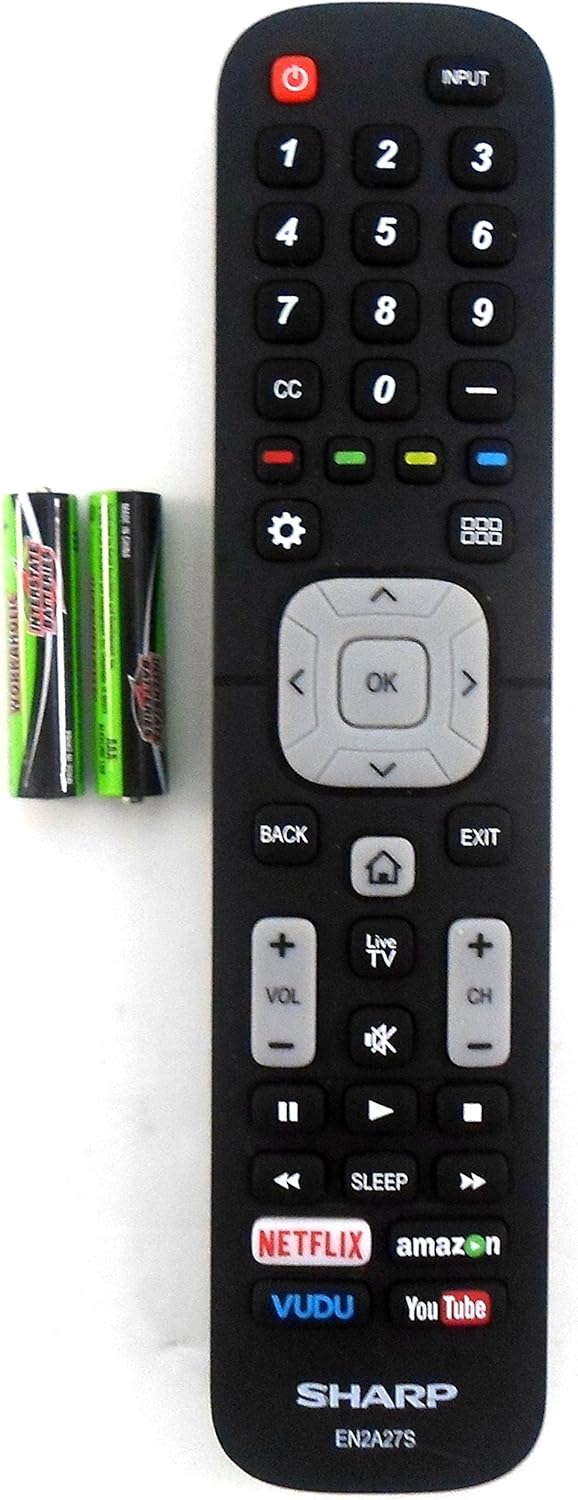
Image: The Sharp EN2A27S remote control shown alongside two AAA batteries, indicating where batteries are inserted for operation.
The remote control is now ready for use with your compatible Sharp TV. No programming is typically required for original Sharp remote controls.
Enstriksyon Operasyon
The Sharp EN2A27S remote control provides direct access to various functions of your Sharp Smart LCD HDTV. Familiarize yourself with the button layout for efficient operation.

Imaj: Yon imaj detaye view of the lower portion of the Sharp EN2A27S remote, showcasing dedicated buttons for Netflix, Amazon, Vudu, and YouTube.
Fonksyon kle:
- Pouvwa (Bouton Wouj): Limen oswa etenn televizyon an.
- Antre: Selects the video input source (e.g., HDMI 1, HDMI 2, AV).
- Bouton nimewo (0-9): Chwazi chanèl televizyon yo dirèkteman.
- CC (Sous-titre): Aktive oubyen dezaktive sous-titres yo.
- Bouton koulè (wouj, vèt, jòn, ble): Used for specific functions within menus or applications, as indicated on the TV screen.
- Anviwònman (Icône Kovèti pou): Aksè nan meni prensipal paramèt televizyon an.
- Grid Icon: Opens the TV's smart hub or app launcher.
- Pavé navigasyon (Anwo, Anba, Agoch, Adwat, OK): Navige nan meni yo epi konfime seleksyon yo.
- Retounen: Retounen nan ekran oswa meni anvan an.
- Sòti: Kite meni oswa aplikasyon aktyèl la.
- Home (House Icon): Retounen nan ekran prensipal televizyon an.
- Televizyon an dirèk: Switches to live television broadcast.
- Volim monte/desann (VOL +/-): Ajiste nivo volim televizyon an.
- Mute (Speaker Icon): Mutes or unmutes the TV's audio.
- Chanèl Monte/Desann (CH +/-): Chanje chanèl televizyon yo.
- Playback Controls (Play, Pause, Fast Forward, Rewind, Stop): Kontwole lèktur medya yo.
- Dòmi: Li fikse yon revèy pou televizyon an etenn otomatikman.
- Dedicated App Buttons (Netflix, Amazon, Vudu, YouTube): Bay aksè dirèk a aplikasyon difizyon sa yo.
Konpatibilite
The Sharp EN2A27S TV Remote Control is compatible with the following Sharp Smart LCD HDTV Television models:
55H6B, 50H7GB, 50H6B, N6200U, LC-60N6200U, LC-60N7000U, LC-65N7000U, LC-43N7000U, LC-50N7000U, LC-55N7000U, LC-40N5000U, LC-43N5000U, LC-43N6100U, LC-50N5000U, LC-50N6000U, LC-55N620CU, LC-55N5300U, LC-55N6000U, LC-60N5100U, LC-65N5200U, LC-65N6200U, LC-65N9000U, LC-75N620U, LC-75N8000U.
Antretyen
Netwayaj:
- Siye kontwòl remote la ak yon twal mou epi sèk.
- Do not use liquid cleaners, sprays, or abrasive materials, as these may damage the remote's surface or internal components.
Swen batri:
- Ranplase pil yo lè repons remote la diminye.
- Retire pil yo si ou pa pral itilize kontwòl remote la pou yon peryòd tan pwolonje pou anpeche flit.
- Jete pil yo itilize dapre règleman lokal yo.
Depanaj
Remote pa reponn:
- Tcheke batri yo: Ensure batteries are inserted correctly with the correct polarity (+/-). Replace old or depleted batteries with new ones.
- Liy Vizyon: Ensure there is a clear line of sight between the remote control and the TV's infrared sensor. Obstructions can block the signal.
- Remote sensor: Verify that the TV's remote sensor is not blocked or dirty.
- Pouvwa televizyon: Konfime ke televizyon an limen epi li pa nan mòd sibstiti.
Bouton pa travay:
- Individual Button Test: If only specific buttons are not working, try pressing them firmly. If the issue persists, the remote may require replacement.
- Netwaye Remote: Dust or debris under buttons can sometimes cause issues. Refer to the cleaning instructions in the Maintenance section.
Espesifikasyon
| Nimewo Modèl | EN2A27S |
| Internal Item Number | 8541714996 |
| Mak | Sharp |
| Dimansyon pwodwi | 8 x 2 x 0.5 pous |
| Pwa atik | 2.89 ons |
| Koulè | Nwa |
| Max Kantite Aparèy Sipòte | 1 |
| Aparèy konpatib | Televizyon |
| Manifakti | OEM Sharp |
Sipò
For further assistance or inquiries regarding your Sharp EN2A27S TV Remote Control, please refer to the support resources provided by Sharp or your television's original documentation. You may also visit the official Sharp website for product information and customer service contacts.