
1. Entwodiksyon
This manual provides detailed instructions for the safe and effective use of the SMART SENSOR AS8805 Digital Sulfur Dioxide Gas Monitor. This device is designed for high-sensitivity detection of sulfur dioxide (SO2) gas, featuring sound and light alarms, and a rechargeable Li-battery for portable operation. Please read this manual thoroughly before operating the device and retain it for future reference.
2. Enfòmasyon sou Sekirite
Toujou respekte prekosyon sekirite sa yo pou evite aksidan oswa domaj nan aparèy la:
- Pa eseye modifye oswa demonte aparèy la.
- Asire w ke aparèy la ap itilize nan limit tanperati ak imidite ki espesifye pou fonksyònman li yo.
- Kenbe aparèy la lwen jaden elektwomayetik fò.
- Regilyèman tcheke aparèy la pou nenpòt siy domaj oswa fonksyone byen.
- Perform zero calibration in a clean air environment, free from SO2 or other interfering gases.
- Recharge the battery promptly when the low power indicator is active to maintain optimal performance and safety.
- This device is designed for detecting SO2 gas. Do not use it for other gas types without proper calibration and verification.
3. Pwodwi souview
The SMART SENSOR AS8805 is a compact and portable sulfur dioxide gas detector. Familiarize yourself with its components:

Figi 3.1: Devan View of the AS8805 Detector. This image shows the front of the device, highlighting the digital LCD display, power on/off key, up key (addition), down key (subtraction), and enter key. The alarm light is visible at the top left, and the sulfur dioxide gas sensor is at the top right.
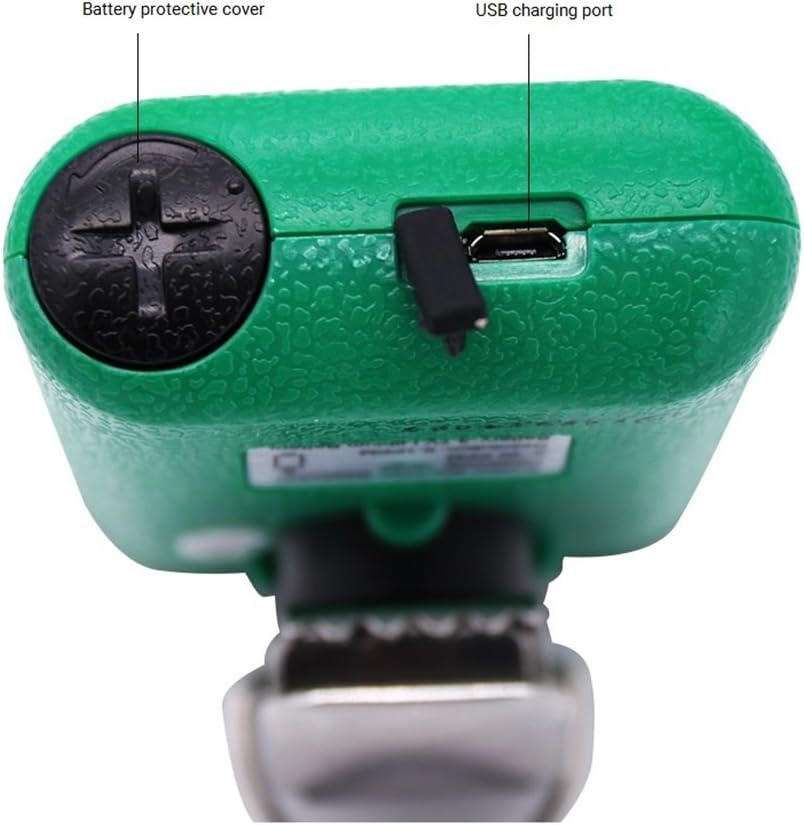
Figi 3.2: Top View of the AS8805 Detector. This image displays the top section of the device, indicating the battery protective cover and the USB charging port.

Figi 3.3: Side View of the AS8805 Detector. This image illustrates the side of the device, pointing out the gas sensor inside and the alarm light.
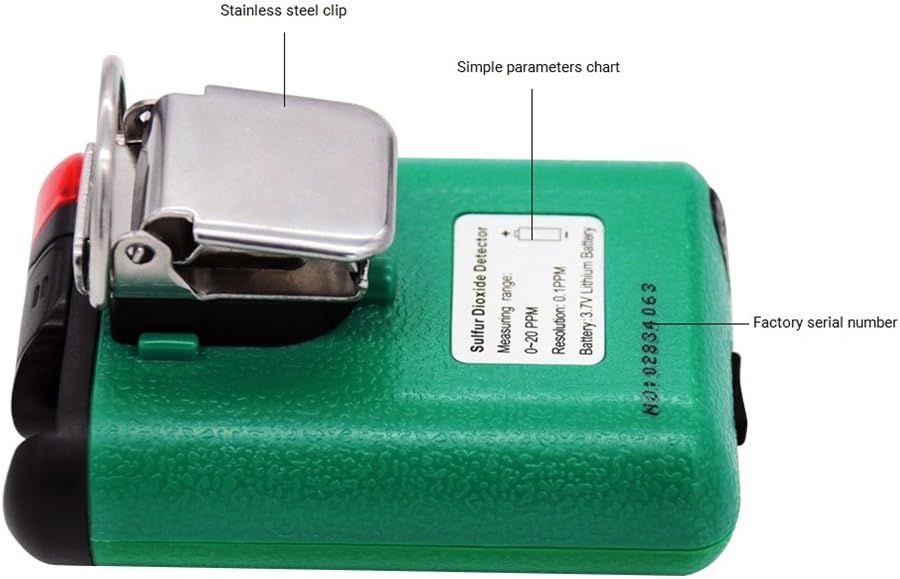
Figi 3.4: Retounen View of the AS8805 Detector. This image shows the back of the device, featuring the stainless steel clip, a simple parameters chart, and the factory serial number.
3.1 Konpozan kle
- Sulfur Dioxide Gas Sensor: Detects SO2 concentration in the air.
- Limyè alam: Provides visual indication during an alarm event.
- Digital LCD Display: Shows real-time gas concentration, battery status, and other operational information.
- Kle On/Off: Itilize pou limen oswa etenn aparèy la.
- Up Key (Addition): Used for navigating menus or increasinvalè g yo.
- Down Key (Subtraction): Used for navigating menus or decreasinvalè g yo.
- Antre kle: Used to confirm selections or enter menus.
- Battery Protective Cover: Secures the internal battery.
- USB chaje Port: For recharging the device's internal Li-battery.
- Stainless Steel Clip: Allows for convenient carrying and attachment.
4. Enstalasyon
4.1 Debale ak Kontni Pakè a
Carefully unpack the device and verify that all standard accessories are present:

Figure 4.1: Standard Package Contents. This image shows the items included in the standard package: the AS8805 gas monitor, power charger and cable, user manual, explosive-proof certificate, certificate of calibration, and warranty card.
- 1x Sulfur Dioxide Gas Monitor (AS8805)
- 1x manyèl itilizatè
- 1x Explosive-proof Certificate
- 1x kat garanti
- 1x Power Charger
- 1x pouvwa kab
4.2 Chaje batri a
The device is powered by a 3.7V Li-battery. Before first use, or when the low power indicator appears, charge the device:
- Connect the provided power cable to the USB charging port on the top of the device (refer to Figure 3.2).
- Connect the other end of the cable to the power charger, and then plug the charger into a suitable power outlet.
- Ikòn batri a sou ekran LCD a ap endike eta chaj la.
- A full charge typically allows for approximately 60 hours of continuous operation without alarms.
4.3 Premye pouvwa-sou
Pou pouvwa sou aparèy la:
- Peze epi kenbe la Power On/Off kle until the display illuminates.
- The device will perform a self-test and warm-up sequence. During this time, the display may show various readings before settling.
5. Operasyon
5.1 Power On/Off
- Pouvwa sou: Peze epi kenbe la Power On/Off kle for a few seconds until the display turns on.
- Pouvwa Off: Peze epi kenbe la Power On/Off kle for a few seconds until the display turns off.
5.2 Montre Enfòmasyon
The digital LCD display shows the following information:
- Real-time SO2 Concentration: Displayed in parts per million (ppm).
- Endikatè estati batri: Montre nivo chaj batri aktyèl la.
- Endikatè alam: Visual cues for high or low alarm conditions.
5.3 Alarm Functions and Settings
The device features adjustable high and low alarm values with three alarm methods: sound, light, and vibration. The alarm sound can reach up to 80dB.
- Default High Alarm: 10.0 ppm
- Default Low Alarm: 5.0 ppm
To adjust alarm values:
- Avèk aparèy la limen, peze bouton an Up kle or Desann kle to enter the password interface.
- Enter the password (e.g., "123" as shown in the calibration video, though specific password should be confirmed in the full user manual). Use the Up epi Down Keys to change digits and the Antre kle to move to the next digit or confirm.
- After entering the correct password, navigate through the menu using the Up epi Down Keys to find the alarm setting options.
- Adjust the high and low alarm thresholds as required using the Up epi Down Keys, and confirm each setting with the Antre kle.
5.4 Kalibrasyon zewo
Zero calibration ensures accurate readings by setting the baseline in a clean air environment. This procedure should be performed regularly or if you suspect inaccurate readings.
- Ensure the device is in a clean environment, free from any SO2 gas.
- Pouvwa sou aparèy la.
- Access the calibration menu by pressing the Up kle or Desann kle to enter the password interface.
- Enter the password (e.g., "123").
- After successful password entry, navigate to the calibration option (often labeled "CAL" or "ZERO CAL").
- Confirm the zero calibration selection with the Antre kle. The device will then perform the zero calibration, displaying a changing number as it stabilizes.
- Wait for the device to stabilize and confirm the calibration. The display may show "F" or return to 0.0 ppm, indicating successful calibration.
5.5 Auto/Hand Power Off Function
The device includes an auto power-off feature to conserve battery life. This can be set manually.
- Auto Power Off: If enabled, the device will automatically turn off after 10 minutes of no operation.
- Refer to the full user manual for specific instructions on how to enable or disable the auto power-off function.
6. Antretyen
6.1 Swen Batri
- Recharge the 3.7V Li-battery when the low power indicator is displayed.
- Evite vide batri a nèt souvan pou pwolonje dire lavi li.
- Sèvi sèlman ak plato ak kab ki vini ak aparèy la.
6.2 Lavi Capteur
The electrochemical sensor has an estimated life of 2 years. After this period, the sensor's accuracy may degrade, and replacement or professional calibration may be required.
6.3 Netwayaj
- Siye deyò aparèy la ak yon twal mou,amp twal.
- Pa sèvi ak pwodui netwayaj abrazif oswa solvang.
- Ensure no liquid enters the sensor opening or charging port.
NAN. Depanaj
| Pwoblèm | Kòz posib | Solisyon |
|---|---|---|
| Aparèy pa limen. | Batri ki fèb oswa ki vid. | Chaje aparèy la lè l sèvi avèk plato ak kab yo bay la. |
| Lekti ki pa kòrèk. | Sensor requires zero calibration; sensor lifespan exceeded. | Perform zero calibration in clean air. If issues persist, consider sensor replacement or professional service. |
| Alam son kontinyèlman. | High SO2 concentration detected; alarm settings too low. | Evacuate the area and ventilate. Check and adjust alarm thresholds if necessary. |
| Ekran an vid oswa li bloke. | Software error or battery issue. | Try restarting the device. If problem persists, contact support. |
8. Espesifikasyon
| Karakteristik | Detay |
|---|---|
| Nimewo Modèl Pwodwi | AS8805 |
| Gas Measurement Type | Dyoksid souf (SO2) |
| Mezire Range | 0 ~ 20 ppm |
| Testing Resolution | 0.1 ppm |
| Prensip Mezire | Elektrochimik |
| Vite Capteur | 2 ane |
| Alam ki ba/segondè | Supported, adjustable values |
| Metòd alam | Sound, Light, Vibration |
| Nivo son alam | Jiska 80 dB |
| Tanperati Fonksyònman | -10 ~ 50 ℃ (14 ~ 122 ℉) |
| Operasyon Imidite | 15 ~ 95% RH (Standard) |
| Kalite batri | 3.7V Li-battery (754060p) |
| Tan travay batri | Approx. 60 hours (no alarm) |
| Auto Power Off | Yes (after 10 minutes of no operation, if enabled) |
| Pwodwi Net Pwa | 200g (7.1 ons) |
| Gwosè pwodwi | 120 * 65 * 38 mm |
| UPC | 785197913523 |
9. Garanti ak sipò
The SMART SENSOR AS8805 Digital Sulfur Dioxide Gas Monitor comes with a warranty as detailed in the included Warranty Card. Please refer to the card for specific terms and conditions.
For technical support, service, or inquiries regarding your device, please contact your retailer or the manufacturer directly. Keep your purchase receipt and warranty card handy when seeking support.