
1. Entwodiksyon
Thank you for choosing the ASAKUKI Smart Wi-Fi Essential Oil Diffuser. This device combines aromatherapy with smart technology, allowing you to control it via a mobile application or voice commands. It is designed to humidify and purify the air, creating a relaxing atmosphere in your home or office.
This manual provides detailed instructions for the safe and efficient use of your diffuser. Please read it thoroughly before operation and retain it for future reference.

Image: The ASAKUKI Smart Wi-Fi Essential Oil Diffuser is versatile for various environments, including nurseries, family rooms, bedrooms, yoga studios, and workspaces.
2. Prekosyon sekirite
Pou asire yon operasyon an sekirite epi pou evite domaj, tanpri obsève sa ki annapre yo:
- Toujou mete difizè a sou yon sifas plat epi ki estab.
- Do not exceed the maximum water fill line (500ml).
- Use only clean tap water or distilled water. Avoid using hot water.
- Add essential oils carefully to avoid spilling on the exterior of the unit.
- Kenbe difize a deyò pou timoun ak bèt kay.
- Do not cover the mist outlet during operation.
- Unplug the device from the power outlet before cleaning or refilling.
- Pa plonje inite a nan dlo oswa lòt likid.
- If the unit is damaged, do not attempt to repair it yourself. Contact customer support.
- The diffuser features an automatic shut-off when water runs out, but it is recommended to monitor water levels.
3. Pake kontni
Verifye ke tout atik yo prezan nan pakè ou a:
- ASAKUKI Smart Wi-Fi Essential Oil Diffuser (Model DF010)
- Adaptè pouvwa
- Manyèl itilizatè
- Measuring Cup (may be included)
4. Pwodwi souview
Familiarize yourself with the main components of your diffuser:

Image: The ASAKUKI Smart Wi-Fi Essential Oil Diffuser, showing its sleek design and the accompanying mobile app for control.
- Kouvèti: Top cover of the diffuser.
- Mist Outlet: Where the mist is released.
- Tank dlo: Holds up to 500ml of water.
- Max Water Line: Indicates the maximum fill level.
- Ultrasonic Plate: Located at the bottom of the water tank, responsible for mist generation.
- Priz lè: Located on the base.
- Drain Side: Indicated for proper water drainage.
- Limyè bouton: Controls the LED light functions.
- Mist/Wi-Fi Button: Controls mist output and initiates Wi-Fi pairing.
- Pouvwa Jack: Pou konekte adaptè pouvwa a.
5. Enstriksyon Enstalasyon
Swiv etap sa yo pou premye konfigirasyon:
- Place the Diffuser: Position the diffuser on a flat, stable, and water-resistant surface.
- Retire kouvèti a: Gently lift the top lid off the diffuser.
- Ajoute dlo: Using a measuring cup, fill the water tank with clean tap water or distilled water up to the maximum water line (500ml). Do not overfill.
- Ajoute lwil esansyèl: Add 3-5 drops of your preferred essential oil directly into the water tank. Adjust the amount based on personal preference and room size.
- Ranplase kouvèti a: Securely place the lid back onto the diffuser.
- Konekte pouvwa: Plug the power adapter into the power jack at the base of the diffuser, then plug the adapter into a wall outlet.
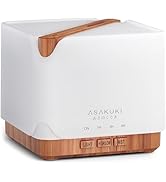
Image: Simple setup guide illustrating connecting power, app pairing, and wireless control.
6. Operasyon Enstriksyon
6.1 Manyèl Kontwòl
- Kontwòl bwouya: Peze a Mist/Wi-Fi button once for continuous mist. Press again for intermittent mist (30 seconds on, 30 seconds off). Press a third time to turn off the mist.
- Kontwòl limyè: Peze a Limyè button once to turn on the LED light with automatic color cycling. Press again to fix the light to a specific color. Continue pressing to cycle through colors. Press and hold the Light button to turn off the light.
6.2 Smart Wi-Fi and App Control
The diffuser can be controlled remotely using the TuyaSmart app.
- Telechaje App a: Chèche pou "TuyaSmart" in your smartphone's app store (iOS or Android) and download it.
- Enskri/Konekte: Louvri aplikasyon an epi kreye yon nouvo kont oubyen konekte si ou deja genyen youn.
- Antre nan Mode Pè: With the diffuser plugged in, press and hold the Mist/Wi-Fi button for 5 seconds until the indicator light flashes rapidly. This indicates the diffuser is in pairing mode.
- Ajoute Aparèy: In the TuyaSmart app, tap "Add Device" or the "+" icon. Select "Small Home Appliance" > "Diffuser" (Wi-Fi).
- Konekte ak Wi-Fi: Follow the in-app instructions to connect the diffuser to your 2.4GHz Wi-Fi network. Ensure your phone is also connected to the same 2.4GHz network during setup.
- Kontwòl: Once successfully paired, you can control the mist, light, set timers, and create schedules directly from the TuyaSmart app.

Image: The mobile app allows for convenient control of the diffuser's functions.
6.3 Kontwòl Vwa ak Alexa
The diffuser is compatible with Amazon Alexa for voice control.
- Pèmèt konpetans: In the Alexa app, search for and enable the "TuyaSmart" skill.
- Kont lyezon: Link your TuyaSmart account to your Alexa account.
- Dekouvri Aparèy: Ask Alexa to "Discover devices" or manually discover them in the Alexa app.
- Kòmandman vwa: Once discovered, you can use commands such as:
- "Alexa, turn on the diffuser."
- "Alexa, turn off the diffuser."
- "Alexa, set the diffuser to red."
- "Alexa, set diffuser brightness to 50%."

Image: Voice control with Alexa allows hands-free operation of the diffuser.
7. Antretyen
Netwayaj regilye ede kenbe pèfòmans optimal epi pwolonje dire lavi difizè ou a.
7.1 Netwayaj
Netwaye difizè a apre chak 5-6 itilizasyon oswa chak 3-5 jou, sitou lè w ap chanje lwil esansyèl.
- Deploge: Disconnect the diffuser from the power outlet.
- Dlo Vide: Remove the lid and carefully pour out any remaining water from the drain side of the water tank.
- Siye Netwaye: Use a soft cloth or cotton swab with a small amount of mild dish soap to gently wipe the inside of the water tank and the ultrasonic plate.
- Rense: Rinse the water tank with clean water, being careful not to get water into the air outlet.
- Sèk: Wipe all parts dry with a clean, soft cloth.
- Deep Clean (Optional): For stubborn residue, add a small amount of white vinegar to the water tank and let it sit for 10-15 minutes before wiping and rinsing.
7.2 Depo
When not in use for an extended period, ensure the diffuser is clean and completely dry. Store it in a cool, dry place away from direct sunlight.
NAN. Depanaj
Si ou rankontre pwoblèm, gade pwoblèm ak solisyon komen sa yo:
| Pwoblèm | Kòz posib | Solisyon |
|---|---|---|
| Pa gen bwouya oswa pwodiksyon bwouya ki ba |
|
|
| Diffuser does not power on |
|
|
| Pa ka konekte ak Wi-Fi/Aplikasyon an |
|
|
| Dlo flit |
|
|
9. Espesifikasyon
| Karakteristik | Detay |
|---|---|
| Mak | ASAKUKI |
| Nimewo Modèl | DF010 |
| Kapasite | 500 mililit |
| Dimansyon | 6"L x 6"L x 7"H |
| Materyèl | Akrilonitril Butadien Styrene (ABS), Polipropilèn (PP) |
| Sous pouvwa | Fil elektrik |
| Wattage | 10 wat |
| Zòn Kouvèti | Jiska 323 pye kare |
| Karakteristik espesyal | App Control, Automatic Shut-Off, Multiple Light Settings, Multiple Mist Settings, Voice Control (Alexa) |
| Nivo bri | Lower than 35 dB |
| Runtime (Full Capacity) | Up to 16 hours (on weak mist setting) |
10. Garanti ak sipò
The ASAKUKI Smart Wi-Fi Essential Oil Diffuser comes with a 1-year technical support warrantyGaranti sa a kouvri domaj fabrikasyon ak pwoblèm ki rive akoz itilizasyon nòmal.
For technical assistance, troubleshooting, or warranty claims, please contact ASAKUKI customer support through the retailer where you purchased the product or visit the official ASAKUKI websit pou enfòmasyon kontak.
Please have your model number (DF010) and proof of purchase ready when contacting support.