
1. Entwodiksyon
This manual provides detailed instructions for the safe and effective operation of your BENNING CM 12 True RMS Digital Power Clamp Multimeter. Please read this manual thoroughly before using the device and keep it for future reference. The BENNING CM 12 is designed for demanding measurement tasks in industrial and commercial environments, offering precise measurements of AC, AC+DC True RMS, inrush current, and more, with data logging and Bluetooth connectivity.
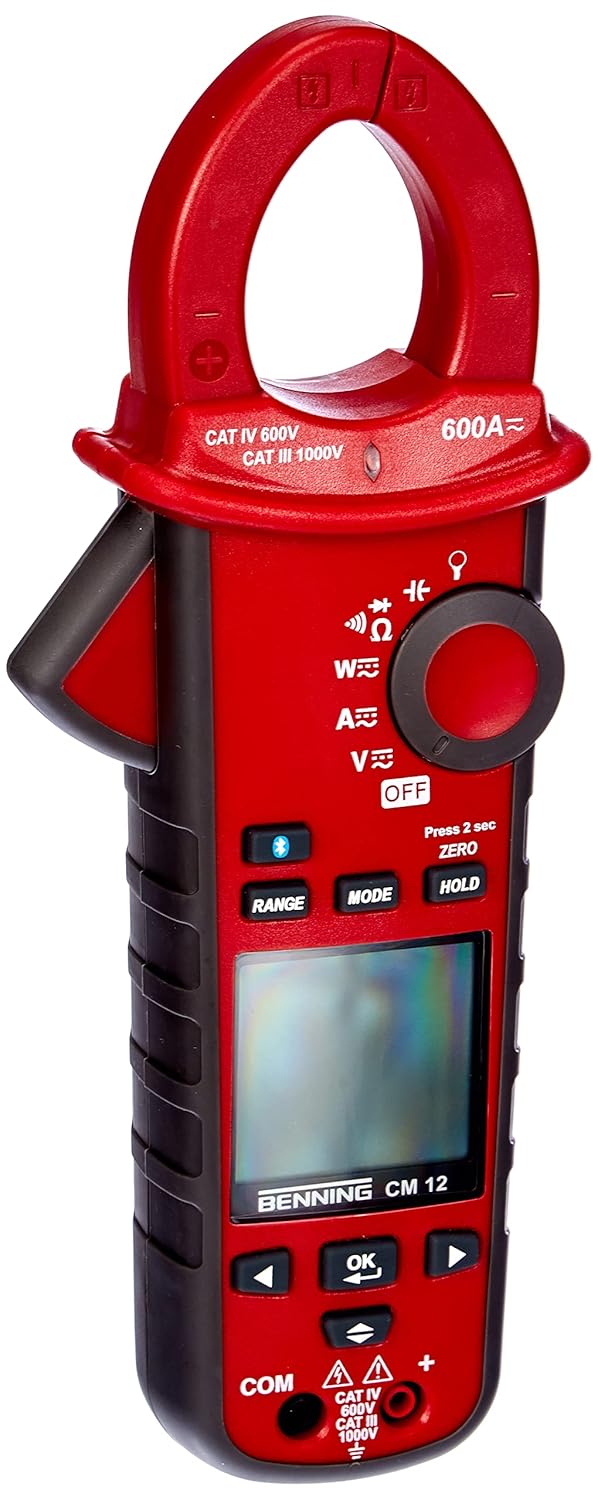
Figi 1: The Benning CM 12 True RMS Digital Power Clamp Multimeter. This image displays the main unit with its red casing, clamp jaw, display screen, and control buttons.
2. Enfòmasyon sou Sekirite
Always observe the following safety precautions to prevent personal injury and damage to the instrument:
- Pa sèvi ak mèt la si li sanble domaje oswa si izolasyon sou fil tès yo konpwomèt.
- Asire w ke ou chwazi fonksyon ak ranje ki kòrèk la anvan ou pran mezi yo.
- Pa depase limit maksimòm opinyon yo pou okenn fonksyon.
- Pran prekosyon lè w ap travay ak voltagki pi wo pase 30V AC RMS, 42V pik, oubyen 60V DC, paske sa yo poze yon danje pou elektrisite.
- Toujou dekonekte kouran sikwi a epi dechaje tout gwo vòltaj yo.tage capacitors before performing resistance, continuity, diode, or capacitance tests.
- Konfòme ak kòd sekirite lokal ak nasyonal yo.
3. Pwodwi konpozan
The BENNING CM 12 package includes the following items:
- BENNING CM 12 Digital Power Clamp Miltimèt
- Fil Tès (Wouj ak Nwa)
- Pil AAA (6 enkli)
- Ka pote
- Manyèl Itilizatè (dokiman sa a)
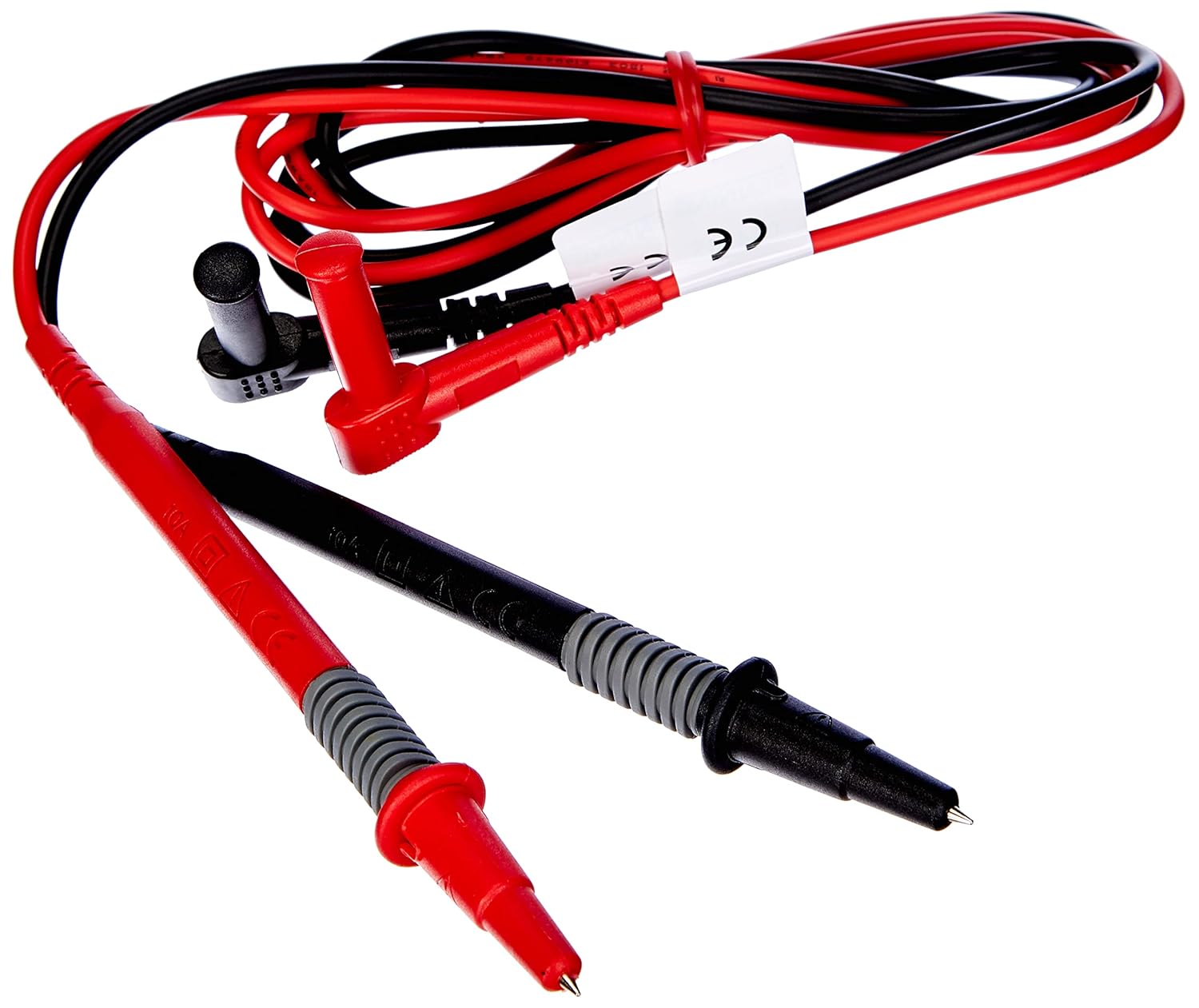
Figi 2: Red and black test leads. These leads are used for voltage, resistance, continuity, and other measurements.

Figi 3: Six AAA batteries. These batteries power the Benning CM 12 multimeter.

Figi 4: Black carrying case. This case provides protection and portability for the multimeter and its accessories.
4. Enstalasyon
4.1. Enstalasyon batri
- Jwenn kouvèti konpatiman batri a sou dèyè aparèy la.
- Sèvi ak yon tournevis pou louvri lòj batri a.
- Mete sis (6) pil AAA, asire w polarite a kòrèk jan yo endike anndan konpatiman an.
- Ranplase kouvèti lòj batri a epi an sekirite li ak vis la.
4.2. Premye Limen
Turn the rotary switch to any measurement function (e.g., V~ for AC Voltage) to power on the device. The display will illuminate, indicating the device is ready for use.
5. Operasyon Enstriksyon
The BENNING CM 12 offers a variety of measurement functions. Select the desired function using the rotary switch.
5.1. AC/DC Current Measurement (Clamp Fonksyon)
- Turn the rotary switch to the 'A~' (AC Current) or 'A=' (DC Current) position.
- Peze cl laamp deklanche pou louvri machwè a.
- Enclose a single conductor with the clamp jaw. Ensure the jaw is fully closed.
- Li valè aktyèl la sou ekran an.
- For AC+DC True RMS measurements, ensure the appropriate mode is selected if available via the MODE button.
5.2. VòltagMezi (AC/DC)
- Insert the red test lead into the 'VΩ' input jack and the black test lead into the 'COM' input jack.
- Turn the rotary switch to 'V~' (AC Voltage) oubyen 'V=' (Volim DCtagak).
- Konekte fil tès yo an paralèl ak sikwi a oswa konpozan ki anba tès la.
- Li voltage valè sou ekspozisyon an.
5.3. Resistance and Continuity Measurement
- Ensure the circuit is de-energized before measurement.
- Insert test leads as for voltage mezi.
- Turn the rotary switch to 'Ω' (Resistance/Continuity).
- Konekte fil tès yo atravè konpozan an.
- For continuity, the meter will beep if resistance is below approximately 30Ω - 100Ω.
5.4. Dyòd tès
- Asire w ke sikwi a pa gen enèji.
- Insert test leads as for voltage mezi.
- Turn the rotary switch to the 'Diode' symbol.
- Connect the red lead to the anode and the black lead to the cathode of the diode. A forward voltage drop (approx. 0.8V) will be displayed. Reverse the leads for an open circuit reading.
5.5. Mezi Kouran Entèval
This function measures the initial surge of current when a device (e.g., motor, lamp) is first turned on.
- Turn the rotary switch to the 'A~' position.
- Press the 'INRUSH' button (if dedicated) or activate via 'MODE' button.
- Clamp the meter around the power conductor of the device.
- Turn on the device to measure the inrush current.
5.6. Power Measurement (W) and Power Factor
The BENNING CM 12 can simultaneously detect current (A) and voltage (V) to calculate active power (W) and power factor in AC/DC networks.
- Turn the rotary switch to the 'W' (Power) position.
- Connect the test leads for voltage measurement and clamp the jaw around the current conductor.
- The display will show active power (W) and power factor.
5.7. Data Logger Function (LOG) and Bluetooth Interface
The device features a data logger capable of storing 10,000 readings with a sampling rate from 1 second to 10 minutes. It also includes a Bluetooth interface for data connection to smartphones or tablets via the "BENNING MM-CM Link" app.
- Download and install the "BENNING MM-CM Link" app from your device's app store (iOS and Android compatible).
- Activate Bluetooth on your smartphone/tablet and on the BENNING CM 12 (refer to the device's specific button for Bluetooth activation, usually a dedicated button or a long press of 'MODE').
- Pair the device with the app.
- Use the app to configure logging parameters (sampling rate, start/stop logging) and to view/export recorded data.
5.8. Low-Pass Filter (HFR)
The HFR (High-Frequency Rejection) low-pass filter is used for accurate measurements on clocked motor drives or other noisy environments by filtering out high-frequency interference.
- Activate the HFR filter via a dedicated button or by pressing the 'MODE' button in relevant measurement functions (e.g., AC Voltage or Current).
- The display will typically show an indicator when the filter is active.
5.9. Total Harmonic Distortion (THD) Measurement
The THD function assesses network quality by measuring the total harmonic distortion of voltage or current waveforms.
- Select the THD function using the rotary switch or 'MODE' button in AC Voltage/Current modes.
- Connect the meter as appropriate for voltage oswa aktyèl mezi.
- The display will show the THD value.
5.10. Two-Pole Rotary Field Testing
This function is used to determine the phase sequence in three-phase systems.
- Turn the rotary switch to the 'Rotary Field' symbol (if dedicated) or select via 'MODE' button in a relevant AC voltage fonksyon.
- Connect the test leads to two phases of the three-phase system.
- The display will indicate the phase sequence (e.g., L1-L2, L2-L3).
6. Antretyen
6.1. Netwayaj
Siye ka a ak anonsamp twal ak savon dou. Pa sèvi ak pwodui abrazif oswa solvan. Asire w ke aparèy la etenn epi dekonekte nan nenpòt sikwi anvan ou netwaye li.
6.2. Ranplasman batri
When the low battery indicator appears on the display, replace the batteries as described in Section 4.1. Remove batteries if the device will not be used for an extended period to prevent leakage.
6.3. Depo
Store the multimeter in its carrying case in a cool, dry environment, away from direct sunlight and extreme temperatures. Remove batteries for long-term storage.
NAN. Depanaj
| Pwoblèm | Kòz posib | Solisyon |
|---|---|---|
| Kontè a pa limen. | Pil ki mouri oswa ki mal enstale. | Tcheke polarite pil yo; ranplase pil yo. |
| No reading or "OL" (Overload) displayed. | Incorrect range selected, open circuit, or measurement exceeds range. | Select appropriate range, check circuit connections, ensure measurement is within device limits. |
| Lekti ki pa kòrèk. | Poor test lead connection, external interference, or low battery. | Ensure secure connections, move away from strong electromagnetic fields, replace batteries. |
| Pwoblèm koneksyon Bluetooth. | Bluetooth not activated on device/phone, app issues, or out of range. | Ensure Bluetooth is on for both devices, restart app, move closer to the meter. |
8. Espesifikasyon
| Karakteristik | Detay |
|---|---|
| Nimewo Modèl | CM 12 |
| Kalite Mezi | True RMS (AC, AC+DC) |
| Kouran inrush | Wi |
| Chaj Profile Anrejistreman | Yes (single-phase and three-phase) |
| Mezi pouvwa | Active Power (W), Power Factor |
| Tès kontinwite | 30 Ω - 100 Ω |
| Tès dyòd | 0.8 V |
| Rotary Field Testing | De-pòl |
| Low-Pas Filter | HFR (High-Frequency Rejection) |
| Harmonic Measurement | THD (Total distòsyon amonik) |
| Done Logger | 10,000 readings, 1s - 10min samppousantaj ling |
| Entèfas | Bluetooth (iOS and Android app "BENNING MM-CM Link") |
| Sous pouvwa | 6 pil AAA (enkli) |
| Dimansyon pwodwi | 11.42 x 5.12 x 2.76 pous |
| Pwa atik | 1.3 Liv (590 gram) |
| Manifakti | Benning |

Figi 5: Dimansyon view of the Benning CM 12 Multimeter, indicating its approximate height of 11 inches (27 cm).
9. Enfòmasyon sou Garanti
BENNING products are manufactured to high-quality standards. For specific warranty terms and conditions, please refer to the warranty card included with your product or visit the official BENNING websit la. Kenbe prèv acha ou pou reklamasyon garanti.
10. Sipò pou Kliyan
If you encounter any issues or have questions regarding your BENNING CM 12, please contact BENNING customer support. You can find contact information on the official BENNING websit la oubyen atravè distribitè lokal ou a.
- Websit: www.benning.de (Tanpri verifye pou rejyon ou an) websit)
- Imèl: Gade nan website for specific contact emails.
- Telefòn: Gade nan websit pou nimewo kontak espesifik.