
1. Entwodiksyon
Mèsi pou acha aasing the Sharp HT-SB140MT 2.0 150W Soundbar. This soundbar is designed to enhance your audio experience, providing clear and powerful sound for your television, music, and other media. With its sleek design and versatile connectivity options, including Bluetooth, HDMI ARC/CEC, Optical, and Auxiliary inputs, it integrates seamlessly into any home entertainment setup. This manual provides essential information for safe and effective use, including setup, operation, maintenance, and troubleshooting.
2. Enfòmasyon sou Sekirite
- Sous pouvwa: Asire ekipman pou pouvwa a voltage matches the requirements specified on the soundbar. Use only the provided power cable.
- Vantilasyon: Do not block any ventilation openings. Maintain adequate space around the soundbar for proper airflow.
- Dlo ak imidite: Do not expose the soundbar to dripping or splashing water. Do not place objects filled with liquids, such as vases, on the apparatus.
- Chalè: Do not place the soundbar near heat sources such as radiators, heat registers, stoves, or other apparatus (including amplifiers) ki pwodui chalè.
- Netwayaj: Unplug the soundbar from the power outlet before cleaning. Use a dry, soft cloth for cleaning. Do not use liquid cleaners or aerosol cleaners.
- Sèvis: Pa eseye fè sèvis pwodui sa a tèt ou. Refere tout sèvis yo bay pèsonèl sèvis kalifye.
- Batri: The remote control uses a CR2 battery. Ensure correct polarity when inserting batteries. Do not mix old and new batteries.
3. Pake kontni
Tanpri verifye ke tout atik yo prezan nan pakè a:
- Sharp HT-SB140MT Soundbar
- Kontwòl Remote
- Pouvwa kab
- Manyèl Itilizatè (dokiman sa a)
4. Pwodwi souview

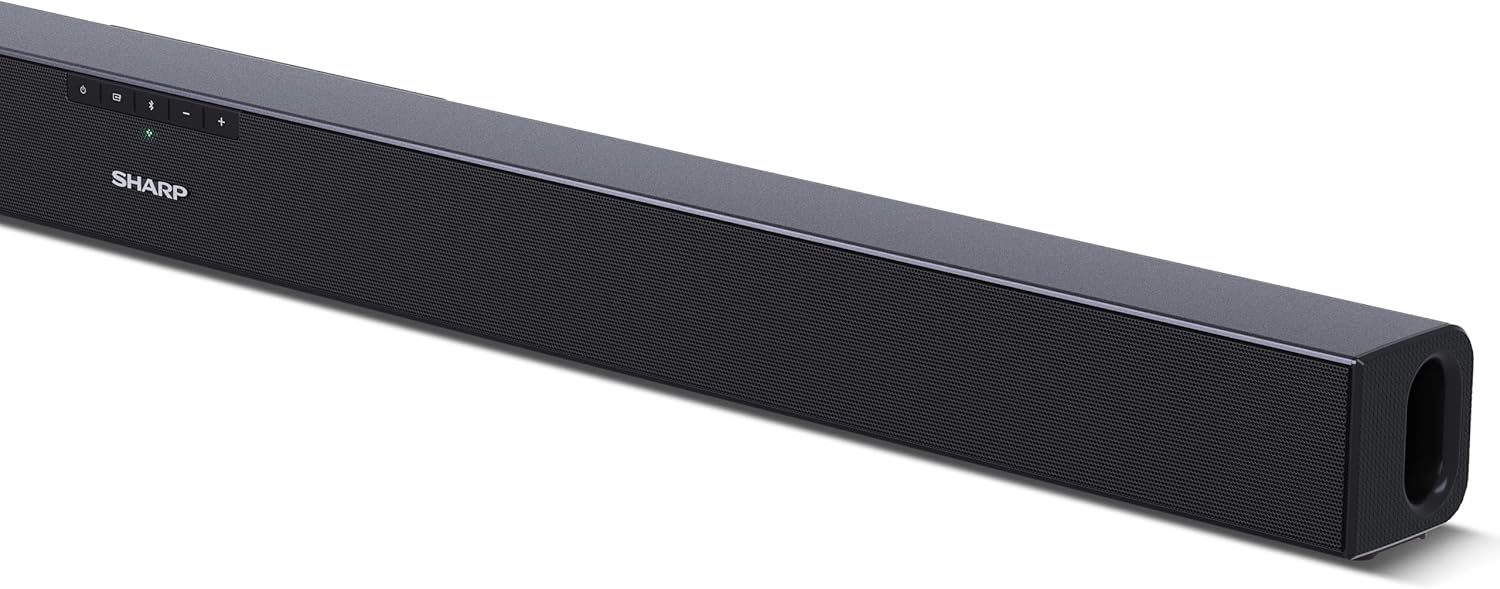
Figi 4.1: Devan View
The front of the soundbar features the Sharp logo and LED indicators for source selection and status. Control buttons for power, input, and volume are located on the top panel.
Figi 4.2: Dèyè View (Koneksyon)
The rear panel provides all necessary connection ports: HDMI ARC, Optical (S/PDIF), and Auxiliary (3.5mm) input, along with the power input.

Figi 4.3: Kontwòl Remote
The included remote control allows for convenient operation of the soundbar, including power, input selection, volume, bass, and treble adjustments.
5. Enstalasyon
5.1 Plasman
The Sharp HT-SB140MT Soundbar can be placed on a flat surface, such as a TV stand, or wall-mounted. Its slim profile of 6 cm allows it to fit easily under most TV screens without obstructing the view.

Figure 5.1: Soundbar Placement
The soundbar is ideally positioned directly in front of your television for optimal sound projection.
5.2 Konekte ak televizyon ou an
Chwazi youn nan metòd koneksyon sa yo:
- HDMI ARC/CEC (Recommended): Connect an HDMI cable (not included) from the HDMI ARC port on your TV to the HDMI ARC port on the soundbar. This allows your TV remote to control the soundbar's volume and power. Ensure HDMI ARC/CEC is enabled in your TV's settings.
- Digital Optical Audio (S/PDIF): Connect an optical cable (not included) from the Optical Out port on your TV to the OPTICAL IN port on the soundbar. Select the Optical input on the soundbar.
- Oksilyè (AUX): Connect a 3.5mm audio cable (not included) from the headphone jack or AUX Out port on your TV to the AUX IN port on the soundbar. Select the AUX input on the soundbar.
5.3 Koneksyon pouvwa
After connecting the audio cable, plug the power cable into the soundbar's power input and then into a wall outlet (220-240V / 50Hz).
6. Operasyon Enstriksyon
6.1 Power On/Off
Peze bouton Power ki sou ba son an oswa sou kontwòl remote la pou limen oswa etenn aparèy la.
6.2 Seleksyon Sous
Press the Input button on the soundbar or the remote control repeatedly to cycle through the available input sources: HDMI ARC, Optical, AUX, and Bluetooth. The LED indicator on the soundbar will change to reflect the selected source.
6.3 Ajisteman Volim
Sèvi ak bouton Ogmante Volim (+) ak Diminye Volim (-) ki sou ba son an oswa sou kontwòl remote la pou ajiste nivo son an.
6.4 Bluetooth Pairing
Pou konekte yon aparèy Bluetooth:
- Select Bluetooth input on the soundbar. The Bluetooth LED indicator will flash, indicating pairing mode.
- On your smart device (smartphone, tablet, etc.), enable Bluetooth and search for available devices.
- Select "SHARP HT-SB140MT" from the list of devices.
- Once connected, the Bluetooth LED indicator will stop flashing and remain solid. You can now stream audio wirelessly to the soundbar.
6.5 Mòd Son (Egalizè)
The soundbar features an equalizer with different sound modes to optimize audio for various content types. Use the EQ button on the remote control to cycle through these modes (e.g., Movie, Music, News). You can also adjust Bass and Treble levels using dedicated buttons on the remote.
7. Antretyen
7.1 Netwayaj
To clean the soundbar, unplug it from the power outlet. Use a soft, dry, lint-free cloth to wipe down the surfaces. Do not use abrasive cleaners, waxes, or solvents as they may damage the finish.
7.2 Depo
If you plan to store the soundbar for an extended period, disconnect it from the power supply and store it in a cool, dry place, away from direct sunlight and extreme temperatures.
NAN. Depanaj
Si ou rankontre pwoblèm ak soundbar ou a, gade pwoblèm ak solisyon komen sa yo:
| Pwoblèm | Kòz posib | Solisyon |
|---|---|---|
| Pa gen son nan ba son an. | Ba son an etenn oswa li pa sonnen. Sous opinyon ki pa kòrèk la chwazi. Kab yo pa byen konekte. Paramèt pwodiksyon odyo televizyon an pa kòrèk. | Ensure the soundbar is powered on and not muted. Select the correct input source (HDMI ARC, Optical, AUX). Check all cable connections (HDMI, Optical, AUX). Verify your TV's audio output settings are set to external speakers or the correct digital output. |
| Aparèy Bluetooth la pa ka konekte. | Soundbar is not in pairing mode. Aparèy la andeyò. Entèferans ki soti nan lòt aparèy. | Ensure the soundbar is in Bluetooth input mode and the LED is flashing. Move your Bluetooth device closer to the soundbar (within 10 meters). Turn off other Bluetooth devices nearby. Try unpairing and re-pairing. |
| Kontwòl remote pa travay. | Battery is low or inserted incorrectly. Gen yon obstak ant telekòmand lan ak ba son an. Kontwòl remote la gen pwoblèm. | Replace the CR2 battery and ensure correct polarity. Remove any obstructions between the remote and the soundbar's sensor. Si pwoblèm pèsiste, kontakte sipò kliyan. |
9. Espesifikasyon
| Non modèl | HT-SB140(MT) |
| Kalite Oratè | Ba son |
| Konfigirasyon chanèl son antoure | 2.0 |
| Maksimòm puisans sòti oratè | 150 Watts |
| Repons Frekans | 60 Hz |
| Koneksyon Teknoloji | Bluetooth, HDMI ARC/CEC, Digital Optical Audio (S/PDIF), 3.5mm Auxiliary (AUX) |
| Teknoloji kominikasyon san fil | Bluetooth |
| Maksimòm Ranje (Bluetooth) | 10 mèt |
| Metòd kontwòl | Kontwòl Remote |
| Sous pouvwa | Kouran AC (kouran prensipal) |
| Antre Voltage | 220-240 vòlt |
| Koulè | Nwa |
| Materyèl | Plastik, Metal |
| Kalite aliye | Mi mòn, Tabletop |
| Dimansyon pwodwi (L x W x H) | 95 x 6 x 6 cm |
| Pwa atik | 1.5 Kilogram |
| Konpozan ki enkli | Kontwòl Remote |
| Batri obligatwa | 1 batri CR2 |
| Ki enpèmeyab | Non |
| Disponibilite pyès rezèv | 5 Ane |
| Mizajou lojisyèl garanti jiska | Enfòmasyon pa disponib |
10. Garanti ak sipò
The Sharp HT-SB140MT Soundbar comes with a Limited Warranty. Please refer to the warranty card included in your package for specific terms and conditions. Spare parts are available for up to 5 years from the date of purchase.
For technical support, service, or warranty claims, please contact Sharp customer service through their official website or the contact information provided in your product documentation. When contacting support, please have your product model number (HT-SB140(MT)) and purchase details ready.