
Ergosolid Falco-22
Ergosolid Falco-22 Adjustable Roller Stand User Manual
Model: Falco-22
1. Entwodiksyon
This user manual provides comprehensive instructions for the assembly, operation, and maintenance of your Ergosolid Falco-22 Adjustable Roller Stand. Designed for LED LCD TVs ranging from 19 to 37 inches (48-94 cm diagonal) and supporting a maximum load of 20 kg, this stand offers mobility and adjustable viewing angles for various environments. Please read this manual thoroughly before installation and use to ensure safe and proper functionality.

Figure 1.1: Ergosolid Falco-22 Adjustable Roller Stand with a mounted television.
2. Enfòmasyon sou Sekirite
AVÈTISMAN: Please read and understand all instructions completely before attempting to install or use this product. Failure to do so may result in property damage, serious injury, or death. If you have any doubts, contact a professional installer.
- This product contains small items that could be a choking hazard. Keep these items away from young children.
- The assembly element or mounting support surface must be capable of supporting five times the weight of the product and the combined load. The structure must be reinforced.
- Safety gear and proper tools must be used during installation. A minimum of two people are required for this installation.
- Never exceed the maximum load capacity of 20 kg for the product. Exceeding this limit may result in property damage or serious injury.
- Pwodwi sa a fèt pou itilize andedan kay la sèlman.
- Ensure all screws are securely tightened to prevent loosening.
- Do not use this product for any purpose not expressly specified by the manufacturer.
- When installing a flat panel display, ensure no damage occurs to electrical wiring or power supply.
- Ensure installation and routing of monitor cables on the monitor bracket metal comply with all electrical regulations.
- The monitor, mount, and data cables must be secured to prevent twisting and damage.
- The manufacturer disclaims any liability for modifications, improper installation, or force majeure.
- The manufacturer will not be liable for any damages arising from use for any purpose not expressly specified.
REMAK: Before assembly, verify that all components are present in the kit. If any parts are missing, contact your local distributor for replacements.
Antretyen: Regularly check all joint parts every two months to ensure screws remain tightened.

Figure 2.1: Original safety and warning sheet included with the product.
3. Pake kontni
Before beginning assembly, please ensure all parts listed below are present and undamaged. If any components are missing or damaged, do not proceed with assembly and contact customer support.
- Main Column (Vertical Support Pole)
- Base (Foot Support with Legs)
- Wheels with Brakes (4 units)
- VESA Mounting Bracket (for TV attachment)
- Etajè reglabl
- Assortment of Screws, Washers, and Spacers (for VESA mounting and assembly)
- Enstriksyon Asanblaj (manyèl sa a)

Figure 3.1: The Falco-22 stand components assembled, showing the main column, base, wheels, VESA mount, and shelf.
4. Enstriksyon Asanble
Follow these steps carefully to assemble your Falco-22 Adjustable Roller Stand. It is recommended to have a second person assist with assembly, especially when handling the TV.
- Attach the Base to the Main Column: Securely fasten the base (foot support) to the bottom of the main vertical column using the provided screws and tools.
- Enstale wou yo: Insert and tighten the four wheels into the designated slots on the base. Ensure the wheels with brakes are positioned where they can be easily accessed.
- Attach the VESA Mounting Bracket: Connect the VESA mounting bracket to the top section of the main column. This bracket will hold your television.
- Install the Adjustable Shelf: Position the adjustable shelf at your desired height on the main column and secure it using the provided fasteners. The shelf can be adjusted vertically later if needed.
- Mount Your Television: Carefully attach your LED LCD TV to the VESA mounting bracket. Select the appropriate screws and spacers from the assortment provided to match your TV's VESA pattern (75x75, 100x100, 200x100, 200x200). Ensure the TV is centered and securely fastened.
- Jesyon kab: Utilize the cable management opening in the main column to route and conceal your TV's power and data cables for a tidy setup.
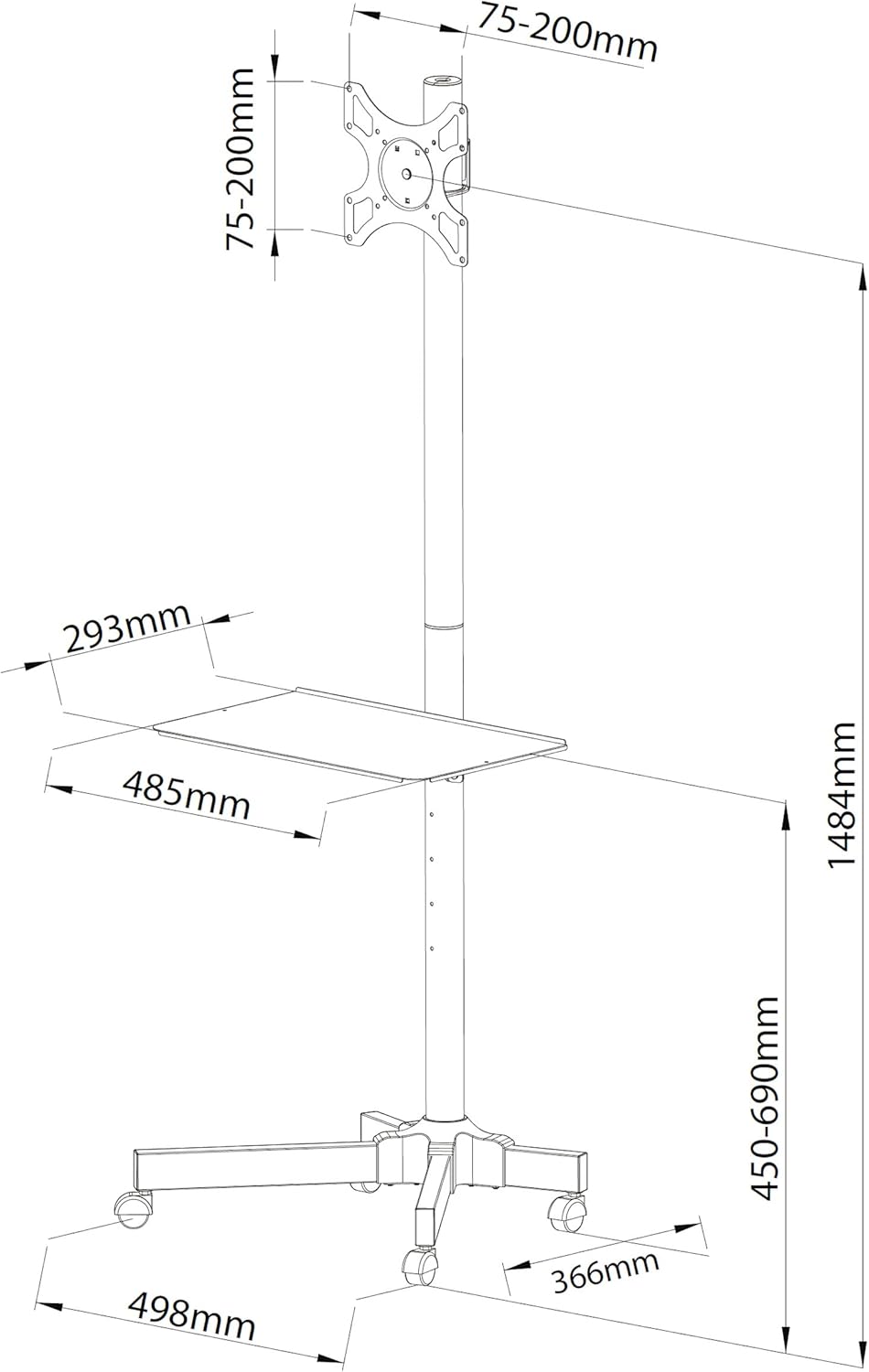
Figure 4.1: Dimensional diagram illustrating key measurements and component placement for assembly.

Figure 4.2: Diagram detailing VESA mounting patterns, 360° pivot, and adjustable height ranges for the TV and shelf.
5. Operasyon Enstriksyon
The Falco-22 stand is designed for ease of use and flexibility.
- Deplase kanpe a: To move the stand, release the brakes on all four wheels. Gently push the stand to your desired location. Once in position, engage the wheel brakes to secure the stand.
- Ajiste wotè televizyon an: The TV mounting bracket can be adjusted vertically along the main column. Loosen the securing mechanism, slide the TV to the desired height, and re-tighten the mechanism. Refer to Figure 4.2 for height ranges.
- Adjusting TV Tilt: The TV can be tilted vertically by up to -12 degrees (downwards). Loosen the tilt adjustment knobs on the VESA bracket, set the desired angle, and re-tighten.
- Swiveling the TV: The TV can be swiveled 360 degrees around the main column. Gently rotate the TV to achieve your preferred viewang ang.
- Ajisteman wotè etajè a: The accessory shelf can also be adjusted vertically along the main column. Loosen its securing mechanism, slide to the desired height (min. 360mm, max. 700mm), and re-tighten.

Figure 5.1: Detail of a wheel with an engaged brake, ensuring stability when the stand is stationary.
6. Antretyen
Regular maintenance ensures the longevity and safe operation of your Falco-22 stand.
- Screw Tightness Check: Every two months, inspect all screws and bolts on the stand. Re-tighten any that have become loose to maintain stability and prevent accidents.
- Netwayaj: Siye kanpe a ak yon twal mou,amp twal. Evite itilize pwodui netwayaj abrazif oswa solvan ki ka domaje fini an.
- Enspeksyon wou: Periodically check the wheels for any debris or damage that might impede their movement or the effectiveness of the brakes. Clean as necessary.
NAN. Depanaj
If you encounter any issues with your Falco-22 stand, refer to the following common problems and solutions:
| Pwoblèm | Kòz posib | Solisyon |
|---|---|---|
| Stand is unstable or wobbly. | Loose screws; uneven floor; TV too heavy or off-center. | Ensure all assembly screws are tightened. Move stand to a level surface. Verify TV weight is within limits (max 20kg) and properly centered on the VESA mount. |
| Wheels do not roll smoothly or brakes don't hold. | Debris in wheels; brakes engaged; damaged wheels. | Clean any debris from wheels. Ensure brakes are disengaged when moving. If wheels are damaged, contact support for replacements. |
| TV does not fit the VESA mount. | Incorrect VESA pattern; TV size outside range. | Verify your TV's VESA pattern is compatible (75x75, 100x100, 200x100, 200x200). Ensure your TV is between 19-37 inches. |
| Pati ki manke pandan asanblaj la. | Erè anbalaj. | Do not proceed with assembly. Contact your local distributor or Ergosolid customer support for replacement parts. |
8. Espesifikasyon
| Modèl | Falco-22 |
| Gwosè televizyon konpatib | 19 - 37 inches (48 - 94 cm diagonal) |
| Kapasite chaj maksimòm | 20 kg (44 liv) |
| VESA konpatibilite | 75x75mm, 100x100mm, 200x100mm, 200x200mm |
| Materyèl | Steel |
| Koulè | Nwa |
| Foot Height (Overall) | 1600 mm (apeprè 63 pous) |
| Panche vètikal | -12 degrees (downwards) |
| Swivel | 360 degre |
| Dimansyon baz (L x W) | 498mm x 366mm (apeprè 19.6 x 14.4 pous) |
| Wotè etajè reglabl | Min. 360mm to Max. 700mm (from floor) |
| Pwa atik | 22 liv (apeprè 10 kg) |
9. Garanti ak sipò
For information regarding the product warranty, please refer to the warranty card included in your product packaging or visit the official Ergosolid website. For technical support, missing parts, or any other inquiries, please contact your local distributor or Ergosolid customer service through the contact information provided with your purchase documentation.
Ask a question about this manual
Ask about setup, troubleshooting, compatibility, parts, safety, or missing instructions. Manuals+ will review the question and use this page’s manual context to help answer it.