
Apera Instruments PH700, LLC-AI501, LLC-AI1109
Apera Instruments PH700 Benchtop Lab pH Meter and Calibration Buffer Solution Kit User Manual
Models: PH700, LLC-AI501, LLC-AI1109
1. Entwodiksyon
This user manual provides detailed instructions for the proper setup, operation, maintenance, and troubleshooting of your Apera Instruments PH700 Benchtop Lab pH Meter and the accompanying pH Calibration Buffer Solution Kit. This system is designed for accurate and reliable pH measurements in laboratory environments.
2. Prekosyon sekirite
- Always wear appropriate personal protective equipment (PPE), such as safety glasses and gloves, when handling chemicals, especially calibration solutions.
- Do not ingest calibration solutions. In case of accidental ingestion, seek immediate medical attention.
- Ensure the pH meter is connected to a power source with the correct voltage and frequency as specified.
- Evite ekspoze mèt la nan tanperati ekstrèm, limyè solèy dirèk, oswa anviwònman koroziv.
- Handle the pH electrode with care. The glass bulb is fragile.
- Keep all solutions and the meter out of reach of children and pets.
3. Pake kontni
Verifye ke tout atik yo prezan epi yo pa domaje lè w ap debale yo:
- Apera Instruments PH700 Benchtop Lab pH Meter (Model: LLC-AI501)
- 201T-F 3-in-1 Combination pH Electrode
- Detantè elektwòd
- Apera Instruments 8oz. pH Calibration Buffer Solution Kit (Model: LLC-AI1109) including:
- pH 4.00 Buffer Solution (8oz)
- pH 7.00 Buffer Solution (8oz)
- pH 10.01 Buffer Solution (8oz)
- Apera Instruments 3M KCL Storage Solution (4oz)
- Adaptè pouvwa
- Manyèl Enstriksyon (dokiman sa a)

This image displays the complete Apera Instruments PH700 Benchtop Lab pH Meter setup, including the meter unit, electrode, electrode holder, and the accompanying pH calibration buffer solutions (pH 4.00, 7.00, 10.01) and 3M KCL storage solution.
4. Enstalasyon
- Depake konpozan: Retire tout konpozan yo nan anbalaj yo avèk anpil atansyon.
- Assemble Electrode Holder: Attach the electrode holder to the meter unit according to the provided diagram in the quick start guide (if applicable).
- Connect Electrode: Connect the 201T-F combination pH electrode to the designated BNC connector on the back of the PH700 meter. Ensure a secure connection.
- Konekte pouvwa: Plug the power adapter into the meter's power input and then into a standard electrical outlet.
- Initial Electrode Preparation: Before first use, remove the protective cap from the electrode. Rinse the electrode thoroughly with distilled water. If the electrode has been stored dry, soak it in 3M KCL storage solution for at least 30 minutes to rehydrate the glass membrane.
5. Operasyon Enstriksyon
5.1. Kalibrasyon
The PH700 meter features advanced auto-calibration with a self-diagnosis function. Regular calibration is crucial for accurate measurements.
- Prepare Solisyon Tampon yo: Pour small amounts of pH 4.00, pH 7.00, and pH 10.01 buffer solutions into separate, clean beakers. Ensure the solutions are at room temperature.
- Rense elektwòd la: Rinse the electrode with distilled water and gently blot dry with a lint-free tissue.
- Kòmanse Kalibrasyon: Turn on the meter. Follow the on-screen prompts or refer to the meter's specific button functions to enter calibration mode.
- Calibrate with pH 7.00: Immerse the electrode into the pH 7.00 buffer solution. Stir gently and wait for the reading to stabilize. The meter will automatically recognize the buffer and complete the calibration point.
- Calibrate with pH 4.00 or pH 10.01: Rinse the electrode with distilled water. Immerse it into either the pH 4.00 or pH 10.01 buffer solution (depending on your expected sample range). The meter will guide you through the process. For optimal accuracy, perform a 3-point calibration (4.00, 7.00, 10.01).
- Sòti Kalibrasyon: Once all desired points are calibrated, exit calibration mode. The meter is now ready for measurement.
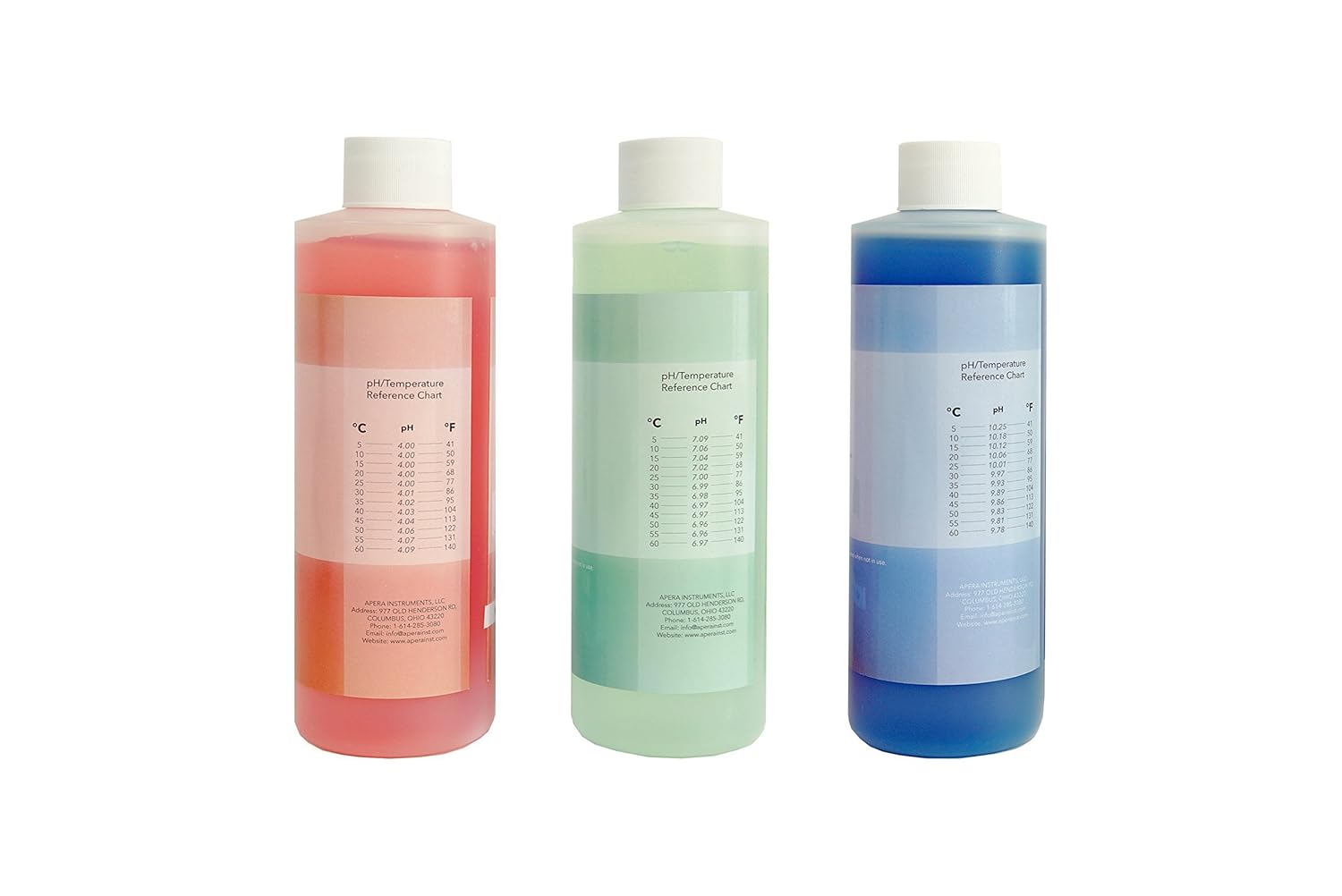
Yon fèmen view of the three primary pH calibration buffer solutions provided with the kit, color-coded for easy identification and labeled with their respective pH values.
5.2. Mezi
- Prepare Sample: Vide s ouample solution into a clean beaker.
- Rense elektwòd la: Rinse the electrode with distilled water and gently blot dry.
- Elektwòd plonje: Plonje elektwòd la nan s laample solution, ensuring the sensing bulb and reference junction are fully submerged.
- Stir and Stabilize: Gently stir the solution to ensure homogeneity and wait for the reading on the meter to stabilize. The PH700's advanced digital processing technology helps generate quick and stable readings.
- Lekti Anrejistreman: Once stable, record the pH and temperature readings displayed on the meter.
- Netwaye apre itilizasyon: After each measurement, rinse the electrode thoroughly with distilled water.
6. Antretyen
6.1. Electrode Care and Storage
- Depo chak jou: For short-term storage (up to a week), keep the electrode cap filled with 3M KCL storage solution. Ensure the electrode bulb is immersed.
- Depo alontèm: For longer periods, ensure the electrode cap is securely filled with 3M KCL storage solution. Store the electrode upright. Never store the electrode in distilled water, as this will deplete the reference electrolyte and damage the electrode.
- Netwayaj: If the electrode becomes dirty or readings are sluggish, clean it by soaking in a mild cleaning solution (e.g., Apera Instruments electrode cleaning solution) for 15-30 minutes, then rinse thoroughly with distilled water and re-calibrate.

This image shows the 4 oz bottle of 3M KCL storage solution, essential for maintaining the pH electrode's performance and extending its lifespan.
6.2. Buffer Solution Storage
- Keep buffer solutions in their original, double-sealed bottles when not in use.
- Store solutions in a cool, dark place, away from direct sunlight and extreme temperatures.
- Do not return used buffer solution to the original bottle to prevent contamination.
- Note the 2-year expiration from manufacture for an unopened bottle. Discard expired solutions.
6.3. Meter Cleaning
- Wipe the meter's exterior with a clean, damp twal. Pa sèvi ak pwodui netwayaj abrazif oswa solvang.
- Ensure no liquid enters the meter's connectors or internal components.
NAN. Depanaj
| Pwoblèm | Kòz posib | Solisyon |
|---|---|---|
| Unstable readings / Drifting pH | Dirty electrode; Electrode not properly hydrated; Contaminated buffer solutions; Air bubbles on electrode bulb. | Clean electrode; Soak electrode in 3M KCL solution; Use fresh buffer solutions; Gently tap electrode to remove bubbles. |
| Calibration error / Fails to calibrate | Expired or contaminated buffer solutions; Damaged electrode; Incorrect calibration procedure. | Use fresh, unexpired buffer solutions; Inspect electrode for damage; Review calibration steps in manual. |
| Pa gen ekspozisyon / Kontè a pa limen | Power adapter issue; Loose connection. | Check power adapter and cable connections; Try a different power outlet. |
| Tan repons dousman | Electrode aging; Electrode not clean. | Clean electrode; Rehydrate electrode; Consider electrode replacement if issue persists. |
8. Espesifikasyon
| Karakteristik | Deskripsyon |
|---|---|
| presizyon pH | +/- 0.01 pH at 25 °C (traceable to NIST SRMs) |
| Elektwòd | 201T-F 3-in-1 Combination pH Electrode (measures pH and temperature simultaneously) |
| Konpansasyon Tanperati | Otomatik Konpansasyon Tanperati (ATC) |
| Kalibrasyon | Advanced Auto. calibration mode with calibration guide and self-diagnosis (1-3 points) |
| Teknoloji | Advanced digital processing technology for quick and stable readings |
| Buffer Solutions | pH 4.00, 7.00, 10.01 (8oz each), color-coded, double-sealed, 2-year expiration from manufacture for unopened bottle |
| Solisyon Depo | 3M KCL Storage Solution (4oz) for pH/ORP Electrodes |
| Faktori | Produced in an ISO 9001:2015 certified facility using high-purity reagents and deionized water |
9. Garanti ak sipò
Pwodwi Apera Instruments yo fèt pou fyab ak pèfòmans. Pou enfòmasyon espesifik sou garanti a, tanpri al gade kat garanti ki vini ak pwodwi ou a oswa vizite sit ofisyèl Apera Instruments la. website. For technical support, troubleshooting assistance, or to inquire about replacement parts, please contact Apera Instruments customer service directly.
Apera Instruments, LLC
Websit: www.aperainst.com
Contact Information: Refer to product packaging or websit la pou jwenn enfòmasyon kontak aktyèl yo.
Ask a question about this manual
Ask about setup, troubleshooting, compatibility, parts, safety, or missing instructions. Manuals+ will review the question and use this page’s manual context to help answer it.