
Entwodiksyon
The Ruggard Electronic Dry Cabinet is designed to protect sensitive equipment such as cameras, lenses, photographic and optical instruments, mobile electronics, and other valuables from the damaging effects of excessive moisture, dirt, and dust. Utilizing a fast-acting TE Cooling Wafer, this cabinet precisely regulates the interior's relative humidity, helping to prevent corrosion and mold growth that can harm delicate gear. Its silent, dripless operation ensures a hassle-free environment for your valuable items.

Figure 1: The Ruggard Electronic Dry Cabinet (80L) with various camera equipment stored inside, showcasing its transparent door and internal organization.
Enfòmasyon sou Sekirite
- Asire w ke kabinè a mete sou yon sifas ki estab e plat pou anpeche li chavire.
- Do not block the ventilation openings on the back or sides of the cabinet.
- Kenbe fil elektrik la lwen sous chalè ak kwen byen file.
- Do not operate the cabinet with a damaged power cord or plug.
- Avoid placing liquids inside the cabinet.
- The cabinet is designed for indoor use only.
- Keep keys out of reach of children to prevent unauthorized access to contents.
Kontni pake
Tanpri verifye ke tout konpozan sa yo enkli nan pake ou a:
- Ruggard Electronic Dry Cabinet (80L)
- Multi-Voltage Pwovizyon pou pouvwa
- Adjustable Steel Shelves (2)
- Foam Liners (2)
- Shelf Brackets (4)
- Door Lock Keys (2)

Figure 2: The Ruggard Electronic Dry Cabinet with its door open, showing the interior, and the adjustable shelf, foam liner, and shelf brackets laid out next to it.
Enstalasyon
- Debake: Carefully remove the dry cabinet and all accessories from the packaging. Inspect for any damage.
- Enstalasyon manch: If the door handle is not pre-installed or is on the inside, attach it to the exterior of the door using the provided screws. Ensure it is securely fastened.
- Enstalasyon etajè: Insert the shelf brackets into the desired slots on the interior sides of the cabinet. Place the adjustable steel shelves on top of the brackets. You can adjust the height of the shelves to accommodate items of various sizes. Place the foam liners on the shelves to protect your equipment.
- Nivelman: The cabinet features four feet, two of which are leveling feet. Adjust these feet as needed to ensure the cabinet is stable and level on your chosen surface.
- Koneksyon pouvwa: Konekte milti-vol latage power supply to the cabinet's power input port, typically located at the back or top. Plug the power supply into a suitable electrical outlet (110 to 240 VAC, 50/60 Hz).
- Operasyon inisyal: Upon plugging in, the LCD screen will illuminate, displaying the current internal temperature and relative humidity. Allow the cabinet to operate for 1-3 hours with the door closed to stabilize the internal humidity before storing sensitive items.

Figure 3: The multi-voltage power supply for the Ruggard Electronic Dry Cabinet, showing its plug and connector.
Enstriksyon Operasyon
- Limen/Etenyen: The cabinet powers on automatically when plugged in. There is no separate power button. To turn off, unplug the power supply.
- Kontwòl imidite:
- The large LCD screen displays the current internal temperature and relative humidity (RH).
- Sèvi ak la UP epi DESANN arrow buttons on the control panel to adjust the desired relative humidity level. The range is typically 35% to 60% RH.
- Peze a SET button to confirm your selection. The cabinet will then work to achieve and maintain the set humidity level.
- Ekspozisyon Tanperati: The LCD screen displays temperature in either Fahrenheit or Celsius. Use the dedicated F/C button (if available, or typically part of the SET/MODE button functionality) to toggle between the two units.
- Ekleraj enteryè LED: The cabinet features interior LED lights for better visibility. Locate the light button on the control panel (often labeled with a light bulb icon) to turn the lights on or off.
- Mekanis bloke: The door is equipped with a keyed lock. Use the provided keys to lock or unlock the cabinet, securing your valuable contents and preventing unauthorized access.

Figure 4: The Ruggard Electronic Dry Cabinet with its door open, revealing the organized interior with camera gear and the digital control panel at the top.
Antretyen
- Netwaye eksteryè a: Siye sifas eksteryè yo ak yon mou, damp twal. Evite pwodui netwayaj abrazif oswa solvan ki ka domaje fini an.
- Netwayaj enteryè a: The interior can be wiped down with a dry or slightly damp cloth. Ensure the cabinet is unplugged before cleaning the interior.
- Cleaning the Glass Door: Use a glass cleaner and a soft cloth to clean the glass door.
- No Water Tray: This dry cabinet is dripless and does not require a water tray or draining, simplifying maintenance.
- Enspeksyon regilye: Periodically check the door gasket for any signs of wear or damage to ensure a proper seal, which is crucial for maintaining humidity levels.
Depanaj
| Pwoblèm | Kòz posib | Solisyon |
|---|---|---|
| Cabinet not powering on. | Kòd kouran an pa konekte oswa pwoblèm priz. | Ensure power supply is securely plugged into the cabinet and a working electrical outlet. |
| Humidity not decreasing. | Door not sealed properly; ambient humidity too high; cabinet overloaded. | Check door seal and ensure it's fully closed. Avoid frequent opening. If ambient humidity is extremely high, it may take longer to reach target. Do not overload the cabinet. |
| Inaccurate humidity/temperature reading. | External factors or sensor calibration. | Allow cabinet to stabilize for several hours. If discrepancies persist, consider using an independent hygrometer inside for comparison. Note that the internal display may have a slight variance. |
| Interior lights not working. | Light function off or LED issue. | Press the light button on the control panel. Ensure the cabinet is powered on. |
Espesifikasyon
| Karakteristik | Detay |
|---|---|
| Kapasite Volim | 80 Liters (2.8 ft³) |
| Ranje kontwòl imidite | 35% a 60% imidite relatif (RH) |
| Sekirite | Kle Lock |
| Entèfas kontwòl | LCD Display (Temperature & Humidity) |
| AC Antre pouvwa | 110 a 240 VAC, 50 / 60 Hz |
| Konsomasyon pouvwa | <8 W |
| Konstriksyon | Glass, Steel |
| Interior Dimensions (W x H x D) | 21.1 x 17.7 x 13" (53.6 x 45 x 33 cm) |
| Dimansyon Eksteryè (L x H x P) | 21.3 x 20.3 x 14.3" (54.1 x 51.6 x 36.3 cm) |
| Pwa atik | 29.5 lb (13.4 kg) |
| Karakteristik espesyal | Virtually Silent Operation, Portable, Automatic Moisture Removal, Interior LED Lighting |
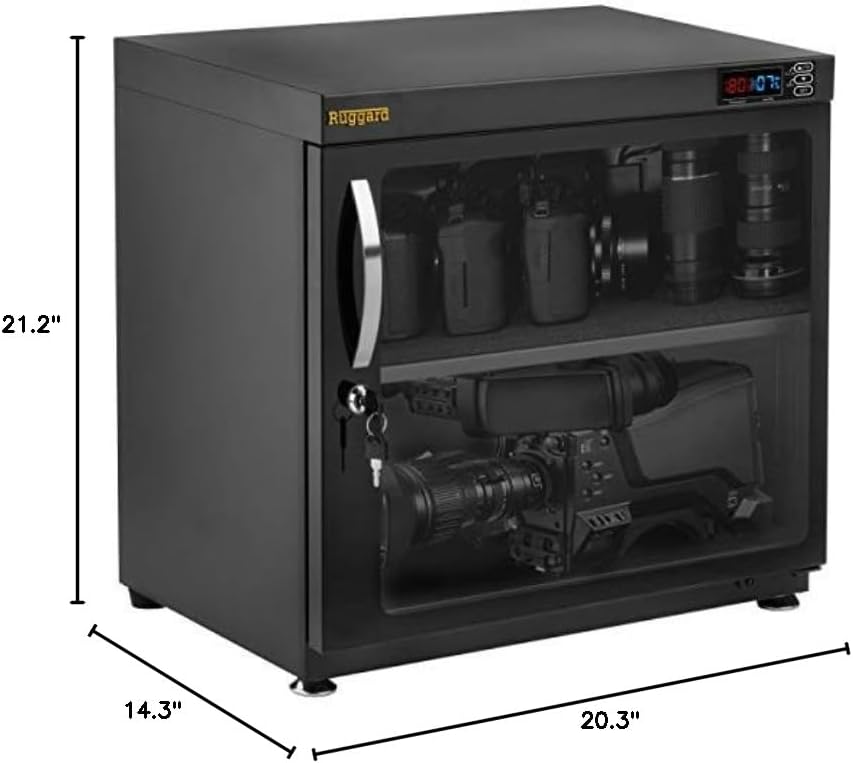
Figure 5: Diagram showing the exterior dimensions of the Ruggard Electronic Dry Cabinet (80L).
Garanti ak sipò
For warranty information or technical support, please refer to the warranty card included with your product or contact Ruggard customer service directly. Contact details can typically be found on the manufacturer's official websit la oubyen sou anbalaj pwodwi a.
Videyo pwodwi
Pa gen okenn videyo pwodwi ofisyèl ki kreye pa vandè a ki disponib pou modèl sa a kounye a.