
1. Entwodiksyon
This manual provides essential information for the safe and efficient operation of your InFocus IN3148HD 1080p 5000 Lumen Professional Projector. Please read these instructions thoroughly before using the projector and retain them for future reference. The InFocus IN3148HD is designed for professional environments, offering high brightness, full HD resolution, and versatile connectivity for various presentation needs.

Figi 1: Devan view of the InFocus IN3148HD Projector.
2. Karakteristik kle
The InFocus IN3148HD projector offers a range of features designed for high-performance presentations:
- 1080p (1920 x 1080) Native Resolution: Delivers crisp, high-definition images.
- 5000 Lumens klète: Ensures clear visibility in well-lit rooms.
- Zoom optik 1.5x: Provides flexibility in projector placement and image sizing.
- Sipò 3D: Compatible with Blu-ray and other 3D content sources.
- 10W Speaker: Integrated audio for presentations.
- Opsyon Koneksyon miltip: Includes two HDMI 1.4 ports, VGA, and more.
- Siveyans rezo: Allows for remote management and control.
Videyo 1: Yon overview of the InFocus IN3148HD projector's features and capabilities.
3. Enstalasyon ak Enstalasyon
3.1 Debake
Carefully remove the projector and all accessories from the packaging. Verify that all components listed in the packing list are present and undamaged. Keep the original packaging for future transport or storage.
3.2 Plasman
Position the projector on a stable, flat surface or mount it securely. Ensure adequate ventilation around the unit to prevent overheating. Consider the throw distance and screen size for optimal image quality. The projector supports both tabletop and ceiling mount installations.

Figure 2: Projector dimensions for installation planning.
4. Koneksyon
The IN3148HD offers a variety of input and output ports for connecting to different devices.
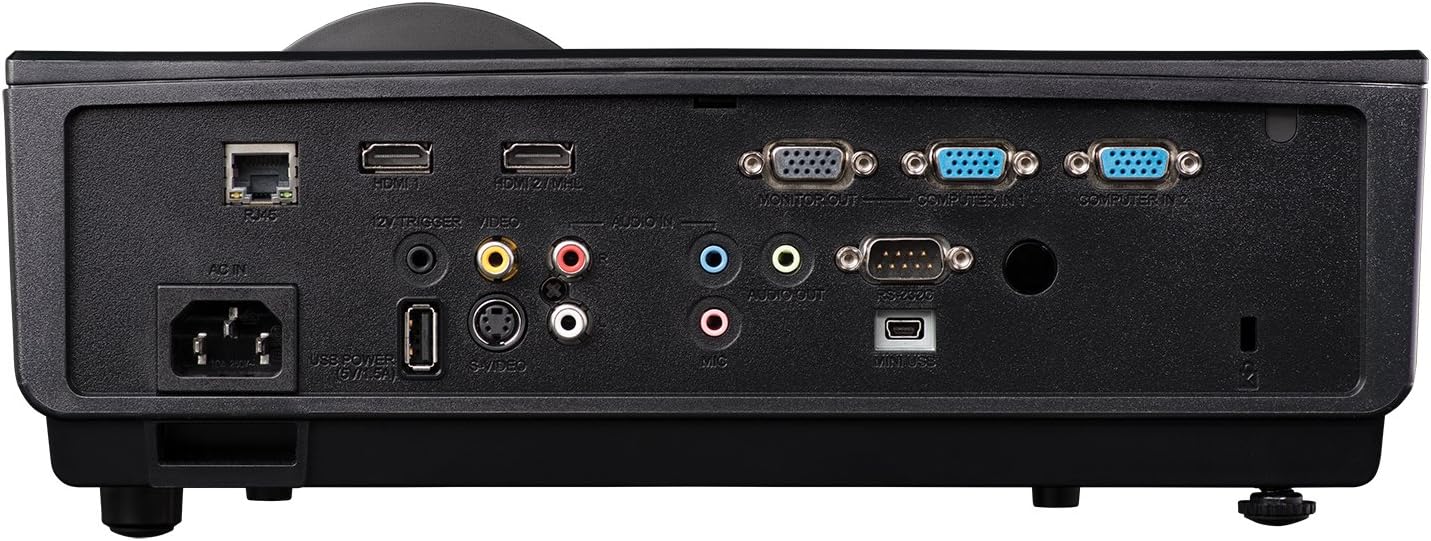
Figure 3: Rear panel showing available connection ports.
- HDMI (x2): For digital video and audio input from computers, Blu-ray players, and other HDMI-enabled devices.
- VGA (x2): For analog video input from computers.
- USB: Pou sèvis oswa mizajou firmwèr.
- Rezo (RJ45): Pou kontwòl ak siveyans rezo a.
- Antre/soti odyo: 3.5mm jacks for external audio sources or output to external speakers.
- Videyo (RCA): For composite video input.
5. Operasyon
5.1 Power On/Off
- Pouvwa sou: Connect the power cord and press the power button on the projector or remote control. The power indicator light will turn blue.
- Pouvwa Off: Peze bouton pouvwa a de fwa. Pwojektè a pral antre nan yon sik refwadisman anvan li fèmen nèt.
5.2 Ajiste imaj la
- Konsantre: Vire bag konsantre a sou lantiy la jiskaske imaj la vin byen file.
- Zoom: Ajiste bag zoom lan sou lantiy la pou chanje gwosè imaj la.
- Koreksyon Keystone: Use the keystone correction function in the OSD (On-Screen Display) menu to correct trapezoidal image distortion.
6. Fonksyonalite 3D
The InFocus IN3148HD projector supports 3D content from compatible sources, such as Blu-ray players. To experience 3D, you will need active 3D glasses (sold separately) and a 3D-enabled source device.

Figure 4: Visual representation of 3D content viewing.
7. Antretyen
Antretyen regilye asire pèfòmans optimal epi pwolonje dire lavi pwojektè ou a.
- Lamp Ranplasman: L laamp has a limited lifespan. Refer to the OSD menu for lamp hour information. Replace the lamp when its brightness significantly decreases or when the lamp indicator light illuminates. Always use genuine InFocus replacement lamps.
- Netwayaj filtè: Clean the air filter regularly to prevent dust buildup, which can affect cooling and image quality. Refer to the full user manual for specific instructions on accessing and cleaning the filter.
- Netwayaj lantiy: Use a soft, lint-free cloth and a specialized lens cleaning solution to gently clean the projector lens. Avoid abrasive materials.
NAN. Depanaj
If you encounter issues with your projector, consult the table below for common problems and solutions.
| Pwoblèm | Kòz posib | Solisyon |
|---|---|---|
| Pa gen imaj ki parèt | Power cable disconnected, input source not selected, lamp echèk. | Check power connection, select correct input source, replace lamp si sa nesesè. |
| Imaj la twoub | Lens out of focus, incorrect throw distance. | Adjust focus ring, reposition projector. |
| Pa gen odyo | Volume too low, audio cable disconnected, incorrect audio source. | Increase volume, check audio cable connections, select correct audio input. |
| Pwojektè surchof | Blocked ventilation, dirty air filter. | Ensure clear ventilation, clean air filter. |
9. Espesifikasyon
Detailed technical specifications for the InFocus IN3148HD projector.
| Karakteristik | Spesifikasyon |
|---|---|
| Mak | Enfocus |
| Non modèl | IN3148HD |
| Rezolisyon ekspozisyon | 1920 x 1080 (1080p) |
| Klète | 5000 Lumens (ANSI) |
| Pwopòsyon kontras | 1000:1 |
| Kalite ekspozisyon | DLP |
| Koneksyon Teknoloji | HDMI, USB, VGA |
| Karakteristik espesyal | Difizyon 3D |
| Lamp Wattage | 310 Watts |
| Sous limyè opere lavi | 4500 èdtan |
| Pwa atik | 4.47 Kilogram |
10. Garanti ak sipò
For warranty information, technical support, or service inquiries, please refer to the warranty card included with your product or visit the official InFocus websit la. Kenbe resi acha ou kòm prèv acha pou reklamasyon garanti.