
1. Enstriksyon Sekirite Enpòtan
Li tout avètisman sekirite, enstriksyon, ilistrasyon, ak espesifikasyon yo bay zouti elektrik sa a. Si w pa swiv tout enstriksyon ki endike anba la yo, sa ka lakòz chòk elektrik, dife, ak/oswa blesi grav.
- Sekirite Zòn Travay: Kenbe zòn travay la pwòp epi byen limen. Pa sèvi ak zouti elektrik nan atmosfè eksplozif, tankou nan prezans likid, gaz oswa pousyè ki ka pran dife.
- Sekirite elektrik: Priz zouti elektrik yo dwe koresponn ak priz la. Pa janm modifye priz la nan okenn fason. Pa maltrete kòd la. Kenbe kòd la lwen chalè, lwil, bor byen file, oswa pati k ap deplase.
- Sekirite Pèsonèl: Always wear eye protection, hearing protection, and a dust mask. Dress properly; avoid loose clothing or jewelry. Secure workpiece before operating.
- Itilizasyon ak swen zouti elektrik: Pa fòse zouti elektrik la. Sèvi ak zouti elektrik ki kòrèk la pou aplikasyon w lan. Dekonekte ploge a nan sous kouran an anvan ou fè nenpòt ajisteman, chanje akseswa, oswa sere zouti elektrik yo.
- Planer Specific Safety:
- Tann kouto a sispann anvan li mete zouti a desann.
- Never reach into the chip ejection port while the tool is running.
- Ensure the workpiece is free of nails, screws, or other foreign objects before planing.
- Always hold the planer firmly with both hands during operation.
2. Pwodwi souview
The Einhell BT-PL 750 Electric Planer is designed for planing wood surfaces. Familiarize yourself with its components before operation.
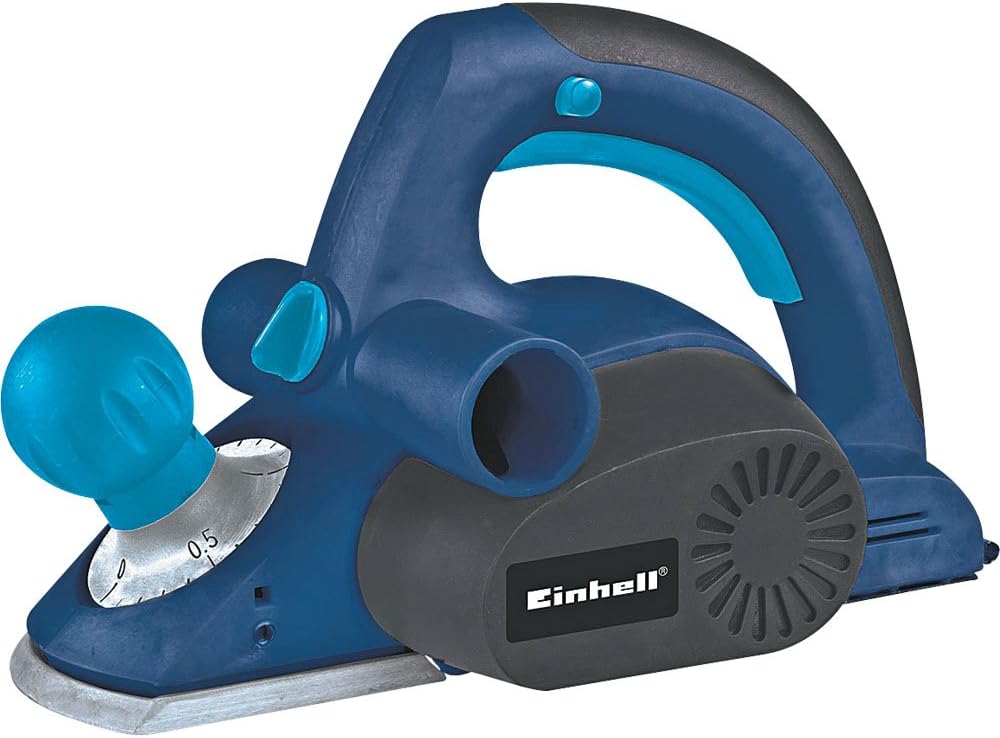
Figi 2.1: An jeneral view of the Einhell BT-PL 750 Electric Planer. This image shows the main body, handles, and base plate of the tool.
- Front Handle/Depth Adjustment Knob: Used for guiding the tool and setting the planing depth.
- Rear Handle/Switch: Main grip for operation, contains the power switch.
- Plak baz: The flat surface that rests on the workpiece.
- Cutter Drum: Houses the planing blades.
- Chip Ejection Port: Where wood chips are expelled.
- Dust Bag/Vacuum Connection: Pou konekte yon sistèm koleksyon pousyè.

Figure 2.2: Detail of the front handle and depth adjustment knob, showing the scale for setting planing depth.

Figi 2.3: Close-up view of the chip ejection port and the Einhell brand logo on the motor housing.
3. Enstalasyon
3.1 Debake
Carefully remove the planer and all accessories from the packaging. Inspect the tool for any damage that may have occurred during transit. Do not operate a damaged tool.
3.2 Blade Installation/Adjustment (if applicable)
The planer blades are factory-installed. If replacement is necessary, refer to the Maintenance section. Ensure blades are sharp and correctly seated before use.
3.3 Koleksyon Pousyè
For a cleaner work environment and improved visibility, connect a dust bag or a suitable vacuum cleaner to the chip ejection port. Ensure the connection is secure to prevent dust leakage.
3.4 Koneksyon pouvwa
Ensure the power switch is in the "OFF" position before plugging the tool into a 127V power outlet. Verify that the voltage of your power supply matches the tool's requirements.
4. Operasyon Enstriksyon
4.1 Setting Planing Depth
Rotate the front handle/depth adjustment knob to select the desired planing depth. Start with a shallow depth for initial passes and increase gradually if needed. Refer to Figure 2.2 for knob location.
4.2 Securing the Workpiece
Toujou byen sere pyès la ak kle.amps or a vise to prevent movement during planing. Unsecured workpieces can lead to injury or damage to the tool and material.
4.3 Teknik Planifikasyon
- Place the front part of the planer's base plate flat on the workpiece, ensuring the blades are not touching the surface.
- Start the motor by pressing the power switch. Allow the motor to reach full speed before engaging the blades with the wood.
- Apply even pressure and move the planer smoothly and consistently across the workpiece. Maintain a steady feed rate.
- At the end of the pass, ensure the entire base plate is supported by the workpiece before lifting the tool.
- For best results, plane with the grain of the wood.
4.4 Sekirite pandan operasyon an
Never attempt to clear chips from the ejection port while the tool is running. Always disconnect the power before clearing any blockages or making adjustments.
5. Antretyen
Regular maintenance ensures the longevity and safe operation of your Einhell BT-PL 750 Electric Planer. Always disconnect the tool from the power supply before performing any maintenance.
5.1 Netwayaj
After each use, clean the tool thoroughly. Remove wood chips and dust from the base plate, chip ejection port, and motor vents using a brush or compressed air. Do not use solvents or abrasive cleaners.
5.2 Blade Replacement/Sharpening
Dull or damaged blades will affect planing quality and can strain the motor. Replace blades when they become dull. Refer to your tool's specific instructions for blade replacement procedures. Always use genuine Einhell replacement blades.
5.3 Carbon Brush Inspection
Periodically inspect the carbon brushes for wear. Worn carbon brushes can lead to reduced performance or motor failure. Replace both brushes simultaneously if one is worn down to its limit mark. This procedure should ideally be performed by a qualified technician.
5.4 Depo
Store the planer in a dry, secure location, out of reach of children. Protect the blades from damage during storage.
NAN. Depanaj
This section addresses common issues you might encounter with your electric planer. For problems not listed here, contact customer support.
| Pwoblèm | Kòz posib | Solisyon |
|---|---|---|
| Planer does not start. | Pa gen kouran; switch ki gen pwoblèm; bwòs kabòn ki ize. | Check power connection and outlet. Ensure switch is fully engaged. Inspect and replace carbon brushes if necessary. |
| Poor planing finish (rough surface, chatter marks). | Dull or damaged blades; incorrect planing depth; uneven feed rate. | Replace or sharpen blades. Reduce planing depth. Maintain a consistent, smooth feed rate. |
| Twòp vibrasyon oswa bri. | Unbalanced blades; loose components; worn bearings. | Check blades for damage or improper installation. Tighten any loose screws. If problem persists, seek professional service. |
| Chips not ejecting properly. | Clogged chip ejection port; full dust bag. | Disconnect power, then clear the chip ejection port. Empty the dust bag or vacuum container. |
7. Espesifikasyon
Technical data for the Einhell BT-PL 750 Electric Planer.
| Karakteristik | Valè |
|---|---|
| Nimewo Modèl | BT-PL 750 |
| Mak | Einhell |
| Antre pouvwa | 750 Watts |
| Voltage | 127V |
| Pwa pwodwi | 2430 gram (apeprè 5.36 liv) |
| Manifakti | Einhell Germany |
8. Garanti ak sipò
Einhell products are manufactured to high-quality standards and undergo strict quality controls. This product is covered by a manufacturer's warranty in accordance with country-specific regulations.
Please retain your proof of purchase for warranty claims. For service, repairs, or technical support, please contact your local Einhell service center or authorized dealer. Do not attempt to repair the tool yourself, as this may void the warranty and pose safety risks.

Figure 8.1: Einhell Germany quality seal, indicating tested and inspected quality.