
InFocus IN112XV
InFocus IN112XV Presentation Projector User Manual
Model: IN112XV | Brand: InFocus
1. Entwodiksyon
This manual provides essential information for the safe and efficient operation of your InFocus IN112XV Presentation Projector. The IN112XV is designed for business presentations and educational use, offering a long lamp life, high brightness, and clear image quality.
- Pwolonje Lamp Lavi: Enjoy over 15,000 hours of viewing.
- Segondè klète: 3800 lumens for clear images in various lighting conditions.
- Pwopòsyon kontras: 26000:1 for distinct whites and blacks.
- Fleksib Viewing: Projects images from 28 inches to 300 inches diagonally.
- Koneksyon: Features HDMI input and SVGA (800 x 600) resolution.
2. Pake kontni
Verifye ke tout atik ki nan lis anba a yo enkli nan pakè ou a:
- InFocus IN112XV Projector
- Kòd pouvwa
- Kontwòl Remote
- VGA kab
- Dokimantasyon (manyèl sa a ak lòt gid yo)
3. Pwodwi souview
Familiarize yourself with the components and controls of your InFocus IN112XV projector.
3.1 Devan View
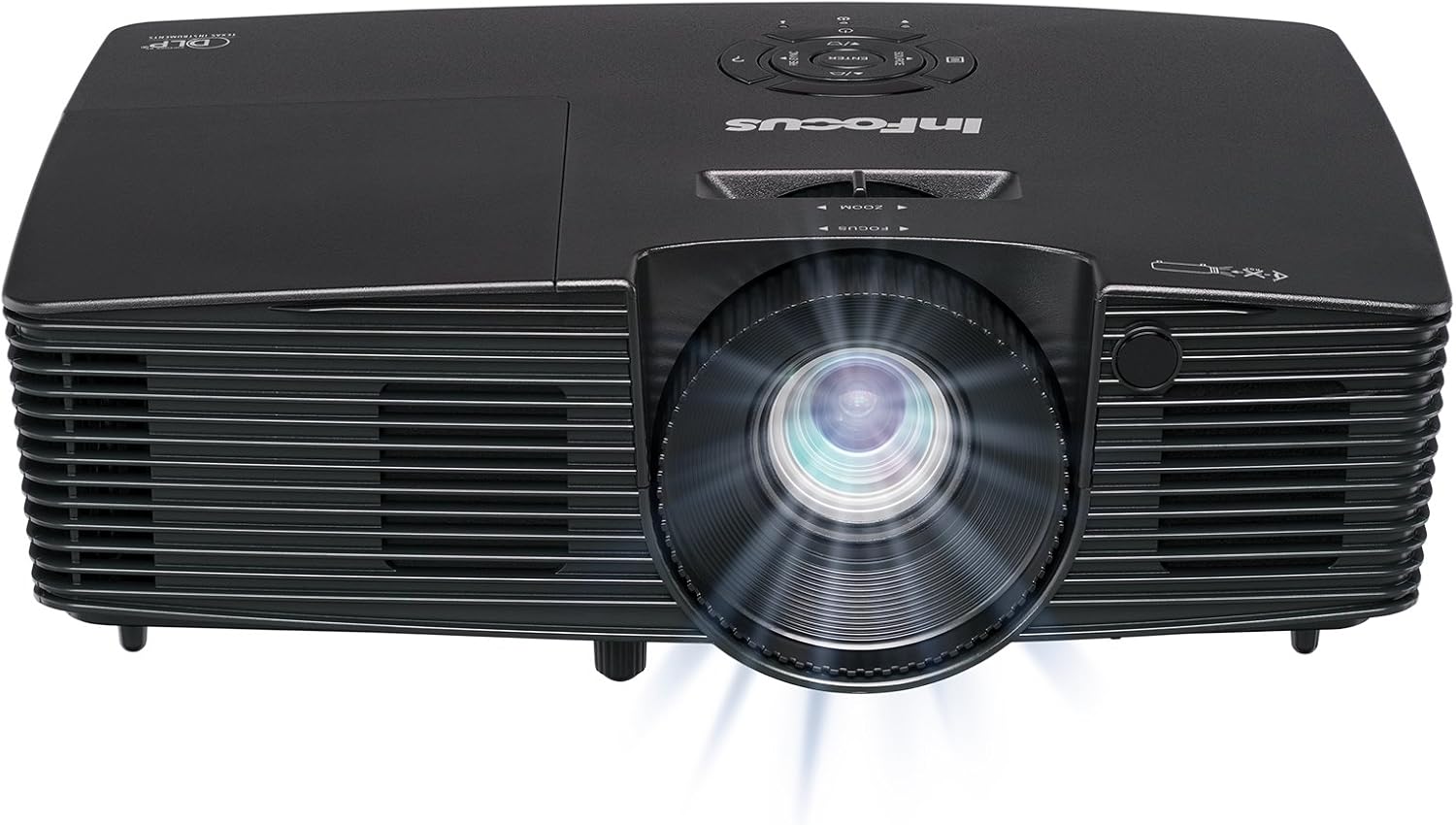
Imaj 3.1: Devan view of the InFocus IN112XV projector. This image highlights the main projection lens and the front ventilation grilles.
3.2 Top View ak Kontwòl Panel

Imaj 3.2: Top view of the InFocus IN112XV projector. The control panel is visible on the right, featuring buttons for power, source selection, menu navigation, keystone adjustment, and volume. The focus and zoom adjustment rings are located around the lens.
The control panel on the top of the projector allows for basic operation without the remote. Key buttons include:
- Pouvwa: Limen oswa etenn pwojektè a.
- Sous: Chanje sous opinyon ki disponib yo.
- Meni: Aksè meni ekspozisyon sou ekran an (OSD).
- Antre: Konfime seleksyon yo nan meni OSD la.
- Kle flèch: Navigate menu options and adjust settings.
- Re-Sync: Synchronizes the image.
3.3 Dèyè View ak pò koneksyon

Imaj 3.3: Dèyè view of the InFocus IN112XV projector. This image displays the available connection ports, including Video In, S-Video In, Computer In (VGA), HDMI, and the power input.
Panèl dèyè a gen plizyè pò pou konekte aparèy ekstèn:
- Videyo nan: For composite video sources.
- Antre S-Videyo: For S-Video sources.
- Antre Odinatè (VGA): For connecting to computers via VGA cable.
- HDMI: For digital video and audio sources.
- Sèvis: Pou rezon sèvis ak antretyen.
- Antre pouvwa: Connects the power cord to an electrical outlet.
3.4 Kontwòl Remote

Imaj 3.4: Remote control for the InFocus IN112XV projector. The remote provides full control over the projector's functions, including power, source selection, menu navigation, keystone correction, and volume.
The remote control offers convenient access to all projector functions. Ensure batteries are correctly installed.
4. Enstalasyon
4.1 Plasman
Position the projector on a stable, flat surface or mount it securely. Ensure there is adequate space around the projector for ventilation.
4.2 Koneksyon pouvwa
- Konekte kòd kouran an nan pò antre kouran pwojektè a.
- Ploge lòt pwent fil kouran an nan yon priz elektrik ki chita.
4.3 Konekte Sous Antre yo
The projector supports various input sources. Choose the appropriate cable for your device:
- HDMI: Connect an HDMI cable from your source device (e.g., laptop, media player) to the projector's HDMI port.
- VGA (Antre Odinatè): Connect a VGA cable from your computer to the projector's Computer In port. This is a plug-and-play connection.
- Video In / S-Video In: Use composite video or S-Video cables for older video sources.
- Aparèy mobil: To connect an iPad or smartphone, a LightCast Key (sold separately) is required.
5. Operasyon Enstriksyon
5.1 Limen/Etenyen
- Pou limen: Peze a Pouvwa button on the projector's control panel or the remote control. The power indicator light will change.
- Pou etenn: Peze a Pouvwa button again. A confirmation message may appear. Press again to confirm shutdown. Allow the projector to cool down before unplugging.
5.2 Chwazi yon Sous Antre
After connecting your source device, select the correct input:
- Peze a Sous button on the projector's control panel or the remote control to cycle through available inputs (HDMI, VGA, Video, S-Video).
- Alternatively, use the dedicated input buttons (HDMI, VGA, Video) on the remote control.
5.3 Ajisteman Fokus ak Zoom
For a clear and appropriately sized image, adjust the lens rings:

Imaj 5.1: Manual Focus Adjustment. This image illustrates the effect of adjusting the focus ring, transforming a blurry projection into a clear and sharp image.
- Konsantre: Vire a Konsantre ring on the projector lens until the image appears sharp and clear.
- Zoom: Vire a Zoom ring on the projector lens to adjust the size of the projected image.
5.4 Koreksyon Keystone
If the projected image appears trapezoidal (wider at the top or bottom), use keystone correction to square it:
- Peze a Keystone+ or Keystone- buttons on the remote control to adjust the image geometry.
5.5 Navigasyon meni
Access the On-Screen Display (OSD) menu for advanced settings:
- Peze a Menu button on the remote or control panel.
- Use the arrow keys to navigate through menu options.
- Peze Antre pou chwazi yon opsyon oubyen konfime yon paramèt.
- Peze Menu again to exit the OSD.
6. Antretyen
6.1 Lamp Lavi
Pwojektè a lamp has an estimated life of over 15,000 hours. When the lamp reaches the end of its life, the projector may display a warning message or the image brightness may significantly decrease. Refer to the full service manual for lamp replacement procedures if necessary.
6.2 Netwayaj
- Pwojektè Casing: Use a soft, dry cloth to wipe the exterior of the projector. Do not use abrasive cleaners or solvents.
- Lantiy: Gently clean the lens with a lens cleaning cloth and specialized lens cleaning solution. Avoid touching the lens surface with your fingers.
- Ouvèti vantilasyon: Periodically check and clean the ventilation openings to ensure proper airflow and prevent overheating. Use a soft brush or compressed air to remove dust.
NAN. Depanaj
Seksyon sa a adrese pwoblèm komen ou ka rankontre ak pwojektè ou a.
| Pwoblèm | Kòz posib | Solisyon |
|---|---|---|
| Pa gen imaj ki parèt |
|
|
| Imaj la twoub |
|
|
| Imaj la se trapezoidal |
|
|
| Projector runs hot or smells of burning plastic |
|
|
| Pa gen odyo |
|
|
Nòt enpòtan: This projector is not recommended for high-definition movie viewing. While it can accept a 1080p input signal, it projects at its native SVGA (800 x 600) resolution.
8. Espesifikasyon
| Karakteristik | Detay |
|---|---|
| Nimewo Modèl | IN112XV |
| Teknoloji ekspozisyon | DLP |
| Rezolisyon natif natal | SVGA (800 x 600) |
| Klète | 3800 Lumen |
| Pwopòsyon kontras | 26000:1 |
| Lamp Lavi | Jiska 15,000 èdtan |
| Koneksyon | HDMI, VGA (Computer In), Video In, S-Video In |
| Karakteristik espesyal | 3D-pare |
| Itilizasyon Rekòmande | Business, Education |
| Dimansyon pwodwi | 8.8 x 12.4 x 4 pous |
| Pwa atik | 5.5 liv |
9. Garanti ak sipò
9.1 Enfòmasyon sou Garanti
The InFocus IN112XV projector is backed by a 2-ane garantiGaranti sa a kouvri domaj nan materyèl ak nan fabrikasyon anba itilizasyon nòmal. Tanpri konsève prèv acha ou pou reklamasyon garanti.
9.2 Sipò pou Kliyan
For technical assistance, troubleshooting beyond this manual, or warranty service, please contact InFocus customer support. Contact information can typically be found on the official InFocus websit la oubyen nan dokimantasyon ki vini ak pwodwi ou a.
Ask a question about this manual
Ask about setup, troubleshooting, compatibility, parts, safety, or missing instructions. Manuals+ will review the question and use this page’s manual context to help answer it.