
G-Technology 0G06053-1
G-Technology 1TB G-DRIVE mobile SSD R-Series Instruction Manual
Model: 0G06053-1
1. Entwodiksyon
The G-Technology G-DRIVE mobile SSD R-Series is a durable and portable external solid-state drive designed for reliable data storage and transfer. It features robust protection against water, dust, drops, and crushing, making it suitable for various environments. With high-speed USB-C connectivity, it offers fast data transfer rates for efficient workflow.

Figi 1: Devan view of the G-Technology G-DRIVE mobile SSD R-Series.
2. Ki sa ki nan bwat la
Verifye ke tout atik yo prezan nan pakè a:
- G-DRIVE mobile SSD R-Series device
- USB-C pou USB-C kab
- USB-C pou USB-A kab
- Quick Start Guide (Documentation)
- 3-Year Limited Warranty information

Figure 2: The G-DRIVE mobile SSD R-Series shown with its included USB-C to USB-C and USB-C to USB-A cables.
3. Enstalasyon
3.1 Konekte aparèy la
- Select the appropriate cable (USB-C to USB-C or USB-C to USB-A) for your computer's port.
- Connect one end of the cable to the USB-C port on the G-DRIVE mobile SSD R-Series.
- Konekte lòt bout kab la nan yon pò USB ki disponib sou òdinatè w la.
- The device is bus-powered and does not require an external power adapter.

Figi 3: Close-up view of the USB-C port on the G-DRIVE mobile SSD R-Series.
3.2 Initial Use and Formatting
The G-DRIVE mobile SSD R-Series is pre-formatted for macOS. For Windows users, reformatting the drive to NTFS is necessary for optimal compatibility and stability. Detailed instructions for formatting can be found on the G-Technology support pages. If cross-platform use between Mac and PC is required, exFAT formatting is an option, though NTFS is generally more stable for Windows-only use.
4. Opere Aparèy la
4.1 Transfè Done
The G-DRIVE mobile SSD R-Series offers super-fast transfer rates up to 560MB/s, utilizing the latest generation USB-C connectivity (USB 3.1 Gen 2). This allows for quick saving, editing, and archiving of large files. Senpleman trennen epi depoze files to and from the drive, or use your operating system's copy/paste functions.
4.2 Konpatibilite
The drive is compatible with both PC (Windows 7 and later) and Mac (macOS 10.10 and later) operating systems. Its versatile USB-C port ensures readiness for a wide range of laptops and desktops.
4.3 Portabilite
Designed to be compact and lightweight, the G-DRIVE mobile SSD R-Series is ideal for on-the-go professionals. Its small form factor allows it to be easily carried in a bag or pocket, providing access to your data wherever you need it.
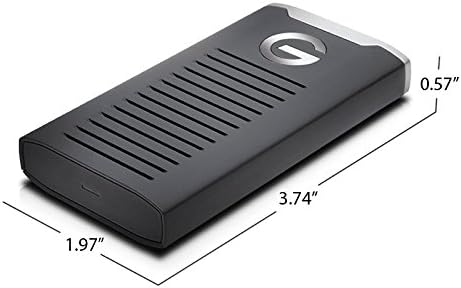
Figure 4: The compact dimensions of the G-DRIVE mobile SSD R-Series.
5. Antretyen ak Swen
5.1 Karakteristik Durabilite
The G-DRIVE mobile SSD R-Series is built for durability, featuring:
- IP67 dlo ak rezistans pousyè
- 3-meter drop protection (on a carpeted concrete floor)
- 1000lb crushproof rating
- Shock and vibration resistant solid state drive technology
5.2 Swen Jeneral
Pou asire lonjevite aparèy ou an:
- Avoid exposing the drive to extreme temperatures.
- Keep the ports clean and free of debris.
- While durable, avoid intentional drops or excessive force.
- Disconnect the drive safely using your operating system's eject function before unplugging.
NAN. Depanaj
6.1 Drive Not Recognized on Windows
If the drive is not recognized on a Windows computer, it may need to be reformatted. The drive is pre-formatted for macOS. Refer to the G-Technology support website for detailed instructions on how to reformat the drive for Windows (NTFS) or cross-platform use (exFAT).
6.2 Vitès transfè ba
Ensure you are using a USB 3.1 Gen 2 compatible port on your computer for optimal transfer speeds. Older USB ports (e.g., USB 2.0 or USB 3.0) will result in slower performance. Performance can also vary depending on your hardware, software components, and configurations.
6.3 Device Feels Warm During Use
It is normal for the device to become warm during extended use, especially during large data transfers. The aluminum casing is designed to help dissipate heat. This typically does not affect performance or reliability.
7. Espesifikasyon
| Karakteristik | Detay |
|---|---|
| Kapasite depo dijital | 1 TB |
| Entèfas Disk Disk | USB 3.1 |
| Koneksyon Teknoloji | USB |
| Karakteristik espesyal | Water and Dust Resistant (IP67), Shock and Vibration Resistant, Crushproof |
| Aparèy konpatib | Laptop (PC; Mac) |
| Kalite enstalasyon | Ekstèn Disk Disk |
| Koulè | Nwa |
| Dimansyon atik LxWxH | 3.74 x 1.97 x 0.57 pous |
| Pwa atik | 3.03 ons |
| Sistèm operasyon | Mac OS 10.10+; Windows 7+ |
8. Garanti ak sipò
8.1 Garanti limite
The G-DRIVE mobile SSD R-Series comes with a 3-Year Limited Warranty. Please retain your proof of purchase for warranty claims.
8.2 Sipò teknik
For technical assistance, product registration, or to access the full user manual and FAQs, please visit the official G-Technology support website. You can find the latest drivers, software, and troubleshooting guides there.
Pou plis enfòmasyon, vizite G-Technology Store on Amazon.
Ask a question about this manual
Ask about setup, troubleshooting, compatibility, parts, safety, or missing instructions. Manuals+ will review the question and use this page’s manual context to help answer it.