
1. Entwodiksyon
Thank you for choosing the XTUGA BK510 Single Channel Wireless In-Ear Monitor System. This system is designed to provide professional-grade audio monitoring for musicians, performers, and presenters. It features UHF wireless technology with 100 selectable channels, ensuring clear and reliable sound transmission. This manual will guide you through the setup, operation, and maintenance of your new in-ear monitor system.
2. Enfòmasyon sou Sekirite
Tanpri li epi konprann tout enstriksyon sekirite yo anvan ou itilize aparèy sa a. Kenbe manyèl sa a pou referans pita.
- Konfòmite FCC: Most users do not need a license to operate this wireless microphone system. However, operation is subject to certain restrictions: the system must not cause harmful interference, must operate at a low power level (not exceeding 50 milliwatts), and has no protection from interference received from any other device.
- Règleman FCC: Purchasers should be aware that the FCC is currently evaluating the use of wireless microphone systems, and these rules are subject to change. For more information, contact the FCC at 1-888-CALL-FCC (TTY: 1-888-TELL-FCC) or visit the FCC's wireless microphone websit: fcc.gov/cgb/wirelessmicrophones.
- Sekirite elektrik: To prevent electric shock, do not open the device casing. Konfye tout antretyen bay pèsonèl kalifye.
- Sous pouvwa: Sèvi ak adaptè kouran ki vini ak li a sèlman. Asire w ke vòl latage matche ak kondisyon aparèy yo.
- Dlo ak imidite: Pa ekspoze aparèy la nan dlo, lapli, oswa imidite twòp.
- Chalè: Kenbe aparèy la lwen sous chalè tankou radyatè, recho, recho oswa lòt aparèy ki pwodui chalè.
- Vantilasyon: Ensure proper ventilation around the transmitter unit. Do not block any ventilation openings.
- Earphone Volume: Evite koute nan nivo volim wo pou peryòd pwolonje pou anpeche domaj tande.
3. Pake kontni
Verifye ke tout atik ki nan lis anba a yo enkli nan pakè ou a. Si gen nenpòt atik ki manke oswa ki domaje, tanpri kontakte machann ou an.
- 1x XTUGA BK510 Transmitter Unit
- 1x XTUGA BK510 Bodypack Receiver
- 1x Detachable Antenna
- 1x Power Adapter (DC 12V-18V)
- 2x Audio Cables (1/4" TS to 1/4" TS)
- 1x Pair of Earbud Headphones (White)

Imaj: XTUGA BK510 Single Channel Wireless In-Ear Monitor System package contents, showing the transmitter, bodypack receiver, antenna, power adapter, two audio cables, and white earbud headphones.
4. Pwodwi souview
4.1 Inite transmetè
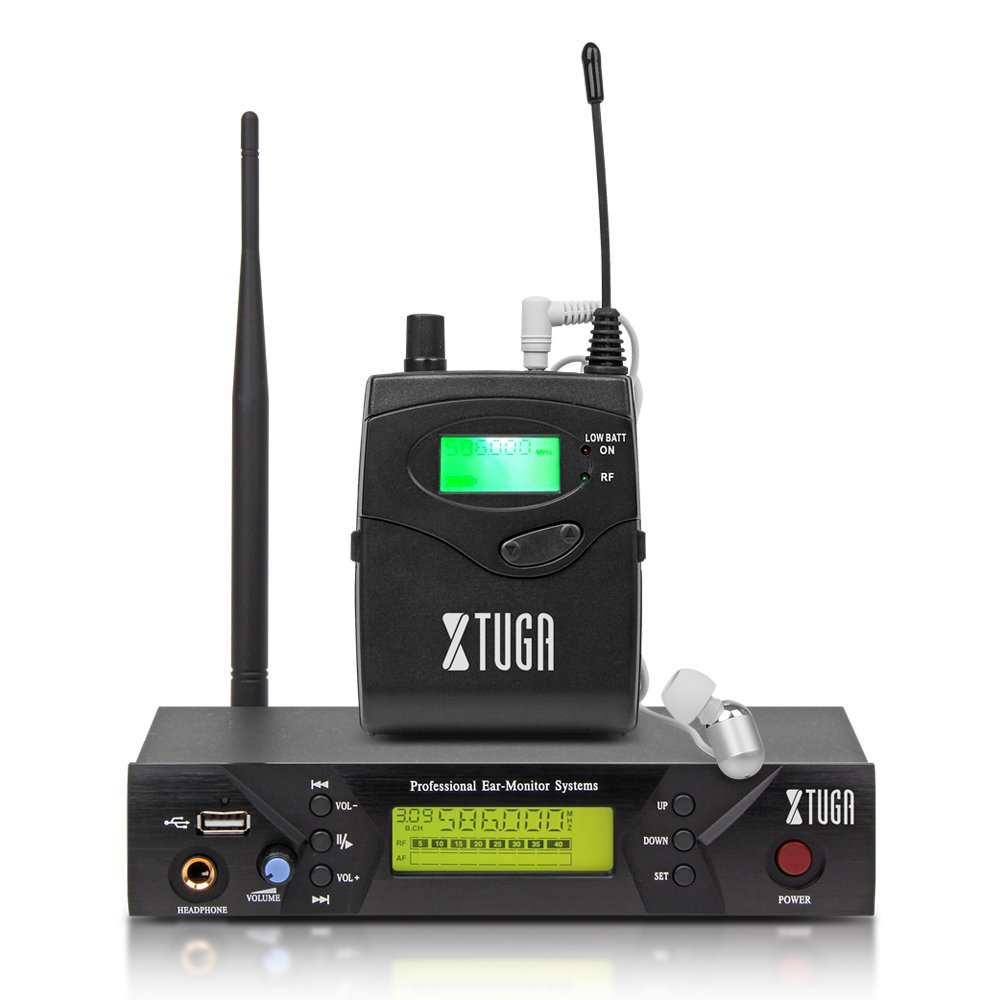
Imaj: Front panel of the XTUGA BK510 transmitter unit, featuring a USB port, headphone output, volume control, channel selection buttons (UP/DOWN), SET button, power button, and an LCD display.
- Pò USB: For connecting USB devices (e.g., for playback or recording, specific functionality may vary).
- Sòti kas ekoutè: 3.5mm jack for wired headphone monitoring directly from the transmitter.
- Bouton VOLIM: Adjusts the output volume for the HEADPHONE output.
- Bouton HEVE/BA: Used to navigate and select channels or frequencies.
- SET bouton: Konfime seleksyon yo oubyen antre nan meni paramèt yo.
- POUVWA bouton: Turns the transmitter unit on or off.
- Ekspozisyon LCD: Shows current channel, frequency, and other operational information.

Imaj: Rear panel of the XTUGA BK510 transmitter unit, showing the DC IN power input, AF IN (L) and AF IN (R) combo XLR/TRS inputs, AF LEVEL (Left/Right) adjustment knobs, and the ANTENNA connector.
- DC IN (12V-18V): Antre kouran pou adaptè kouran ki enkli a.
- AF IN (L)/(R): Combo XLR/TRS inputs for connecting audio sources (e.g., mixer output).
- AF LEVEL (Left/Right): Rotary knobs to adjust the input audio level for each channel.
- ANTENNA Connector: Pou tache antèn detachab la.
4.2 Bodypack Receiver

Imaj: Devan view of the XTUGA BK510 bodypack receiver, showing the LCD display, LOW BATT indicator, RF indicator, and control buttons.
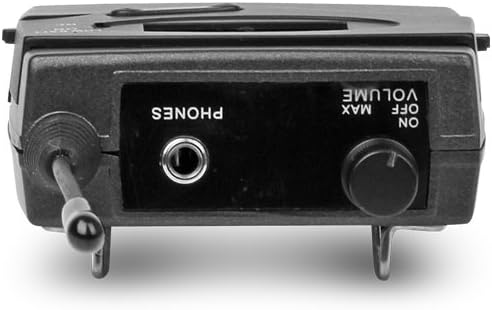
Imaj: Top view of the XTUGA BK510 bodypack receiver, showing the PHONES output jack and the ON/OFF/VOLUME knob.

Imaj: XTUGA BK510 bodypack receiver with the battery compartment open, showing slots for two AA batteries and the belt clip on the back.
- Ekspozisyon LCD: Shows current channel, frequency, and battery status.
- LOW BATT Indicator: Illuminates when battery power is low.
- Endikatè RF: Illuminates when receiving a radio frequency signal from the transmitter.
- ON/OFF/VOLUME Knob: Turns the receiver on/off and adjusts the headphone volume.
- Sòti TELEFÒN: 3.5mm jack for connecting in-ear headphones.
- Lòj batri: Kenbe de pil AA.
- Clip senti: For attaching the bodypack to clothing or a belt.
5. Gid Enstalasyon
- Connect Transmitter Antenna: Screw the detachable antenna onto the ANTENNA connector on the rear panel of the transmitter unit. Ensure it is securely fastened.
- Alimante transmetè a: Connect the provided power adapter to the DC IN (12V-18V) port on the rear of the transmitter, then plug the adapter into a suitable power outlet.
- Konekte Sous Odyo a: Use the included 1/4" TS cables (or XLR cables, not included) to connect your audio source (e.g., mixer's auxiliary output, monitor send) to the AF IN (L) and/or AF IN (R) inputs on the transmitter's rear panel. For mono operation, typically use AF IN (L).
- Install Receiver Batteries: Open the battery compartment on the bodypack receiver and insert two AA batteries, observing correct polarity (+/-). Close the compartment securely.
- Connect Headphones to Receiver: Plug your in-ear headphones into the PHONES output jack on the bodypack receiver.
6. Operasyon Enstriksyon
- Transmetè sou pouvwa: Press the POWER button on the transmitter's front panel. The LCD display will illuminate.
- Pouvwa sou reseptè: Rotate the ON/OFF/VOLUME knob on the bodypack receiver clockwise until it clicks and the LCD display illuminates.
- Select Channel/Frequency (Transmitter):
- Use the UP/DOWN buttons on the transmitter to browse through the available 100 UHF channels.
- Press the SET button to confirm your desired channel. The display will show the selected frequency.
- Choose a channel that is clear of interference in your operating environment.
- Sync Receiver to Transmitter: The bodypack receiver should automatically sync to the transmitter's frequency. If not, consult the receiver's specific instructions (often involves holding a SET or SYNC button on the receiver while the transmitter is broadcasting). Ensure the RF indicator on the receiver is lit, indicating a successful connection.
- Adjust Audio Input Level (Transmitter): Play audio through your connected source. Adjust the AF LEVEL (Left/Right) knobs on the rear of the transmitter until the audio level is appropriate without clipping (distortion). Monitor the audio through the transmitter's HEADPHONE output if desired.
- Adjust Monitoring Volume (Receiver): Put on your in-ear headphones. Slowly rotate the ON/OFF/VOLUME knob on the bodypack receiver to adjust the listening volume to a comfortable level. Avoid excessively high volumes to protect your hearing.
- Begin Monitoring: Your XTUGA BK510 system is now ready for use.
7. Antretyen
- Netwayaj: Wipe the units with a soft, dry cloth. Do not use liquid cleaners or solvents.
- Ranplasman batri: When the LOW BATT indicator on the bodypack receiver illuminates, replace both AA batteries with fresh ones. Remove batteries if the receiver will not be used for an extended period.
- Depo: Sere sistèm nan nan yon kote ki fre epi sèk, lwen limyè solèy dirèk ak tanperati ekstrèm.
- Swen antèn: Handle the antenna carefully to avoid bending or breaking.
NAN. Depanaj
| Pwoblèm | Kòz posib | Solisyon |
|---|---|---|
| No sound from receiver. |
|
|
| Entèferans oswa elektrisite estatik. |
|
|
| Low audio quality (e.g., lack of bass). |
|
|
| LOW BATT indicator on receiver is lit. | Batri yo ba. | Replace both AA batteries immediately. |
9. Espesifikasyon
| Karakteristik | Detay |
|---|---|
| Modèl | BK510 |
| Mak | XTUGA |
| Koneksyon Teknoloji | Wired, Wireless (RF) |
| Kominikasyon san fil | UHF (100 Channels) |
| Transmitter Material | Metal |
| Bodypack Receiver Batteries | 2 pil AA (obligatwa) |
| Antre pouvwa transmetè | DC 12V-18V |
| Dimansyon transmetè | 17.72 x 11.81 x 4.72 pous |
| Pwa Atik (apeprè) | 3.34 liv (pakè total) |
| Karakteristik espesyal | Lightweight (receiver), Volume Control |
| Manifakti | Te fè nan peyi Lachin |
10. Garanti ak sipò
Garanti: No specific warranty information is provided within this user manual. For details regarding warranty coverage, terms, and conditions, please refer to the product packaging, the purchase receipt, or contact the manufacturer directly.
Sipò: For technical assistance, troubleshooting beyond this guide, or inquiries about your XTUGA BK510 system, please contact XTUGA customer support. You may find contact information on the official XTUGA websit entènèt la oubyen atravè pwen acha orijinal ou a.
Enfòmasyon FCC: For regulatory questions concerning wireless microphone systems, you can contact the FCC at 1-888-CALL-FCC (TTY: 1-888-TELL-FCC) or visit fcc.gov/cgb/wirelessmicrophones.