
Edifier DA5100
Edifier DA5100 5.1 Speakers User Manual
Gid konplè ou pou enstalasyon, operasyon ak antretyen.
Entwodiksyon
Mèsi pou acha aasing the Edifier DA5100 5.1 multimedia speaker system. This manual provides detailed instructions to help you set up, operate, and maintain your speakers for optimal performance and longevity. Please read this manual thoroughly before using the product.
Kontni pake
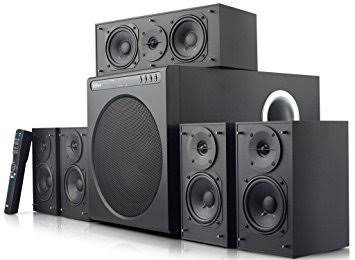
Before proceeding, please verify that all components are present in your package:
- Inite subwoofer
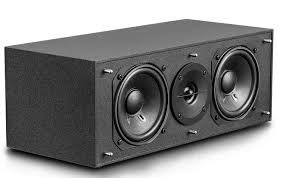
- Oratè sant
- Front satellite speakers (2)
- Rear satellite speakers (2)
- Remote kontwòl
- Audio input cables (RCA to RCA, 3.5mm to RCA)
- Speaker connection cables
- Manyèl itilizatè (dokiman sa a)
Prekosyon Sekirite Enpòtan
Pou asire yon operasyon an sekirite epi pou evite domaj, tanpri obsève sa ki annapre yo:
- Pa ekspoze aparèy la a lapli oswa imidite.
- Do not open the speaker enclosures; there are no user-serviceable parts inside.
- Mete aparèy la sou yon sifas ki estab e plat pou anpeche l chavire.
- Ensure adequate ventilation around the speakers and subwoofer.
- Disconnect from power during lightning storms or when unused for long periods.
- Kenbe lwen sous chalè ak limyè solèy la dirèk.
- Sèvi sèlman ak ekipman pou pouvwa ak akseswa ki espesifye yo.
Gid Enstalasyon
1. Plasman Oratè
Proper speaker placement is crucial for optimal 5.1 surround sound experience.
- Oratè Sant: Place directly in front of the listening position, typically above or below your display.
- Front Speakers (Left/Right): Position equidistant from the listening position, forming an equilateral triangle with the listener.
- Rear Speakers (Left/Right): Place behind the listening position, slightly to the sides, at ear level or slightly above.
- Subwoofers: Can be placed anywhere in the room, but corner placement often enhances bass. Experiment for best results.
2. Konekte moun kap pale yo
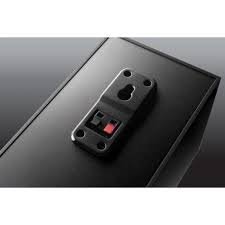
Connect the satellite speakers to the subwoofer unit using the provided speaker cables. Ensure correct polarity (red to red, black to black) for each connection.
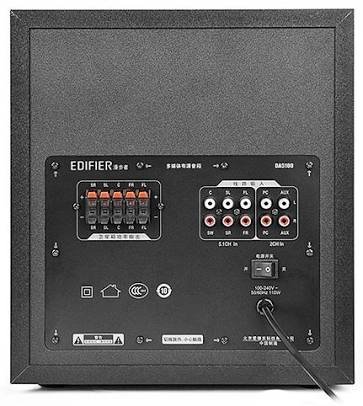
- Identify the speaker output terminals on the rear of the subwoofer. These are typically labeled for Front Left (FL), Front Right (FR), Center (C), Surround Left (SL), and Surround Right (SR).
- Connect each satellite speaker to its corresponding terminal on the subwoofer.
3. Konekte Sous Odyo yo
The DA5100 offers multiple input options. Choose the one that best suits your audio source.
- 5.1 Antre chanèl: For true 5.1 surround sound, connect your DVD player, Blu-ray player, or sound card's 5.1 analog outputs to the corresponding 5.1 input jacks on the subwoofer (FL, FR, C, SL, SR, SW).
- Antre PC: Use the 3.5mm to RCA cable to connect your computer's audio output to the "PC" input jacks.
- Antre AUX: Use the RCA to RCA cable to connect other stereo audio devices (e.g., TV, game console) to the "AUX" input jacks.
4. Koneksyon pouvwa
After all audio and speaker connections are made, connect the power cord to the subwoofer and then to a wall outlet. Ensure the power switch on the rear of the subwoofer is in the "OFF" position before plugging in.
Enstriksyon Operasyon
1. Powering On / Off
Locate the power switch on the rear panel of the subwoofer. Flip it to the "ON" position to power on the system. Flip it to "OFF" to power off.
2. Seleksyon Antre
Use the "Input" button on the remote control or the control panel on the subwoofer to cycle through the available audio inputs: 5.1, PC, AUX.
3. Kontwòl Volim
Use the "Volume +" and "Volume -" buttons on the remote control or the main volume knob on the subwoofer to adjust the overall system volume.
4. Individual Channel Volume Adjustment
The remote control allows for individual adjustment of the center, surround, and subwoofer volumes to fine-tune your sound experience.
- Press the "Center", "Surround", or "Subwoofer" button on the remote.
- Use the "Volume +" or "Volume -" buttons to adjust the level for that specific channel.
5. Fonksyon bèbè
Press the "Mute" button on the remote control to temporarily silence the audio. Press it again to restore the sound.
Antretyen ak Swen
To keep your Edifier DA5100 speakers in optimal condition:
- Netwayaj: Use a soft, dry cloth to wipe down the speaker surfaces. Do not use liquid cleaners or abrasive materials.
- Vantilasyon: Ensure that the subwoofer's heat sink and ventilation ports are not obstructed.
- Depo: Si w ap sere oratè yo pou yon peryòd tan pwolonje, dekonekte yo nan kouran an epi sere yo nan yon kote ki fre epi sèk.
- Jesyon kab: Keep cables tidy and avoid sharp bends or kinks to prevent damage.
Depanaj
If you encounter issues with your Edifier DA5100 system, refer to the table below for common problems and solutions.
| Pwoblèm | Kòz posib | Solisyon |
|---|---|---|
| Pa gen son | Power off; incorrect input selected; loose cables; muted. | Check power switch; select correct input; re-connect all cables securely; un-mute. |
| Son defòme | Volume too high; poor audio source quality; incorrect cable connection. | Reduce volume; try a different audio source; check cable connections and polarity. |
| Remote kontwòl pa travay | Dead batteries; obstruction between remote and sensor. | Replace batteries; ensure clear line of sight to the subwoofer's IR sensor. |
| Only some speakers producing sound | Incorrect 5.1 setup; loose speaker cables; audio source not 5.1. | Verify 5.1 input connections; check individual speaker cables; ensure audio source is outputting 5.1. |
If the problem persists, please contact Edifier customer support.
Espesifikasyon
The following are the general specifications for the Edifier DA5100 5.1 speaker system. Specifications are subject to change without notice.
- Sorti pouvwa: RMS 8W x 5 + 38W (THD+N=10%)
- Repons frekans: R/L/C/SL/SR: 150Hz-20KHz | SW: 20Hz-130Hz
- Sansiblite Antre: 5.1CH: L/R: 450mV+/-50mV; SW: 150mV+/-50mV | PC: 700mV+/-50mV | AUX: 350mV+/-50mV
- Kalite Antre: 5.1 Channel, PC, AUX
- Inite Bass: 8 pous (210mm)
- Mid-range Unit: 3 pous (78mm)
- Treble Inite: 1 pous (25mm)
- Dimansyon (subwoofer): 270mm x 300mm x 435mm (L x H x P)
- Dimensions (Satellite): 130mm x 160mm x 100mm (L x H x P)
Enfòmasyon sou Garanti
Edifier products come with a limited warranty. Please refer to the warranty card included with your product or visit the official Edifier websit la pou wè kondisyon garanti detaye espesifik pou rejyon ou an. Kenbe resi acha ou kòm prèv acha pou reklamasyon garanti.
Sipò pou Kliyan
For further assistance, technical support, or service inquiries, please contact Edifier customer support through their official websit la oswa enfòmasyon kontak ki nan anbalaj pwodwi ou a.
Edifier Official Websit: www.edifier.com
Ask a question about this manual
Ask about setup, troubleshooting, compatibility, parts, safety, or missing instructions. Manuals+ will review the question and use this page’s manual context to help answer it.