
Entwodiksyon
Thank you for choosing the ClearClick Retro AM/FM Radio with Bluetooth. This classic wooden vintage-style speaker combines nostalgic aesthetics with modern functionality, allowing you to enjoy both traditional radio broadcasts and contemporary digital audio. This manual provides essential information for setting up, operating, and maintaining your new radio.
Pwodwi souview
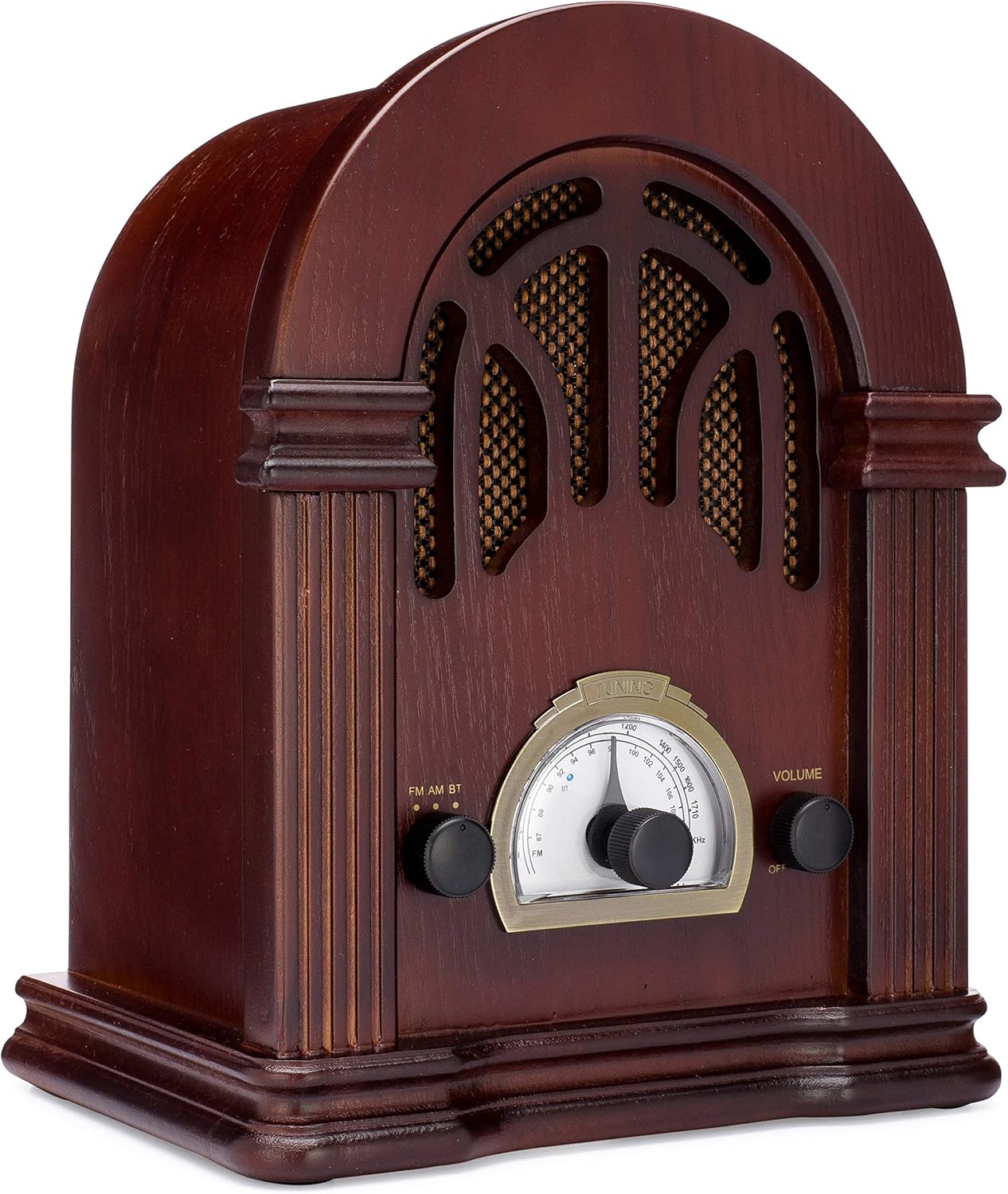
Figi 1: Devan view of the ClearClick Retro AM/FM Radio, showcasing its classic wooden design and central tuning dial.

Figure 2: Close-up of the tuning dial and control knobs for FM/AM/BT selection and volume.
The ClearClick Retro Radio features a beautiful, handmade wooden exterior, an easy-to-use tuning dial, and dedicated knobs for mode selection and volume control. It is designed to be powered by a standard North American power plug.
Enstalasyon
- Debake: Carefully remove the radio from its packaging. Ensure all components, including the power cord, are present.
- Plasman: Mete radyo a sou yon sifas ki plat e ki estab, lwen limyè solèy dirèk, sous chalè ak imidite twòp.
- Koneksyon pouvwa: Insert the included power cord into the AC input on the back of the radio. Plug the other end into a standard North American wall outlet (120V AC, 60Hz).
- Enstalasyon antèn: For optimal FM reception, extend the built-in wire antenna fully. For AM reception, the radio utilizes an internal antenna; repositioning the radio may improve signal strength.
Enstriksyon Operasyon
Pouvwa sou / Off ak kontwòl Volim
- To power on the radio, rotate the right-side VOLIM knob clockwise until you hear a click.
- Pou ajiste volim nan, kontinye vire bouton an VOLIM bouton.
- Pou etenn, vire VOLIM vire bouton an nan sans kontrè ak zegwi mont lan jiskaske li klike pou fèmen.
Operasyon radyo AM/FM
- Rotate the left-side FM AM BT knob to select either FM or AM mòd.
- Vire santral la REGLAGE knob to scan for radio stations. The tuning backlight will illuminate in AM/FM mode.
- Ajiste a REGLAGE knob carefully for clear reception.
Operasyon Bluetooth
- Rotate the left-side FM AM BT bouton pou chwazi BT mode. The radio will enter Bluetooth pairing mode, indicated by a blue LED.
- Sou aparèy ou ki gen Bluetooth la (pa egzanp, telefòn entelijan, tablèt), chèche aparèy Bluetooth ki disponib yo.
- Select "Vintage Radio" or "ClearClick Radio" from the list to pair.
- Once paired, the blue LED will remain solid, and you can play audio from your device through the radio.
- The radio's tuning backlight stays on even in Bluetooth mode (NEW 2019 feature).
Antretyen
- Netwayaj: Use a soft, dry cloth to wipe the exterior of the radio. Do not use abrasive cleaners or solvents, as they may damage the wooden finish.
- Depo: When not in use for extended periods, store the radio in a cool, dry place, away from extreme temperatures and humidity.
- Vantilasyon: Ensure the radio has adequate ventilation to prevent overheating. Do not block the ventilation holes on the back.
Depanaj
| Pwoblèm | Kòz posib | Solisyon |
|---|---|---|
| Pa gen pouvwa | Kòd kouran an pa konekte; priz la pa aktif. | Ensure power cord is securely plugged into the radio and a working wall outlet. Check if the volume knob is turned on. |
| Resepsyon radyo pòv | Siyal fèb; antèn nan pa lonje. | Fully extend the FM wire antenna. For AM, try repositioning the radio. Adjust the tuning knob slowly. |
| Bluetooth pa konekte | Radio not in BT mode; device too far; device already paired. | Ensure radio is in BT mode. Move your device closer to the radio. Unpair "Vintage Radio" from your device's Bluetooth settings and try pairing again. |
| Pa gen son ki soti nan Bluetooth | Volume too low on radio or device. | Increase volume on both the radio and your connected Bluetooth device. |
Espesifikasyon
- Dimansyon pwodwi: 10.5" (H) x 8" (W) x 6" (D)
- Pwa atik: 4.74 liv
- Koneksyon Teknoloji: Bluetooth
- Teknoloji sentonizè: AM, FM (2-Band)
- Sous pouvwa: Corded Electric (Standard North American Power Plug)
- Eleman ki enkli: Kòd pouvwa
- Nivo rezistans dlo: Pa reziste dlo
- Teknoloji ekspozisyon: LCD (for tuning dial backlight)

Figi 3: Side view illustrating the dimensions of the radio.
Garanti ak sipò
The ClearClick Retro AM/FM Radio with Bluetooth comes with a Garanti 5-ane konplè. ClearClick is a USA-Based Small Business committed to providing excellent customer support.
For warranty claims or technical assistance, please refer to the contact information provided with your product packaging or visit the official ClearClick websit la. Kenbe resi acha ou a pou validasyon garanti a.
Enfòmasyon enpòtan sou sekirite
Please read and follow all safety instructions provided in the original product packaging. Do not expose the unit to rain or moisture. Do not disassemble the unit; refer all servicing to qualified personnel. Ensure proper ventilation to prevent overheating.