
Eurom Alutherm 2000 Wi-Fi
Eurom Alutherm 2000 Wi-Fi Convection Heater User Manual
Model: Alutherm 2000 Wi-Fi (EUM360776)
1. Entwodiksyon
Thank you for choosing the Eurom Alutherm 2000 Wi-Fi convection heater. This manual provides essential information for the safe and efficient operation, installation, and maintenance of your new heater. Please read these instructions carefully before use and keep them for future reference.
The Eurom Alutherm 2000 Wi-Fi is an elegant convection heater designed to integrate seamlessly into any interior. With a power output of 2000 W, it is capable of heating spaces between 49-65 m³, making it suitable for living rooms, bedrooms, or offices. This heater can be wall-mounted for continuous heating and features a built-in thermostat to maintain your desired temperature. Control is made convenient through the free Eurom Smart app, which also allows for connecting multiple heaters.
2. Enstriksyon Sekirite
Toujou obsève prekosyon sekirite sa yo pou diminye risk dife, chòk elektrik, oswa blesi:
- Li tout enstriksyon yo anvan ou sèvi ak aparèy chofaj sa a.
- Pa sèvi ak aparèy chofaj sa a tou pre yon beny, yon douch oswa yon pisin.
- Do not cover the heater. Covering the heater can lead to overheating and fire.
- Kenbe materyèl ki ka pran dife tankou mèb, rido, ak lòt bagay ki ka pran dife omwen 1 mèt (3 pye) lwen devan ak kote aparèy chofaj la.
- Asire voltagVolim ki endike sou etikèt klasman an koresponn ak vòltaj prensipal ou a.tage.
- Pa sèvi ak okenn aparèy chofaj ki gen yon kòd oswa yon ploge ki domaje, oubyen apre aparèy chofaj la pa fonksyone byen, li tonbe atè oswa li domaje nan nenpòt fason.
- Aparèy sa a pa fèt pou itilize pa moun (ki gen ladan timoun) ki gen kapasite fizik, sansoryèl oswa mantal redwi, oswa ki pa gen eksperyans ak konesans, sof si yo te ba yo sipèvizyon oswa enstriksyon konsènan itilizasyon aparèy la pa yon moun ki responsab sekirite yo.
- Timoun yo ta dwe sipèvize pou asire ke yo pa jwe ak aparèy la.
3. Pwodwi souview
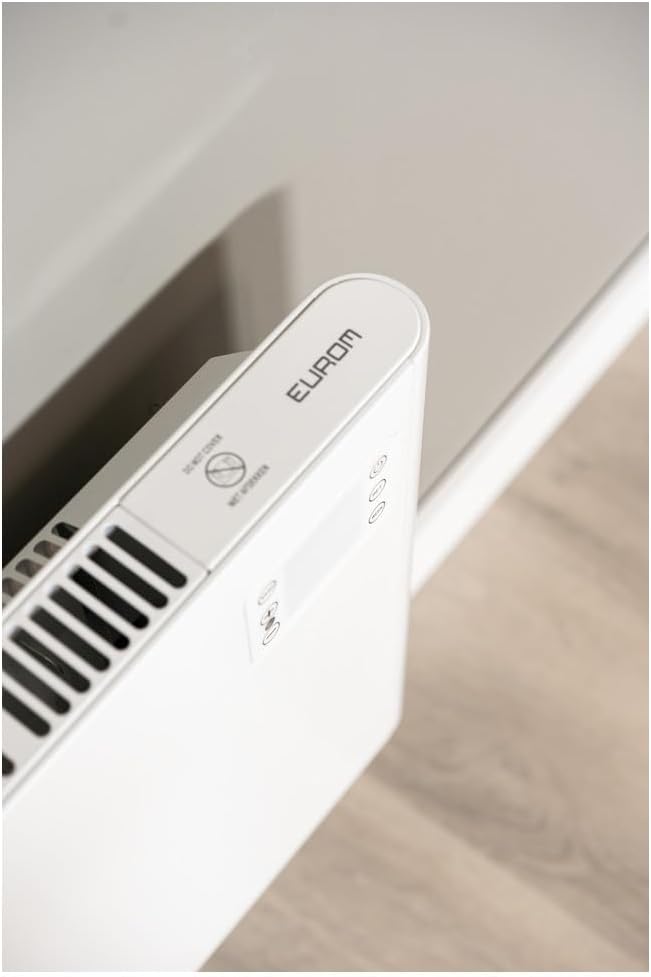
The Eurom Alutherm 2000 Wi-Fi heater features a sleek design and intuitive controls. Below are key components and their descriptions.



4. Enstalasyon ak Enstalasyon
The Eurom Alutherm 2000 Wi-Fi heater offers flexible installation options: wall-mounted or freestanding.
4.1 Montaj mi
For permanent heating, the unit can be securely mounted to a wall. Refer to the included mounting template and hardware for precise installation. Ensure the heater is installed at a safe distance from flammable materials and that there is adequate clearance for air circulation.

4.2 Freestanding Placement
If you prefer a portable solution, attach the provided feet to the base of the heater. Place the heater on a stable, level surface, ensuring it is not obstructed and has sufficient space around it for proper operation.

4.3 Koneksyon pouvwa
Once installed, plug the heater into a suitable electrical outlet. Ensure the main power switch (Figure 3.4) is in the 'OFF' position before plugging in. After plugging in, switch the main power switch to 'ON'.
5. Operasyon Enstriksyon
The Alutherm 2000 Wi-Fi can be operated via its integrated control panel, the remote control, or the Eurom Smart app.
5.1 Operasyon Panel Kontwòl
The control panel (Figure 3.6) allows direct adjustment of settings:
- Bouton pouvwa: Turns the heater on or off.
- bouton mòd: Cycles through different operating modes (e.g., Comfort, ECO, Anti-frost).
- SET bouton: Konfime seleksyon yo oubyen antre nan meni paramèt yo.
- Ajisteman Tanperati (+/-): Ogmante oswa diminye tanperati ki nesesè a.
- Bouton SEMÈN: Accesses weekly programming settings.
5.2 Operasyon kontwòl Remote
The remote control (Figure 3.5) provides convenient access to all heater functions from a distance. Its buttons mirror the functions available on the control panel.
5.3 Eurom Smart App Control (Wi-Fi)
For advanced control and scheduling, download the free Eurom Smart app. This app allows you to:
- Turn the heater on/off remotely.
- Set and adjust the desired temperature.
- Program weekly heating schedules.
- Connect and manage multiple Eurom Wi-Fi heaters.
Follow the in-app instructions for pairing your heater with the app and connecting to your home Wi-Fi network.
6. Antretyen
Antretyen regilye asire pèfòmans optimal ak lonjevite aparèy chofaj ou a.
- Netwayaj: Toujou debranche aparèy chofaj la epi kite l refwadi nèt anvan ou netwaye li. Sèvi ak yon twal mou.amp twal pou siye sifas ekstèn yo. Pa sèvi ak pwodui netwayaj abrazif oswa solvan.
- Depo: Si w ap sere aparèy chofaj la pou yon bon bout tan, asire w ke li pwòp epi sèk. Sere l nan yon kote ki fre epi sèk, de preferans nan anbalaj orijinal li.
- Enspeksyon: Periodically check the power cord and plug for any signs of damage. If damage is found, do not use the heater and contact qualified service personnel.
NAN. Depanaj
If you encounter issues with your Eurom Alutherm 2000 Wi-Fi heater, refer to the following common problems and solutions:
| Pwoblèm | Kòz posib | Solisyon |
|---|---|---|
| Chofaj pa limen. | No power supply; Main power switch off; Overheat protection activated. | Check power outlet and plug; Ensure main power switch (Figure 3.4) is ON; Unplug, allow to cool for 30 minutes, then restart. |
| Heater not heating to desired temperature. | Temperature setting too low; Room size exceeds heater capacity; Obstruction of air vents. | Increase temperature setting; Ensure heater is appropriate for room size; Clear any obstructions from air vents. |
| Pwoblèm koneksyon Wi-Fi. | Weak Wi-Fi signal; Incorrect app pairing; Router issues. | Ensure heater is within Wi-Fi range; Re-pair the heater with the Eurom Smart app; Restart your Wi-Fi router. |
| Heater overheats or runs continuously. | Thermostat malfunction; Air vents blocked; Software glitch. | Ensure vents are clear and heater is not covered; If issue persists, unplug and contact support. (Note: A user review mentioned potential overheating issues if the management module gets stuck. Always monitor the heater.) |
| Heater does not restart automatically after power outage. | Limitasyon konsepsyon. | This model may require manual restart after a power interruption. |
If the problem persists after attempting these solutions, please contact Eurom customer support.
8. Espesifikasyon
| Karakteristik | Spesifikasyon |
|---|---|
| Mak | Eurom |
| Nimewo Modèl | EUM360776 |
| Koulè | Blan |
| Dimansyon pwodwi (L x W x H) | 101 x 46 x 12 cm |
| Pwa | 6 Kilogram |
| Klas efikasite enèji | B |
| Karakteristik espesyal | Wi-Fi Compatible, Electronic Thermostat |
| Faktè fòm | Tower |
| Andedan kay la / Deyò Itilizasyon | Andedan kay la |
| Sous pouvwa | Fil elektrik |
| Metòd chofaj | Konveksyon |
| Kalite aliye | Mi mòn |
9. Garanti ak sipò
For warranty information, please refer to the documentation provided with your purchase or visit the official Eurom website. If you require technical assistance, spare parts, or have any questions regarding your Eurom Alutherm 2000 Wi-Fi heater, please contact Eurom customer support directly. Contact details can typically be found on the product packaging or the manufacturer's websit.
Ask a question about this manual
Ask about setup, troubleshooting, compatibility, parts, safety, or missing instructions. Manuals+ will review the question and use this page’s manual context to help answer it.