
Entwodiksyon
The ZAGG Folio Case with Backlit Keyboard is designed to enhance your Verizon Ellipsis 8" HD Tablet experience by providing both protection and increased productivity. This folio features a built-in Bluetooth keyboard with island-style keys and backlighting, a unique hinge design for multiple viewing angles, and a long-lasting battery. This manual provides instructions for setup, operation, maintenance, and troubleshooting to ensure optimal use of your device.
Kontni pake
Verifye ke tout atik yo prezan nan pakè ou a:
- ZAGG Folio Case with Backlit Keyboard
- USB Chaje Kab
- Manyèl Itilizatè (dokiman sa a)
Enstalasyon
1. Inserting Your Tablet
Carefully align your Verizon Ellipsis 8" HD Tablet with the case. Gently press the tablet into the protective shell until it is securely seated. Ensure all ports and buttons are accessible.

Image: The ZAGG Folio Case open with a tablet inserted, showing the backlit keyboard and the tablet screen at an angle.
2. Chaje klavye a
Before initial use, fully charge your ZAGG Folio keyboard. Connect the included USB charging cable to the charging port on the keyboard and plug the other end into a USB power source (e.g., wall adapter, computer USB port). The charging indicator light will illuminate during charging and turn off when fully charged. A full charge can provide up to three months of regular use.
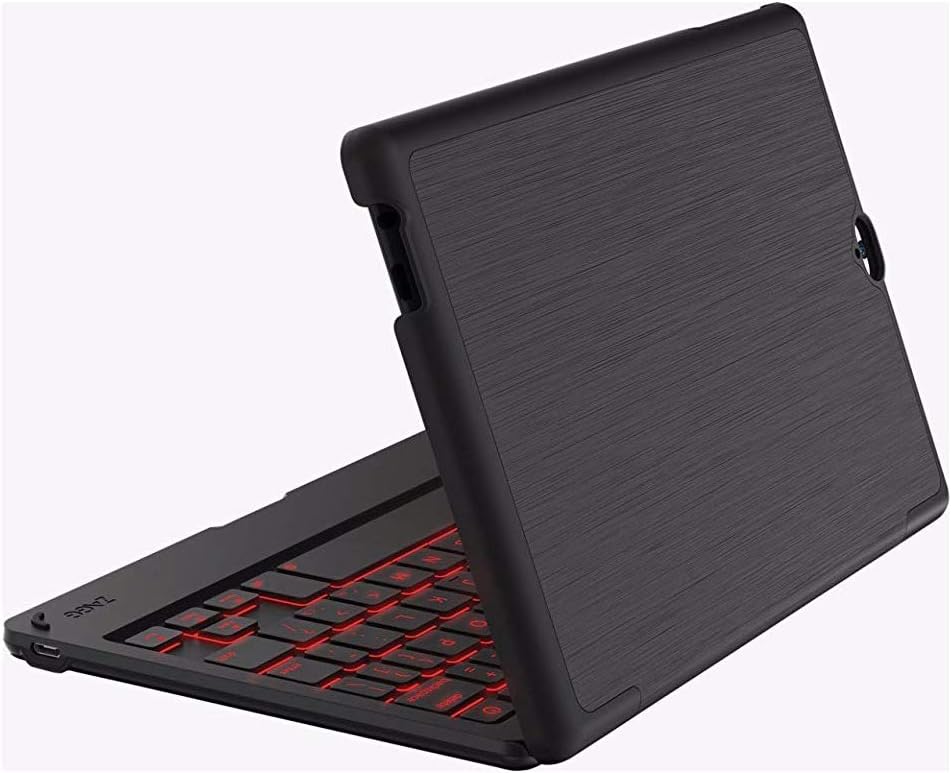
Image: The ZAGG Folio Case in a closed position, showcasing the textured exterior of the case.
3. Pè Bluetooth
- Ensure your tablet's Bluetooth is enabled.
- On the ZAGG Folio keyboard, locate and press the Bluetooth pairing button (refer to the keyboard layout for exact location, usually near the power button). The Bluetooth indicator light will begin to flash, indicating it is in pairing mode.
- On your tablet, go to Bluetooth settings and search for available devices.
- Select "ZAGG Folio" from the list of available devices.
- Swiv nenpòt enstriksyon ki parèt sou ekran an pou konplete pwosesis koneksyon an. Yon fwa koneksyon an fini, limyè endikatè Bluetooth ki sou klavye a ap sispann flache.
Enstriksyon Operasyon
Sèvi ak klavye a
The ZAGG Folio features a full-size, island-style keyboard designed for comfortable and efficient typing. Simply open the case and position your tablet to begin typing.
Kle retroeklere
The keyboard includes a backlight feature for typing in low-light conditions. To activate or adjust the backlight, locate the backlight key (often represented by a sun icon or similar) on the keyboard. Pressing this key repeatedly will cycle through brightness levels or turn the backlight off. This model supports single-color backlighting.
Reglabl Viewang yo
The unique hinge design allows you to position your tablet at various viewing angles, up to 135 degrees. Adjust the tablet to your preferred angle for typing, viewing, or interacting with the touchscreen.
Sleep/Wake Function
The ZAGG Folio utilizes magnets to automatically put your tablet to sleep when the case is closed and wake it up when opened. This feature helps conserve your tablet's battery life.
Antretyen
To ensure the longevity and performance of your ZAGG Folio Case:
- Netwayaj: Sèvi ak yon mou, damp cloth to wipe down the exterior of the case and the keyboard. Avoid harsh chemicals or abrasive cleaners.
- Depo: When not in use for extended periods, ensure the keyboard is turned off and stored in a cool, dry place.
- Swen batri: For optimal battery health, avoid completely draining the battery frequently. Charge the keyboard regularly, especially if it will be unused for several weeks.
Depanaj
If you encounter issues with your ZAGG Folio, try the following solutions:
- Klavye a pa reponn:
- Asire w ke klavye a limen.
- Tcheke nivo batri a epi chaje si sa nesesè.
- Verify that Bluetooth is enabled on your tablet and the keyboard is paired. If not, re-pair the devices.
- Eseye etenn epi limen klavye a ankò.
- Backlight pa travay:
- Press the backlight key multiple times to cycle through brightness settings.
- Asire w ke klavye a gen ase chaj batri.
- Tablet Not Sleeping/Waking:
- Ensure the tablet is correctly seated in the case.
- Check your tablet's settings to ensure the sleep/wake function is enabled (if applicable).
- Pwoblèm Koneksyon:
- Unpair the keyboard from your tablet and then re-pair it.
- Rekòmanse tou de tablèt ou ak klavye a.
Espesifikasyon
| Karakteristik | Detay |
|---|---|
| Nimewo Modèl | E86ZFK-BB0 |
| Aparèy konpatib | Verizon Ellipsis 8" HD Tablet |
| Koneksyon Teknoloji | Bluetooth |
| Deskripsyon klavye | Wireless, Island-style keys |
| Karakteristik espesyal | Backlit (Single Color) |
| Kalite batri | 1 Lityòm Polymère (enkli) |
| Lavi batri | Up to 3 months between charges (951 mAh) |
| Pwa atik | 13.1 ons (apeprè 371 gram) |
| Dimansyon pwodwi (LxWxH) | 8.35 x 0.71 x 5.39 pous |
| Koulè | Nwa |
| Materyèl | Plastic, possibly polyurethane or leather |
Garanti ak sipò
For warranty information or technical support, please visit the official ZAGG website or contact ZAGG customer service. Keep your proof of purchase for warranty claims.
ZAGG Official Websit: zagg.com