
Entwodiksyon
This manual provides instructions for the safe and effective operation of the Benetech GM8905 Digital Laser Tachometer. This device is designed for non-contact measurement of rotational speed (RPM) using a laser, offering precise readings for various industrial and mechanical applications.
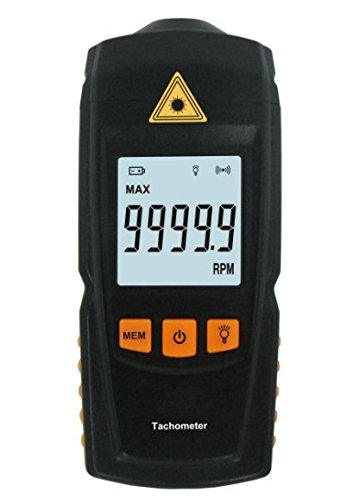
Deskripsyon imaj: Yon fasad view of the Benetech GM8905 Digital Laser Tachometer, showing its black casing, LCD display with "9999.9 RPM" shown, and orange control buttons for MEM, Power, and Light. A yellow laser warning symbol is visible at the top.
Enfòmasyon sou Sekirite
Please read all safety warnings and instructions carefully before using this product. Failure to follow these instructions may result in injury or damage to the device.
- Sekirite lazè: Do not look directly into the laser beam. Laser radiation can cause eye damage. Do not point the laser at people or animals.
- Itilizasyon apwopriye: Use the device only as described in this manual. Any unauthorized modifications or repairs will void the warranty and may pose safety risks.
- Kondisyon anviwònman: Keep the device away from water, high humidity, and extreme temperatures. Do not operate in explosive atmospheres.
- Manyen batri: Jete pil yo byen dapre règleman lokal yo. Pa melanje pil fin vye granmoun ak pil nèf oubyen diferan kalite pil.
Pwodwi souview
The Benetech GM8905 is a portable, non-contact digital tachometer designed for accurate RPM measurements. It features a large LCD display, memory function, and a precise laser pointer for easy targeting.

Image description: The Benetech GM8905 Tachometer laid out with its instruction manual, two AAA batteries, reflective tape, and product packaging.
Eleman
- Laser Emitter: Projects the laser beam onto the target surface.
- Photoelectric Receiver: Detects the reflected laser light to calculate RPM.
- Ekspozisyon LCD: Shows measurement readings, units, and status indicators.
- Bouton MEM: Cycles through Maximum, Minimum, Average, and Last measurement values.
- Bouton pouvwa: Limen oswa etenn aparèy la.
- Limyè bouton: Aktive oswa dezaktive ekleraj dèyè ekran an.
- Lòj batri: Located at the rear, holds two 1.5V AAA batteries.
Enstalasyon
1. Enstalasyon batri
- Jwenn kouvèti konpatiman batri a sou dèyè aparèy la.
- Glise kouvèti a louvri.
- Insert two 1.5V AAA batteries, ensuring correct polarity (+/-) as indicated inside the compartment.
- Fèmen kouvèti lòj batri a byen.

Image description: The Benetech GM8905 Tachometer inside its packaging, alongside its instruction manual and two AAA batteries, indicating the items included for setup.
2. Applying Reflective Tape
For accurate non-contact measurements, a piece of reflective tape must be applied to the rotating object.
- Cut a small piece of the provided reflective tape (approximately 10-30mm long).
- Attach it to the rotating shaft, disk, or wheel where you intend to measure RPM. Ensure the tape is flat, smooth, and securely adhered to prevent detachment during rotation.
- The reflective tape provides a distinct target for the laser beam, allowing the tachometer to count rotations.
Enstriksyon Operasyon
1. Powering On / Off
Peze a Pouvwa bouton () to turn the tachometer on. The LCD display will illuminate. To turn it off, press and hold the Pouvwa button for approximately 2 seconds. The device also features an automatic shutdown function, turning off after 60 seconds of inactivity to conserve battery life.
2. Pran yon mezi
- Ensure the reflective tape is properly applied to the rotating object.
- Hold the tachometer firmly and point the laser beam towards the reflective tape on the rotating object. The laser emitter is located at the top front of the device.
- Maintain a measuring distance between 50mm and 500mm (approximately 2 to 20 inches) for optimal accuracy.
- The current RPM reading will be displayed on the LCD screen. Ensure the laser spot consistently hits the reflective tape for stable readings.

Image description: A side view of the Benetech GM8905 Tachometer, highlighting the laser emitter at the front, which projects the beam for RPM measurement.
3. Using Memory Functions (MAX/MIN/AVG/LAST)
During or after a measurement session, press the MEM bouton () repeatedly to cycle through the stored measurement values:
- MAX: Displays the maximum RPM recorded during the current measurement session.
- MIN: Displays the minimum RPM recorded during the current measurement session.
- AVG: Displays the average RPM calculated from the measurements taken.
- DÈNYE: Displays the last measured RPM value before entering memory mode.
4. Ekleraj
Peze a Limyè bouton () to turn the LCD backlight on or off. This feature improves visibility of the display in low-light conditions.
Antretyen
Netwayaj
Wipe the device with a soft, dry cloth. Do not use abrasive cleaners, solvents, or corrosive chemicals, as these can damage the casing or display. Keep the laser emitter and photoelectric receiver lenses clean and free of dust or debris to ensure accurate readings.
Ranplasman batri
When the low battery indicator appears on the display, replace the batteries promptly to ensure continued accurate readings. Refer to the "Battery Installation" section for detailed instructions.
Depo
If the device will not be used for an extended period, remove the batteries to prevent leakage and potential damage. Store the tachometer in a cool, dry place, away from direct sunlight, extreme temperatures, and high humidity.
Depanaj
| Pwoblèm | Kòz posib | Solisyon |
|---|---|---|
| Pa gen ekran/Aparèy la pa vle limen | Batri ki mouri oswa mal enstale | Ranplase pil yo, asire w ke polarite a kòrèk. |
| Lekti ki pa egzak oswa ki pa estab |
|
|
| Mesaj "Err" sou ekran an | Measurement out of range or no signal detected | Ensure target RPM is within range (2.5-99999 RPM) and laser is properly aimed at the reflective tape. |
| Aparèy fèmen san atann | Automatic shutdown activated (60 seconds inactivity) or low battery | Turn device back on. Replace batteries if the low battery indicator is present. |
Espesifikasyon
The following table outlines the technical specifications of the Benetech GM8905 Digital Laser Tachometer.
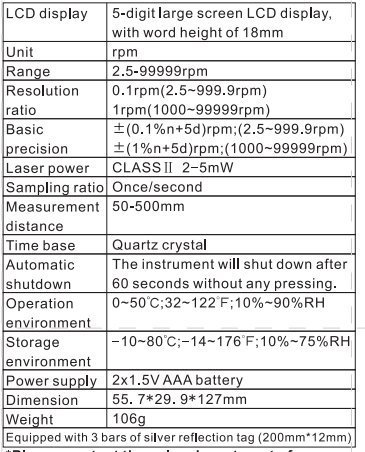
Image description: A detailed table listing the technical specifications of the Benetech GM8905 Tachometer, including LCD display type, unit, range, resolution, precision, laser power, sampling ratio, measurement distance, time base, automatic shutdown, operation environment, storage environment, power supply, dimension, and weight.
| Karakteristik | Spesifikasyon |
|---|---|
| Mezire Range | 2.5 ~ 99999RPM |
| Rezolisyon | 0.1 RPM (2.5 ~ 999.9 RPM), 1 RPM (1000 ~ 99999 RPM) |
| Basic Precision | ±(0.1%n + 5d) RPM (2.5 ~ 999.9 RPM) ±(1%n + 5d) RPM (1000 ~ 99999 RPM) |
| Lazè pouvwa | Class II, 2 ~ 5 mW |
| Sampling Rapò | Once/second |
| Distans Mezi | 50 ~ 500 mm (2 ~ 20 pous) |
| Tan baz | Quartz Crystal |
| Otomatik fèmen | Aprè 60 segonn inaktivite |
| Anviwònman operasyon | 0 ~ 50°C (32 ~ 122°F), 10% ~ 90% RH |
| Anviwònman Depo | -10 ~ 80°C (14 ~ 176°F), 10% ~ 75% RH |
| Pwovizyon pou pouvwa | 2 x 1.5V AAA batri |
| Dimansyon | 55.7 x 29.9 x 127 mm |
| Pwa | 106 gram (3.74 ons) |
| UPC | 732140088524 |
Garanti ak sipò
For warranty information or technical support regarding your Benetech GM8905 Digital Laser Tachometer, please refer to the documentation provided with your purchase or contact the retailer directly. Keep your purchase receipt as proof of purchase for any warranty claims.