
1. Pwodwi souview
The PetSafe Smart Feed Automatic Feeder is designed to provide scheduled meals for your dog or cat, offering convenience and peace of mind. This feeder connects to your home Wi-Fi network, allowing you to manage feeding schedules and dispense meals remotely using a compatible smartphone application.
Karakteristik kle yo enkli:
- Kontwòl Smartphone: Feed your pet anytime, anywhere using the Smart Feed app on your iPhone (iOS 9.0 or later) or Android (6.0 or later) device.
- Customizable Meal Schedules: Schedule up to 12 meals per day with flexible portion sizes from 1/8 cup to 4 cups.
- "Feed Now" Option: Dispense an immediate meal outside of the scheduled times.
- Slow Feed Option: Dispenses food slowly over 15 minutes to help prevent digestive upset in fast eaters.
- Batri Backup: Ensures your pet receives scheduled feedings even during power outages or Wi-Fi interruptions (requires 4 D-cell alkaline batteries, not included).
- Fasil pou netwaye: The lid, hopper, stainless steel bowl, and bowl holder are top-shelf dishwasher safe.
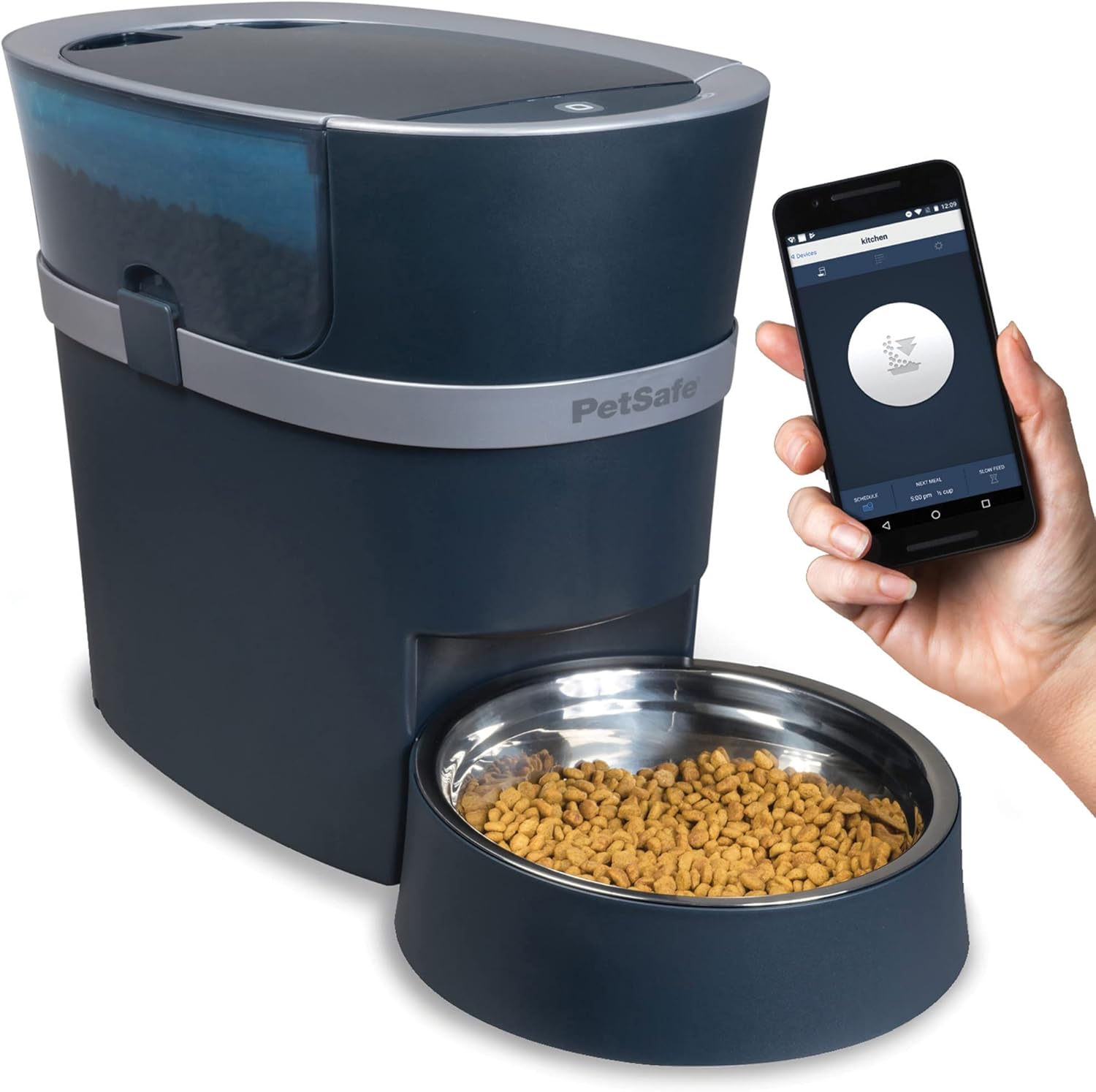
Figure 1: PetSafe Smart Feed Automatic Feeder with a smartphone showing the control app. The feeder is dark grey with a clear food hopper and a stainless steel bowl filled with kibble.
2. Gid Enstalasyon
2.1 Debalaj ak Asanble
- Carefully remove all components from the packaging: the feeder unit, food hopper, lid, stainless steel bowl, and bowl holder.
- Place the bowl holder on a flat, stable surface. Insert the stainless steel bowl into the bowl holder.
- Attach the food hopper to the top of the feeder unit, ensuring it clicks securely into place.
- Place the lid on top of the food hopper.
2.2 Koneksyon pouvwa
Connect the power adapter to the feeder's power port and plug it into a standard wall outlet. The feeder will power on.
2.3 Optional Battery Backup Installation
Pou manje san entèripsyon pandan kouran an koupetages, install 4 D-cell alkaline batteries (not included) into the battery compartment located on the bottom of the feeder. Ensure correct polarity.
2.4 Filling the Feeder
Open the lid and pour dry pet food into the hopper. The feeder has a capacity of up to 24 cups of dry food. Ensure the food is dry kibble only.
2.5 Telechaje aplikasyon an ak konfigirasyon Wi-Fi a
- Download the PetSafe Smart Feed app from the Apple App Store (for iOS devices) or Google Play Store (for Android devices).
- Follow the in-app instructions to create an account and connect your feeder to your home Wi-Fi network. Ensure your Wi-Fi network is 2.4 GHz compatible.

Figure 2: Diagram illustrating the dimensions of the PetSafe Smart Feed Automatic Feeder. The feeder is approximately 12.6 inches tall, 20.3 inches deep, and 9.4 inches wide at the base.
3. Operating the Feeder
3.1 Scheduling Meals
Use the PetSafe Smart Feed app to set up your pet's feeding schedule. You can schedule up to 12 meals per day, specifying the time and portion size for each meal. Portion sizes can be set from 1/8 cup to 4 cups.

Figure 3: A woman on a staircase using her smartphone, demonstrating the ability to control the Smart Feed feeder from anywhere.
3.2 "Feed Now" Function
To dispense an immediate meal outside of the scheduled times, use the "Feed Now" option within the app. This is useful for extra snacks or if your pet needs an unscheduled meal.
3.3 Slow Feed Option
If your pet tends to eat too quickly, activate the Slow Feed option in the app. This feature dispenses the meal slowly over a 15-minute period, promoting healthier eating habits and preventing digestive upset.
3.4 Multiple Feed Options Summary
| Opsyon | Deskripsyon |
|---|---|
| Manje | Schedule meals from 1/8 cup up to 4 cups. |
| Feed Now | Dispense next meal instantly. |
| Ti goute | Give a small snack during the day. |
| Slow Feed | Prevents over eating by dispensing food slowly. |

Figure 4: A cat eating from the PetSafe Smart Feed Feeder, accompanied by a table summarizing the various feeding options available through the app.
3.5 Voice Control (Alexa Integration)
The PetSafe Smart Feed Feeder can be integrated with Amazon Alexa for voice-activated feeding commands. Refer to the app's settings for instructions on enabling Alexa integration.

Figure 5: A dog eating from the PetSafe Smart Feed Feeder, with an overlay indicating compatibility with Amazon Alexa for hands-free convenience.
4. Antretyen
4.1 Enstriksyon netwayaj
Regular cleaning of your feeder is essential for hygiene and proper operation. The following parts are top-shelf dishwasher safe:
- Kouvèti
- Hopper Manje
- Nerjaveèi asye bòl
- Detantè bòl
To clean, disassemble these parts and place them on the top rack of your dishwasher. Wipe down the main feeder unit with a damp cloth; do not submerge the main unit in water.
4.2 Refilling Food
Monitor the food level in the hopper regularly. When the food level is low, simply remove the lid and pour in more dry kibble. Ensure the lid is securely replaced after refilling.
NAN. Depanaj
If you encounter issues with your PetSafe Smart Feed Automatic Feeder, please refer to the following common troubleshooting tips:
- Manje a pa ap distribye manje:
- Tcheke si Hopper a vid.
- Ensure the feeder is plugged in and powered on.
- Verify that there are no food blockages in the dispenser chute.
- Confirm that the scheduled meal time has passed or that the "Feed Now" command was successfully sent via the app.
- Pwoblèm koneksyon aplikasyon an:
- Ensure your feeder is within range of your Wi-Fi router.
- Tcheke koneksyon rezo Wi-Fi ou a.
- Rekòmanse routeur Wi-Fi ou a ak alimentatè a.
- Confirm your smartphone's operating system is compatible (iOS 9.0+ or Android 6.0+).
- If issues persist, try re-pairing the feeder with the app.
- Incorrect Portion Sizes:
- Double-check the portion settings in the Smart Feed app for each scheduled meal.
- Ensure you are using dry kibble. Irregularly shaped or moist food may affect dispensing accuracy.
For further assistance, please contact PetSafe Customer Care.
6. Espesifikasyon
| Karakteristik | Detay |
|---|---|
| Mak | PetSafe |
| Modèl | Smart Feed Automatic Feeder (B073WYP317) |
| Materyèl | Plastik, Nerjaveèi |
| Espès sib | Dog, Cat |
| Itilizasyon Rekòmande | Andedan kay la |
| Karakteristik espesyal | Smart App Control (Wi-Fi Enabled) |
| Kapasite Manje | Up to 24 cups (dry food only) |
| Gwosè pòsyon yo | 1/8 cup to 4 cups |
| Pouvwa | AC Adapter (included), 4 D-cell alkaline batteries (not included, for backup) |
| Dimansyon (Apeprè) | 12.6" H x 20.3" D x 9.4" W |
7. Garanti ak Sipò Kliyan
PetSafe brand is committed to quality and customer satisfaction. This product comes with a quality promise from PetSafe, a trusted global leader in pet behavior, containment, and lifestyle innovations since 1998.
For any questions, assistance, or troubleshooting not covered in this manual, our U.S.-based customer care experts are available to help. You can reach them by phone, email, or chat.
Please visit the official PetSafe website for the most current contact information and warranty details. Keep your purchase receipt for warranty claims.