
Entwodiksyon
This manual provides essential instructions for the safe and efficient operation, maintenance, and care of your Weston Pro Series Digital Dehydrator, Model 28-0301-W. Please read all instructions thoroughly before using the appliance to ensure proper function and to prevent injury or damage.
Enstriksyon Sekirite Enpòtan
Lè w ap itilize aparèy elektrik, yo ta dwe toujou swiv prekosyon sekirite debaz yo pou diminye risk pou dife, chòk elektrik ak blesi moun, tankou sa ki annapre yo:
- Li tout enstriksyon yo.
- Pa manyen sifas cho. Sèvi ak manch oswa bouton.
- Pou pwoteje tèt ou kont chòk elektrik, pa plonje kòd, ploge, oswa aparèy nan dlo oswa nan lòt likid.
- Sipèvizyon sere se nesesè lè nenpòt aparèy itilize pa oswa toupre timoun yo.
- Debranche soti nan priz lè yo pa itilize ak anvan netwaye. Kite refwadi anvan ou mete oswa retire pati yo.
- Pa opere nenpòt aparèy ki gen yon kòd oswa ploge ki domaje oswa apre aparèy la fonksyone mal oswa li te domaje nan nenpòt fason. Retounen aparèy la nan sant sèvis otorize ki pi pre a pou l egzamine, reparasyon oswa ajisteman.
- Sèvi ak atachman akseswar ki pa rekòmande pa manifakti aparèy la ka lakòz blesi.
- Pa sèvi ak deyò.
- Pa kite kòd pandye sou kwen tab oswa kontwa, oswa manyen sifas cho.
- Pa mete sou oswa toupre yon gaz cho oswa recho elektrik, oswa nan yon fou chofe.
- Ou dwe pran anpil prekosyon lè w ap deplase yon aparèy ki gen lwil cho oswa lòt likid cho.
- Toujou branche ploge a nan aparèy la an premye, answit branche kòd la nan priz miray la. Pou dekonekte li, vire nenpòt kontwòl sou "off", epi retire ploge a nan priz miray la.
- Pa sèvi ak aparèy pou lòt itilizasyon ki gen entansyon an.
Pwodwi souview
The Weston Pro Series Digital Dehydrator is designed for efficient food preservation, featuring a commercial-style steel alloy cabinet and a large drying capacity.

Imaj: Devan view of the Weston Pro Series Digital Dehydrator, showcasing fini asye pur li yo ak panèl kontwòl la.
Karakteristik kle:
- Commercial Style Cabinet: Constructed from durable steel alloy.
- Gwo kapasite: Up to 28 square feet of drying space with 12 trays.
- Pwisan chofaj: 1600 watt heating element (110 volt, 60 Hz).
- Revèy dijital: 12-hour digital timer with automatic shut-off.
- Termostat reglabl: Temperature control up to 160°F.
- Limyè enteryè: For monitoring drying progress without opening the door.
- Drip Reservoir: Collects moisture and drips for easier cleaning.

Image: The dehydrator with its door open, revealing the 12 removable drying trays and the interior heating element.
Enstalasyon
- Debake: Carefully remove the dehydrator and all its components from the packaging. Retain packaging for future storage or shipping.
- Netwayaj inisyal: Before first use, wash all removable parts (trays, drip tray) in warm, soapy water. Wipe the interior and exterior of the dehydrator with a damp twal. Asire w tout pyès yo byen sèk anvan ou monte yo.
- Plasman: Place the dehydrator on a stable, level, heat-resistant surface. Ensure there is adequate air circulation around the unit, at least 6 inches (15 cm) from walls or other appliances. Do not place near heat sources or in direct sunlight.
- Enstalasyon plato: Insert the 12 drying trays into the designated slots inside the dehydrator. Ensure they are seated correctly.
- Koneksyon pouvwa: Plug the power cord into a grounded 110-volt, 60 Hz electrical outlet.
Enstriksyon Operasyon
Preparing Food for Dehydration:
- Wash and prepare food items as desired (e.g., slice fruits and vegetables evenly, marinate jerky).
- Arrange food in a single layer on the drying trays, ensuring there is space between pieces for air circulation. Do not overlap food.

Image: The dehydrator loaded with various sliced fruits and vegetables on its trays, ready for the dehydration process.
Sèvi ak panèl kontwòl la:
The control panel is located at the top of the unit and features digital controls for time, temperature, power, and interior lights.
- Limen/Etenyen: Peze a POUVWA bouton pou limen oswa etenn inite a.
- Mete Tanperati: Peze a TEMP bouton, Lè sa a, sèvi ak la UP epi DESANN buttons to adjust the desired drying temperature (up to 160°F).
- Mete revèy: Peze a TAN bouton, Lè sa a, sèvi ak la UP epi DESANN buttons to set the drying duration (up to 12 hours). The unit will automatically shut off when the timer expires.
- Limyè enteryè: Peze a LIMÈ button to turn the interior illumination on or off, allowing you to monitor progress without opening the door.
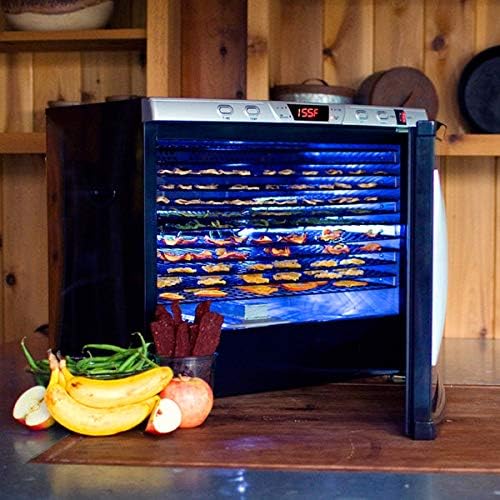
Image: The dehydrator with its interior lights activated, providing visibility of the food drying on the trays.
Pwosesis siye:
Once temperature and time are set, the dehydrator will begin operation. Periodically check the food for desired dryness. Drying times vary based on food type, thickness, and moisture content.
Antretyen ak netwayaj
Netwayaj regilye asire pèfòmans optimal epi pwolonje lavi dezidratatè ou a.
- Toujou debranche inite a nan priz kouran an epi kite l refwadi nèt anvan ou netwaye li.
- Trays and Drip Tray: Remove the drying trays and drip tray. Wash them in warm, soapy water. Rinse thoroughly and dry completely. Nòt: Pati sa yo pa an sekirite pou lave-vaisselle.
- Enteryè: Siye sifas enteryè yo ak yon damp cloth. For stubborn residue, use a mild detergent solution, then wipe with a clean, damp cloth. Ensure the interior is completely dry before next use.
- Eksteryè: Wipe the exterior cabinet with a soft, damp Pa sèvi ak pwodui netwayaj abrazif oswa eponj abrazif, paske yo ka domaje fini an.
- Depo: Sere dezidratasyon an nan yon kote ki pwòp epi sèk lè li pa itilize.
Depanaj
Si ou rankontre pwoblèm ak dezidratatè ou a, gade pwoblèm ak solisyon komen sa yo:
| Pwoblèm | Kòz posib | Solisyon |
|---|---|---|
| Dezidratatè a pa limen. |
|
|
| Unit not heating or not holding set temperature. |
|
|
| Manje a pa seche byen. |
|
|
Si pwoblèm nan pèsiste apre ou fin eseye solisyon sa yo, kontakte sèvis kliyan.
Espesifikasyon
| Mak | Weston |
| Nimewo Modèl | 28-0301-W |
| Materyèl | Alloy Steel (cabinet), Food Safe (trays) |
| Koulè | Ajan |
| Wattage | 1600 Watts (110 Volt, 60 Hz) |
| Pwa atik | 71.4 liv |
| Dimansyon pwodwi | 23.75 x 28 x 26 pous |
| Kantite plato | 12 |
| Ranje Tanperati | Jiska 160 ° F |
| UPC | 812830022882 |
Enfòmasyon sou Garanti
The Weston Pro Series Digital Dehydrator Model 28-0301-W comes with a Garanti manifakti 5 zanGaranti sa a kouvri domaj nan materyèl ak nan fabrikasyon anba itilizasyon nòmal nan kay la. Tanpri konsève prèv acha ou pou reklamasyon garanti.
For detailed warranty terms and conditions, please refer to the documentation included with your product or contact Weston customer support.
Sipò pou Kliyan
For technical assistance, parts, or warranty inquiries, please contact Weston customer support.
- Websit: Visit the official Weston websit pou resous sipò ak enfòmasyon pou kontakte yo.
- Magazen sou entènèt: Ou kapab jwenn plis enfòmasyon ak pwodwi tou nan Weston Store on Amazon.