
1. Entwodiksyon
This manual provides comprehensive instructions for the installation, operation, and maintenance of the Bemko TS-GM1 24-Hour Mechanical Timer Switch. Please read this manual thoroughly before installation and use to ensure safe and efficient operation. This device is designed to control electrical circuits based on a programmed 24-hour schedule, suitable for applications such as automatic lighting, control circuits, and other timed operations.
2. Enstriksyon Sekirite
- Always disconnect power to the circuit before attempting any installation, wiring, or maintenance.
- Enstalasyon an dwe fèt pa yon elektrisyen kalifye, dapre tout kòd elektrik lokal ak nasyonal yo.
- Do not exceed the specified maximum load capacity of 16A or 3500W. Overloading can cause damage to the device and create a fire hazard.
- This device is designed for indoor use only within the specified operating temperature range (-10 °C to +50 °C).
- Ensure proper grounding where applicable and secure all wire connections firmly to prevent loose contacts.
- Pa ouvri oswa eseye repare aparèy la. Konfye sèvis la bay pèsonèl kalifye.
3. Pake kontni
- 1x Bemko TS-GM1 24-Hour Mechanical Timer Switch
4. Pwodwi souview
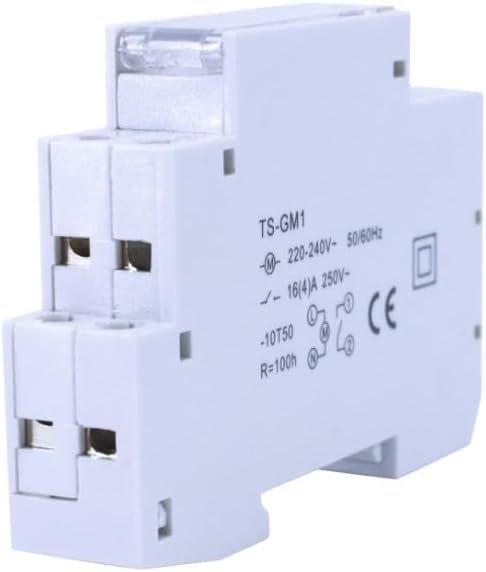
The Bemko TS-GM1 is a compact 24-hour mechanical timer switch designed for DIN rail mounting. It features a rotating dial for time setting and programming segments for scheduling ON/OFF cycles.


5. Enstalasyon
5.1 Montaj
The Bemko TS-GM1 timer is designed for DIN rail mounting (DIN/TH/TS 35 mm standard) inside an electrical enclosure. Snap the timer onto the DIN rail until it clicks securely into place.
5.2 fil elektrik
WARNING: Ensure power is disconnected before wiring.
- Identify the input terminals (L for Live, N for Neutral) and output terminals (typically marked 1 and 2 for the switching contact). Refer to the wiring diagram printed on the device.
- Connect the incoming power supply (220-240V AC, 50/60Hz) to the input terminals.
- Connect the load (e.g., light fixture, appliance) to the output terminals. The timer features a 1 NO (Normally Open) switching contact.
- Use wires with a cross-section of 2.5 mm² for all connections. Ensure all screw terminals are tightened securely to prevent loose connections and overheating.
5.3 Premye Anrejistreman Tan
After wiring, restore power. Rotate the central dial clockwise until the current time aligns with the arrow indicator on the timer's face. The dial is marked for 24 hours (e.g., 18 for 6 PM).
6. Operasyon Enstriksyon
6.1 Pwogramasyon Sik ON/OFF
The timer allows for up to 96 ON/OFF switching cycles within a 24-hour period. Each segment on the dial represents 15 minutes.
- To program an ON period, push the corresponding segments outwards.
- To program an OFF period, leave the segments pushed inwards.
Pou egzanpample, to turn a device ON from 7:00 AM to 8:00 AM, push out the four segments corresponding to 7:00, 7:15, 7:30, and 7:45.
6.2 Operating Modes (Manual Override)
The timer typically includes a manual override switch, often a small lever or slider, on its front face. This switch allows you to temporarily bypass the programmed schedule:
- Mòd otomatik: Position the switch to the clock symbol or 'AUTO' setting. The timer will operate according to the programmed segments.
- Kontinyèl ON: Position the switch to 'I' or 'ON'. The connected device will remain ON, regardless of the programmed schedule.
- Continuous OFF: Position the switch to 'O' or 'OFF'. The connected device will remain OFF, regardless of the programmed schedule.
Remember to return the switch to the automatic position for programmed operation to resume.
7. Antretyen
The Bemko TS-GM1 timer requires minimal maintenance. Periodically inspect the wiring connections for tightness and ensure the device is free from dust and debris. Clean the exterior with a dry, soft cloth. Do not use abrasive cleaners, solvents, or liquids directly on the device.
NAN. Depanaj
- Timer not switching:
- Check power supply connections to ensure they are secure and live.
- Ensure the manual override switch is in the automatic (clock symbol) position.
- Verify that the programming segments are correctly pushed out for the desired ON periods.
- Moman ki pa kòrèk:
- Ensure the current time is correctly set on the dial.
- Check for power interruptions. The timer has a power reserve of up to 100 hours, but prolonged outages may require resetting the current time.
- Aparèy pa soumen:
- Verifye opinyon voltage (220-240V) and frequency (50/60Hz) are correct.
- Tcheke disjonktè a oswa fizib la pou sikwi a.
- Ensure the load is properly connected and functional.
9. Espesifikasyon
| Nimewo Modèl | A26-TSGM1 |
| Mak | Bemko |
| Pwovizyon pou pouvwa | ~ 220-240 V AC |
| Frekans | 50/60 Hz (± 10%) |
| Max. Chanje pouvwa | 3500 W |
| Max. Chaj kouran | 16 A |
| Konsomasyon pouvwa | 10 A/250 V ~ (internal) |
| Chanje Kapasite | 0.5 |
| Presizyon | ± 3 seconds / 1 day |
| Pouvwa Rezèv | Max 100 hours (after power cut) |
| Entèval Pwogramasyon | 96 times / 24 hours; 15-minute segments |
| Connection Wire Size | 2.5 mm² |
| Tanperati Fonksyònman | -10 °C a +50 °C |
| Klas pwoteksyon | IP20 |
| Klas izolasyon | II |
| Kalite aliye | DIN rail (DIN/TH/TS 35 mm) |
| Kontak chanjman | 1 NO (Normally Open) |
| Materyèl | Plastik |
| Sètifika | CE, RoHS, EAC |
| Dimansyon (L x W x H) | 6.3 x 1.8 x 9.2 cm |
| Pwa | 82 g |
10. Garanti ak sipò
For warranty information or technical support regarding your Bemko TS-GM1 24-Hour Mechanical Timer Switch, please contact your retailer or the manufacturer, Bemko. Keep your purchase receipt as proof of purchase for any warranty claims.