
Uncaged Ergonomics RUwbk
Uncaged Ergonomics Rise Up Electric Standing Desk Instruction Manual
Model: RUwbk
Pwodwi souview
The Uncaged Ergonomics Rise Up Electric Standing Desk is designed to provide a seamless transition between sitting and standing positions, promoting a healthier and more dynamic work environment. This desk features a robust dual-motor system, anti-collision technology, and programmable memory settings for personalized height adjustments. It is built with a durable, one-piece bamboo desktop and a sturdy alloy steel frame, engineered for long-lasting performance.

Image: The Rise Up Electric Standing Desk, showcasing its spacious black bamboo desktop and white frame, equipped with dual monitors for a complete workstation setup.
- Sistèm motè doub: Ensures smooth, quiet, and efficient height adjustments.
- Ranje wotè reglabl: From 23.6 inches to 49.2 inches, accommodating various user heights and preferences.
- Teknoloji Anti-Kolizyon: Automatically stops and reverses if an obstruction is detected during movement, enhancing safety.
- Anviwònman memwa: Four programmable height presets for quick and convenient adjustments.
- Konstriksyon dirab: Features a solid 60x30 inch bamboo desktop and a robust alloy steel frame, supporting up to 250 lbs.
Enstalasyon ak Asanble
Your Uncaged Ergonomics Rise Up Electric Standing Desk requires assembly. All necessary tools are included in the package to facilitate a straightforward setup process. Please follow the detailed instructions provided in the separate assembly guide for step-by-step installation.
Konpozan kle asanblaj yo:
- Electric Standing Desk Frame (Alloy Steel)
- 60x30 inch Bamboo Desktop
- Control Panel/Keypad
- Adaptè pouvwa ak Câbles
- Materyèl ak Zouti Asanblaj
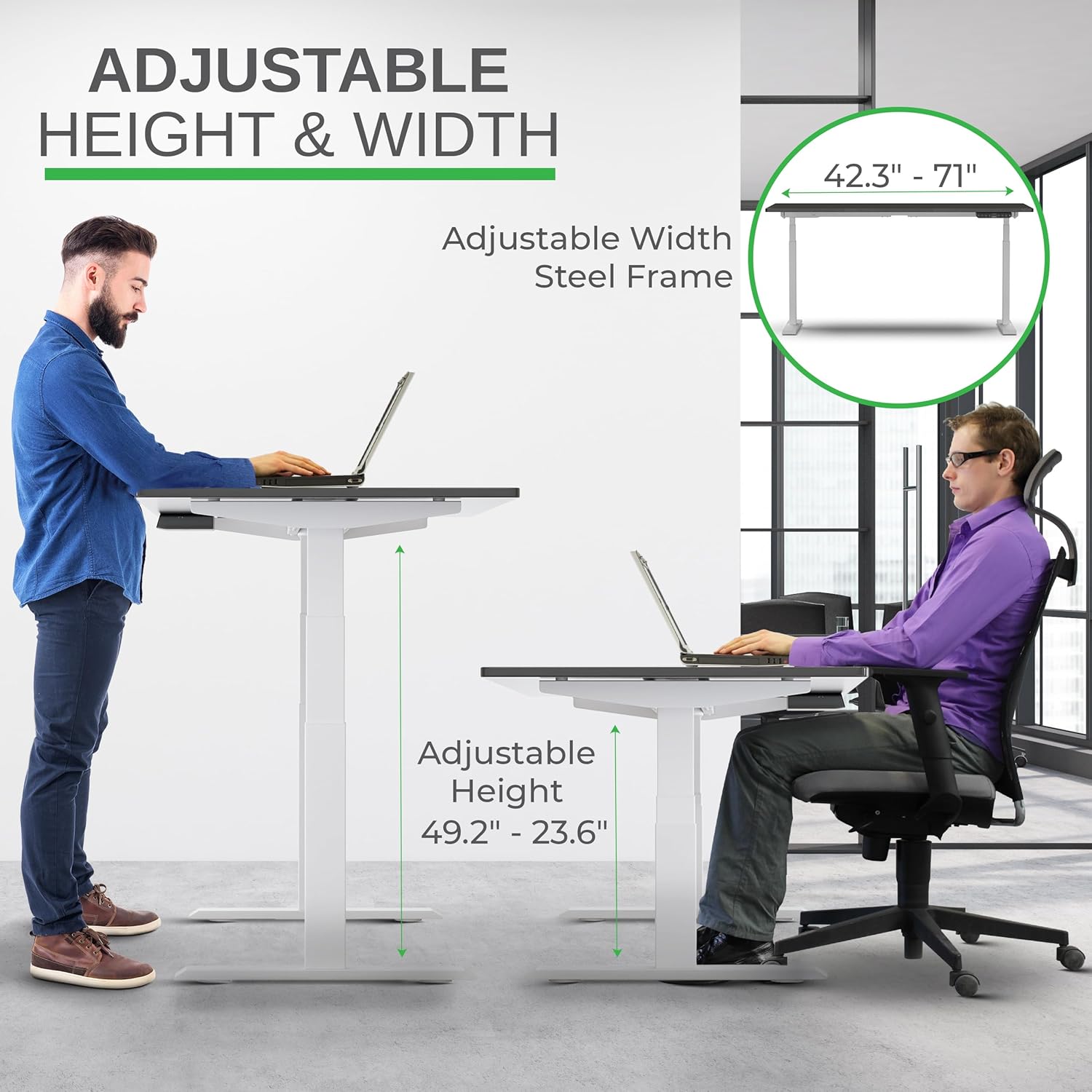
Image: A visual representation of the desk's adjustable height and width capabilities, highlighting the steel frame's adaptability.
Ensure all components are present and undamaged before beginning assembly. It is recommended to assemble the desk on a soft, clean surface to prevent scratches to the desktop or frame.
Enstriksyon Operasyon
The Rise Up Electric Standing Desk features an intuitive control panel for easy height adjustments and memory programming.
Fonksyon panèl kontwòl:

Image: A detailed diagram of the desk's multifunctional keypad, illustrating the setting button, memory presets (1-4), digital display, and auto up/down controls.
- Up/Down Buttons (^ / _): Press and hold to manually adjust the desk height. Release to stop at the desired height.
- Prereglaj Memwa (1, 2, 3, 4):
- Ajiste biwo a nan wotè ou vle a avèk bouton Monte/Desann yo.
- Peze bouton "M" la. Ekran an ap montre "S-".
- Within 3 seconds, press the desired number button (1, 2, 3, or 4) to save the current height. The display will show "S-1", "S-2", etc., indicating successful storage.
- To recall a saved height, simply press the corresponding number button. The desk will automatically move to the programmed position.
- Sistèm Anti-Kolizyon: The desk is equipped with an anti-collision feature. If the desk encounters an obstacle while moving up or down, it will automatically stop and reverse slightly to prevent damage.

Image: Demonstrating the seamless transition from sitting to standing, highlighting the desk's ability to adjust to various ergonomic needs.
Antretyen
Proper maintenance will ensure the longevity and optimal performance of your Uncaged Ergonomics Rise Up Electric Standing Desk.
- Netwayaj:
- For the bamboo desktop, wipe with a soft, damp twal. Evite pwodui netwayaj abrazif oswa pwodui chimik ki ka domaje fini an.
- For the steel frame, use a mild cleaner and a soft cloth. Ensure no liquids enter the motor or control components.
- Jesyon kab: Regularly check and organize cables to prevent tangling or damage, which could interfere with desk movement.
- Kapasite pwa: Do not exceed the maximum weight capacity of 250 lbs. Overloading can strain the motors and affect performance.
- Enspeksyon regilye: Tcheke tout vis ak koneksyon yo regilyèman pou asire yo byen sere. Sere boulon yo si sa nesesè.

Imaj: Yon gwo plan view of the desk's durable bamboo desktop and integrated control panel, highlighting its scratch-resistant and smooth finish with anti-collision design.
Depanaj
If you encounter any issues with your Rise Up Electric Standing Desk, please refer to the following common solutions. For more complex problems, contact customer support.
| Pwoblèm | Kòz posib | Solisyon |
|---|---|---|
| Biwo a pa deplase. | Power cable disconnected; Overload; Control panel error. | Check power connections. Reduce weight on desk. Unplug and replug power after 10 seconds. |
| Desk stops unexpectedly. | Anti-collision activated; Overload. | Check for obstructions. Reduce weight. Reset by moving desk slightly in opposite direction. |
| Uneven movement. | Unbalanced load; Loose connections. | Distribute weight evenly. Check and tighten all assembly screws. |
Nòt enpòtan: The anti-collision system is a safety feature. If the desk repeatedly stops, ensure there are no obstacles in its path and that the weight on the desk does not exceed 250 lbs.
Espesifikasyon pwodwi
| Karakteristik | Detay |
|---|---|
| Mak | Ergonomi Uncaged |
| Nimewo Modèl | RUwbk |
| Dimansyon pwodwi (D x W x H) | 30"D x 60"W x 49.2"H |
| Materyèl Desktop | Solid Bamboo (Black Bamboo finish) |
| Materyèl de baz | Alloy Steel (White finish) |
| Wotè Minimòm | 23.6 pous |
| Wotè maksimòm | 49.2 pous |
| Mekanis leve | Electric Dual Motor |
| Kapasite maksimòm pwa | 250 liv |
| Karakteristik espesyal | Adjustable, Electric, Ergonomic, Anti-Collision, Memory Presets |
| Asanble obligatwa | Wi (Tout zouti enkli) |
| Pwa atik | 110 liv |
Enfòmasyon sou Garanti
The Uncaged Ergonomics Rise Up Electric Standing Desk comes with a 5-ane garanti limite. This warranty covers defects in materials and workmanship under normal use and service. For specific terms and conditions, please refer to the warranty documentation included with your product or contact customer support.
This product has been field-tested since 2010, reflecting our commitment to durability and quality.
Sipò pou Kliyan
Uncaged Ergonomics is dedicated to providing outstanding customer support. If you have any questions regarding assembly, operation, maintenance, or warranty claims, please do not hesitate to contact us.
Pou asistans, tanpri vizite Uncaged Ergonomics Store on Amazon oubyen gade enfòmasyon kontak ki nan anbalaj pwodwi w la.
Our team is committed to treating every customer like family and ensuring your satisfaction with our products.
Ask a question about this manual
Ask about setup, troubleshooting, compatibility, parts, safety, or missing instructions. Manuals+ will review the question and use this page’s manual context to help answer it.