
Entwodiksyon
The Riwbox WT-7S Kids Bluetooth Headphones are designed to provide an engaging audio experience for children, featuring LED lights that synchronize with music. These headphones offer both wireless Bluetooth 5.3 connectivity and a wired mode for continuous use. They are foldable for portability and include a built-in microphone for communication.
Karakteristik kle
- Limyè ki ap dirije dinamik: LED lights on both sides of the headphones flash with the music's frequency, adding a fun visual element.
- Teknoloji Bluetooth 5.3: Ensures stable and efficient wireless connection with powerful 40mm speakers for natural sound and strong bass.
- ON/OFF LED Light Function: Users can turn off the LED blinking effect in Bluetooth mode to conserve battery life.
- Dual Mode (Wired/Wireless): Seamlessly switch between Bluetooth wireless mode and wired mode using the included Riwbox D1 audio cable when the battery is low.
- Kontwòl entegre: Convenient controls on the headphone allow for easy navigation of songs and volume adjustment.
- Konsepsyon pliable: The headphones can be folded for compact storage and portability, making them ideal for travel.
- Mikwofòn entegre: Enables hands-free calls and voice chat.
Ki sa ki nan bwat la
- Riwbox WT-7S Kids Bluetooth Headphones (Blue)
- Riwbox D1 Audio Cable (3.5mm Jack)
- USB Chaje Kab
Gid Enstalasyon
1. Chaje kas ekoutè yo
Before first use, fully charge your Riwbox WT-7S headphones. Connect the provided USB charging cable to the USB charge port on the headphones and the other end to a compatible USB power source (e.g., computer USB port, wall adapter). The LED indicator will show charging status and turn off when fully charged. Charging time is approximately 3 hours.

Image: Diagram showing the location of the USB charge port and LED indicator on the Riwbox WT-7S headphones.
2. Pè Bluetooth
- Asire w ke kas ekoutè yo etenn.
- Peze epi kenbe bouton pouvwa a jiskaske endikatè LED la flache ble ak wouj altènativman, sa ki endike mòd koneksyon.
- Sou aparèy ou an (telefòn entelijan, tablèt, òdinatè), aktive Bluetooth epi chèche aparèy ki disponib yo.
- Select "WT-7S" from the list of found devices.
- Yon fwa konekte, endikatè LED la ap vin ble fiks oswa ap flache dousman.

Image: Riwbox WT-7S headphones connected wirelessly to a smartphone, illustrating the Bluetooth connection and power display.
The headphones support Bluetooth 5.3 and have a range of up to 10 meters.
3. Koneksyon filaire (AUX Mode)
To use the headphones in wired mode, connect the Riwbox D1 audio cable (3.5mm jack) to the AUX port on the headphones and the other end to your audio device's 3.5mm audio output. This mode allows you to continue listening even when the headphone battery is depleted.

Image: Riwbox WT-7S headphones connected via a 3.5mm audio cable, demonstrating wired compatibility with devices like computers, iPads, smartphones, and MP3/MP4 players.
Enstriksyon Operasyon
Kontwòl souview
Image: Detailed diagram of the Riwbox WT-7S headphone controls, including ON/OFF switch, microphone, LED indicator, USB charge port, and 3.5mm audio AUX port.
| Bouton/Kontwòl | Function (Bluetooth Mode) |
|---|---|
| ON/OFF switch | Powers the headphones on or off. |
| Bouton jwe/poz | Short press to play or pause music. Press to answer/hang up calls. |
| Volim monte (+) | Kout peze pou ogmante volim. |
| Volim Dawonn (-) | Kout peze pou diminye volim. |
| Next bouton chante | Long press to skip to the next song. |
| Previous Song bouton | Peze lontan pou ale nan chante anvan an. |
| Dirije limyè kontwòl | Long press to open/close the LED light effect. |
| Mikwofòn | For hands-free calls and voice input. |
The LED lights on the earcups will flash according to the music's rhythm, enhancing the listening experience. You can turn off the LED lights to save battery life, extending playtime up to 39.99 hours.

Imaj: Devan view of the Riwbox WT-7S Kids Bluetooth Headphones in blue, showcasing the illuminated LED lights on the earcup.
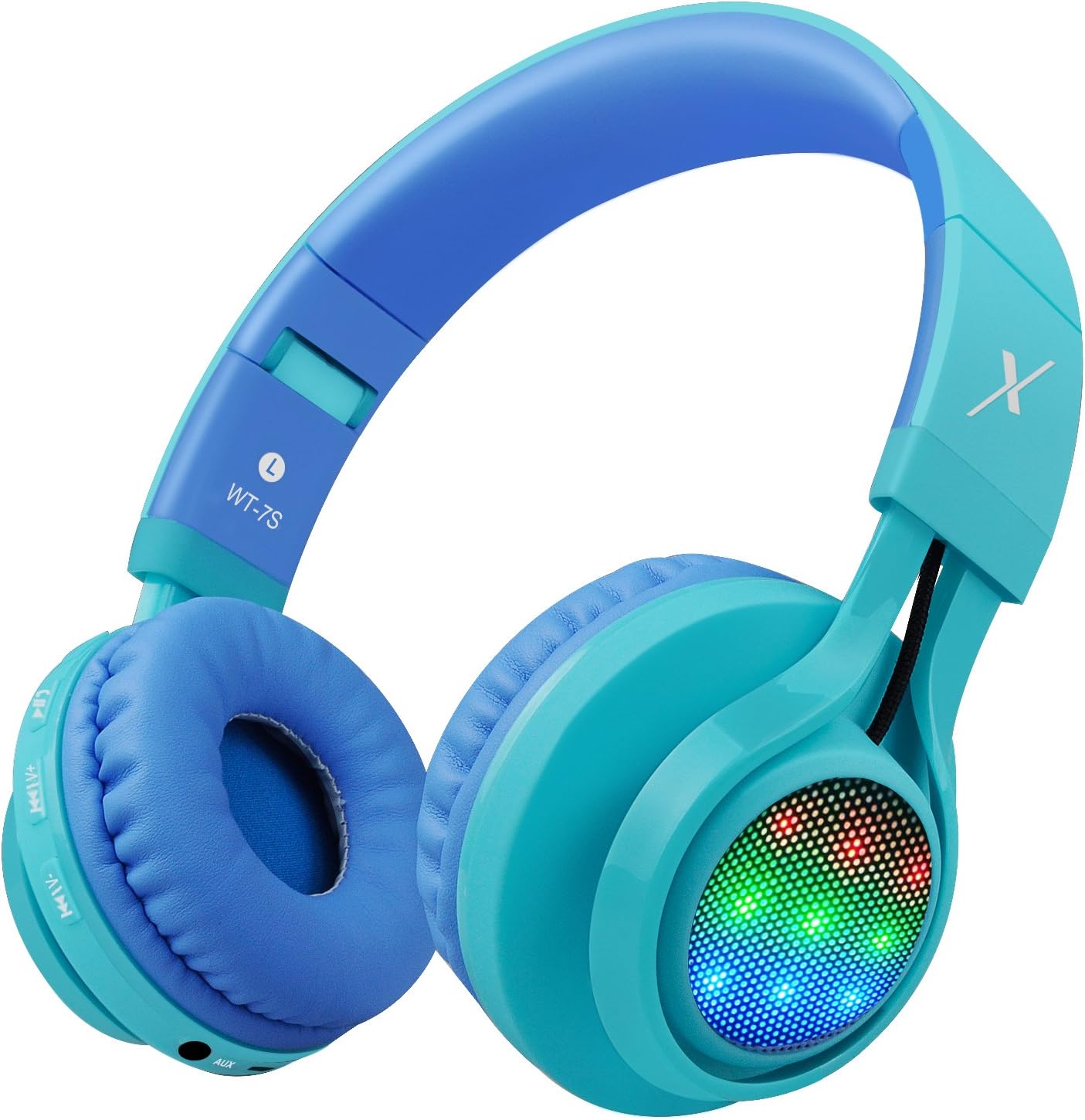
Imaj: Bò kote view of the Riwbox WT-7S Kids Bluetooth Headphones in blue, highlighting the LED lights on the earcup and the control buttons.
Antretyen ak Swen
- Netwayaj: Use a soft, dry cloth to clean the headphones. Avoid using abrasive cleaners or solvents.
- Depo: When not in use, store the headphones in a cool, dry place. The foldable design allows for compact storage, minimizing space.
- Swen batri: Pou pwolonje lavi batri a, evite dechaje kas ekoutè yo nèt souvan. Chaje yo regilyèman, menm si w pa itilize yo tout tan.
- Rezistans dlo: Kas ekoutè yo reziste dlo, men yo pa enpèmeyab. Evite plonje yo nan dlo oswa ekspoze yo anba gwo lapli.

Image: The Riwbox WT-7S headphones shown in their collapsed, folded state, demonstrating how they minimize storage space and fit easily into a backpack or drawer.
Depanaj
| Pwoblèm | Solisyon posib |
|---|---|
| Kas ekoutè yo pa vle limen. | Ensure the headphones are charged. Connect to a power source using the USB charging cable. |
| Pa ka asosye ak aparèy Bluetooth. |
|
| Pa gen son nan mòd san fil. |
|
| Pa gen son nan mòd filaire. |
|
| LED lights are not flashing. | Long press the LED light control button to ensure the feature is enabled. If enabled, ensure music is playing. |
Espesifikasyon pwodwi
| Spesifikasyon | Detay |
|---|---|
| Non modèl | WT-7S |
| Mak | ripbox |
| Koulè | Ble |
| Koneksyon Teknoloji | Bluetooth |
| Teknoloji kominikasyon san fil | Bluetooth |
| Bluetooth vèsyon | 5.3 (Note: Product data shows 4.0, but feature bullets state 5.3. Using 5.3 as it's more recent and likely correct for current models.) |
| Gamme Bluetooth | 10 mèt |
| Gwosè Chofè Audio | 40 Milimèt |
| Repons Frekans | 20 Hz - 20 kHz |
| Sansiblite | 108 dB |
| Enpedans | 32 Ohm |
| Ekoutè Jack | 3.5mm Jack |
| Tan pou chaje | 3 èdtan |
| Lavi batri | 39.99 èdtan |
| Pwa atik | 210 gram (7.4 ons) |
| Dimansyon pwodwi | 7.09 x 5.91 x 3.15 pous |
| Nivo rezistans dlo | Dlo rezistan |
| Kalite kontwòl | Kontwòl Volim, Touche |
| Materyèl | Plastik |
Garanti ak sipò
For warranty information and customer support, please refer to the product packaging or visit the official Riwbox websit la. Kenbe resi acha ou a pou nenpòt reklamasyon garanti.
Ou ka vizite tou Riwbox Store on Amazon pou plis enfòmasyon sou pwodwi a ak resous sipò.
Videyo pwodwi
Video: An official product video titled "Top Best Headphones for Kids with LED and Mic" by Cotico (Seller). This video demonstrates the features and usage of the Riwbox WT-7S headphones, including the LED lights and overall design, in a family setting.