
1. Entwodiksyon
Thank you for choosing the BBC Jadel K100 Gaming Keyboard. This manual provides essential information for setting up, operating, maintaining, and troubleshooting your new keyboard. The Jadel K100 is designed for gaming, office, and daily home use, featuring multimedia keys and a mechanical suspension design for a responsive typing experience.
Tanpri li manyèl sa a byen anvan ou itilize pwodwi a pou asire bon fonksyonman ak lonjevite.
2. Pake kontni
Lè w ap debale, tanpri asire w ke tout bagay yo la:
- BBC Jadel K100 Gaming Keyboard
- Manyèl Itilizatè (dokiman sa a)
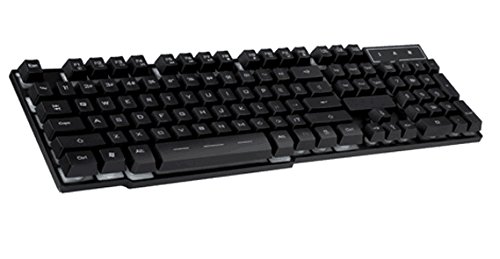
Image 1: The BBC Jadel K100 Gaming Keyboard, showcasing konsepsyon ak anbalaj li yo.
3. Enstalasyon
Follow these steps to connect your BBC Jadel K100 Gaming Keyboard to your computer:
- Depake klavye a: Retire klavye a nan anbalaj li avèk prekosyon.
- Konekte ak òdinatè: Locate an available USB port on your laptop or desktop computer. Insert the USB connector of the keyboard firmly into the USB port.
- Enstalasyon chofè: The keyboard is plug-and-play. Your operating system (Windows, macOS, Linux) should automatically detect and install the necessary drivers. This process may take a few moments.
- Verifye Koneksyon: Once drivers are installed, the keyboard should be ready for use. Test by typing in a text editor or browser.
Nòt: This keyboard is compatible with laptops and desktop computers running standard operating systems.
4. Operasyon Enstriksyon
The Jadel K100 keyboard features a standard 104-key layout, including a numeric keypad and function keys. It also incorporates multimedia functions accessible via the FN kle.
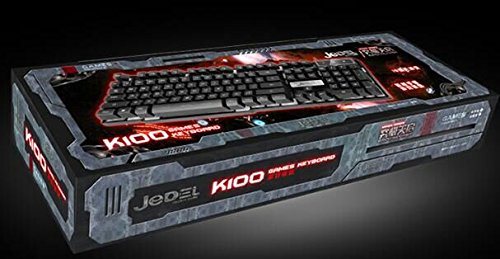
Imaj 2: Gwo plan view of the BBC Jadel K100 keyboard's main keys, including Esc, Tab, Caps Lock, Shift, Ctrl, and Alt.
4.1. Standard Key Functions
All standard alphanumeric, symbol, and navigation keys operate as expected on a typical keyboard.
4.2. Multimedia Functions (FN Key)
The Jadel K100 includes an FN (Function) key, similar to those found on laptops, to access multimedia controls. To use these functions, press and hold the FN key, then press the corresponding function key (F1-F12) or other designated keys.
Common multimedia functions typically include:
- FN + F1-F12: Control media playback (play/pause, stop, previous/next track), volume (mute, volume up/down), and other system functions (e.g., open default browser, email client, calculator). Refer to the keycap legends for specific functions.
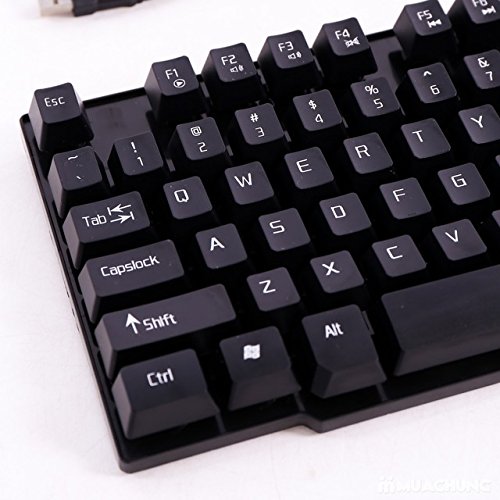
Imaj 3: Detaye view of the BBC Jadel K100 keyboard's F-keys, which often include multimedia shortcuts when combined with the FN key.
4.3. Gaming Experience
The mechanical suspension design provides a tactile and responsive feel, enhancing the gaming experience. The keyboard is designed for durability and comfort during extended gaming sessions.
5. Antretyen
Bon antretyen asire lonjevite ak pèfòmans optimal klavye ou a.
- Netwayaj:
- Dekonekte klavye a nan òdinatè w la anvan ou netwaye li.
- Sèvi ak yon ti moso twal mou, ki san pèl dampRense avèk dlo oswa yon solisyon netwayaj dou pou siye bouchon kle yo ak sifas la.
- Pou pousyè ak debri ant kle yo, sèvi ak lè konprese.
- Evite itilize pwodui chimik ki fò, pwodui netwayaj abrazif, oubyen flite likid dirèkteman sou klavye a.
- Depo: Sere klavye a nan yon kote ki fre epi sèk, lwen limyè solèy dirèk ak tanperati ekstrèm lè w pa itilize li pou yon bon bout tan.
- Manyen: Avoid dropping the keyboard or exposing it to excessive force, which can damage internal components or key mechanisms.
NAN. Depanaj
If you encounter issues with your BBC Jadel K100 keyboard, refer to the following common problems and solutions:
| Pwoblèm | Kòz posib | Solisyon |
|---|---|---|
| Klavye pa reponn | Koneksyon USB ki lach, pò USB ki defektye, pwoblèm chofè. |
|
| Kle espesifik ki pa fonksyone | Debris under keycap, physical damage, software conflict. |
|
| Kle miltimedya yo pa fonksyone | Incorrect usage of FN key, software conflict. |
|
7. Espesifikasyon
| Karakteristik | Detay |
|---|---|
| Mak | BBC |
| Nimewo Modèl | Jadel K100 |
| Deskripsyon klavye | Gaming |
| Kantite kle | 104 |
| Kalite kle | Sispansyon mekanik |
| Koulè | NWA |
| Aparèy konpatib | Laptop, PC Desktop |
| Koneksyon | USB |
| Style | Modèn |
| Oryantasyon men | Anbidextr |
| Manifakti | bbc |
8. Garanti ak sipò
Specific warranty details for the BBC Jadel K100 Gaming Keyboard are not provided in this manual. For warranty information, please refer to the product packaging or contact your retailer at the point of purchase.
For technical support or further assistance, please contact the manufacturer or your retailer. Keep your purchase receipt as proof of purchase for any warranty claims.