
1. Entwodiksyon
This manual provides essential information for the safe and efficient operation of your DNP DS820A Professional Dye-Sublimation Printer. The DS820A is designed for high-quality photo printing, offering a resolution of 300 x 600 dpi and supporting various print sizes up to 8x32 inches. It features a high-speed print mode, producing 8x10 inch glossy photos in approximately 29.3 seconds, and supports multiple surface options including Glossy, Luster, Matte, and Fine Matte.
Please read this manual thoroughly before using the printer to ensure proper setup, operation, and maintenance.

Figi 1: Anglè devan view of the DNP DS820A printer.
2. Enfòmasyon sou Sekirite
Observe the following safety precautions to prevent injury and damage to the printer:
- Toujou konekte enprimant lan nan yon priz kouran ki gen koneksyon ak tè.
- Do not block ventilation openings on the printer. Ensure adequate space around the unit for proper airflow.
- Kenbe enprimant lan lwen dlo oswa imidite twòp.
- Pa eseye demonte oswa repare enprimant lan tèt ou. Konsilte pèsonèl sèvis kalifye.
- Use only DNP-approved media and ribbons.
3. Pake kontni
Verifye ke tout atik yo prezan nan pakè a:
- DNP DS820A Printer Unit
- Pouvwa kab
- USB kab
- Plato Medya
- Gid Demaraj Rapid ak Dokimantasyon
Media (paper and ribbon) is typically sold separately.
4. Enstalasyon
4.1 Debalaj ak plasman
- Ak anpil atansyon retire enprimant lan nan anbalaj li yo.
- Place the printer on a stable, level surface with sufficient space for ventilation and media loading/unloading.
- Remove all protective tapes and packing materials.
4.2 Konekte enprimant lan
- Connect the power cable to the printer's power input and then to a grounded electrical outlet.
- Konekte kab USB a nan pò USB enprimant lan ak nan òdinatè w la.
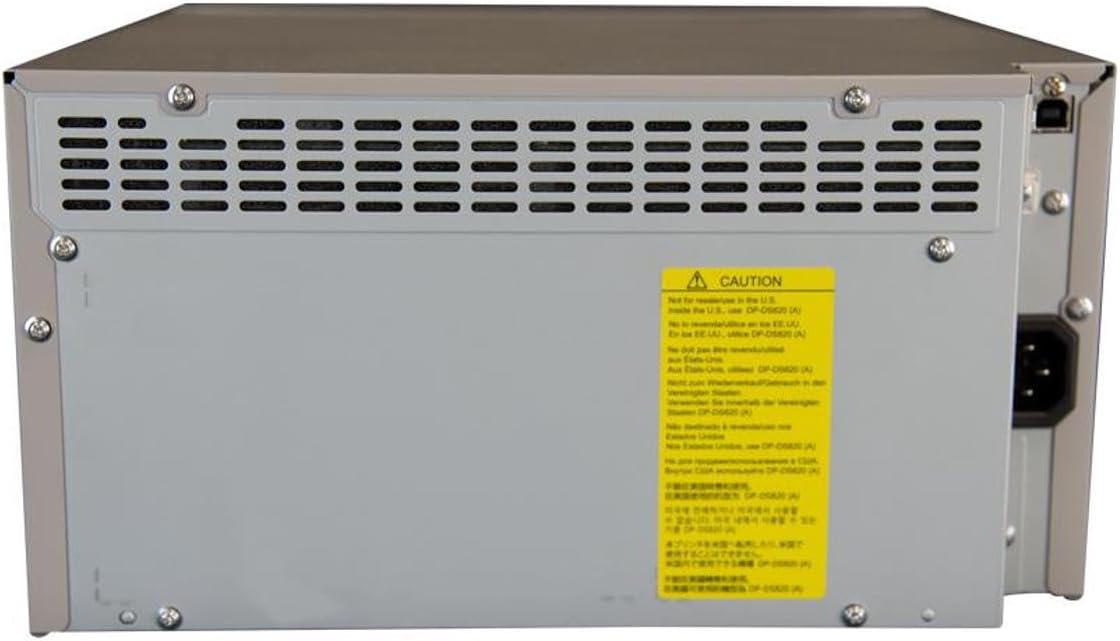
Figi 2: Dèyè view of the DNP DS820A, highlighting connectivity ports.
4.3 Enstalasyon chofè
Install the latest printer drivers from the DNP website. The printer is compatible with Windows and Mac OS X/macOS operating systems.
4.4 Loading Media (Paper and Ribbon)
The DS820A uses a roll-fed media system. Refer to the specific instructions provided with your DNP media for detailed loading procedures. Generally, this involves opening the front panel, inserting the ribbon cassette, and then loading the paper roll into its designated slot.
5. Operasyon Enstriksyon
5.1 Limen/Etenyen
Locate the power switch on the front or side of the printer. Flip the switch to the 'On' position to power on the printer. To power off, flip the switch to the 'Off' position.
5.2 Endikatè Limyè
The printer features several indicator lights on the front panel to communicate its status:
- POUVWA: Endike enprimant lan limen.
- ON/STANDBY: Indicates operational status or standby mode.
- RIBBON: Illuminates when the ribbon needs replacement or is incorrectly installed.
- PAPYE: Illuminates when paper needs replacement or is incorrectly loaded.
- ERÈ: Indicates a general error. Refer to the troubleshooting section or driver software for details.

Figure 3: Front control panel with status indicator lights.
5.3 Pwosesis enprime
- Asire w ke enprimant lan limen epi li konekte ak òdinatè w la.
- Open the image or document you wish to print on your computer.
- Select the DNP DS820A from your printer options.
- Adjust print settings such as print size, resolution (300x600 dpi recommended for color), and surface type (Glossy, Luster, Matte, Fine Matte) in the printer driver settings.
- Initiate the print job. The printer will process and output the photo.
6. Antretyen
6.1 Netwaye aparèy pou enprime a
Netwayaj regilye ede kenbe bon jan kalite enprime a epi pwolonje lavi enprimant lan.
- Eksteryè: Wipe the exterior with a soft, dry, lint-free cloth. Do not use abrasive cleaners or solvents.
- Enteryè: Periodically open the front panel and gently remove any dust or debris from the media path using a soft brush or compressed air.
6.2 Ranplasman Medya
When the RIBBON or PAPER indicator lights illuminate, it's time to replace the respective media. Open the front access panel to replace the ribbon cassette and paper roll according to the instructions provided with the DNP media.
NAN. Depanaj
Seksyon sa a adrese pwoblèm komen ou ka rankontre.
| Pwoblèm | Kòz posib | Solisyon |
|---|---|---|
| Enprimant lan pa limen | Power cable disconnected; Power switch off | Check power cable connection; Ensure power switch is ON. |
| RIBBON light on | Ribbon empty or incorrectly installed | Replace ribbon; Reinstall ribbon correctly. |
| PAPER light on | Paper roll empty or incorrectly loaded | Replace paper roll; Re-load paper correctly. |
| Limyè ERROR limen | Erè jeneral enprimant | Turn printer off and on; Check computer for specific error messages; Consult DNP support. |
| Move kalite enprime | Dirty print head; Incorrect driver settings; Low quality image source | Clean printer interior; Verify print settings (DPI, media type); Use high-resolution images. |
If you encounter issues not covered here, or if solutions do not resolve the problem, contact DNP customer support.
8. Espesifikasyon
| Karakteristik | Spesifikasyon |
|---|---|
| Non modèl | DS820A |
| Teknoloji Enpresyon | Dye sublimasyon |
| Rezolisyon Maksimòm Enpresyon Koulè | 300 x 600 dpi |
| Maksimòm rezolisyon enprime nwa e blan | 300 x 300 dpi or 300 x 600 dpi |
| Sipò pou Medya Gwosè | 5 x 7 inches, 8 x 10 inches, 8 x 12 inches, up to 8 x 32 inches (panoramic) |
| Kalite Medya Enprime | Glossy photo paper, Luster, Matte, Fine Matte |
| Print Speed (8x10 Glossy) | Apeprè 29.3 segonn |
| Max Kapasite Fèy Antre | 250 sheets (depending on media type) |
| Kapasite Fèy Sòti | 250 dra |
| Kantite plato | 2 |
| Koneksyon Teknoloji | USB 2.0 |
| Entèfas Materyèl | USB |
| Metòd kontwòl | App |
| Sòti enprimant | Color; Monochrome |
| Pwa atik | 36 liv (16.33 kg) |
| Dimansyon pwodwi (L x W x H) | 19.25 x 17.25 x 12 pous (48.9 x 43.8 x 30.5 cm) |
| Manifakti | DNP |
| UPC | 650415905867 |
9. Garanti ak sipò
The DNP DS820A printer comes with a full warranty. For specific warranty terms and conditions, please refer to the documentation included with your product or visit the official DNP websit.
For technical assistance, troubleshooting beyond this manual, or to inquire about service, please contact DNP customer support directly. Contact information can typically be found on the DNP websit la oubyen nan anbalaj pwodwi w la.