
Angrox RM-ED047
Angrox Universal Remote Control User Manual
Modèl: RM-ED047
1. Entwodiksyon
This manual provides essential information for the proper use and maintenance of your Angrox Universal Remote Control. Designed for seamless compatibility with a wide range of Sony Bravia TVs, this remote offers a reliable and straightforward replacement for your original or damaged remote.
The Angrox remote control is engineered for ease of use, requiring no complex programming or setup. Simply insert batteries, and it's ready to operate your Sony TV.
2. Pwodwi souview
The Angrox Universal Remote Control is a high-quality, compact, and non-slip device designed for comfortable handling and stable performance. It features a larger transmission range compared to many standard remotes, ensuring reliable operation from a distance.

Imaj 2.1: Devan ak dèyè view of the Angrox Universal Remote Control, showcasing konsepsyon ergonomik li yo ak layout bouton yo.

Image 2.2: Multiple views of the remote control, highlighting its slim profile and textured back for a secure grip.
Karakteristik kle:
- Inivèsèl konpatibilite: 100% compatible with all Sony TV and Sony Bravia remotes.
- Pa gen pwogramasyon obligatwa: Ready to use right out of the box after battery insertion.
- Konsepsyon ergonomique: Small size and compact, with a non-slip surface for practical handling.
- Pèfòmans ki estab: Offers a larger transmission range for reliable control.
- Konstriksyon dirab: Made from ABS material for enhanced safety and durability.

Imaj 2.3: Gwo plan view emphasizing the remote's safety features, durable construction, and use of ABS material.
Compatible Sony TV Models:
This remote is compatible with a wide range of Sony TV models, including but not limited to:
- KDL-40BX420, KDL-40BX421, KDL-22BX320, KDL-22BX321, KDL-32R300B, KDL-32BX320, KDL-32BX321, KDL-32BX420, KDL-32BX421, KDL-40BX421, KDL-40BXB, KDL-421, KDL-46BX420, KDL-46BX421, KDL-55BX520
- KDL-65X830B, KDL-70W830B, KDL-70W840B, KDL-70W850B, KDL-70XX70XX, XBR-40B, 9X850B, XBR-55X850B, XBR-55X900B, XBR-65X850B, XBR-65X900B, XBR-65X950B, XBR-70X850B, XBR-79X900B, XBR-800B, 5X950B
- KDL-19MB4000, KDL-19M4000, KDL-22L4000, KDL-32L4000, KDL-37L4000, KDL-40S4100

Image 2.4: The remote control positioned next to a modern Sony TV, visually confirming its compatibility with Sony LED and LCD televisions.
3. Enstalasyon
The Angrox Universal Remote Control is designed for immediate use with compatible Sony TVs. No complex programming or pairing procedures are required.
Mete pil:
- Jwenn lòj batri a sou do a nan kontwòl remote la.
- Glise kouvèti batri a anba oswa nan direksyon flèch la endike a pou ouvri li.
- Mete de (2) pil AAA (pa enkli), asire w ke tèminal pozitif (+) ak negatif (-) yo byen aliyen ak mak ki anndan konpatiman an.
- Fèmen kouvèti batri a lè w glise l tounen nan plas li jiskaske li fè yon klik byen fèm.
Once batteries are inserted, the remote control is ready to operate your Sony TV. It is recommended to use new, high-quality alkaline batteries for optimal performance and longevity.

Imaj 3.1: Detaye view of the remote's battery compartment, illustrating the correct orientation for inserting two AAA batteries.
4. Operasyon Enstriksyon
The Angrox Universal Remote Control functions identically to the original Sony TV remote. All buttons are pre-programmed to perform their standard functions.
Operasyon debaz:
- Bouton pouvwa: Press to turn your TV on or off.
- Bouton nimewo (0-9): Use to directly enter channel numbers.
- Chanèl Monte/Desann (CH +/-): Navige nan chanèl yo youn apre lòt.
- Volim monte/desann (VOL +/-): Ajiste nivo volim televizyon an.
- Bouton bèbè: Aktive oubyen dezaktive son odyo televizyon an.
- Navigation Pad (Arrow Buttons & Enter): Sèvi ak li pou navige nan meni yo epi chwazi opsyon.
- Bouton Kay: Access the TV's main menu or smart TV interface.
- Bouton Antre/Sous: Chanje ant diferan sous opinyon (HDMI, AV, elatriye).
- Kontwòl Lekti: Buttons for Play, Pause, Stop, Fast Forward, Rewind, etc., for media playback.
Ensure there is a clear line of sight between the remote control and your TV's infrared receiver for optimal signal transmission. The remote offers a stable signal and sensitive buttons for a responsive user experience.

Image 4.1: A hand demonstrating the use of the remote control, highlighting its long-distance capability, fine workmanship, signal stabilization, and sensitive buttons.
5. Antretyen
Proper maintenance will ensure the longevity and optimal performance of your Angrox Universal Remote Control.
Netwayaj:
- Wipe the remote control regularly with a soft, dry cloth.
- Pou pousyè tè ki difisil pou retire, yon ti kras dampRense twal la avèk dlo oswa yon pwodui netwayaj dou ki pa abrazif. Pa flite pwodui netwayaj la dirèkteman sou telekòmand lan.
- Avoid using harsh chemicals, solvents, or abrasive cleaning pads, as these can damage the remote's surface or internal components.
Ranplasman batri:
Replace batteries when the remote's responsiveness decreases or it stops functioning. Always replace both batteries at the same time with new ones of the same type (AAA). Refer to Section 3 for battery insertion instructions.
Depo:
Store the remote control in a cool, dry place away from direct sunlight, extreme temperatures, and high humidity. If the remote will not be used for an extended period, it is advisable to remove the batteries to prevent leakage.
NAN. Depanaj
If you encounter issues with your Angrox Universal Remote Control, please refer to the following common problems and solutions:
| Pwoblèm | Kòz posib | Solisyon |
|---|---|---|
| Telekòmand lan pa reponn. | Pil ki mouri oswa ki mal mete. | Check battery orientation. Replace with new AAA batteries. |
| Telekòmand lan gen yon ranje limite oswa repons lan tanzantan. | Weak batteries, obstruction, or remote too far from TV. | Replace batteries. Ensure clear line of sight to TV's IR receiver. Move closer to the TV. |
| Gen sèten bouton ki pa mache. | Dirt or debris under the button, or internal malfunction. | Clean the remote surface. If problem persists, contact support. |
| Remote does not control TV. | Modèl televizyon ki pa konpatib. | Verify your TV model is listed in the compatible models section (Section 2). |
7. Espesifikasyon
| Karakteristik | Detay |
|---|---|
| Non modèl | RM-ED047 |
| Mak | Angrox |
| Aparèy konpatib | Sony Televisions (various models, see Section 2) |
| Koneksyon Teknoloji | Enfrawouj (IR) |
| Maksimòm Range | 10 mèt |
| Kantite bouton | 50 |
| Kalite kontwolè | Kontwòl Remote |
| Batri obligatwa | 2 x AAA (pa enkli) |
| Dimansyon pwodwi (L x W x H) | 19.99 x 4.78 x 1.98 cm |
| Pwa atik | 82 g |
| Karakteristik espesyal | Universal, Non-slip design |
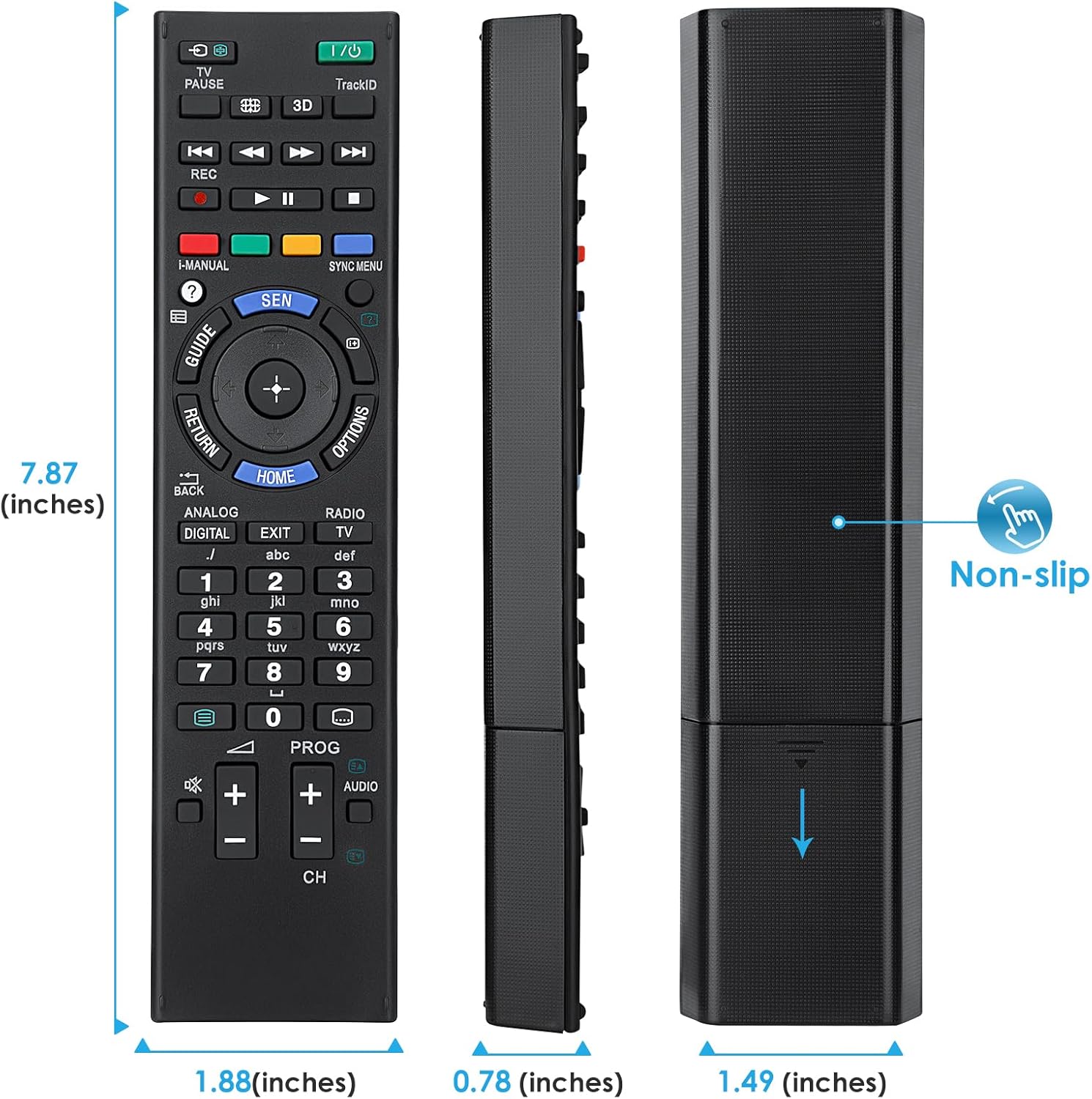
Image 7.1: Visual representation of the remote control's dimensions (length, width, thickness), providing precise measurements for reference.
8. Garanti ak sipò
Enfòmasyon sou garanti:
This Angrox Universal Remote Control comes with a 60-jou garanti from the date of purchase. This warranty covers manufacturing defects and ensures the product functions as described under normal use. Please retain your proof of purchase for warranty claims.
Sipò Kliyan:
For any questions, concerns, or technical assistance not covered in this manual, please contact the retailer or the manufacturer's customer support. Provide your product model number (RM-ED047) and a detailed description of the issue to facilitate faster service.
Ask a question about this manual
Ask about setup, troubleshooting, compatibility, parts, safety, or missing instructions. Manuals+ will review the question and use this page’s manual context to help answer it.