
Entwodiksyon
The Audeze iSINE10 In-Ear Semi-Open Headphones deliver a unique audio experience through advanced planar magnetic technology. Designed for clarity and wide soundstage, these headphones are lightweight and offer versatile connectivity options for various devices. This manual provides essential information for setting up, operating, maintaining, and troubleshooting your iSINE10 headphones.

Image: Audeze iSINE10 headphones showcasing their semi-open design.
Enstalasyon
1. Debale ak Konpozan
Your Audeze iSINE10 headphones typically include:
- Audeze iSINE10 In-Ear Headphones
- Cipher Lightning Cable (with in-line amplifier and DAC)
- Standard 3.5mm Audio Cable
- Various Eartips for optimal fit
- Ear Hooks for secure placement
- Nylon Carrying Case
2. Fitting the Headphones
The iSINE10 offers two primary methods for secure and comfortable wear:
- Ear Clips: These hooks fit over your ear, similar to sunglasses, providing stability.
- Rubber Pieces: These inserts fit inside the ear, resting at the entrance of the ear canal, without deep insertion.
Experiment with the included eartips and ear hooks to find the most comfortable and secure fit for extended listening. Proper fit is crucial for both comfort and sound quality.
3. Konekte ak Aparèy yo
The iSINE10 headphones offer versatile connectivity:
- iOS Devices (Lightning Port): Use the included Cipher Lightning Cable. This cable features a built-in amplifier and 24-bit Digital-to-Analog Converter (DAC) for enhanced audio performance and allows access to the Audeze iOS app for customization.
- Standard Devices (3.5mm Audio Jack): Use the included 3.5mm audio cable to connect to any device with a standard headphone jack. Note that the sound characteristics may differ without the Cipher cable's built-in DSP/EQ.
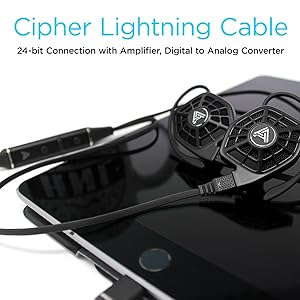
Image: iSINE10 headphones connected to an iPhone, demonstrating Lightning cable use.
Enstriksyon Operasyon
1. Lekti Odyo Debaz
Once connected, simply play audio from your device. Adjust the volume using your device's controls or the in-line controls on the Cipher Lightning Cable.
2. Using the Cipher Lightning Cable (for iOS Devices)
The Cipher Lightning Cable is designed to optimize the iSINE10's performance with iOS devices. It includes:
- Nan liy Amplifier and DAC: Provides high-quality digital-to-analog conversion and amplifikasyon.
- DSP (Tretman Siyal Dijital): Applies an automatic, built-in frequency response correction for a balanced sound profile.
- Siri-Compatible Microphone: Allows for voice commands and hands-free communication.
- Kontwòl nan liy: Manage playback, volume, and calls.
Nòt enpòtan:
- When using the Cipher Lightning Cable, you cannot charge your iOS device simultaneously through the same Lightning port.
- Some users may experience a faint noise with the V1 Lightning cable when no audio is playing. This typically disappears once audio playback begins.
3. Audeze iOS App for Customization
Download the official Audeze iOS app to unlock advanced audio customization features:
- 10-Band egalize: Fine-tune the sound profile selon preferans ou.
- Saveable EQ Presets: Store up to two custom equalizer settings for quick access.
Nòt pou itilizatè Android:
Currently, there is no official Android app available for firmware updates or EQ customization. These features require an iOS device.
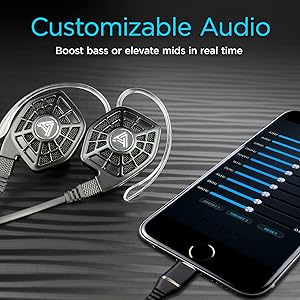
Image: iPhone screen showing the Audeze EQ app interface for audio customization.
4. Optional Bluetooth Cable
An optional Bluetooth cable is available directly from Audeze, allowing wireless connectivity to various devices while maintaining the intended sound profile (with appropriate DSP/EQ).
Videyo: Yon finiview of the Audeze iSINE10 In-Ear Semi-Open Headphones, highlighting key features and design elements.
Antretyen
1. Netwayaj
- Gently wipe the headphone bodies and cables with a soft, dry, lint-free cloth.
- Retire bouchon zòrèy yo epi netwaye yo avèk savon dou ak dlo si sa nesesè. Asire w ke yo byen sèk anvan ou mete yo ankò.
- Evite itilize pwodui chimik ki agresif, solvang, oswa materyèl abrazif.
2. Swen Kab
- Evite pliye byen file oswa rale kab yo twòp pou anpeche domaj entèn.
- Store cables neatly to prevent tangling.
3. Depo
When not in use, store your iSINE10 headphones in the provided nylon carrying case to protect them from dust, moisture, and physical damage.
4. Kwòk zòrèy
The plastic ear hooks, while designed for comfort, may not be highly durable. Handle them with care during attachment and removal to prolong their lifespan.
Depanaj
Pa gen son oswa volim ki ba
- Ensure the cable is securely connected to both the headphones and your audio source.
- Check the volume levels on your device and any in-line controls.
- Test with a different audio source or cable if possible to isolate the issue.
Audio defòme
- If using the 3.5mm cable, ensure your audio source is providing a clean signal. The iSINE10 is designed to benefit from the DSP/EQ of the Cipher cable.
- Reduce the volume on your device to check if distortion is due to overdriving the headphones.
- If using the Cipher cable, check the Audeze iOS app for any extreme EQ settings that might cause distortion.
Discomfort During Wear
- Experiment with different sizes and types of eartips. Foam tips, if available, can sometimes improve comfort by distributing pressure more evenly.
- Adjust the ear hooks or rubber pieces to find a less intrusive position.
- Pran poz pandan sesyon koute ki long yo.
iOS App Issues
- Ensure your iOS device is running a compatible version of iOS.
- Restart the app or your iOS device.
- Ensure the Cipher Lightning Cable is properly connected.
Espesifikasyon
| Karakteristik | Detay |
|---|---|
| Nimewo Modèl | 110-IE-1000-00 |
| Kalite chofè odyo | Chofè mayetik plan |
| Gwosè Chofè Audio | 30 Milimèt |
| Repons Frekans | 10Hz - 50kHz |
| Enpedans | 16 Ohms |
| Sansiblite | 110 dB/1mW |
| Maksimòm manyen pouvwa | 500mW RMS |
| Koneksyon Teknoloji | Wired (Lightning, 3.5mm Audio) |
| Kominikasyon san fil | Bluetooth (via optional cable) |
| Kalite kontwòl | Kontwòl Medya, Aplikasyon |
| Mikwofòn | Siri-compatible (on Cipher cable) |
| Materyèl | Plastik |
| Pwa atik | 20 Grams (per pair) / 0.705 ounces |
| Dimansyon pwodwi | 1.38 x 0.79 x 1.22 pous |
| Nivo rezistans dlo | Pa reziste dlo |
| Materyèl Ka Transpòte | Nylon |
Enfòmasyon sou Garanti
Audeze products are covered by a manufacturer's warranty. For detailed information regarding the warranty period, coverage, and terms and conditions, please refer to the official Audeze websit la oswa kat garanti ki vini ak pwodwi ou a. Kenbe prèv acha ou pou reklamasyon garanti.
Sipò
For technical assistance, product inquiries, or customer service, please visit the official Audeze support page on their website. You can typically find FAQs, troubleshooting guides, and contact information for their support team there.
Audeze Official Websit: www.audeze.com