
Entwodiksyon
This manual provides essential information for the safe installation, operation, and maintenance of your Heathco HZ-5846-WH Motion Activated LED Security Light. This fixture is designed to provide reliable outdoor lighting with energy-efficient LED technology and motion detection capabilities. Please read these instructions thoroughly before installation and retain them for future reference.

Image: Heathco HZ-5846-WH Motion Activated LED Security Light, showing the two adjustable lamp heads and the motion sensor below.
Enfòmasyon sou Sekirite
AVÈTISMAN: Risk of electric shock. Disconnect power at the fuse or circuit breaker before installation or servicing. All electrical connections must be in accordance with local codes, ordinances, or the National Electrical Code (NEC).
- Pwodwi sa a dwe enstale pa yon elektrisyen ki kalifye.
- Asire rezèv la voltage is 120 VAC, 60 Hz.
- Do not attempt to disassemble or modify the fixture. There are no user-serviceable parts inside.
- Avoid looking directly into the LED light source when illuminated, as this may cause eye damage.
- Mount the fixture securely to a structural surface.
Enstalasyon ak Enstalasyon
The Heathco HZ-5846-WH security light is designed for either wall mount or eave mount installation. Ensure the mounting location provides adequate coverage for the desired detection area and is within reach of the electrical supply.
Etap enstalasyon:
- Dekoneksyon pouvwa: Turn off power at the circuit breaker or fuse box before beginning installation.
- Kote montaj: Select a suitable wall or eave location. The fixture should be mounted at a height that allows for optimal motion detection and light coverage.
- Fil elektrik: Connect the fixture's wires to the household wiring according to local electrical codes. Typically, this involves connecting the black wire to live, white wire to neutral, and green/bare copper wire to ground.
- Aparèy sekirite: Mount the fixture securely to the junction box or mounting surface using the provided hardware.
- Ajiste Lamp Heads and Sensor: L laamp heads and motion sensor are tool-free adjustable. Position them to cover the desired area.
- Retablisman pouvwa: Yon fwa enstalasyon an fini epi tout koneksyon yo byen fèm, retabli kouran an nan disjonktè a.
Enstriksyon Operasyon
Your Heathco HZ-5846-WH security light features a 180-degree motion detection zone and adjustable settings for optimal performance.
Ajisteman Capteur Mouvman:
- Ranje: The motion sensor can detect movement up to 40 feet. Adjust the sensor's angle to modify the detection range and area. Avoid pointing the sensor at heat sources or moving objects (e.g., trees, traffic) that could cause false triggers.
- A lè: The light-on time can be adjusted up to 5 minutes. Use the control dial (if present, typically on the sensor unit) to set how long the light remains illuminated after motion is detected.
Manyèl Override:
This fixture includes a manual override function. To activate the manual override, quickly turn the light switch OFF then ON. The light will remain ON continuously. To return to motion-activated mode, quickly turn the light switch OFF then ON again. The light will then operate based on motion detection.
Antretyen
The Heathco HZ-5846-WH security light utilizes energy-saving LED technology, meaning you will never need to change a bulb.
- Netwayaj: To maintain the appearance and performance of your fixture, periodically clean the lens and housing with a soft, damp twal. Pa sèvi ak pwodui netwayaj abrazif oswa solvang.
- Enspeksyon: Enspekte aparèy la detanzantan pou wè si li gen nenpòt siy domaj oswa koneksyon ki lach. Si ou jwenn nenpòt pwoblèm, dekonekte kouran an epi konsilte yon elektrisyen kalifye.
Depanaj
If your security light is not functioning as expected, refer to the following common issues and solutions:
| Pwoblèm | Kòz posib | Solisyon |
|---|---|---|
| Limyè pa limen. | No power; faulty wiring; sensor not detecting motion. | Check circuit breaker; verify wiring connections; adjust sensor angle and range. |
| Limyè rete limen kontinyèlman. | Manual override activated; constant motion in detection zone; faulty sensor. | Toggle power switch to reset manual override; reposition sensor; contact support if sensor is faulty. |
| Light turns ON/OFF frequently. | Sensor detecting unwanted motion (e.g., trees, traffic, animals). | Adjust sensor angle and sensitivity to exclude unwanted motion sources. |
| Detection range is poor. | Capteur a bouche oswa li pa byen oryante. | Clear obstructions; adjust sensor angle for optimal coverage. |
Si etap depanaj yo pa rezoud pwoblèm nan, tanpri kontakte sèvis kliyan.
Espesifikasyon
| Karakteristik | Detay |
|---|---|
| Nimewo Modèl | HZ-5846-WH |
| Mak | Globe elektrik |
| Sous limyè | Entegre dirije |
| Klète | 1250 Lumen |
| Tanperati Koulè | 5296 Kelvin |
| Wattage | 13.73 Watts |
| Mouvman Deteksyon Ang | 180 degre |
| Ranje deteksyon mouvman | Jiska 40 pye |
| Adjustable On-Time | Jiska 5 minit |
| Sous pouvwa | Corded Electric (120 VAC, 60 Hz) |
| Materyèl | Polycarbonate (Shade), Metal (Fixture) |
| Kalite aliye | Wall Mount or Eave Mount |
| Nivo rezistans dlo | Ki enpèmeyab |
| Dimansyon (L x W x H) | 7.54" x 6.79" x 6.22" |
| Pwa atik | 1.9 liv |
| UPC | 016963158467 |
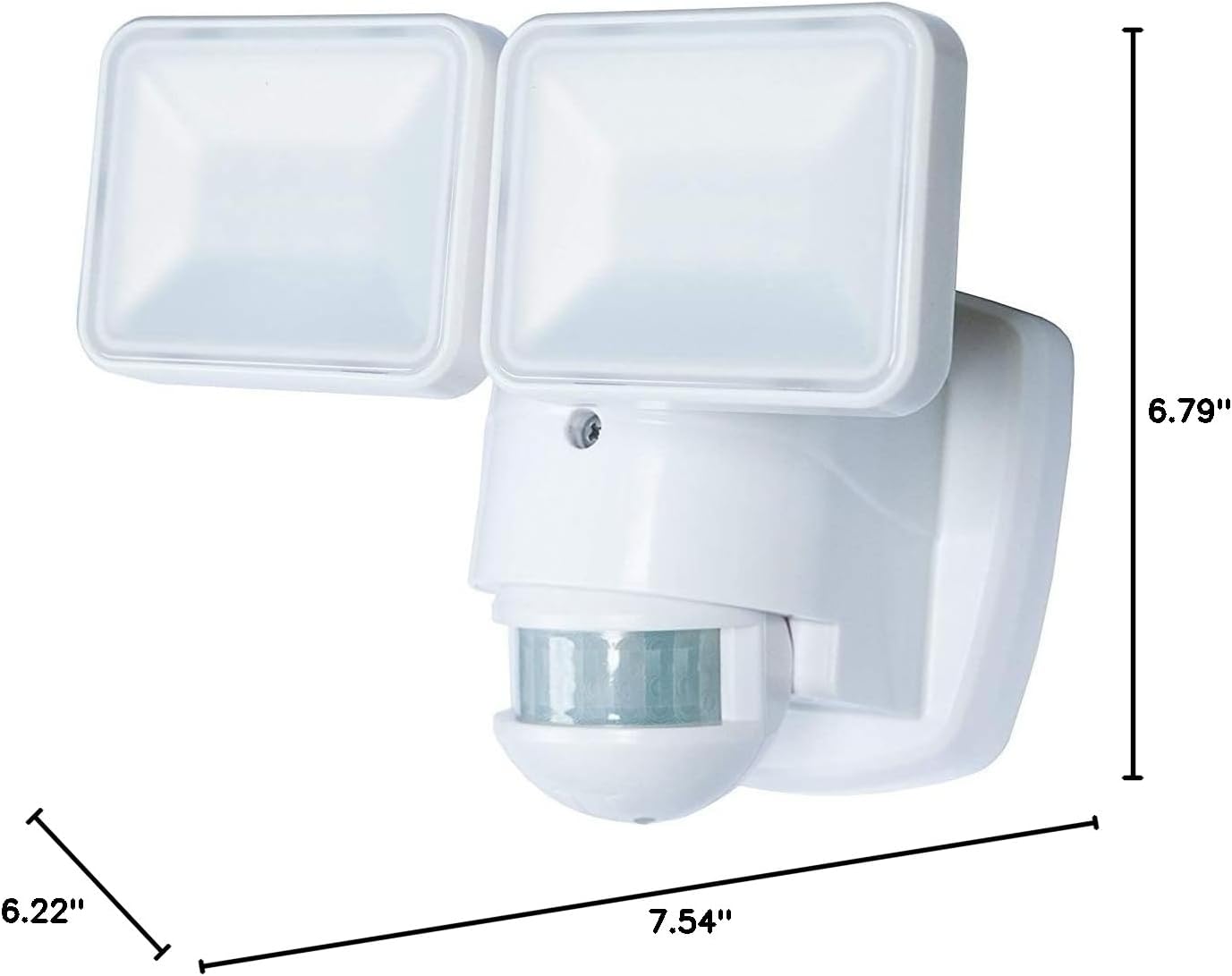
Image: Dimensions of the Heathco HZ-5846-WH security light, showing length (7.54"), width (6.79"), and height (6.22").
Garanti ak sipò
Enfòmasyon sou garanti:
The manufacturer warranty description for this product is Pa aplikab. Please refer to your retailer's return policy for details regarding returns or exchanges.
Sipò Kliyan:
For further assistance, technical support, or inquiries regarding your Heathco HZ-5846-WH Motion Activated LED Security Light, please contact Globe Electric customer service. Refer to the product packaging or the Globe Electric websit pou jwenn enfòmasyon kontak aktyèl.