
SOMFY V250
Somfy V250 Video Intercom System User Manual
Modèl: V250
1. Entwodiksyon
Thank you for choosing the Somfy V250 Video Intercom System. This system allows you to communicate with visitors at your gate or door, view them on a 7-inch color display, and remotely control access. Additionally, the indoor monitor includes an integrated wireless control point for up to five Somfy RTS (Radio Technology Somfy) products, such as roller shutters, lighting, or garage doors.
Please read this manual carefully before installation and operation to ensure correct usage and to maximize the benefits of your V250 system.
2. Enstriksyon Sekirite
- Asire w ke tout koneksyon elektrik yo fèt pa yon elektrisyen kalifye epi konfòm ak règleman lokal yo.
- Dekonekte kouran an anvan ou fè nenpòt enstalasyon, antretyen oswa reparasyon.
- Do not expose the outdoor station to direct water jets or immerse it in water.
- Pa louvri aparèy la casings. There are no user-serviceable parts inside.
- Kenbe sistèm nan lwen chan mayetik ki fò.
- Use only original Somfy accessories and spare parts.
- This product is designed for residential use. Do not modify the system for other applications.
3. Pake kontni
Verifye ke tout konpozan yo prezan nan pake a:
- 1x Somfy V250 Indoor Monitor (7-inch color display)
- 1x Somfy V250 Outdoor Station (with camera and call button)
- Pwodwi pou monte (vis, ploge miray)
- Power adapter for indoor monitor
- Manyèl itilizatè
4. Konpozan Sistèm yoview
4.1. Outdoor Station
The outdoor station is designed for external installation and includes:
- Kamera: Captures video of visitors. Features night vision with white LEDs for clear visibility in low light.
- Mikwofòn: Pou kominikasyon odyo de-fason.
- Oratè: For audio output to visitors.
- Bouton Rele: Kòmanse yon apèl bay monitè andedan kay la.
- Plak non: For displaying resident's name.
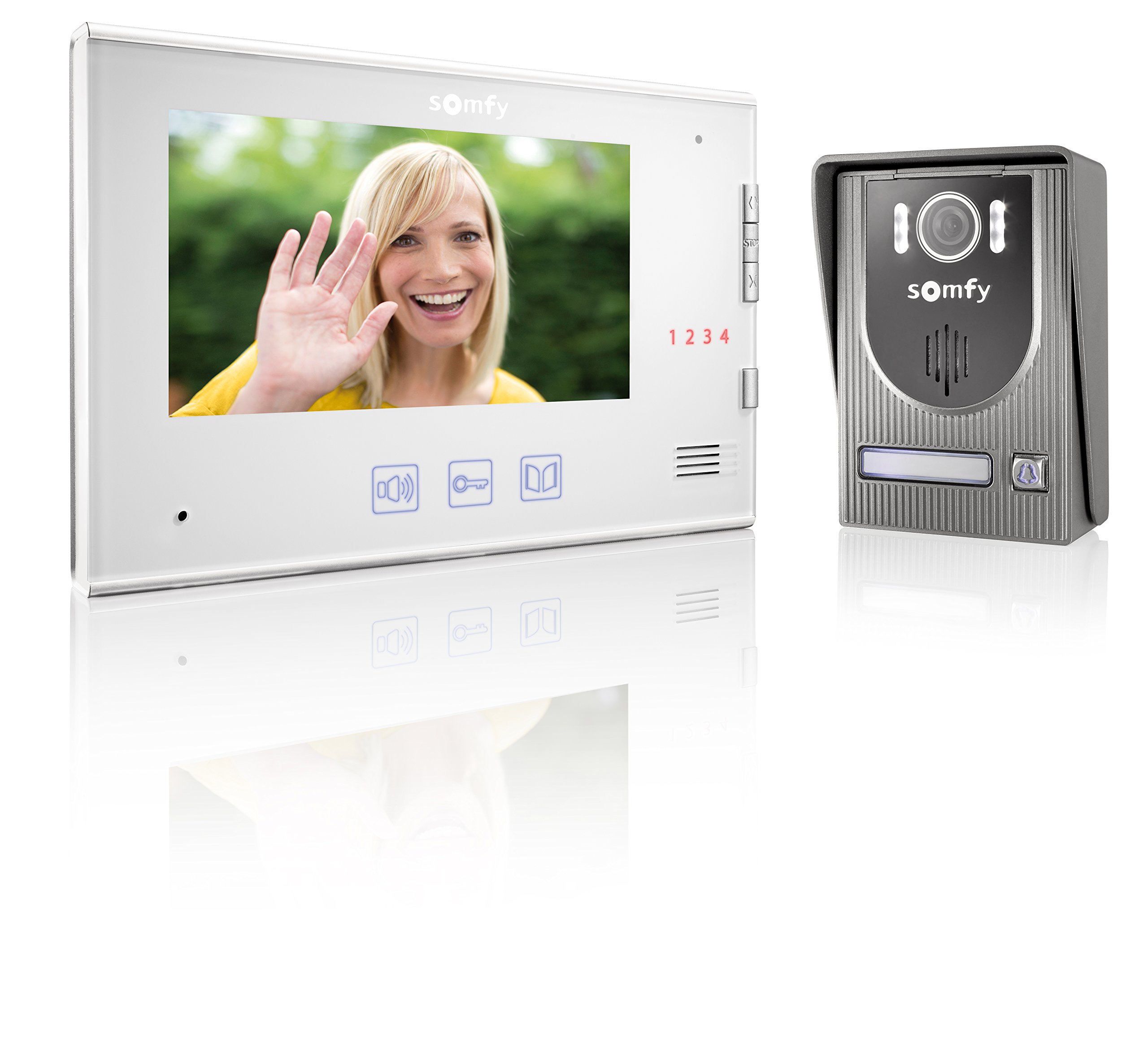
Image: Somfy V250 Outdoor Station with camera, LEDs, speaker, and call button.
4.2. Monitè andedan kay la
The indoor monitor is the central control unit inside your home and features:
- Ekspozisyon koulè 7-pous: Shows live video from the outdoor station.
- Bouton kontwòl: For answering calls, opening gates/doors, and controlling RTS devices.
- Mikwofòn ak Oratè: Pou kominikasyon odyo de-fason.
- RTS Control Point: Integrated module to manage up to 5 Somfy RTS products.

Image: Somfy V250 Indoor Monitor with 7-inch display and control buttons.
5. Enstalasyon ak Enstalasyon
The Somfy V250 system uses a simple 2-wire connection between the indoor monitor and the outdoor station.
5.1. Preparasyon sit
- Choose a suitable location for the outdoor station, typically near your gate or main entrance, at a height of approximately 1.5 to 1.6 meters from the ground. Avoid direct sunlight or strong backlighting if possible.
- Select a convenient indoor location for the monitor, away from direct heat sources or moisture.
- Ensure the maximum distance between the monitor and the outdoor station does not exceed 100 meters.
5.2. Mounting the Outdoor Station
- Make pwen perçage yo sou miray la lè l sèvi avèk sipò montaj la kòm modèl.
- Fè twou epi mete ploge miray la.
- Tache bracket la aliye sou miray la.
- Connect the 2-wire cable from the indoor monitor to the designated terminals on the outdoor station. Ensure correct polarity if specified.
- Attach the outdoor station to the mounting bracket.
5.3. Enstalasyon Monitè Andedan an
- Mark the drilling points for the indoor monitor's mounting bracket.
- Fè twou epi mete ploge miray la.
- Tache bracket la aliye sou miray la.
- Connect the 2-wire cable from the outdoor station to the designated terminals on the indoor monitor.
- Konekte adaptè kouran an nan monitè andedan kay la epi branche li nan yon priz kouran.
- Attach the indoor monitor to its mounting bracket.
5.4. Initial Power-Up and RTS Pairing
- Once all connections are secure, power on the indoor monitor.
- The monitor should display the live feed from the outdoor station or a standby screen.
- To pair Somfy RTS products: Refer to the specific instructions for your RTS device. Generally, you will need to put the RTS device into programming mode and then activate the pairing function on the V250 indoor monitor (usually by pressing a dedicated RTS button or navigating through a menu).
- Test the RTS control functionality after pairing.
6. Operating the Somfy V250 Intercom
6.1. Resevwa yon apèl
When a visitor presses the call button on the outdoor station:
- The indoor monitor will ring and display the live video feed from the outdoor camera.
- Peze a Repons button (often represented by a phone icon) on the monitor to establish two-way audio communication.
- Pou fini apèl la, peze la Fini apèl button. The call will automatically end after a set duration if not answered or manually ended.

Image: A person pressing the call button on an outdoor intercom station.
6.2. Viewing Visitors (Monitoring)
Ou kapab manyèlman view the outdoor station's camera feed at any time without a call:
- Peze a Siveye button (often represented by an eye or camera icon) on the indoor monitor.
- The display will show the live video feed. You can initiate two-way communication if desired.
6.3. Opening Gate/Door
During a call or while monitoring, you can open an electric gate or door connected to the system:
- Peze a Debloke or Pòtay Louvri button (often represented by a key or gate icon) on the indoor monitor.
- The connected gate or door will activate.
6.4. Controlling Somfy RTS Products
The V250 monitor allows control of up to 5 paired Somfy RTS devices:
- Use the dedicated RTS control buttons or navigate through the monitor's menu to select and operate your paired RTS devices (e.g., open/close roller shutters, turn lights on/off).
- Refer to the monitor's on-screen interface for specific RTS control options.

Image: A modern house equipped with Somfy roller shutters, illustrating RTS product integration.
7. Antretyen
- Netwayaj: Sèvi ak yon mou, damp cloth to clean the surfaces of the indoor monitor and outdoor station. Do not use abrasive cleaners, solvents, or chemical sprays.
- Outdoor Station: Periodically check the camera lens and microphone/speaker grilles for dirt or obstructions and gently clean them.
- Fil elektrik: Asire w ke tout koneksyon fil yo rete byen fèm epi san domaj.
- Mizajou lojisyèl: Check the Somfy website for any available firmware updates for your V250 system.
NAN. Depanaj
| Pwoblèm | Kòz posib | Solisyon |
|---|---|---|
| Pa gen imaj sou monitè andedan an. | Power issue, loose wiring, camera malfunction. | Check power connection. Verify 2-wire connection between monitor and outdoor station. Restart the system. |
| No sound during communication. | Volume too low, microphone/speaker obstruction, wiring issue. | Adjust volume on indoor monitor. Check for obstructions on outdoor station's speaker/mic. Verify wiring. |
| Gate/door not opening. | Incorrect wiring to gate/door opener, opener malfunction, system not receiving command. | Check wiring to the gate/door opener. Ensure the opener is functional independently. Consult an electrician. |
| RTS product not responding. | RTS product not paired, out of range, battery low (for battery-powered RTS devices). | Re-attempt RTS pairing. Ensure RTS product is within range of the monitor. Check battery if applicable. |
| Operasyon tanzantan. | Loose connections, electrical interference. | Check all wiring connections. Ensure no strong electrical interference sources are nearby. |
9. Espesifikasyon teknik
| Karakteristik | Detay |
|---|---|
| Modèl | Somfy V250 |
| Ekspozisyon monitè andedan kay la | 7-inch (17.8 cm) Color Display |
| Outdoor Station Camera | Integrated with Night Vision (White LEDs) |
| Fil elektrik | 2-wire connection between monitor and outdoor station |
| Max. Distance (Monitor to Outdoor Station) | 100 mèt |
| Kontwòl RTS | Integrated wireless control for up to 5 Somfy RTS products |
| Koulè | White (Indoor Monitor), Grey (Outdoor Station) |
| Materyèl | Plastik |
| Pwa atik | 1.16 Kilogram |
| Dimansyon atik (L x W x H) | 39 x 29 x 8.5 santimèt |
| Manifakti | SOMFY |
10. Garanti ak sipò
Somfy products are designed for reliability and durability. For detailed warranty information, please refer to the warranty card included with your product or visit the official Somfy websit.
If you encounter any issues that cannot be resolved using the troubleshooting guide, or if you require technical assistance, please contact Somfy customer support:
- Sipò sou entènèt: Vizite www.somfy.com for FAQs, product documentation, and support contact details.
- Sèvis Kliyan: Contact information for your region can be found on the Somfy websit.
Please have your product model (V250) and purchase date ready when contacting support.
Ask a question about this manual
Ask about setup, troubleshooting, compatibility, parts, safety, or missing instructions. Manuals+ will review the question and use this page’s manual context to help answer it.