
1. Entwodiksyon
Thank you for choosing the Lenco PDR-030 DAB+/FM Portable Digital Radio. This manual provides essential information for setting up, operating, and maintaining your device. The PDR-030 offers high-quality digital radio reception (DAB+) and traditional FM radio, along with features such as an integrated rechargeable battery for portability, an RDS display, station memory, and an alarm clock function.
Eleman ki enkli:
- Lenco PDR-030 Digital Radio
- AC Power Adapter (220 Volt)
- Manyèl itilizatè
2. Enfòmasyon enpòtan sou sekirite
- Pa ekspoze aparèy la anba lapli oswa imidite pou evite dife oswa chòk elektrik.
- Asire w ke vòl adaptè kouran antage matche ak ekipman pou kouran lokal ou a.
- Pa ouvri c laasing. Konfye tout antretyen bay pèsonèl kalifye.
- Evite mete aparèy la toupre sous chalè oswa anba limyè solèy dirèk.
- Handle the integrated battery with care. Do not attempt to replace it yourself.
- Kenbe aparèy la lwen gwo chan mayetik.
3. Pwodwi souview
Familiarize yourself with the main components and controls of your Lenco PDR-030 radio.
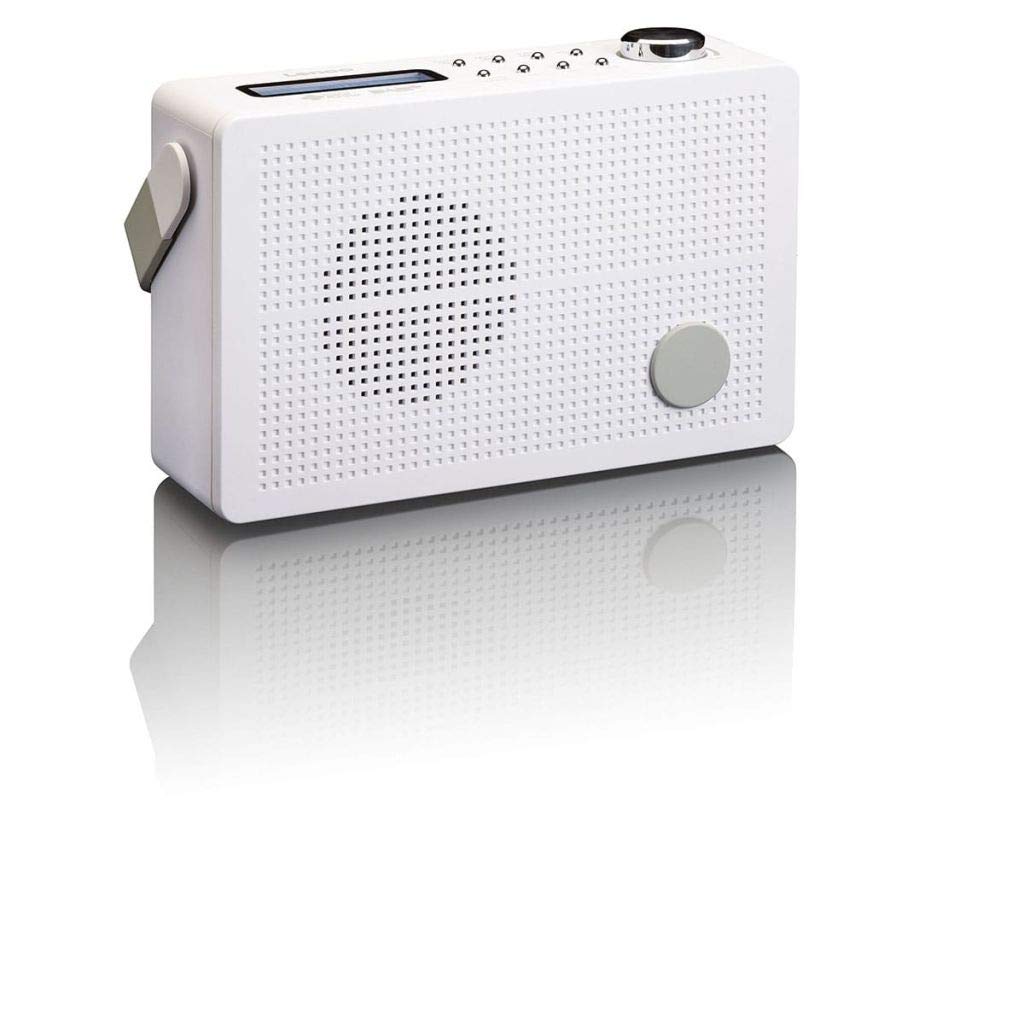
Figi 3.1: Front Panel of Lenco PDR-030 Radio. Features include a blue backlit LCD display, power/source button, alarm, sleep, info/menu, preset buttons, select/snooze, scan, previous, next buttons, and a rotary volume knob.
Key Controls and Features:
- Ekspozisyon: Two-line illuminated LCD for time, date, station name, and information.
- Bouton Pouvwa/Sous: Turns the radio on/off and switches between DAB+ and FM modes.
- Volim bouton: Ajiste nivo pwodiksyon odyo a.
- Antèn teleskopik: For optimal radio signal reception.
- Jack kas ekoutè (3.5mm): Pou koute prive.
- Alarm/Sleep/Info/Menu/Preset Buttons: For various functions including setting alarms, sleep timer, accessing information, menu navigation, and managing station presets.
- Select/Snooze/Scan/Prev/Next Buttons: For station tuning, menu selection, and snooze function.
4. Enstalasyon
4.1 Alimante Radyo a
The PDR-030 can be powered by the included AC adapter or its integrated rechargeable battery.
- AC pouvwa: Connect the supplied 220V AC power adapter to the DC input jack on the radio and then to a wall outlet. The radio will automatically begin charging the internal battery.
- Pouvwa batri: The integrated Lithium-ion battery allows for portable use. Ensure the battery is sufficiently charged before use without the AC adapter.
4.2 Enstalasyon antèn
Extend the telescopic antenna fully for optimal reception of both DAB+ and FM signals. Adjust its position for the best signal quality.
4.3 Initial Power On and Station Scan
- Peze a Pouvwa / Sous bouton pou limen radyo a.
- Upon first use, the radio will automatically enter DAB+ mode and perform a full scan for available digital radio stations. This may take a few minutes.
- Yon fwa eskanè a fini, radyo a pral branche sou premye estasyon ki disponib la.
5. Operasyon Enstriksyon
5.1 Power On/Off
Peze a Pouvwa / Sous bouton pou limen oswa etenn radyo a.
5.2 Mode Selection (DAB+/FM)
Peze a Sous button repeatedly to switch between DAB+ and FM radio modes.
5.3 Estasyon Akor
- DAB+ Mode:
- After the initial scan, use the Prev epi Next buttons to navigate through the list of available DAB+ stations.
- To perform a new full scan, press the Menu button, navigate to "Full Scan" using Prev / Next, ak peze Chwazi.
- Mòd FM:
- Peze a Eskane button to automatically scan for the next available FM station.
- For manual tuning, press and hold the Prev or Next bouton pou ajiste frekans lan avèk presizyon.
5.4 Saving and Recalling Preset Stations
The radio allows you to store up to 10 DAB+ and 10 FM preset stations.
- Pou sove yon predefinisyon:
- Branche sou estasyon ou vle a.
- Peze epi kenbe la Prereglaj bouton an jiskaske "Preset Store" parèt sou ekran an.
- Sèvi ak la Prev / Next bouton yo pou chwazi yon nimewo prereglaj (1-10).
- Peze Chwazi pou konfime epi sove estasyon an.
- Pou Raple yon Prereglaj:
- Peze a Prereglaj bouton yon ti tan.
- Sèvi ak la Prev / Next bouton yo pou chwazi nimewo prereglaj ou vle a.
- Peze Chwazi to tune to the preset station.
5.5 Kontwòl Volim
Vire a Volim bouton nan sans zegwi mont lan pou ogmante volim nan epi nan sans kontrè zegwi mont lan pou diminye li.
5.6 RDS Functionality (FM Mode)
In FM mode, the RDS (Radio Data System) function displays information such as station name, program type, and other broadcast data on the two-line LCD display.
5.7 Fonksyon revèy alam
The PDR-030 can be used as an alarm clock with two separate alarm times.
- Mete yon alam:
- Peze a Alam bouton.
- Sèvi ak Prev / Next pou chwazi Alam 1 oswa Alam 2, answit peze Chwazi.
- Follow the on-screen prompts to set the alarm time, duration, source (Buzzer or Radio), frequency (Daily, Once, Weekdays, Weekends), and volume.
- Ensure the alarm is set to "On" and press Chwazi pou sove.
- Fonksyon Snooze: Lè alam la son, peze la Snooze bouton pou fèmen l tanporèman pou yon peryòd defini.
- Revèy dòmi: Peze a Dòmi button repeatedly to set a sleep timer (e.g., 15, 30, 45, 60 minutes) after which the radio will automatically turn off.
5.8 Koneksyon kas ekoutè
Connect 3.5mm stereo headphones to the headphone jack for private listening. The internal speaker will be muted automatically.
6. Antretyen
6.1 Netwayaj
Wipe the radio's exterior with a soft, dry cloth. Do not use abrasive cleaners, waxes, or solvents as they may damage the finish. Ensure no liquids enter the device.
6.2 Swen Batri
The integrated Lithium-ion battery is designed for long life. To maximize battery lifespan:
- Evite dechaje batri a nèt souvan.
- If storing the radio for an extended period, charge the battery to approximately 50% and store in a cool, dry place.
- Do not attempt to replace the battery yourself. Contact qualified service personnel if battery issues arise.
NAN. Depanaj
| Pwoblèm | Kòz posib | Solisyon |
|---|---|---|
| Pa gen pouvwa | AC adapter not connected or faulty; battery discharged. | Check AC adapter connection. Charge the battery. |
| Resepsyon DAB+/FM ki pòv | Antèn pa pwolonje; zòn siyal fèb; entèferans. | Fully extend and adjust the telescopic antenna. Move the radio to a location with better signal. Avoid placing near other electronic devices. |
| Pa gen son | Volim nan twò ba; kas ekoutè konekte; silans aktive. | Increase volume. Disconnect headphones. Check if mute is active (if applicable). |
| Alam pa sonnen | Alarm not activated; alarm volume too low; incorrect time setting. | Ensure alarm is set to "On". Check alarm volume. Verify current time and alarm time settings. |
8. Espesifikasyon
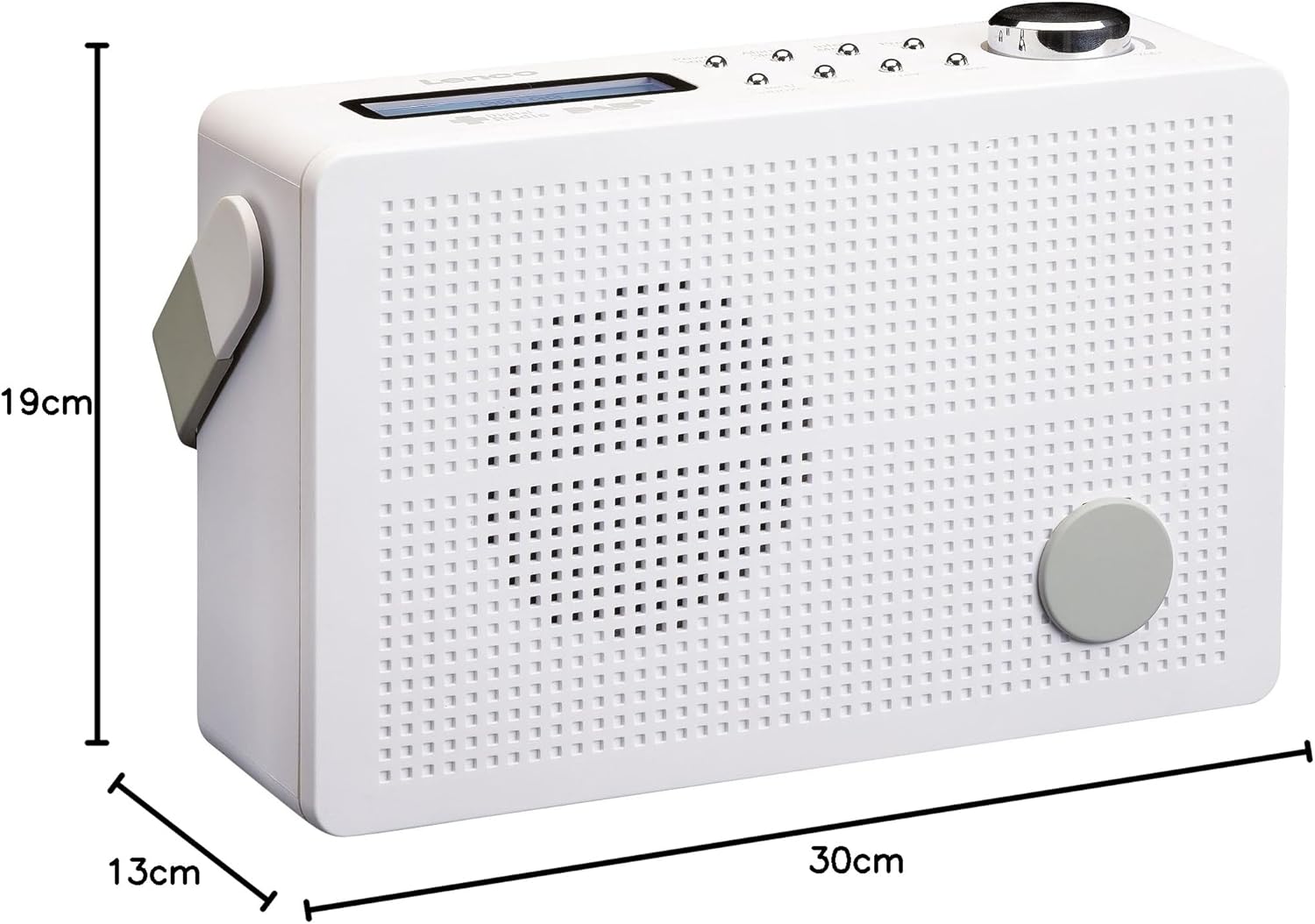
Figi 8.1: Lenco PDR-030 Dimensions.
| Karakteristik | Detay |
|---|---|
| Nimewo Modèl | PDR-030 |
| Tuner Teknoloji | DAB+, FM (Ukw) |
| Sous pouvwa | Battery-Powered (Integrated Lithium-ion), AC Adapter |
| AC Voltage | 220 Volt |
| Pwodwi Dimansyon (W x D x H) | 21.4 x 6.5 x 13.8 cm (approx. 22.5 x 8.5 x 15 cm as per another spec) |
| Pwa atik | 9 g (Note: This seems incorrect, likely 670g from description) |
| Kalite Materyèl | Plastik |
| Entèfas Materyèl | 3.5 mm Audio (Headphone Jack) |
| Karakteristik espesyal | Portable, RDS Display, Alarm Clock, Station Memory (10 DAB+, 10 FM) |
Note: Some dimensions and weight specifications provided by the manufacturer may vary slightly. The description states 670 grams for weight, while specifications list 9g. Please refer to the product packaging for the most accurate information.
9. Garanti ak sipò
Lenco products are designed for reliability and performance. This product typically comes with a 24-month manufacturer's warranty from the date of purchase, covering defects in materials and workmanship. Please retain your proof of purchase for warranty claims.
For technical support, service, or warranty inquiries, please refer to the contact information provided on the Lenco official website or your local retailer. Do not attempt to repair the device yourself.
Pou plis enfòmasyon, ou ka vizite Lenco Store on Amazon.