
Entwodiksyon
This manual provides comprehensive instructions for the setup, operation, and maintenance of your GPX Digital AM/FM Clock Radio, model C224B. Please read this manual thoroughly before using the device to ensure proper functionality and to maximize your user experience. Keep this manual for future reference.
Pwodwi souview
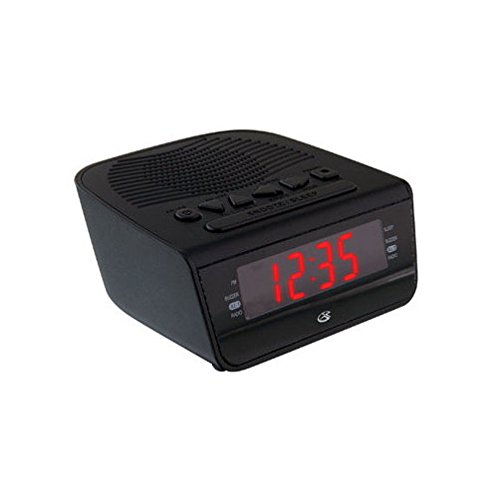
Figi 1: Devan view of the GPX Digital AM/FM Clock Radio. This image shows the compact black unit with its digital display and control buttons.
The GPX Digital AM/FM Clock Radio (C224B) is designed for reliable timekeeping and audio entertainment. Key features include a clear multi-display clock, AM/FM radio tuner, dual alarm functionality, and a battery backup option to ensure continuous operation during power interruptions. Its compact and modern design makes it suitable for various indoor settings.
Enstalasyon
1. Debake
Carefully remove the clock radio from its packaging. Ensure all components are present: the clock radio unit and the power adapter.
2. Koneksyon pouvwa
- Plug the power adapter into the DC input jack located on the back of the clock radio.
- Plug the other end of the power adapter into a standard wall outlet (AC 120V, 60Hz).
- The display will illuminate, indicating the unit is receiving power.
3. Enstalasyon batri backup (Si ou vle)
Pou pouvwa backup pandan outages, install batteries (not included).
- Jwenn konpatiman batri a anba aparèy la.
- Louvri kouvèti lòj batri a.
- Insert the required batteries (e.g., 2 x AAA, check unit for specific type) according to the polarity markings (+ and -).
- Fèmen kouvèti lòj batri a byen.
Nòt: Batteries are for backup only and will not power the display or radio functions continuously. They preserve time and alarm settings during a power interruption.
Enstriksyon Operasyon
1. Mete Tan an
- Peze epi kenbe la TAN SET bouton an jiskaske ekran an flache.
- Sèvi ak la LÈ epi MINIT bouton pou ajiste tan an.
- Peze TAN SET ankò pou konfime epi sòti nan mòd reglaj tan an.
2. Mete Alam yo (Alam 1 ak Alam 2)
This unit features dual alarms, allowing you to set two independent wake-up times.
- Peze epi kenbe la ALARM 1 SET (oswa ALARM 2 SET) button until the alarm time flashes.
- Sèvi ak la LÈ epi MINIT buttons to adjust the desired alarm time.
- Peze ALARM 1 SET (oswa ALARM 2 SET) again to confirm the time.
- Immediately after confirming the time, use the MOD ALARM button to select the alarm source: BUZZER or RADYO.
- The alarm icon (e.g., AL1 or AL2) will appear on the display, indicating the alarm is active.
To turn off an alarm, press the corresponding ALAM 1 ON/OFF (oswa ALAM 2 ON/OFF) button. The alarm icon will disappear.
3. Operasyon Radyo AM/FM
- Peze a RADYO ON/OFF bouton pou limen radyo a.
- Peze a BAND bouton pou chanje ant bann AM ak FM yo.
- Sèvi ak la TUNE + or MELODI - bouton yo pou w sintonize estasyon w vle a manyèlman.
- To automatically scan for the next available station, press and hold TUNE + or MELODI - pou kèk segond.
- Ajiste volim nan lè l sèvi avèk la VOLIM + or VOLIM - bouton.
- Pou fèmen radyo a, peze la RADYO ON/OFF bouton ankò.
4. Fonksyon repetisyon
Lè yon alam sonnen, peze bouton an SNOOZE bouton an pou fèmen alam lan tanporèman pou apeprè 9 minit. Alam lan ap sonnen ankò apre peryòd repetisyon an.
5. Fonksyon dòmi
Fonksyon dòmi an pèmèt radyo a jwe pou yon dire defini anvan li etenn otomatikman.
- Pandan radyo a ap jwe, peze bouton an DOMÒM Peze bouton an plizyè fwa pou chanje lè dòmi ki disponib yo (pa egzanp, 90, 60, 30, 15 minit, OFF).
- Radyo a ap etenn otomatikman apre lè yo chwazi a.
Antretyen
1. Netwayaj
To clean the unit, wipe the exterior with a soft, slightly damp cloth. Do not use abrasive cleaners or solvents, as these may damage the finish. Ensure the unit is unplugged before cleaning.
2. Ranplasman batri
If the battery backup function is not working, or if the unit loses time during a power outage, the backup batteries may need replacement. Follow the "Battery Backup Installation" steps in the Setup section to replace them.
Depanaj
| Pwoblèm | Kòz posib | Solisyon |
|---|---|---|
| Aparèy pa limen. | Adaptè kouran an pa konekte oswa priz la gen pwoblèm. | Ensure power adapter is securely plugged into the unit and a working wall outlet. Try a different outlet. |
| Alam lan pa sonnen. | Alam lan pa fikse, volim alam lan twò ba, oubyen alam lan etenn. | Verify alarm time and source (buzzer/radio) are set correctly. Ensure alarm is activated (icon visible). Increase radio volume if alarm source is radio. |
| Resepsyon radyo pòv. | Siyal fèb oswa entèferans. | Adjust the position of the unit or the antenna (if external). Move away from other electronic devices that may cause interference. |
| Tan/paramèt pèdi apre kouran an koupetage. | Pil backup yo mouri oswa yo pa enstale. | Install fresh backup batteries or replace existing ones. |
Espesifikasyon
- Modèl: C224B
- Sous pouvwa: AC 120V, 60Hz (main); Battery Powered (backup)
- Kalite ekspozisyon: Dirije Digital Display
- Gwoup Radyo: AM/FM
- Dimansyon (apeprè): 5.12" lajè x 5.12" wotè
- Pwa (Apeprè): 3 liv
- Koulè: Nwa
- Materyèl: Plastik
Garanti ak sipò
For warranty information or technical support, please refer to the warranty card included with your product or visit the official GPX website. Do not attempt to repair this unit yourself, as this may void your warranty.
GPX Official Websit: www.gpx.com