
Entwodiksyon
Thank you for choosing the KINGONE K5 Portable Wireless Bluetooth Speaker. This manual provides essential information for the proper setup, operation, and maintenance of your device. Please read it thoroughly before use to ensure optimal performance and longevity of your speaker.
Enfòmasyon sou Sekirite
- Pa ekspoze oratè a nan tanperati ekstrèm, limyè solèy dirèk, oswa imidite ki wo.
- Evite jete oswa soumèt oratè a nan gwo enpak.
- Pa demonte oswa eseye repare oratè a tèt ou. Sa ap anile garanti a.
- Keep the speaker away from water and liquids. While it is waterproof, prolonged submersion or exposure to high-pressure water jets should be avoided.
- Sèvi ak sèlman volim chaj espesifye atage (5V kouran dirèk).
Kontni pake
- KINGONE K5 Portable Wireless Bluetooth Speaker
- USB Chaje Kab
- Manyèl itilizatè
Pwodwi souview
Familyarize w ak kontwòl ak pò oratè a.
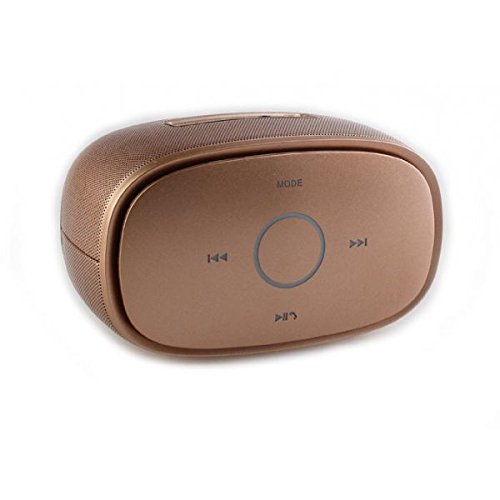
Imaj: Top view of the KINGONE K5 Portable Wireless Bluetooth Speaker. The image displays the speaker's top panel, which features a central circular play/pause button, surrounded by four other buttons: 'MODE' at the top, 'previous track' (left), 'next track' (right), and 'volume down/call answer' (bottom). The speaker has a metallic brown finish with a textured grille on the sides.
Bouton kontwòl:
- MOD: Press to switch between Bluetooth, AUX, and other available modes.
- Tras anvan an (<<): Kout peze pou ale nan tras anvan an.
- Pwochen tras la (>>): Kout peze pou ale nan pwochen track la.
- Jwe/Pòz (►▮▮): Press to play or pause music. Long press for power on/off.
- Volume Down/Call Answer (▼): Short press to decrease volume. During an incoming call, press to answer.
- Volume Up/Call End (▲): Short press to increase volume. During a call, press to end. (Note: Volume Up button is not explicitly visible in the provided image but is a standard function for such devices, assuming it's paired with Volume Down or integrated.)
Pò:
- Mikwo USB chaje Port: Pou chaje oratè a.
- Pò AUX-in: Pou koneksyon odyo ak fil.
Enstalasyon
1. Chaje Oratè a
- Connect the small end of the USB charging cable to the Micro USB port on the speaker.
- Connect the larger end of the USB cable to a USB power adapter (DC 5V, not included) or a computer's USB port.
- Limyè endikatè chaj la ap limen. Li pral etenn oswa chanje koulè yon fwa li fin chaje nèt.
- Yon chaj konplè pran apeprè 3-4 èdtan epi li bay jiska 7 èdtan lekti.
2. Powering On / Off
- Pou limen: Long press the Play/Pause button until you hear an audible prompt or see an indicator light.
- Pou etenn: Long press the Play/Pause button again until you hear an audible prompt or the indicator light turns off.
3. Pè Bluetooth
- Ensure the speaker is powered on and in Bluetooth mode. If not, press the 'MODE' button to switch to Bluetooth mode. The indicator light will flash, indicating it's ready for pairing.
- Aktive Bluetooth sou telefòn entelijan ou, tablèt ou, oswa lòt aparèy ki gen Bluetooth.
- Chèche pou available Bluetooth devices. You should see "KINGONE K5" in the list.
- Select "KINGONE K5" to connect. Once paired, you will hear a confirmation sound, and the indicator light will stop flashing and remain solid.
- Oratè a ap otomatikman eseye rekonekte ak dènye aparèy ki konekte a lè li limen.
4. Connecting via AUX (Audio Input)
- Konekte yon bout kab odyo 3.5mm (pa enkli) nan pò AUX-in ki sou oratè a.
- Connect the other end of the audio cable to the headphone jack of your audio device.
- The speaker will automatically switch to AUX mode, or you may need to press the 'MODE' button to select AUX.
Opere
Jwe Mizik
- Jwe/Poz: Peze bouton Lekti/Poz pou kòmanse oswa pran yon poz lekti.
- Pwochen Track: Press the Next Track (>>) button to skip to the next song.
- Track Previous: Press the Previous Track (<<) button to go back to the beginning of the current song or to the previous song.
- Kontwòl Volim: Use the Volume Down (▼) and Volume Up (▲) buttons on the speaker to adjust the volume. You can also control the volume from your connected device.
Rele men-gratis
Lè oratè a konekte via Bluetooth, ou ka itilize li pou apèl men lib.
- Reponn apèl: Press the Volume Down (▼) button once to answer an incoming call.
- Fini apèl: Press the Volume Up (▲) button once to end an ongoing call.
- Rejte apèl: Long press the Volume Down (▼) button to reject an incoming call.
Antretyen
Netwayaj
- Wipe the speaker with a soft, dry, or slightly damp twal.
- Pa sèvi ak pwodui netwayaj abrazif, alkòl, oswa solvan chimik.
Depo
- Sere oratè a nan yon kote ki fre epi sèk, lwen limyè solèy dirèk ak tanperati ekstrèm.
- Si w ap sere l pou yon peryòd pwolonje, chaje batri a detanzantan (pa egzanp, chak 3 mwa) pou kenbe l an bon eta.
Swen batri
- Evite dechaje batri a nèt souvan.
- Do not leave the speaker connected to a charger for excessively long periods after it is fully charged.
Depanaj
| Pwoblèm | Kòz posib | Solisyon |
|---|---|---|
| Oratè a pa limen. | Batri a fèb oswa li vid. | Chaje oratè a pou omwen 30 minit. |
| Pa ka asosye ak aparèy Bluetooth. | Speaker is not in pairing mode. Bluetooth is off on your device. Speaker is already connected to another device. | Ensure speaker is in Bluetooth pairing mode (flashing indicator). Turn on Bluetooth on your device. Disconnect from other devices or restart the speaker. |
| Pa gen son oswa volim nan ba. | Volume is too low on speaker or device. Incorrect mode selected. | Increase volume on both the speaker and your connected device. Press the 'MODE' button to select the correct input (Bluetooth/AUX). |
| Son deformation. | Volume too high. Device too far from speaker. | Reduce volume on speaker and/or device. Move the device closer to the speaker (within 10 meters). |
Espesifikasyon
- Non modèl: KINGONE K5
- Nimewo Modèl Atik: KNG006
- Teknoloji kominikasyon san fil: Bluetooth
- Bluetooth vèsyon: V2.0 (as per product title)
- Kalite oratè: Bookshelf (Portable)
- Gwosè Oratè: 2 pous
- Audio Sòti Mode: Stereo (2.0 Chanèl)
- Sous pouvwa: Battery Powered (Built-in Li-ion battery)
- Rated Voltage: DC 5V
- Repons frekans: 3dB
- Frequency Scope: 170-15KHz
- Metòd kontwòl: Manyen
- Enpèmeyab: Wi
- Lavi batri: Jiska 7 èdtan (apeprè)
- Aparèy konpatib: Smartphone, tablèt
Garanti ak sipò
For warranty information or technical support, please refer to the documentation provided at the time of purchase or contact your retailer. Keep your proof of purchase for warranty claims.