
1. Entwodiksyon
This manual provides essential instructions for the installation, operation, maintenance, and troubleshooting of your APC Smart-UPS SRT 3000VA RM 230V (SRT3000RMXLI). This Uninterruptible Power Supply (UPS) is designed to provide high-density, true double-conversion online power protection for critical electronic equipment, including servers, voice/data networks, medical labs, and light industrial applications. Please read this manual thoroughly before installing or operating the UPS to ensure proper and safe usage.
2. Enfòmasyon sou Sekirite
Observe all warnings and operating instructions in this manual. Failure to do so may result in injury or equipment damage. This UPS contains hazardous voltages. Do not attempt to disassemble the unit. There are no user-serviceable parts inside.
Sekirite jeneral
- UPS sa a fèt pou itilize andedan kay la sèlman.
- Pa opere UPS sa a nan limyè solèy la dirèk, an kontak ak likid, oswa kote ki gen twòp pousyè oswa imidite.
- Ensure the ventilation openings on the UPS are not blocked. Maintain adequate clearance around the unit for proper airflow.
- Connect the UPS power cable directly to a grounded wall outlet. Do not use extension cords or surge suppressors.
Sekirite batri
- Batteries are heavy. Remove the battery module before installing the UPS in a rack or tower configuration.
- Battery service should be performed or supervised by personnel knowledgeable of batteries and the required precautions.
- Pa jete pil nan dife. Batri yo ka eksploze.
- Pa louvri oswa detwi pil yo. Elektwolit lage se danjere pou po a ak je. Li ka toksik.
- Replace batteries with the same type and number of batteries as originally installed.
3. Pake kontni
Carefully unpack the unit and inspect for shipping damage. If any damage is found, notify the carrier and dealer. The package should contain the following items:
- APC Smart-UPS SRT 3000VA RM 230V (SRT3000RMXLI) unit
- Battery module (may be pre-installed or separate)
- Rack-mounting hardware (rails, brackets)
- Tower stand (for tower configuration)
- USB kominikasyon kab
- Serial kominikasyon kab
- CD dokimantasyon
- Safety information and warranty guide
4. Pwodwi souview
The APC Smart-UPS SRT 3000VA RM 230V is a high-performance Uninterruptible Power Supply designed to protect your critical equipment from power disturbances. It features a rack/tower convertible form factor for flexible deployment.
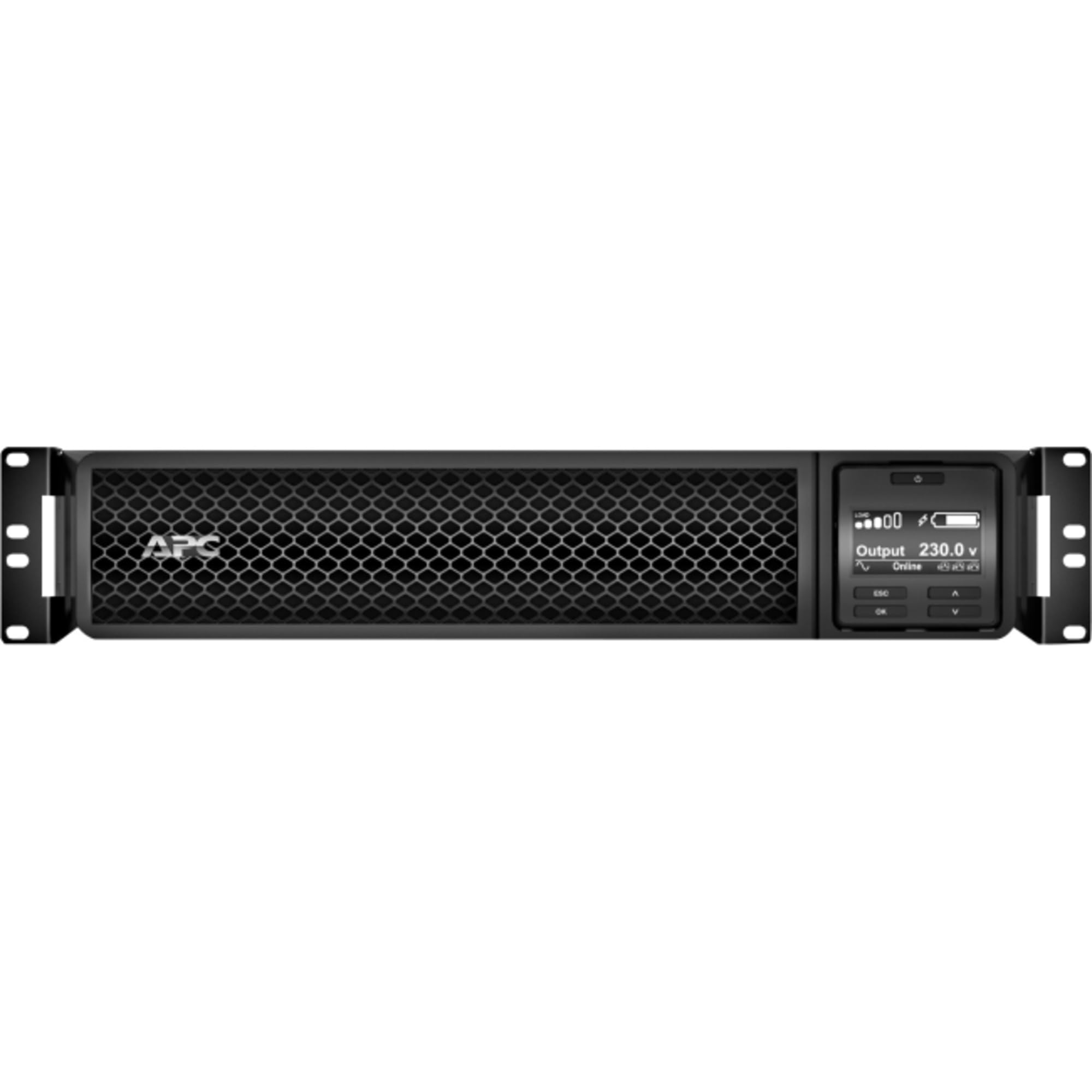
Figi 1: Devan view of the APC Smart-UPS SRT 3000VA RM 230V. This image displays the front panel with the LCD display, control buttons, and ventilation grilles.
Konpozan kle
- Front Panel LCD Display: Provides real-time status information, configuration options, and alarm notifications.
- Bouton kontwòl: Used to navigate the LCD menu, power on/off the UPS, and perform self-tests.
- Modil batri: Provides backup power during outages. Hot-swappable for easy replacement.
- Antre pouvwa Connector: Connects the UPS to the utility power source.
- Output Receptacles (IEC 320): Provide protected power to connected equipment.
- Communication Ports (USB, Serial): For connecting to a computer or network management card for monitoring and control.
- EPO (Emergency Power Off) Pò: Allows for remote emergency shutdown of the UPS.
5. Enstalasyon
Follow these steps for initial setup of your UPS.
Etap 1: Chwazi yon kote
- Place the UPS on a sturdy, level surface or install it in a standard 19-inch rack.
- Ensure the ambient temperature is between 0°C and 40°C (32°F and 104°F).
- Maintain at least 10 cm (4 inches) of clearance at the front and rear of the unit for proper ventilation.
Step 2: Install the Battery Module
If the battery module is not pre-installed, slide it into the battery bay until it clicks into place. Connect the battery cables as indicated by the labels.
Step 3: Connect to Utility Power
- Connect the UPS input power cord to a grounded 230V AC outlet.
- The UPS will perform a self-test and the LCD display will illuminate.
Etap 4: Konekte Ekipman
- Connect your critical equipment (servers, network devices, etc.) to the output receptacles on the rear of the UPS.
- Ensure the total load does not exceed the UPS capacity (3000VA / 2700W).
Step 5: Connect Communication Cables (Optional)
- Connect the USB or serial cable from the UPS to your computer or server for monitoring and graceful shutdown capabilities.
- Install the PowerChute software (available from APC website) on your computer for advanced management.
6. Fonksyonman UPS la
Alimente sou UPS la
Press and hold the power button on the front panel until you hear a beep. The UPS will start up and provide power to connected equipment.
Powering Off the UPS
Press and hold the power button until the UPS shuts down. Ensure all connected equipment is safely shut down before powering off the UPS.
LCD Display and Navigation
The LCD display provides detailed information about the UPS status, battery charge, load level, and various settings. Use the navigation buttons (up, down, enter, escape) to browse through the menus and adjust settings.
Tès pwòp tèt ou
Regularly perform a self-test to ensure the UPS battery and internal components are functioning correctly. This can typically be initiated via the LCD menu or PowerChute software.
7. Antretyen
Ranplasman batri
The UPS batteries have a typical lifespan of 3-5 years. The UPS will indicate when the batteries need replacement. Refer to the safety information before attempting battery replacement. Use only APC-approved replacement battery modules (APCRBC152).
Netwayaj
Clean the exterior of the UPS with a soft, damp cloth. Do not use solvents or abrasive cleaners. Ensure ventilation openings are free from dust and debris.
Konsiderasyon anviwònman an
Store the UPS in a cool, dry place when not in use. Avoid extreme temperatures and humidity, which can shorten battery life.
NAN. Depanaj
Seksyon sa a bay solisyon pou pwoblèm komen ou ka rankontre ak UPS ou a.
| Pwoblèm | Kòz posib | Solisyon |
|---|---|---|
| UPS la pa limen | No utility power; Battery not connected; UPS fault | Check power outlet; Ensure battery cables are connected; Contact APC support if fault persists. |
| UPS la ap bipe kontinyèlman | Sou pil; Twòp chaj; Pil fèb | Check utility power; Reduce connected load; Allow battery to recharge. |
| Batri pa chaje | Battery disconnected; Battery fault; Internal fault | Verify battery connection; Replace battery if faulty; Contact APC support. |
| Ekipman konekte pèdi pouvwa | UPS overload; Battery depleted; UPS fault | Reduce load; Allow battery to recharge; Contact APC support. |
9. Espesifikasyon
Detailed technical specifications for the APC Smart-UPS SRT 3000VA RM 230V (SRT3000RMXLI).
| Karakteristik | Detay |
|---|---|
| Nimewo Modèl | SRT3000RMXLI |
| Mak | APC |
| Kapasite | 3000 VA / 2700 Watt |
| Antre Voltage | 230 Volts |
| Sòti Voltage | 230 Volts |
| Faktè fòm | Rack/Tower Convertible (2U) |
| Kalite batri | Asid plon |
| Typical Runtime (Full Load) | Apeprè 4 minit |
| Kantite plòg | 8 x IEC 320 C13, 2 x IEC 320 C19 |
| Pò kominikasyon | USB, Serial (RJ45), SmartSlot |
| Dimansyon (H x W x P) | 8.5 cm x 43.2 cm x 63.5 cm (3.35 pous x 17.0 pous x 25.0 pous) |
| Pwa | 31.3 kg (69 liv) |
| Koulè | Nwa |
10. Garanti ak sipò
Enfòmasyon sou Garanti
APC provides a standard warranty for this product. Please refer to the warranty card included in your package or visit the official APC websit la pou wè kondisyon garanti detaye espesifik pou rejyon ou an. Kenbe prèv acha ou pou reklamasyon garanti.
Sipò teknik
For technical assistance, troubleshooting beyond this manual, or to inquire about replacement parts, please contact APC customer support. Support contact information can typically be found on the APC website or in the documentation provided with your unit. When contacting support, please have your model number (SRT3000RMXLI) and serial number ready.