
1. Entwodiksyon
Thank you for choosing the Kaidi KD-766 Gaming Headset. This manual provides essential information for the proper setup, operation, and maintenance of your new headset. Please read it thoroughly before use to ensure optimal performance and longevity of the product.
2. Enfòmasyon sou Sekirite
- Evite koute mizik pandan lontan ak gwo volim pou anpeche domaj nan zòrèy ou.
- Pa ekspoze kas ekoutè a nan tanperati ekstrèm, imidite, oswa sibstans koroziv.
- Kenbe aparèy la lwen dlo ak lòt likid.
- Pa eseye demonte oswa modifye kas ekoutè a. Sa ap anile garanti a.
- Clean the headset with a soft, dry cloth only.
3. Pake kontni
Asire w tout atik yo prezan nan pakè a:
- Kaidi KD-766 Gaming Headset
- Manyèl Itilizatè (dokiman sa a)

Image: Retail box of the Kaidi KD-766 Gaming Headset, showing the headset with RGB lighting and the model number KD-766.
4. Pwodwi souview
Familiarize yourself with the components of your KD-766 Gaming Headset.
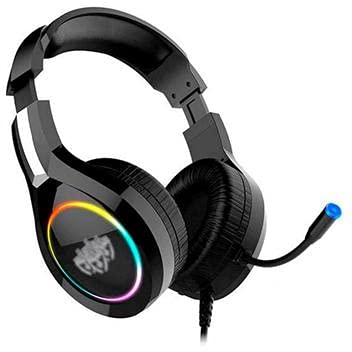
Image: The Kaidi KD-766 Gaming Headset, featuring over-ear cups, an adjustable headband, and a flexible boom microphone.
- Bando reglabl: Pou yon anfòm konfòtab.
- Kouvèti zòrèy rembourré: Over-ear design for sound isolation and comfort.
- Flexible Boom Microphone: Adjustable for clear voice communication.
- Kontwòl remote sou liy: Pou ajisteman volim ak pou mete mikwofòn nan silans.
- 3.5mm Audio Jack (P2): Pou antre/soti odyo.
- Konektè USB: For powering LED lighting.
5. Enstriksyon Enstalasyon
5.1 Connecting to a PC/Console
- Audio Koneksyon: Locate the 3.5mm audio jack (P2) on your computer or gaming console. Plug the 3.5mm connector from the headset into this port. Ensure it is fully inserted.
- USB Power (for LED): If your headset features LED lighting, plug the USB connector into an available USB port on your computer or console. This provides power for the lighting effects.
- Enstalasyon Mikwofòn: If your device has separate audio and microphone jacks, you may need a Y-splitter adapter (not included) to use both the headset audio and microphone simultaneously with a single 3.5mm combo jack. For devices with separate ports, plug the 3.5mm audio jack into the headphone port and the microphone jack (if separate) into the microphone port. The KD-766 typically uses a single 3.5mm jack for audio and mic, plus a USB for LED.
- Ajiste Anviwònman: After connecting, go to your device's sound settings to ensure the headset is selected as the default audio output and input device. Adjust volume levels as needed.
6. Operasyon Enstriksyon
6.1 Kontwòl Volim
Use the in-line remote control on the headset cable to adjust the volume. Rotate the volume wheel up to increase volume and down to decrease it.
6.2 Itilizasyon Mikwofòn
Position the flexible boom microphone approximately 2-3 cm (1 inch) from your mouth for optimal voice clarity. Use the microphone mute switch on the in-line remote to quickly turn the microphone on or off.
6.3 dirije ekleraj
The LED lighting on the earcups will illuminate automatically when the USB connector is plugged into a powered USB port. There are no user-adjustable controls for the LED lighting.
7. Antretyen
- Netwayaj: Wipe the headset with a soft, dry, lint-free cloth. Do not use liquid cleaners or aerosols.
- Depo: Store the headset in a cool, dry place when not in use. Avoid direct sunlight and extreme temperatures.
- Swen kab: Evite pliye byen file oswa rale kab yo twòp pou anpeche yo domaje.
NAN. Depanaj
| Pwoblèm | Kòz posib | Solisyon |
|---|---|---|
| Pa gen son nan kask. | Headset not properly connected. Volume too low. Incorrect audio output selected. | Ensure the 3.5mm jack is fully inserted. Increase volume using the in-line control and your device's settings. Check your device's sound settings and select the headset as the default output. |
| Mikwofòn pa mache. | Microphone muted. Incorrect audio input selected. | Check the microphone mute switch on the in-line remote. Ensure the headset microphone is selected as the default input device in your device's sound settings. |
| Limyè LED yo pa mache. | USB connector not plugged in or not receiving power. | Ensure the USB connector is securely plugged into a powered USB port. Try a different USB port. |
| Kalite son pòv. | Loose connection. Audio source issue. | Check all connections. Test the headset with another device to rule out an issue with the audio source. |
9. Espesifikasyon
| Mak: | Kaidi |
| Modèl: | KD-766 |
| Plasman Zòrèy: | Circum-aural (Over-ear) |
| Kontwòl bri: | Izolasyon son |
| Sansiblite: | 108 dB |
| Gamme frekans: | 20Hz - 20kHz |
| Koneksyon Teknoloji: | Branche |
| Antre kask: | 3.5mm Jack |
| Aparèy konpatib: | Desktops, Notebooks, Gaming Consoles |
| Metòd kontwòl: | Kontwòl a distans (an liy) |
10. Garanti ak sipò
For warranty information and technical support, please refer to the warranty card included with your product or contact your local Kaidi distributor or retailer. Keep your proof of purchase for warranty claims.