
Denso BHT-825Q
Denso BHT-825Q Handy Terminal Mobile Computer User Manual
Model: BHT-825Q
Entwodiksyon
This manual provides essential information for the safe and efficient operation of your Denso BHT-825Q Handy Terminal Mobile Computer. Please read this manual thoroughly before using the device and keep it for future reference. The BHT-825Q is a robust mobile computer designed for data capture, featuring a 2D imager, a 2.6-inch color screen, and a 27-key keypad, running on a basic operating system.
Pwodwi souview
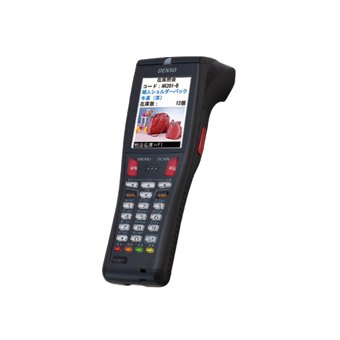
Figi 1: Denso BHT-825Q Handy Terminal Mobile Computer. This image displays the front view of the device, showing its ergonomic design, the 2.6-inch color screen, and the 27-key alphanumeric keypad. The device is black with red accents on some keys.
The Denso BHT-825Q is engineered for reliable performance in various data collection environments. Its key features include:
- Basic OS: Optimized for efficient data processing.
- Batch/IrDA Communication: Pou transfè done.
- Imager 2D: Capable of reading various 1D and 2D barcodes.
- 27 kle: A comprehensive keypad for data entry and navigation.
- Ekran koulè 2.6-pous: Provides clear display of information.
Enstalasyon
1. Chaje batri a
Before initial use, fully charge the device's battery. Connect the charging cable to the charging port on the device and plug the adapter into a power outlet. The charging indicator light will typically show the charging status.
2. Powering On / Off
- Pou limen: Peze epi kenbe bouton Pouvwa a (anjeneral li sitiye sou bò a oswa anlè) jiskaske ekran an limen.
- Pou etenn: Press and hold the Power button until a power-off menu appears, then select "Power Off" or "Shut Down".
3. Inisyal Konfigirasyon
Upon first power-on, you may be prompted to set basic configurations such as date, time, and language. Follow the on-screen instructions to complete these settings.
Opere Aparèy la
1. Navigasyon Entèfas la
Use the directional keys (up, down, left, right) and the Enter key to navigate through menus and select options on the 2.6-inch color screen. The keypad allows for alphanumeric input.
2. Eskane kòd bar
- Point the 2D imager at the barcode you wish to scan.
- Peze bouton deklanchman eskanè a (anjeneral li sitiye sou kote aparèy la).
- Ensure the barcode is within the imager's field of view. A successful scan will usually be indicated by an audible beep or a visual confirmation on the screen.
3. Data Entry
Utilize the 27-key keypad for manual data input. The keys include numbers, letters, and function keys. Refer to the on-screen prompts for specific data entry requirements within applications.
4. Data Transfer (Batch/IrDA)
The BHT-825Q supports batch data transfer and IrDA (Infrared Data Association) communication. Consult your system administrator or application guide for specific instructions on how to transfer collected data to a host system.
Antretyen
1. Netwaye Aparèy la
- Sèvi ak yon ti moso twal mou, ki san pèl dampened with water or a mild, non-abrasive cleaning solution to wipe the exterior of the device.
- Pa sèvi ak pwodui chimik ki fò, solvang, oswa pwodui netwayaj abrazif.
- Ensure no liquid enters the device's ports or openings.
- For the imager window, use a lens cleaning cloth to avoid scratches.
2. Swen batri
- Evite dechaje batri a nèt souvan.
- Sere aparèy la nan yon kote ki fre epi sèk lè w pa itilize li pou yon bon bout tan.
- Use only Denso-approved charging accessories.
3. Mizajou lojisyèl
Periodically check with your system administrator or Denso support for available software or firmware updates to ensure optimal performance and security.
Depanaj
| Pwoblèm | Kòz posib | Solisyon |
|---|---|---|
| Aparèy pa limen. | Batri ki fèb oswa ki vid. | Charge the battery for at least 30 minutes. Ensure the charger is properly connected. |
| Barcode not scanning. | Barcode damaged or poor quality; Imager lens dirty; Incorrect scanning angle. | Try scanning a different barcode. Clean the imager lens. Adjust the scanning angle and distance. Ensure the barcode symbology is enabled. |
| Ekran an vid oswa li bloke. | Software error; Device crash. | Perform a soft reset (refer to device documentation for specific key combination, often holding power button for 10+ seconds). If issue persists, contact support. |
| Pwoblèm transfè done. | Incorrect settings; Connection problem. | Verify communication settings (e.g., IrDA alignment). Check cables if using a cradle. Consult your system administrator. |
If the problem persists after attempting these solutions, please contact Denso customer support.
Espesifikasyon
| Karakteristik | Detay |
|---|---|
| Nimewo Modèl | BHT-825Q |
| Sistèm operasyon | Basic OS |
| Kalite Imajè | Imager 2D |
| Klavye | 27 kle |
| Ekspozisyon | 2.6-pous ekran koulè |
| Kominikasyon | Batch/IrDA |
| Dimansyon pake | 12 x 6 x 4 pous |
| Pwa atik | 1 liv |
| Manifakti | Denso |
| Dat Premye Disponib | 14 septanm 2016 |
Garanti ak sipò
Enfòmasyon sou Garanti
The Denso BHT-825Q Handy Terminal Mobile Computer is covered by Denso's standard limited warranty. Please refer to the warranty card included with your product or visit the official Denso websit la pou wè kondisyon detaye konsènan pwoteksyon garanti a, dire a, ak pwosedi pou fè reklamasyon yo.
Sipò pou Kliyan
For technical assistance, troubleshooting beyond this manual, or service inquiries, please contact Denso customer support:
- Websit: Visit the official Denso websit pou resous sipò, FAQ, ak fòm kontak.
- Telefòn: Refer to the Denso websit pou nimewo telefòn sipò rejyonal yo.
- Imèl: Specific email contacts may be available on the Denso support page.
When contacting support, please have your product model number (BHT-825Q) and serial number ready.
Ask a question about this manual
Ask about setup, troubleshooting, compatibility, parts, safety, or missing instructions. Manuals+ will review the question and use this page’s manual context to help answer it.