
1. Entwodiksyon
Thank you for choosing the Baseus Encok S16 Neck Hung Bluetooth Wireless In-Ear Earphone. This manual provides detailed instructions for setup, operation, and maintenance to ensure optimal performance and longevity of your device. Please read this manual thoroughly before use.
2. Pake kontni
Verifye ke tout atik yo prezan nan pakè a:
- 1 x Baseus Encok S16 Wireless Earphone
- 1 x kab chaje
- 1 x manyèl itilizatè
- 1 x kat garanti

Image: Contents of the Baseus Encok S16 earphone package, showing the earphones, charging cable, user manual, and warranty card.
3. Pwodwi souview
The Baseus Encok S16 earphones feature a neck-hung design for comfortable and secure wear. Key features include:
- fiksasyon mayetik: Earbuds can be magnetically joined when not in use, preventing tangling and loss.
- Adjustable Coils: The earphone line length can be adjusted by sliding for a customized fit.
- Son Segondè Fidelite: Equipped with a dynamic speaker unit, composite diaphragm, and independent tune trope structure for clear audio.
- Pouvwa efikas: Utilizes a British CSR chip and 120mAh battery for low power consumption and extended battery life.
- Inivèsèl konpatibilite: Smartly matches with smartphones and tablet PCs, compatible with all Bluetooth 4.0 enabled devices.

Image: Close-up of the Baseus Encok S16 earbuds demonstrating their magnetic connection capability.
4. Enstalasyon
4.1 Chaje ekoutè yo
- Connect the provided charging cable to the charging port on the earphone's control unit.
- Konekte lòt bout kab chaje a nan yon sous kouran USB (pa egzanp, yon pò USB òdinatè, yon adaptè USB nan miray).
- The indicator light will illuminate during charging and turn off or change color when fully charged.
- A full charge typically takes approximately 1.5 to 2 hours.
4.2 Bluetooth Pairing
- Asire w ke ekoutè yo byen chaje.
- Press and hold the Power button on the control unit until the indicator light flashes red and blue alternately, indicating pairing mode.
- Sou telefòn entelijan ou oswa aparèy ki gen Bluetooth, ale nan paramèt Bluetooth yo.
- Chèche pou available devices and select "Baseus Encok S16" from the list.
- Once connected, the indicator light will flash blue slowly or turn solid blue.
- Si yo mande w yon modpas, antre "0000".
5. Operasyon Enstriksyon
5.1 Kontwòl debaz yo
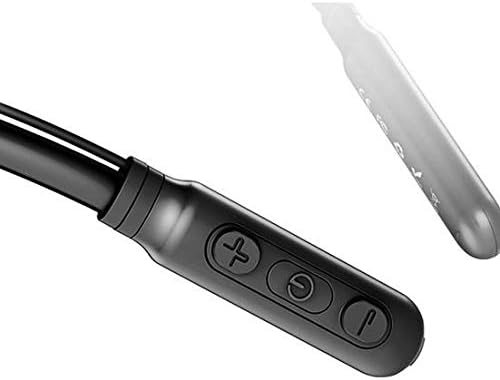
Image: Close-up of the Baseus Encok S16 earphone's inline control unit, showing the power/multi-function button, volume up, and volume down buttons.
| Bouton | Fonksyon |
|---|---|
| Bouton Pouvwa (Sant) |
|
| Volim monte (+) |
|
| Volim Dawonn (-) |
|
5.2 Mete ekoutè yo
Place the neckband around your neck, ensuring the control unit is easily accessible. Insert the earbuds comfortably into your ears. Adjust the earphone line length using the sliding coils for a secure and comfortable fit.
6. Antretyen
- Clean the earbuds and control unit regularly with a soft, dry cloth.
- Avoid exposing the earphones to extreme temperatures, humidity, or corrosive liquids.
- Store the earphones in a cool, dry place when not in use. The magnetic earbuds can help prevent tangling during storage.
- Pa eseye demonte oswa repare kas ekoutè yo tèt ou, paske sa ap anile garanti a.
NAN. Depanaj
| Pwoblèm | Solisyon |
|---|---|
| Pa ka limen | Ensure the earphones are fully charged. Press and hold the Power button for 3 seconds. |
| Pa ka konekte ak aparèy la |
|
| Pa gen son oswa volim ki ba |
|
| Koneksyon tanzantan |
|
8. Espesifikasyon
| Karakteristik | Detay |
|---|---|
| Mak | Baseus |
| Nimewo Modèl | FWP-E-S16 |
| Koneksyon Teknoloji | Bluetooth |
| Bluetooth vèsyon | 4.0 (compatible with devices enabling Bluetooth 4.0) |
| Faktè fòm | In Ear, Neck Hung |
| Kalite kontwòl | Voice Control, Touch (via buttons) |
| Kapasite batri | 120mAh |
| Pwa | 30 gram |
| Konpozan ki enkli | Wireless Earphone, Charging Cable, User Manual, Warranty Card |
9. Garanti ak sipò
This product comes with a Limited Warranty. Please refer to the included Warranty Card for detailed terms and conditions regarding coverage and duration.
For technical support or warranty claims, please contact your retailer or visit the official Baseus websit entènèt pou jwenn enfòmasyon sou sèvis kliyan.
Nimewo Idantifikasyon Komès Mondyal (GTIN): 06953156264489