
Entwodiksyon
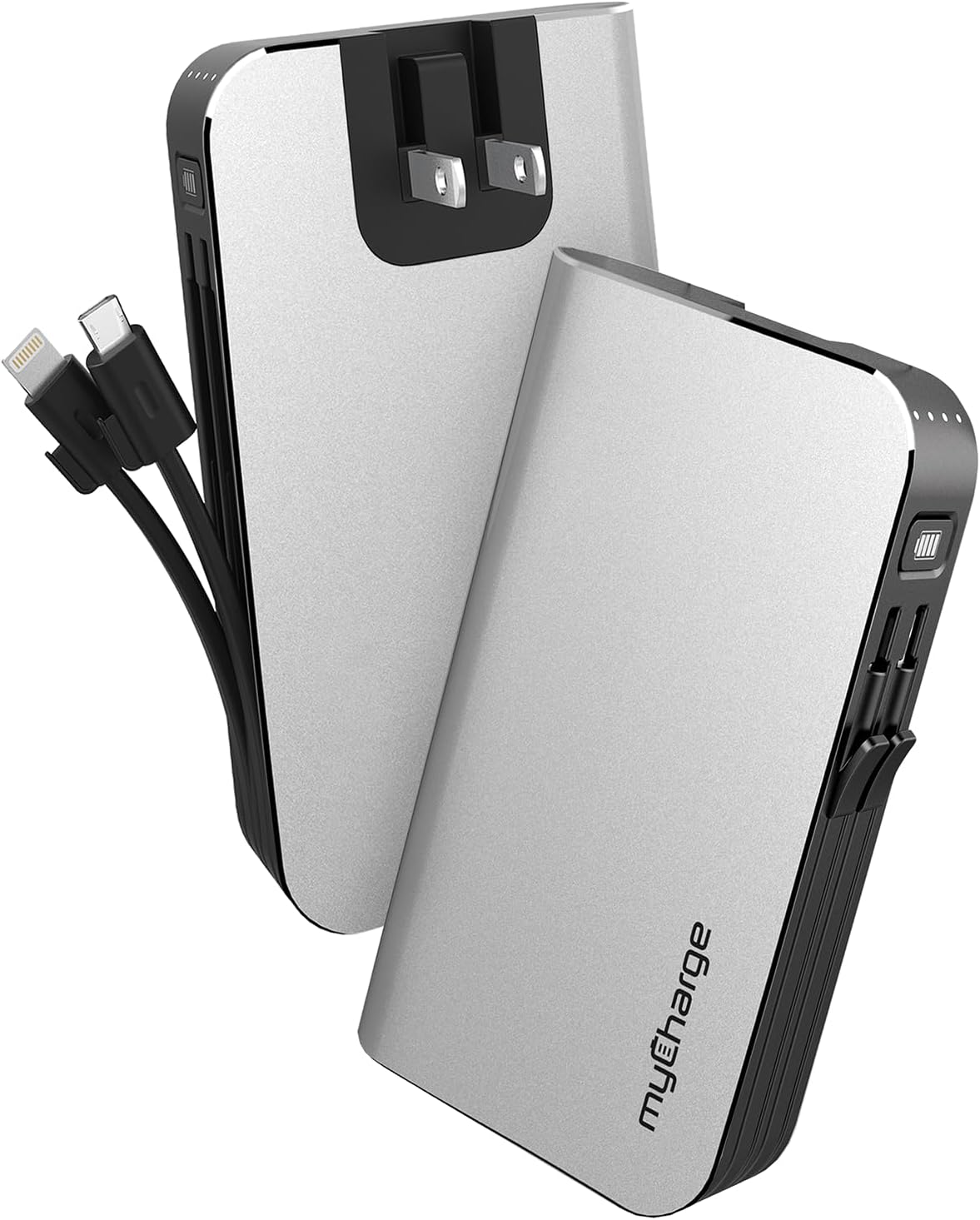
The myCharge HubMax portable charger, model HB10V, is a versatile power bank designed to provide on-the-go power for your mobile devices. It features a 10050mAh internal battery, integrated Lightning and Micro USB charging cables, and a built-in wall plug for convenient recharging of the power bank itself. This manual provides instructions for the proper use and care of your HubMax charger.
Enstalasyon
Initial Charging of the HubMax
Before first use, fully charge your myCharge HubMax. The device features a foldable wall plug for direct connection to a standard AC outlet.
- Locate the foldable wall prongs on the side of the HubMax.
- Flip out the prongs and plug the HubMax directly into a wall outlet.
- The LED indicators on the device will illuminate to show the charging status. A full recharge typically takes approximately 4.6 hours.
- Once fully charged, unplug the device and fold the prongs back into the unit for storage.
Enstriksyon Operasyon
Chaje Aparèy mobil yo
The HubMax allows you to charge up to three devices simultaneously using its built-in cables and USB-A port.
- Sèvi ak kab entegre: Extend the integrated Lightning cable for Apple devices or the Micro USB cable for compatible Android and other devices. Connect the appropriate cable to your device's charging port.
- Sèvi ak pò USB-A a: For devices requiring a different cable type (e.g., USB-C), connect your device's standard USB charging cable to the USB-A output port on the HubMax.
- The HubMax will automatically begin charging your connected device(s). The LED indicators will show the remaining battery capacity of the HubMax.
- For optimal charging speed, ensure your device is compatible with Power Delivery or Quick Charge 3.0 standards, which the HubMax supports for faster charging (up to 2.4x faster than standard chargers).


Antretyen
Proper maintenance ensures the longevity and optimal performance of your myCharge HubMax.
- Netwayaj: Sèvi ak yon twal mou, sèk pou netwaye eksteryè aparèy la. Evite itilize pwodwi chimik piman bouk oswa materyèl abrazif.
- Depo: Store the HubMax in a cool, dry place away from direct sunlight and extreme temperatures.
- Swen batri: Pou pi bon sante batri a, evite dechaje bank pouvwa a nèt souvan. Rechaje li lè nivo batri a ba.
- Swen kab: Handle the built-in cables gently. Avoid excessive bending or pulling to prevent damage.
Depanaj
If you encounter issues with your myCharge HubMax, refer to the following common solutions:
- HubMax Not Charging:
- Ensure the wall plug is fully extended and securely inserted into a working AC outlet.
- Tcheke si priz la ap fonksyone lè w branche yon lòt aparèy ladan l.
- Device Not Charging from HubMax:
- Verify that the HubMax itself has sufficient charge (check LED indicators).
- Ensure the built-in cables or your external USB cable are securely connected to both the HubMax and your device.
- Eseye yon lòt kab oswa aparèy pou izole pwoblèm nan.
- Chaje dousman:
- Ensure your device is compatible with fast charging protocols supported by the HubMax.
- Evite sèvi ak aparèy ou a twòp pandan l ap chaje, paske sa ka ralanti pwosesis chaje a.
Espesifikasyon
| Karakteristik | Detay |
|---|---|
| Nimewo Modèl | HB10V |
| Mak | myCharge |
| Kapasite batri | 10050mAh (Lityòm Polymè) |
| Dimansyon pwodwi | 0.9 x 2.8 x 4.6 pous |
| Pwa atik | 3.53 ons |
| Kalite Connector | Built-in Lightning Cable, Built-in Micro USB, USB-A Output Port |
| Karakteristik espesyal | Built-in Wall Plug, Integrated Cables |
| Tan rechaje | Approximately 4.6 hours (via wall plug) |
Garanti ak sipò
For warranty information and customer support, please refer to the official myCharge websit la oubyen kontakte sèvis kliyan yo dirèkteman. Kenbe prèv acha ou a pou nenpòt reklamasyon garanti.
Manifakti: myCharge
Pou plis asistans, vizite: www.mycharge.com