
Entwodiksyon
This manual provides essential instructions for the installation, operation, and maintenance of your LiftMaster 41A5273-1 Security Multi-Function Wall Control Panel. Please read this manual thoroughly before attempting to install or operate the device to ensure proper function and safety.
Pwodwi souview
The LiftMaster 41A5273-1 is a multi-function wall control panel designed for use with LiftMaster garage door openers operating at 390MHz. It provides convenient control over your garage door and its integrated lighting system.
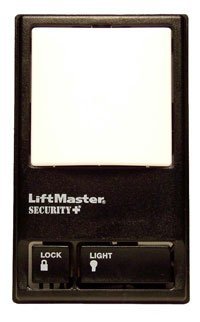
Image showing the LiftMaster 41A5273-1 Security Multi-Function Wall Control Panel, typically mounted on a wall, featuring buttons for garage door operation, light control, and a lock function.
Karakteristik kle:
- 390 MHz compatibility with LiftMaster garage door openers.
- Multi-function control for garage door operation.
- Integrated light control features.
- Lock feature for enhanced security.
Enstalasyon ak Enstalasyon
Proper installation is crucial for the safe and reliable operation of your wall control panel. It is recommended to consult the full installation guide provided with your garage door opener or seek professional assistance if you are unsure about any steps.
Etap Jeneral Enstalasyon:
- Sekirite Premye: Disconnect power to the garage door opener before beginning installation.
- Kote montaj: Choose a convenient location within sight of the garage door, at least 5 feet (1.5 meters) above the floor to keep it out of reach of small children.
- Fil elektrik: Connect the wall control panel to the garage door opener's terminal block using low-voltage wire. Ensure correct polarity if specified by your opener's manual.
- Montaj sekirite: Mount the panel securely to the wall using the provided screws.
- Retabli pouvwa: Rekonekte kouran nan ouvè pòt garaj la.
- Tès: Test the wall control panel's functions (door operation, light control, lock feature) to ensure it is working correctly.
Note: This panel is designed for 390MHz LiftMaster garage door openers. Compatibility with other frequencies or brands is not guaranteed.
Enstriksyon Operasyon
Once installed, the LiftMaster 41A5273-1 wall control panel provides intuitive control over your garage door system.
Fonksyon:
- Garage Door Operation: Press the main button to open or close the garage door. Pressing it again during operation will stop the door.
- Kontwòl limyè: The light button allows you to turn the garage door opener's light on or off independently of the door operation. The light will also activate automatically when the door is operated.
- Karakteristik fèmen: The lock button disables all remote controls and wireless keypads, preventing unauthorized access. The garage door can still be operated using the wall control panel. To deactivate the lock feature, press the lock button again.
Antretyen
The LiftMaster 41A5273-1 wall control panel requires minimal maintenance to ensure long-term performance.
- Netwayaj: Periodically wipe the surface of the control panel with a soft, dry cloth. Avoid using abrasive cleaners or solvents.
- Enspeksyon: Detanzantan, tcheke koneksyon fil elektrik yo pou asire yo byen fèm.
- Kondisyon anviwònman: Ensure the panel is not exposed to excessive moisture or extreme temperatures, which can affect its electronic components.
Depanaj
If you encounter issues with your wall control panel, try the following troubleshooting steps:
- Panèl la pa reponn:
- Check if the garage door opener has power.
- Inspect the wiring connections at both the wall control panel and the garage door opener for loose or damaged wires.
- Ensure the "Lock" feature is not activated.
- Remote Controls Not Working:
- Verify that the "Lock" feature on the wall control panel is not engaged.
- Check the batteries in your remote controls.
- Reprogram your remote controls if necessary, following the instructions for your specific garage door opener model.
- Limyè a pa fonksyone:
- Check the light bulb in the garage door opener.
- Ensure the light button on the wall control panel is pressed.
If problems persist after attempting these steps, contact LiftMaster customer support or a qualified garage door technician.
Espesifikasyon
| Nimewo Modèl: | 41A5273-1 |
| Mak: | LiftMaster |
| Manifakti: | Gwoup la Chamberlain |
| Frekans: | 390 MHz |
| Koulè: | Nwa |
| Style: | Modèn |
| Kantite pake atik: | 1 |
| Batri obligatwa: | Non |
| Dat premye disponib: | 19 out 2016 |
Garanti ak sipò
Specific warranty details for the LiftMaster 41A5273-1 Security Multi-Function Wall Control Panel are not provided in this document. For warranty information, technical support, or to purchase replacement parts, please visit the official LiftMaster websit la oubyen kontakte sèvis kliyan yo dirèkteman.
Ou ka souvan jwenn resous sipò, FAQ, ak enfòmasyon pou kontakte sou sit entènèt manifakti a. websit: www.liftmaster.com


