
UNIC UC46 IDSP-011
Manyèl Itilizatè Mini Pwojektè UNIC UC46 la
Model: UC46 IDSP-011
1. Entwodiksyon
This user manual provides detailed instructions for the operation, setup, and maintenance of your UNIC UC46 Mini Projector. Please read this manual thoroughly before using the product to ensure proper and safe operation. Keep this manual for future reference.
Enfòmasyon sou Sekirite
- Pa gade dirèkteman nan lantiy pwojektè a lè l ap limen.amp se sou.
- Ensure proper ventilation around the projector to prevent overheating. It is recommended to rest the projector after 4-5 hours of continuous operation.
- Kenbe pwojektè a lwen dlo oswa nenpòt likid.
- Sèvi sèlman ak adaptè kouran ki vini ak pwojektè a.
- Pa eseye demonte oswa repare pwojektè a tèt ou. Kontakte pèsonèl sèvis kalifye pou asistans.
- This projector is designed for home entertainment and is not suitable for professional teaching, meetings, or business presentations.
2. Pwodwi Features
- Konsepsyon pòtab: Compact and lightweight, ideal for home use, camping, and outdoor parties.
- Segondè klète: 1200 lumens LED lamp for clear and vibrant images.
- Rezolisyon natif natal: 800x480 pixels, supporting up to 1920x1080 (Full HD) via input.
- Gwo gwosè pwojeksyon: Projects images from 34 to 130 inches.
- Opsyon Koneksyon miltip: HDMI, VGA, USB, AV, SD Card, and IR.
- Koneksyon Wireless: Supports WiFi, Miracast, and DLNA for seamless smartphone integration (iOS, Android, Windows).
- Long lavi ki ap dirije: Lamp lavi apeprè 20,000 èdtan.
3. Pake kontni
Tanpri tcheke kare a pou atik sa yo:
- UNIC UC46 Mini Projector
- Pouvwa kab
- 3-an-1 AV kab
- Kontwòl Remote
- Manyèl Itilizatè (dokiman sa a)
4. Pwodwi souview
Familiarize yourself with the different parts and controls of your UNIC UC46 Mini Projector.
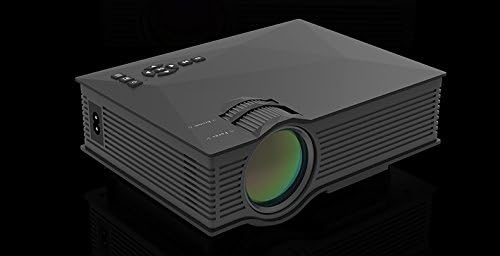
Figi 4.1: Devan ak sou kote View of the UNIC UC46 Mini Projector. Shows the main lens, focus wheel, and ventilation grilles.

Figi 4.2: Dèyè View of the Projector. Displays various input ports including HDMI, USB, AV, SD card slot, and audio output.

Figi 4.3: Top View of the Projector. Shows the control panel buttons for navigation, power, and input selection.

Figure 4.4: Lens Focus and Keystone Adjustment Diagram. Illustrates the location of the lens focus and keystone correction wheels, along with a diagram of the remote control functions.
5. Enstalasyon
5.1 Plasman
Place the projector on a stable, flat surface. Ensure there is adequate space around the projector for ventilation. The projection distance will determine the screen size. Refer to the specifications for recommended distances.
5.2 Koneksyon pouvwa
- Connect the power cable to the projector's AC power input port.
- Plug the other end of the power cable into a standard electrical outlet (100-240V, 50/60Hz).
- Limyè endikatè pouvwa a sou pwojektè a ap limen.
5.3 Premye pouvwa sou
- Press the Power button on the projector or the remote control to turn on the device.
- The projector will display the startup screen.
5.4 Ajisteman Imaj
- Konsantre: Rotate the focus wheel (located near the lens) until the projected image is clear and sharp.
- Koreksyon Keystone: If the image appears trapezoidal, adjust the keystone correction wheel (usually next to the focus wheel) to square the image.
6. Operasyon Enstriksyon
6.1 Konekte Aparèy
The UNIC UC46 projector supports various input sources:
- HDMI: Connect a PC, laptop, DVD player, game console (PS3, PS4), or Smart TV box using an HDMI cable. Select "HDMI" as the input source.
- VGA: Connect a PC or laptop using a VGA cable. Select "VGA" as the input source.
- USB: Mete yon kle USB pou li medya yo files (videos, photos, music, text). Select "USB" as the input source and navigate through the files.
- DE: Use the included 3-in-1 AV cable to connect devices with AV output (e.g., older DVD players, VCRs). Select "AV" as the input source.
- Kat SD: Insert an SD card into the slot to play media files. Select "SD" as the input source.
6.2 Wireless Connectivity (WiFi)
The projector supports WiFi connectivity for screen mirroring from smartphones (iOS, Android, Windows) and DLNA.
- Go to the "WiFi" or "Wireless" menu on the projector.
- Select your WiFi network and enter the password to connect the projector to your home network.
- For screen mirroring (Miracast/AirPlay):
- Ensure your smartphone and the projector are connected to the same WiFi network.
- On your smartphone, enable screen mirroring (e.g., "Screen Mirroring," "Smart View," "AirPlay," "Wireless Display").
- Chwazi pwojektè a nan lis aparèy ki disponib yo.
- For DLNA:
- Ensure your smartphone and the projector are connected to the same WiFi network.
- Use a DLNA-compatible app on your smartphone to stream media to the projector.
6.3 Sòti odyo
The projector has a built-in speaker. For enhanced audio, you can connect external speakers or a sound system via the 3.5mm audio output port.
7. Antretyen
7.1 Netwaye Lantiy la
Sèvi ak yon twal mou ki pa gen pousyè, espesyalman fèt pou lantiy optik, pou siye lantiy pwojektè a dousman. Pa sèvi ak pwodui netwayaj abrazif oswa solvan.
7.2 Netwayaj kò pwojektè a
Siye deyò pwojektè a avèk yon twal mou epi sèk. Pou pousyè tè ki difisil pou retire, yon ti krasamp Ou ka itilize yon twal, epi apre sa, yon twal sèk.
7.3 Vantilasyon
Regularly check that the ventilation grilles are not blocked by dust or debris. Use a soft brush or compressed air to clean them if necessary. Proper airflow is crucial for preventing overheating and extending the projector's lifespan.
7.4 Lamp Lavi
Dirije lamp has an estimated life of 20,000 hours. To maximize lamp life, avoid frequent on/off cycles and allow the projector to cool down properly after use.
NAN. Depanaj
| Pwoblèm | Kòz posib | Solisyon |
|---|---|---|
| Pa gen imaj projeté | Power cable not connected; Projector not turned on; Incorrect input source selected; Input device not connected or powered on. | Check power connection; Press power button; Select correct input source (HDMI, VGA, USB, AV, SD); Ensure input device is connected and powered on. |
| Imaj la twoub | Lens out of focus; Incorrect projection distance. | Adjust the focus wheel; Adjust the projection distance. |
| Imaj la se trapezoidal | Pwojektè a pa pèpandikilè ak ekran an. | Ajiste wou koreksyon trapèz la. |
| Pa gen son | Volume too low; Muted; External audio device not connected or powered on; Audio format not supported. | Increase volume; Unmute; Check external audio connection; Ensure audio format is supported. |
| Remote kontwòl pa travay | Batteries dead or incorrectly inserted; Obstruction between remote and IR receiver. | Ranplase pil yo; Asire w ke liy vizyon an klè ak reseptè IR pwojektè a. |
| Overheating / Shuts down automatically | Vantilasyon bloke; Itilizasyon pwolonje. | Ensure ventilation grilles are clear; Allow projector to rest after 4-5 hours of use. |
9. Espesifikasyon

Figure 9.1: Detailed Specifications of the UNIC UC46 Mini Projector.
| Karakteristik | Detay |
|---|---|
| Sistèm Imaj | LCD |
| Lamp | dirije |
| Rezolisyon natif natal | 800 x 480 piksèl |
| Rezolisyon Max sipòte | 1920 x 1080 piksèl (Full HD) |
| Klète | 1200 Lumen |
| Pwopòsyon kontras | 800:1 |
| Konsomasyon pouvwa | 50-55 wat |
| Pwovizyon pou pouvwa | 100-240V, 50/60Hz |
| Nivo bri | <25dB |
| Gwosè pwojeksyon | 34 - 130 pous |
| Jete Distans | 1.07 a 3.8 mèt (3.51 a 12.47 pye) |
| Aspè rapò | 4:3 / 16:9 |
| Pwa nèt | 1 kg |
| Lantiy | Multi-layer coated glass lens |
| Antre Tèminal | USB, SD, HDMI, AV, VGA, IR |
| Sòti Tèminal | Headphone, Oratè |
| San fil | WiFi 2.4G |
| Dimansyon pwodwi | 201mm x 153mm x 67.5mm |
10. Garanti ak sipò
Pou enfòmasyon sou garanti a ak sipò teknik, tanpri gade anbalaj pwodwi a oswa kontakte revandè ou a. Kenbe resi acha ou kòm prèv acha.
Ask a question about this manual
Ask about setup, troubleshooting, compatibility, parts, safety, or missing instructions. Manuals+ will review the question and use this page’s manual context to help answer it.