
1. Entwodiksyon
Thank you for choosing the UNIC UC18 Mini Projector. This compact and portable projector is designed to provide a versatile viewing experience for home entertainment, presentations, and more. Featuring an LED lighting system, built-in speaker, and multiple input options, the UC18 offers convenience and functionality. Please read this manual thoroughly to ensure proper setup, operation, and maintenance of your device.
2. Enfòmasyon sou Sekirite
- Pwovizyon pou pouvwa: Sèvi ak adaptè kouran espesifye a sèlman. Asire w ke vòl latage koresponn ak egzijans pwojektè a.
- Vantilasyon: Pa bloke ouvèti vantilasyon yo. Asire w ke gen ase espas ozalantou pwojektè a pou bon sikilasyon lè a ka anpeche l chofe twòp.
- Imidite: Keep the projector away from water, rain, and excessive humidity. Do not operate with wet hands.
- Netwayaj: Disconnect power before cleaning. Use a soft, dry cloth. Avoid liquid or aerosol cleaners.
- Manyen: Manyen pwojektè a avèk prekosyon. Evite lage l oswa sibi gwo chòk.
- Pwoteksyon je: Pa gade dirèkteman nan lantiy pwojektè a lè l ap limen.amp limen, paske limyè klere a ka fatige oswa domaje je yo.
- Demonte: Pa eseye demonte oswa repare pwojektè a tèt ou. Konfye tout antretyen bay pèsonèl kalifye.
3. Pake kontni
Tanpri verifye sa ki nan pake a lè w ap debale l. Si gen nenpòt atik ki manke oswa ki domaje, kontakte machann ou an.
- UNIC UC18 Mini Projector
- Pouvwa kab
- 3-an-1 AV kab
- Remote Control (requires lithium battery, not included)
- Manyèl itilizatè
4. Pwodwi souview
Layout Pwojektè
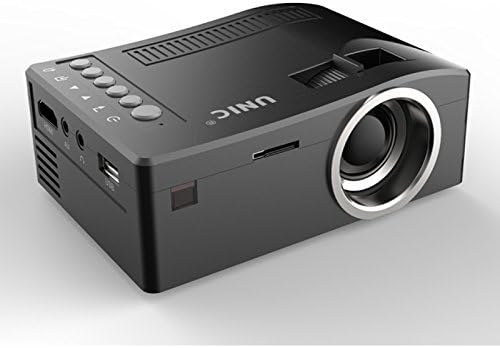
Devan ak bò view of the UNIC UC18 Mini Projector, showing the lens, ventilation, and various ports.
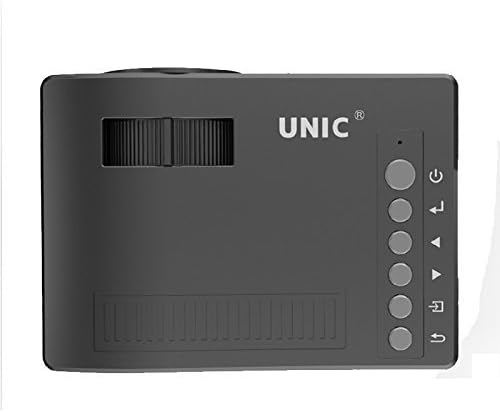
Top view of the UNIC UC18 Mini Projector, highlighting the control buttons and focus wheel.
Pò ak kontwòl
The UNIC UC18 Mini Projector features a range of ports and controls for easy connectivity and operation:
- Lantiy: Pwojte imaj la sou ekran an.
- Konsantre wou: Ajisteman manyèl pou klète imaj la.
- Bouton pouvwa: Limen oswa etenn pwojektè a.
- Bouton meni: Aksè nan meni paramèt pwojektè a.
- Bouton Navigasyon (Anwo/Anba/Agoch/Dwat): Itilize pou navige nan meni yo epi ajiste paramèt yo.
- OK bouton: Konfime seleksyon yo nan meni an.
- Sous bouton: Selects the input source (HDMI, USB, AV, TF).
- Pò USB: Konekte aparèy depo USB pou lekti medya.
- HDMI Port: Connects to HDMI-enabled devices like laptops, gaming consoles, or media players.
- Pò AV: Connects to devices using the included 3-in-1 AV cable.
- TF Kat plas: Inserts a TF (Micro SD) card for media playback.
- Jack ekoutè 3.5mm: Connects external headphones or speakers.
- IR Reseptè: Resevwa siyal soti nan kontwòl la remote.
5. Enstalasyon
5.1 Koneksyon pouvwa
- Konekte kab kouran an nan pò antre kouran pwojektè a.
- Ploge lòt bout kab pouvwa a nan yon priz kouran apwopriye.
- Limyè endikatè pouvwa a sou pwojektè a ap limen.
5.2 Konekte Aparèy Antre
- HDMI: Connect an HDMI cable from your source device (e.g., laptop, DVD player) to the projector's HDMI port.
- USB: Mete yon kle USB nan pò USB a.
- DE: Use the provided 3-in-1 AV cable to connect to devices with AV output. Match the yellow, white, and red connectors.
- Kat TF: Insert a TF (Micro SD) card into the TF card slot.
5.3 Pozisyonman Pwojektè a
Place the projector on a stable, flat surface. For optimal image quality, position the projector perpendicular to the projection surface (wall or screen). The throw distance can range from 0.48 to 2.43 meters, producing a picture size from 12 to 66 inches.
6. Operasyon Enstriksyon
6.1 Limen/Etenyen
Press the Power button on the projector or the remote control to turn the device on or off.
6.2 Ajiste Konsantre
After powering on, if the image appears blurry, rotate the manual focus wheel located near the lens until the image becomes clear and sharp.

Close-up of the manual focus wheel on the UNIC UC18 Mini Projector, located near the lens.
6.3 Chwazi Sous Antre
Press the 'Source' button on the projector or remote control. Use the navigation buttons to select your desired input source (HDMI, USB, AV, TF) and press 'OK' to confirm.
6.4 Navigasyon meni
Press the 'Menu' button to access the projector's settings. Use the navigation buttons to browse options and 'OK' to select. Press 'Menu' again to exit.
6.5 Sòti odyo
The projector has a built-in speaker. For private listening or connecting to external audio systems, plug headphones or external speakers into the 3.5mm headphone jack.
7. Antretyen
7.1 Netwaye Lantiy la
Use a soft, lint-free cloth specifically designed for optical lenses. Gently wipe the lens to remove dust or smudges. Avoid using abrasive materials or harsh chemicals.
7.2 Netwayaj kò pwojektè a
Wipe the exterior of the projector with a soft, dry cloth. Do not use liquid cleaners or solvents.
7.3 Depo
When not in use for extended periods, store the projector in a cool, dry place, away from direct sunlight and extreme temperatures. Cover the lens to protect it from dust.
NAN. Depanaj
| Pwoblèm | Kòz posib | Solisyon |
|---|---|---|
| Pa gen imaj ki parèt | Power not connected; Incorrect input source; Loose cable connection | Check power cable; Select correct input source; Reconnect cables securely |
| Imaj la twoub | Fokus la pa ajiste; Pwojektè a twò pre/lwen | Adjust the focus wheel; Reposition the projector within recommended throw distance |
| Pa gen son | Volume too low; Muted; Audio cable not connected; Source device audio issue | Increase volume; Unmute; Check audio cable connection; Verify audio output on source device |
| Remote kontwòl pa travay | Batteries low/incorrectly inserted; Obstruction between remote and projector | Replace batteries (lithium battery required); Ensure clear line of sight to IR receiver |
| Pwojektè surchof | Blocked ventilation; Prolonged use in hot environment | Ensure ventilation openings are clear; Operate in a well-ventilated area; Allow to cool down |
9. Espesifikasyon
Espesifikasyon teknik
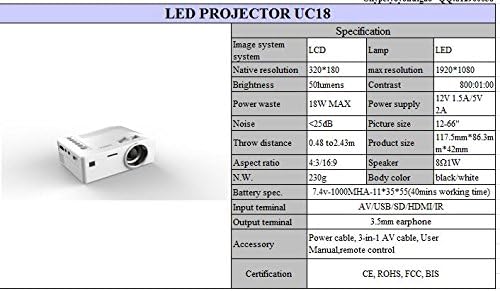
Detailed technical specifications for the UNIC UC18 Mini Projector, including resolution, contrast, and dimensions.
| Karakteristik | Spesifikasyon |
|---|---|
| Mak | UNIC |
| Non modèl | UC18 |
| Teknoloji ekspozisyon | QVGA (LCD) |
| Rezolisyon natif natal | 320 x 240 piksèl |
| Rezolisyon maksimòm sipòte | 1920 x 1080 pixels (1080P) |
| Klète | 50 Lumen |
| Pwopòsyon kontras | 500:1 |
| Aspè rapò | 16:9 (also supports 4:3) |
| Jete Distans | 0.48m - 2.43m (1.57ft - 7.97ft) |
| Gwosè Foto | 12 - 66 pous |
| Antre Tèminal | AV, USB, SD (TF), HDMI, IR |
| Sòti Tèminal | 3.5mm ekouteur Jack |
| Karakteristik espesyal | Oratè entegre, pòtab |
| Konsomasyon pouvwa | 24 Watts (Max 18W) |
| Pwovizyon pou pouvwa | 12V / 1.5V 5A |
| Nivo bri | <25dB |
| Dimansyon pwodwi (L x W x H) | 117.5mm x 86.3mm x 42mm |
| Pwa nèt | 230g |
| Kalite aliye | Mi mòn |
| Kontwòl Remote | Yes (battery not included) |
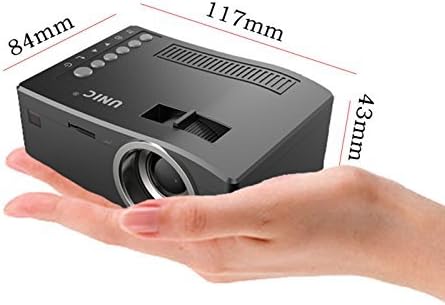
The UNIC UC18 Mini Projector held in a hand, illustrating its compact size and dimensions (117mm x 84mm x 43mm).
10. Garanti ak sipò
Pou enfòmasyon sou garanti a oswa pou sipò teknik, tanpri gade dokiman yo te bay lè w te achte a oswa kontakte revandè w la. Kenbe prèv acha w la pou nenpòt reklamasyon garanti.