
UNIC UC30 (IDSP-004)
Manyèl Itilizatè Mini Pwojektè UNIC UC30 LED
Model: UC30 (IDSP-004)
1. Entwodiksyon
The UNIC UC30 LED Mini Projector is a compact and versatile multimedia device designed for home theater projection. It supports a wide range of input sources and file formats, making it suitable for various entertainment and presentation needs.
Karakteristik kle yo enkli:
- Multiple Input Interfaces: AV, VGA, HDMI, USB, SD, and TV input.
- Vaste File Format Support: Compatible with various video, audio, image, and e-book formats.
- Keystone Correction: Adjusts image distortion for optimal viewing.
- Integrated Speaker: Built-in 2.0W *2 stereo speakers for audio output.
- Flexible Projection: Supports front and rear projection models.

Figi 1: Devan view of the UNIC UC30 LED Mini Projector, showcasing konsepsyon kontra enfòmèl ant li yo ak lantiy li yo.
2. Enstalasyon
2.1 Debalaj ak plasman
Carefully remove the projector and all accessories from the packaging. Place the projector on a stable, flat surface. Ensure adequate ventilation around the unit to prevent overheating.
2.2 Koneksyon pouvwa
- Konekte adaptè kouran an nan pò antre kouran pwojektè a.
- Ploge adaptè pouvwa a nan yon priz elektrik apwopriye.
2.3 Konekte Aparèy Antre
The UC30 projector offers multiple input options. Connect your desired source device (e.g., laptop, DVD player, game console, USB drive) to the corresponding port on the projector.

Figi 2: Dèyè view of the white UNIC UC30 projector, showing various input ports including AV, VGA, HDMI, and USB.
- HDMI: Pou videyo ak odyo dijital an wo definisyon.
- VGA: For connecting computers or laptops.
- DE: For standard definition video and stereo audio (using the included 3-in-1 AV cable).
- USB: Pou jwe medya files dirèkteman nan yon kondwi flash USB.
- Kat SD: Pou jwe medya files directly from an SD memory card.
- Televizyon: For connecting to a TV signal source (if applicable to your region/model).
2.4 Koreksyon Fokus ak Keystone
After powering on the projector, adjust the focus ring around the lens until the projected image is clear. Use the keystone correction feature (usually a dial or button on the projector) to correct any trapezoidal distortion in the image, ensuring a rectangular projection.
3. Operasyon Enstriksyon
3.1 Power On/Off
Press the power button on the projector or the remote control to turn the unit on or off. Allow a few seconds for the projector to warm up or cool down.
3.2 Chwazi Sous Antre
Use the "Source" button on the projector or remote control to cycle through the available input options (HDMI, VGA, AV, USB, SD, TV) until your desired source is displayed.
3.3 Media Playback (USB/SD)
When a USB drive or SD card is inserted, the projector's media player interface will typically appear. Navigate through the menus using the directional buttons on the projector or remote to select and play your desired files.
- Fòma videyo sipòte: AVI, MOV, VOB, DAT, MPEG, MPG, RM, RMVB (encoding: MPEG1/MPEG2/MPEG4/DivX/Xvid).
- Fòma odyo sipòte: MP3, WMA, WAV.
- Fòma imaj ki sipòte: JPEG, BMP, GIF, PNG.
- Supported E-book Format: TXT.

Figure 3: The UNIC UC30 projector displaying a video of a man in a soccer jersey, demonstrating its video playback capability.
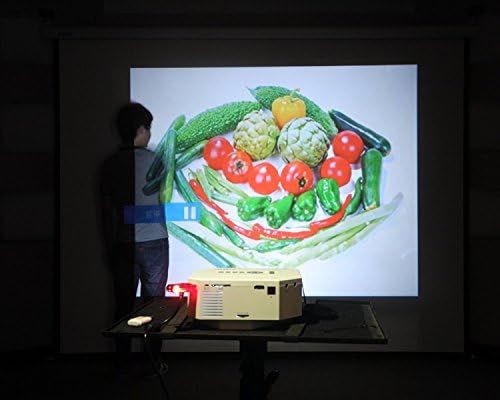
Figure 4: The UNIC UC30 projector displaying a vibrant image of vegetables, showcasing its image display quality.
3.4 Sòti odyo
The projector has built-in stereo speakers. For private listening or connecting to external audio systems, use the stereo earphone output terminal.
3.5 Projection Model
The projector supports both front and rear projection. This setting can typically be adjusted in the projector's menu to suit your setup (e.g., projecting from behind a translucent screen).
4. Antretyen
4.1 Netwaye Lantiy la
Sèvi ak yon twal mou ki pa gen pousyè, espesyalman fèt pou lantiy optik, pou siye lantiy pwojektè a dousman. Evite itilize pwodui netwayaj abrazif oswa fòs twòp, ki ka grate lantiy la.
4.2 Netwayaj kò pwojektè a
Siye deyò pwojektè a avèk yon twal mou epi sèk. Pou mak ki difisil pou retire, yon ti twal mouye.amp cloth can be used, but ensure no liquid enters the ventilation openings.
4.3 Vantilasyon
Ensure the projector's ventilation ports are clear of dust and obstructions. Proper airflow is crucial for maintaining optimal operating temperature and extending the lifespan of the LED lamp.
NAN. Depanaj
5.1 Pa gen imaj oswa mesaj "Pa gen siyal"
- Check if the projector is powered on and the power indicator light is active.
- Verify that the input cable (HDMI, VGA, AV) is securely connected to both the projector and the source device.
- Ensure the correct input source is selected on the projector (use the "Source" button).
- If using a computer, ensure its display output is enabled (e.g., press Fn + F8 or similar key combination).
5.2 Imaj flou
- Adjust the focus ring around the projector lens until the image is sharp.
- Asire w distans pwojeksyon an nan limit rekòmande a (1-3.5 mèt).
- Netwaye lantiy pwojektè a si li sanble sal.
5.3 Pa gen son
- Check the volume level on both the projector and the source device.
- Si w ap itilize HDMI, asire w ke aparèy sous la ap voye odyo a atravè HDMI.
- If using AV, ensure the red and white audio cables are correctly connected.
- If external speakers are connected, ensure they are powered on and functioning correctly.
5.4 Image Distortion (Trapezoid Shape)
- Adjust the keystone correction feature on the projector to square the image.
- Ensure the projector is placed on a level surface and is as perpendicular to the screen as possible.
6. Espesifikasyon
Below are the detailed technical specifications for the UNIC UC30 LED Mini Projector:
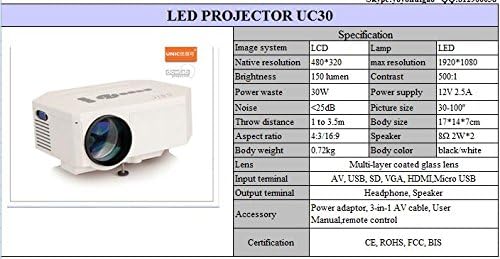
Figure 5: Official specification table for the UNIC UC30 LED Mini Projector, detailing its technical characteristics.
| Karakteristik | Detay |
|---|---|
| Sistèm Imaj | LCD |
| Rezolisyon natif natal | 480 x 320 piksèl |
| Sipò Rezolisyon Maksimòm | 1920 x 1080 (Full HD) |
| Klète | 150 LUX (150 lumen) |
| Pwopòsyon kontras | 500:1 |
| Konsomasyon pouvwa | 30W |
| Pwovizyon pou pouvwa | 12V 2.5A |
| Nivo bri | <25dB |
| Jete Distans | 1 a 3.5 mèt |
| Gwosè Foto | 30-120 pous |
| Aspè rapò | 4:3 / 16:9 |
| Pwa kò | 0.72 kg |
| Gwosè Kò | 17 x 14 x 7 cm |
| Oratè | 2.0W *2 Stereo |
| Lantiy | Multi-layer coated glass lens |
| Antre Tèminal | AV, USB, SD, VGA, HDMI, Micro USB |
| Tèminal Sòti yo | Stereo Earphone, Speaker |
| Pwodwi pou Telefòn enkli | Power adapter, 3-in-1 AV cable, User Manual, Remote control |
| Sètifikasyon | CE, ROHS, FCC, BIS |
7. Garanti ak sipò
For information regarding warranty coverage, technical support, or service, please refer to the warranty card included with your product or contact the retailer or manufacturer directly. Keep your purchase receipt as proof of purchase.
Ask a question about this manual
Ask about setup, troubleshooting, compatibility, parts, safety, or missing instructions. Manuals+ will review the question and use this page’s manual context to help answer it.