
Entwodiksyon
The C2G 40914 Compact Amplifier fèt pou amplify dynamic microphone or stereo audio signals, providing 15 Watts of power per channel to a sound reinforcement system. This amplifier features a discreet installation and remote control capability via an included wall plate. It is suitable for various audio setups requiring compact amplification and external volume management.
Ki sa ki nan bwat la
Tanpri verifye ke tout konpozan yo prezan anvan ou kontinye ak enstalasyon an:
- Kontra enfòmèl ant Amplifier
- Decorator Volume Control Wall Plate
- Kouvèti Plak Vizaj
- Adaptè pouvwa
- Bracket Mounting Screws 6-32 (25mm) qty. 2
- Wall Plate Mounting Screw M3.5 (8mm) qty. 3
- Manyèl itilizatè
Pwodwi souview
Abitye tèt ou ak la amplifier and wall plate components.

Figi 1: Devan view of the C2G 40914 Compact Amplifier. This image displays the local volume control knob, power indicator LED, 1/4 inch microphone input, 3.5mm auxiliary input, and input select switch.

Figi 2: Dèyè view of the C2G 40914 Compact Amplifier. Sa a view shows the speaker output terminals (L+, L-, R+, R-), the remote volume control port (RJ45), and the DC 12V power input.

Figi 3: Decorator Volume Control Wall Plate and face plate cover. The wall plate features a rotary volume knob and a power indicator LED.
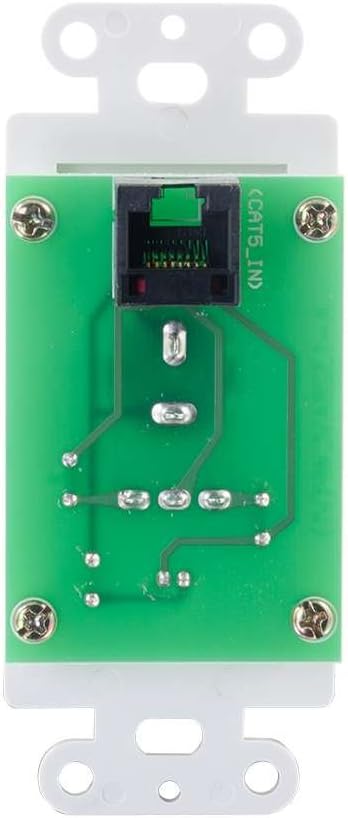
Figi 4: Dèyè view of the Decorator Volume Control Wall Plate, showing the RJ45 connector for remote communication with the amplifier.
Enstalasyon
-
Monte la Amplifier:
La amplifier includes a built-in mounting bracket. Secure the amplifier to a suitable surface using the provided 6-32 (25mm) mounting screws. Ensure adequate ventilation around the unit.
-
Konekte moun kap pale yo:
Connect your passive speakers to the speaker output terminals on the rear of the amplifier (L+, L-, R+, R-). Ensure correct polarity (+ to + and - to -) for each speaker channel. The amplifier provides 15 watts per channel.
-
Konekte sous odyo:
- Antre mikwofòn: Connect a dynamic microphone to the 1/4 inch MIC IN jack on the front panel.
- Antre oksilyè: Connect an audio source (e.g., smartphone, media player) to the 3.5mm AUX IN jack on the front panel.
-
Connecting the Remote Wall Plate:
Install the Decorator Volume Control Wall Plate in a standard wall box. Connect a Cat5e/Cat6 cable (not included) from the RJ45 port on the rear of the wall plate to the REMOTE port (RJ45) on the rear of the amplifier. Secure the wall plate with the provided M3.5 (8mm) screws and attach the face plate cover.
-
Alimente a Amplifier:
Connect the included power adapter to the DC 12V input on the rear of the amplifier, then plug the adapter into a standard AC power outlet. The power indicator LED on the amplifier and wall plate will illuminate.
Enstriksyon Operasyon
-
Limen/Etenyen:
La amplifier powers on automatically when connected to power. The power indicator LED on both the amplifier and the wall plate will light up.
-
Seleksyon Antre:
Sèvi ak la ENP SELECTT CHWAZI switch on the front panel of the amplifier to choose between the MIC IN and AUX IN audio sources.
-
Kontwòl Volim:
La amplifier offers both local and remote volume control options:
- Local Volume: Adjust the rotary knob labeled VOLIM sou panèl la devan nan amplifier.
- Remote Volume: Adjust the rotary knob labeled VOLIM on the Decorator Volume Control Wall Plate.
Sèvi ak la CHWAZI VOLIM chanje sou la amplifier to determine whether the local or remote volume control is active. Set to 'LOCAL' to use the amplifier's knob, or 'REMOTE' to use the wall plate's knob.
-
Itilizasyon Mikwofòn:
When MIC IN is selected, speak into the connected dynamic microphone. Adjust the volume using the selected volume control (local or remote) to achieve the desired output level.
Antretyen
- Kenbe la amplifier and wall plate clean by wiping with a soft, dry cloth.
- Avoid using liquid cleaners or aerosol sprays, which may damage the unit.
- Asire bon vantilasyon alantou an amplifier pou anpeche surchof.
- Do not expose the unit to excessive moisture or extreme temperatures.
Depanaj
If you encounter issues with your C2G 40914 Compact Amplifier, tanpri al gade solisyon komen sa yo:
-
Pa gen Sòti odyo:
- Ensure the power adapter is securely connected and the power indicator LEDs are lit.
- Verify that speakers are correctly wired to the amplifier's output terminals with correct polarity.
- Tcheke ke la ENP SELECTT CHWAZI switch is set to the correct source (MIC or AUX).
- Konfime ke la CHWAZI VOLIM switch is set to the active volume control (LOCAL or REMOTE) and that the volume knob is turned up.
- Test with a different audio source or microphone to rule out source device issues.
-
Remote Volume Control Not Working:
- Ensure the Cat5e/Cat6 cable connecting the wall plate to the amplifier is securely plugged into both RJ45 ports.
- Verifye ke CHWAZI VOLIM chanje sou la amplifier is set to 'REMOTE'.
- Check the wall plate's power indicator LED to ensure it is receiving power.
-
Odyo defòme:
- Reduce the volume level on both the amplifier/wall plate and the audio source device.
- Asire w ke enpedans oratè a koresponn ak amplifier's requirements (typically 4-8 ohms).
- Tcheke tout koneksyon kab yo pou wè si yo lach oswa domaje.
Espesifikasyon
| Karakteristik | Detay |
|---|---|
| Dimansyon pwodwi | 1.95 x 1.3 x 4.05 pous (L x W x H) |
| Pwa atik | 1 liv |
| Nimewo Modèl | 40914 |
| Sortie pouvwa | 15 Watts per channel (30W total) |
| Konektè Antre | 1/4 inch Dynamic Microphone, 3.5mm Stereo Audio Line Level |
| Sòti rakor | Speaker Terminals (L+, L-, R+, R-) |
| Kontwòl Remote | RJ45 for external volume control wall plate |
| Pwovizyon pou pouvwa | DC 12V (Power Adapter included) |
| Aparèy konpatib | Moun kap pale |
| Koulè | Nwa |
Garanti ak sipò
The C2G 40914 Compact Amplifier is thoroughly inspected and tested to ensure quality and comes with a warranty for your complete satisfaction. For specific warranty terms and conditions, please refer to the documentation included with your purchase or visit the official C2G websit.
For technical support, troubleshooting assistance, or further inquiries, please visit the C2G Store oubyen chanèl sipò ofisyèl yo.