
Project X Ghost Box (1 Keypad + 4 Modules)
PROJECT X Ghost Box Wireless Accessory Control Ecosystem Kit Instruction Manual
Model: Ghost Box (1 Keypad + 4 Modules)
Entwodiksyon
This manual provides comprehensive instructions for the installation, operation, and maintenance of your PROJECT X Ghost Box Wireless Accessory Control Ecosystem Kit. This system is designed to offer a customizable and wirelessly controlled experience for managing vehicle accessories. Please read this manual thoroughly before installation and operation to ensure proper function and safety.
The Ghost Box kit includes one keypad and four control modules, enabling smart control of multiple accessories.
Pwodwi souview
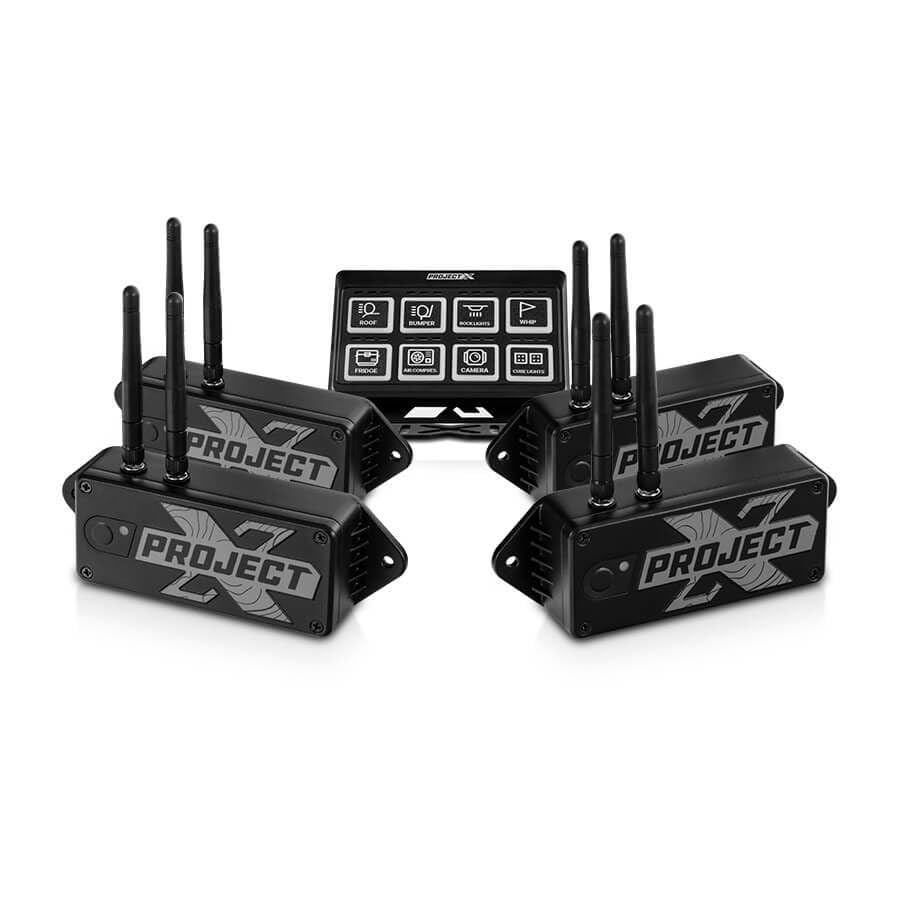
Imaj 1: The PROJECT X Ghost Box Kit, featuring a central control keypad and four individual wireless control modules. Each module is black with "PROJECT X" branding and multiple antennas for wireless communication. The keypad displays various accessory icons such as roof, bumper, spotlights, whip, fridge, air compressor, camera, and rock lights.
The PROJECT X Ghost Box system consists of a central keypad and multiple wireless control modules. These modules connect to your vehicle's accessory power harness, converting traditional accessories into "smart" devices controllable via the keypad or the PROJECT X mobile application.
Karakteristik kle:
- Koneksyon Wireless: Utilizes Bluetooth for initial pairing and 2.4GHz RF Wireless for reliable, low-latency communication with accessories.
- Low-Voltage Pwoteksyon: Each control module features adjustable low-voltage protection (10.0V to 14.9V) to prevent battery drain.
- Kontwòl aplikasyon: Remote control functionality via the PROJECT X mobile application.
- Sistèm dilatabl: Designed for easy integration and expansion with additional accessories.
Ki sa ki nan bwat la
Upon opening your PROJECT X Ghost Box kit, please verify that all components are present:
- 1 x Ghost Box Keypad
- 4 x Ghost Box Control Modules
Enstalasyon ak Enstalasyon
1. Planifikasyon Enstalasyon ou an
Before beginning installation, plan the placement of your Ghost Box Keypad and Control Modules. Consider accessibility, cable routing, and proximity to the accessories they will control. Ensure the chosen locations are protected from extreme elements and potential damage.
2. Installing Control Modules
- Mount each control module securely in a dry, protected location near the accessory it will power.
- Connect the accessory's power harness to the designated output on the control module. Refer to the wiring diagram (if provided separately) for specific connections.
- Connect the control module's power input to a fused 12V power source in your vehicle. Ensure proper grounding.
- Repeat for all four control modules and their respective accessories.
3. Enstale klavye a
- Choose a convenient and accessible location for the keypad within the vehicle's cabin.
- Securely mount the keypad using the provided hardware or adhesive.
- Connect the keypad to a suitable 12V power source, ensuring it is fused.
4. Premye koneksyon (Bluetooth)
- Power on your vehicle and the Ghost Box system.
- Download the PROJECT X app from your device's app store.
- Open the app and follow the on-screen instructions to pair your Ghost Box Keypad and Control Modules via Bluetooth. This initial pairing establishes the connection for 2.4GHz RF Wireless communication.
Enstriksyon Operasyon
Sèvi ak klavye a
The Ghost Box Keypad provides direct control over your connected accessories. Each button on the keypad corresponds to a specific accessory or function.
- Press a button once to activate the corresponding accessory.
- Press the button again to deactivate the accessory.
- Some buttons may have additional functions (e.g., momentary, dimming) configurable via the PROJECT X app.
Using the PROJECT X App
The PROJECT X app offers advanced control and customization options for your Ghost Box system.
- Kontwòl Remote: Activate and deactivate accessories directly from your smartphone.
- Pèsonalizasyon: Assign specific accessories to keypad buttons, configure button behavior (e.g., ON-OFF-ON, momentary), and adjust low-voltage protection settings for each module.
- Siveyans: View the status of connected accessories and system diagnostics.
Adjusting Low-Voltage Pwoteksyon
Each control module's low-voltage protection can be adjusted from 10.0V to 14.9V in 0.1V increments. This feature prevents excessive battery drain by automatically shutting off accessories if the vehicle's battery voltage drops below the set threshold.
- Open the PROJECT X app on your smartphone.
- Navigate to the settings for the specific control module you wish to adjust.
- Select the desired low-voltage cutoff point.
- Sove chanjman ou yo.
Antretyen
The PROJECT X Ghost Box system is designed for durability and minimal maintenance. However, regular checks can ensure optimal performance.
- Enspeksyon fil elektrik: Periodically inspect all wiring connections for corrosion, fraying, or loose terminals. Ensure all connections are secure.
- Module and Keypad Cleaning: Keep the control modules and keypad clean and free of dirt, dust, and moisture. Use a soft, dry cloth for cleaning. Avoid harsh chemicals.
- Mizajou mikrolojisyèl: Check the PROJECT X app regularly for any available firmware updates for your Ghost Box system. Updates can improve performance and add new features.
Depanaj
| Pwoblèm | Kòz posib | Solisyon |
|---|---|---|
| Accessory does not turn on. |
|
|
| Klavye pa reponn. |
|
|
| App cannot connect to Ghost Box. |
|
|
Espesifikasyon
| Karakteristik | Detay |
|---|---|
| Mak | Pwojè X |
| Modèl | Ghost Box (1 Keypad + 4 Modules) |
| Mòd operasyon | ON-OFF-ON |
| Current Rating (per module) | 40 Amps |
| Opere Voltage | 16 Vòlt (Maksimòm) |
| Low-Voltage Pwoteksyon | Adjustable 10.0V to 14.9V |
| Kalite kontak | Nòmalman Louvri |
| Kalite Connector | Ploge nan |
| Teknoloji san fil | Bluetooth (pairing), 2.4GHz RF Wireless (operation) |
| Dimansyon pwodwi (L x W x H) | 6.7 x 3.4 x 4.5 inches (overall package/keypad, modules are smaller) |
| Pwa | 7.3 Pounds (overall package) |
Enfòmasyon sou Garanti
PROJECT X products are manufactured to high-quality standards. For specific warranty terms and conditions, please refer to the warranty card included with your product or visit the official PROJECT X websit la. Kenbe prèv acha ou pou reklamasyon garanti.
Plan pwoteksyon yo disponib pou achte separeman:
- Plan Pwoteksyon 4 Zan
- Complete Protect: Covers eligible past and future purchases (monthly subscription)
Sipò pou Kliyan
If you encounter any issues or have questions not covered in this manual, please contact PROJECT X customer support. Contact information can typically be found on the product packaging or the official PROJECT X websit.
For the latest information, FAQs, and additional resources, please visit the Project X Brand Page.
Ask a question about this manual
Ask about setup, troubleshooting, compatibility, parts, safety, or missing instructions. Manuals+ will review the question and use this page’s manual context to help answer it.