
Showtec Q4
Manyèl Itilizatè Showtec Compact Par 7 Q4 7 x 3W RGBW LED Floor PAR Spot
Modèl: Q4
1. Entwodiksyon
This user manual provides comprehensive instructions for the safe and efficient operation of the Showtec Compact Par 7 Q4 7 x 3W RGBW LED Floor PAR Spot. Please read this manual thoroughly before installation, operation, or maintenance to ensure proper use and to prevent damage to the unit or injury to personnel.
The Showtec Compact Par 7 Q4 is a compact RGBW PAR can designed for various lighting applications, offering versatile color mixing and robust performance.
2. Enstriksyon Sekirite
Toujou obsève prekosyon sekirite sa yo pou diminye risk chòk elektrik, dife, oswa blesi:
- Asire ekipman pou pouvwa a voltage matche ak voltage espesifye sou inite a.
- Toujou konekte aparèy la nan yon priz kouran ki gen koneksyon ak tè.
- Pa sèvi ak aparèy la si kòd elektrik la domaje.
- Disconnect from mains power before cleaning or servicing.
- Pa ekspoze aparèy la a lapli oswa imidite.
- Kenbe yon bon vantilasyon toutotou aparèy la pou anpeche li chofe twòp.
- Evite ekspoze je dirèk nan sous limyè a.
- Inite sa a se pou itilize andedan kay la sèlman.
3. Pwodwi souview
The Showtec Compact Par 7 Q4 features seven 3W RGBW LEDs, providing a wide spectrum of colors. Its compact design makes it suitable for floor standing or truss mounting.

Figi 3.1: Devan view of the Showtec Compact Par 7 Q4 with red light output, showcasing its seven powerful RGBW LEDs.

Figure 3.2: The PAR spot emitting a bright white light, demonstrating its full spectrum capabilities.

Figure 3.3: The PAR spot displaying a vibrant blue light, highlighting its color mixing versatility.

Figi 3.4: Close-up view of the LED array when the unit is off, showing the individual lenses.
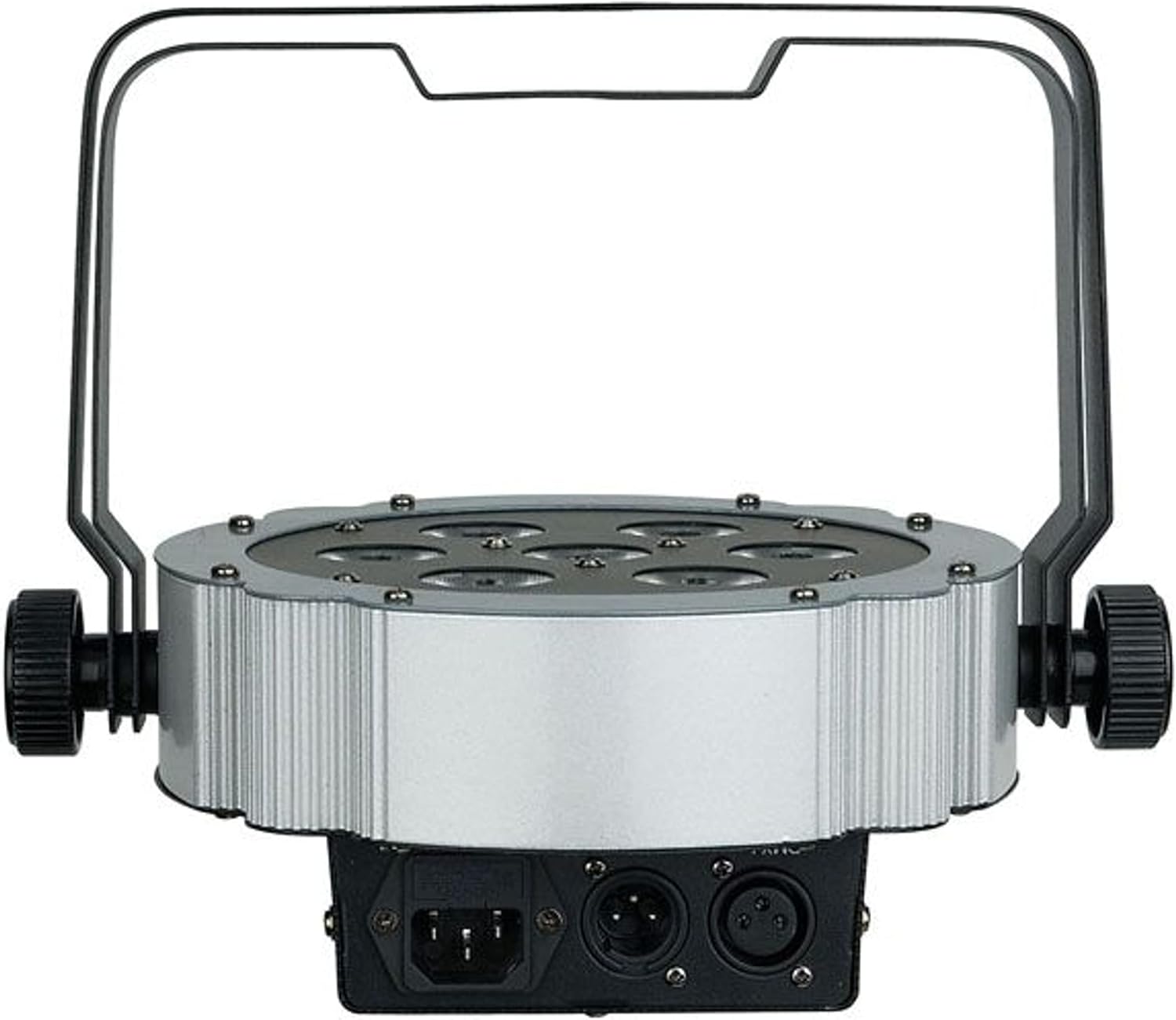
Figi 3.5: Dèyè view of the unit, showing the power input and DMX connections (XLR 3-pin).

Figi 3.6: Angle view of the PAR spot, demonstrating the adjustable mounting bracket for floor or truss applications.
4. Enstalasyon
4.1 Debake
Carefully unpack the unit and check for any damage during transit. Retain the packaging material for future transport or storage.
4.2 Montaj
The Compact Par 7 Q4 can be used as a floor spot or mounted to a truss using the integrated bracket. Ensure the mounting surface or truss can support the weight of the fixture. Use appropriate clamps and safety cables when mounting overhead.
4.3 Koneksyon pouvwa
Connect the power cable to the unit's power input and then to a grounded electrical outlet. Verify that the local voltage koresponn ak egzijans inite a (240 Vòlt).
4.4 Koneksyon DMX (Si ou vle)
For DMX control, connect a DMX cable from your DMX controller to the DMX IN port of the fixture. If connecting multiple units, daisy-chain them by connecting the DMX OUT of the first unit to the DMX IN of the next.
5. Opere
5.1 Kontwòl Panel
The unit features a digital display and control buttons (Menu, Up, Down, Enter) on the rear for setting modes and DMX addresses.
5.2 Mòd Fonksyònman
The Showtec Compact Par 7 Q4 typically offers several operating modes:
- DMX mòd: Allows control via an external DMX controller. Set the DMX address using the control panel.
- Mòd oto: Pre-programmed light shows that run automatically.
- Son mòd aktif: The light reacts to sound via a built-in microphone.
- Mòd Mèt/Esklav: Link multiple units where one acts as the master and others as slaves, synchronizing their operation.
- Mòd Koulè Estatik: Select and display a single static color.
5.3 Tablo Chanèl DMX
Refer to the specific DMX channel chart in the full product manual for detailed information on controlling each function via DMX. Common channels include Dimmer, Red, Green, Blue, White, Strobe, and Program selection.
6. Antretyen
6.1 Netwayaj
Regular cleaning of the lenses and housing is recommended to maintain optimal light output and extend the unit's lifespan. Use a soft, lint-free cloth and a mild glass cleaner. Do not use abrasive materials.
6.2 Ranplasman Fuse
If the unit does not power on, check the fuse located near the power input. Replace it with a fuse of the same type and rating only.
6.3 Depo
When not in use, store the unit in its original packaging or a suitable flight case in a dry, dust-free environment.
NAN. Depanaj
| Pwoblèm | Kòz posib | Solisyon |
|---|---|---|
| Aparèy pa limen | No power supply; Blown fuse; Damaged power cable | Check power connection; Replace fuse; Replace cable |
| Pa gen kontwòl DMX | Incorrect DMX address; Faulty DMX cable; DMX controller issue | Verify DMX address; Check/replace DMX cable; Test controller |
| Limyè yo tranble oswa yo konpòte yo yon fason iregilye | Poor DMX signal; Overheating; Internal fault | Check DMX connections; Ensure proper ventilation; Contact support |
| Koulè yo pa kòrèk | Incorrect DMX channel values; Internal calibration issue | Adjust DMX values; Perform factory reset if available; Contact support |
8. Espesifikasyon
| Karakteristik | Detay |
|---|---|
| Mak | Showtec |
| Modèl | Q4 |
| Nimewo Referans | LIG0013729-000 |
| Sous limyè | 7 x 3W RGBW dirije |
| Pouvwa | 3 Watts (per LED) |
| Voltage | 240 Volts |
| Sous pouvwa | Kab elektrik |
| Dimansyon (L x W x H) | 31.5 x 31 x 15.5 cm |
| Pwa | 2.73 Kilogram |
| ASIN | B01F04U758 |
9. Garanti ak sipò
Information regarding specific warranty terms and conditions for the Showtec Compact Par 7 Q4 is not available in the provided product details. Please refer to the retailer or manufacturer's official websit pou enfòmasyon ki pi ajou sou garanti a.
For technical support, service, or spare parts inquiries, please contact your authorized Showtec dealer or the manufacturer directly. Always provide the model number (Q4) and reference number (LIG0013729-000) when seeking support.
Ask a question about this manual
Ask about setup, troubleshooting, compatibility, parts, safety, or missing instructions. Manuals+ will review the question and use this page’s manual context to help answer it.