
Vogel's MA4000
Vogel's MA4000 Flat Screen Wall Mount Instruction Manual
Model: MA4000 (8554000)
Entwodiksyon
This manual provides comprehensive instructions for the safe and proper installation, operation, and maintenance of your Vogel's MA4000 Flat Screen Wall Mount. Please read all instructions carefully before installation and retain this manual for future reference.
The Vogel's MA4000 is designed to securely mount flat screen televisions ranging from 40 to 80 inches (102-203 cm) with a maximum weight capacity of 80 kg (176 lbs). It features a slim profile and a tilt function to optimize viewang ing yo epi diminye ekla.
Enfòmasyon sou Sekirite
AVÈTISMAN:
- Asire w ke sifas montaj la ka sipòte pwa konbine montaj la ak televizyon an san danje.
- Always use appropriate tools and follow all installation steps precisely.
- Pa depase kapasite pwa maksimòm 80 kg (176 lbs).
- Verify VESA compatibility with your television before installation.
- Si ou pa sèten sou nenpòt pati nan enstalasyon an, konsilte yon pwofesyonèl ki kalifye.
Kontni pake
Before beginning installation, please verify that all components are present and undamaged. Refer to the included parts list in your product packaging for a complete inventory.

Deskripsyon imaj: Yon anlè view of the Vogel's MA4000 Flat Screen Wall Mount, showing the main wall plate and the two vertical TV brackets. The mount is black and designed for flat panel televisions.
The image above displays the primary components of the Vogel's MA4000 wall mount: the wall plate and the two TV interface bars. Additional hardware such as screws, washers, and spacers are included in the retail package.
Espesifikasyon
| Nimewo Modèl | MA4000 (8554000) |
| Mak | Vogel's |
| Kalite aliye | Flat, Tilting |
| Materyèl | Nerjaveèi asye |
| Koulè | Nwa |
| Gwosè televizyon konpatib | 40 - 80 pous (102 - 203 santimèt) |
| Kapasite maksimòm pwa | 80 kg (176 liv) |
| VESA konpatibilite | Min 100x100 mm, Max 600x400 mm |
| Maksimòm Ang Panche | 12 Degre |
| Mi Distans | Apeprè 30 mm (1.2 pous) |
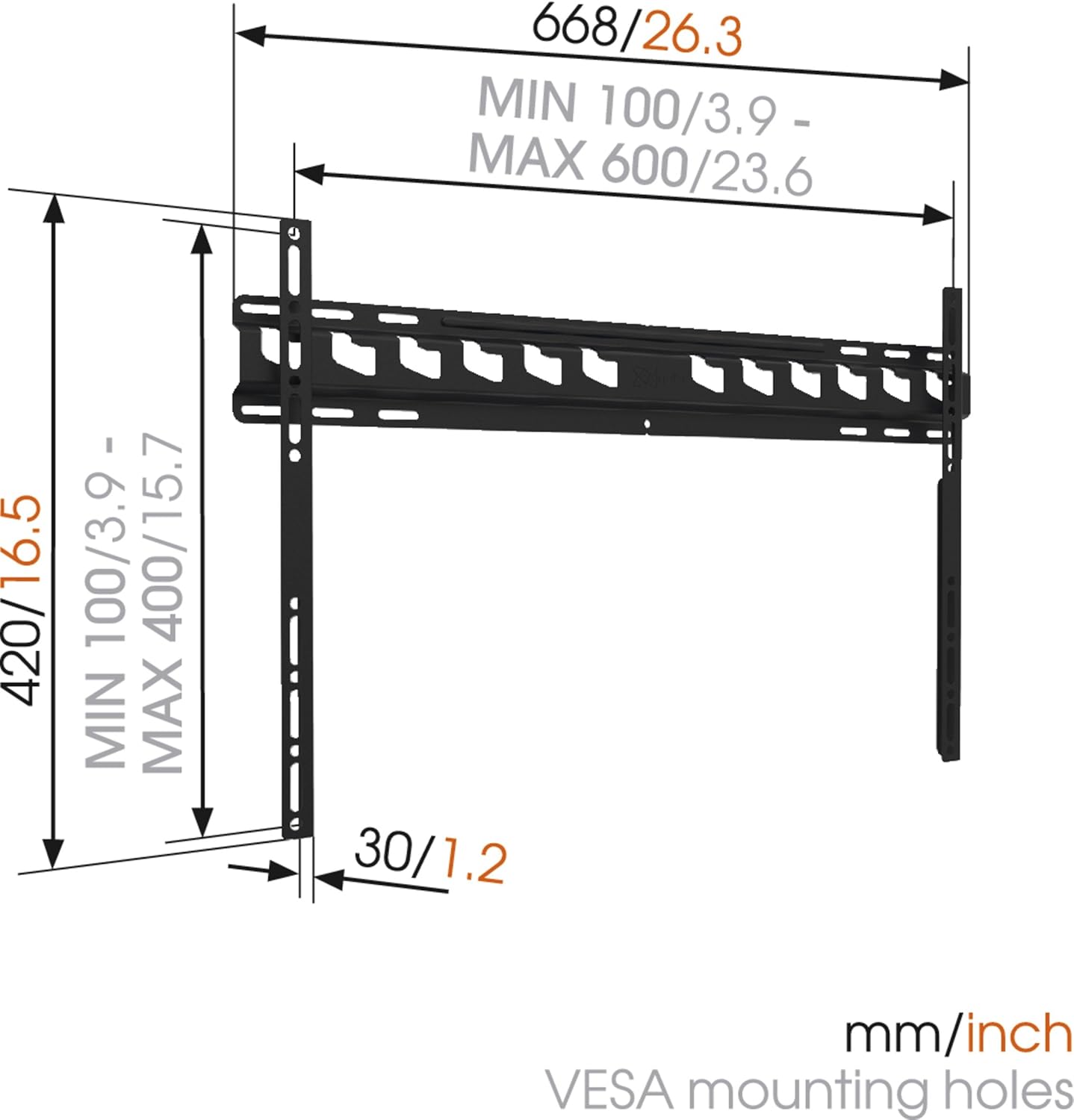
Deskripsyon imaj: A technical diagram illustrating the dimensions of the Vogel's MA4000 wall mount. It shows the overall width (668mm / 26.3 inches), height (420mm / 16.5 inches), and the minimum and maximum VESA mounting hole patterns (100-600mm horizontally, 100-400mm vertically). The distance from the wall is indicated as 30mm (1.2 inches).
Enstalasyon ak Enstalasyon
This section outlines the general steps for installing your Vogel's MA4000 wall mount. Always refer to the detailed graphical instructions included with your product for specific drilling templates and hardware usage.
Zouti obligatwa (pa enkli):
- Fè egzèsis
- Drill bits appropriate for your wall type (wood, concrete, brick, etc.)
- Stud finder (for wood stud walls)
- Nivo
- Kreyon
- Mezire tep
- Tournvis oswa kle
Etap enstalasyon:
- Detèmine Kote Montaj: Choose a suitable location on your wall, ensuring it is structurally sound and free from electrical wires or plumbing. Use a stud finder if mounting to wood studs.
- Make twou perçage yo: Hold the wall plate against the wall at the desired height and use a level to ensure it is straight. Mark the drilling holes with a pencil.
- Fè twou: Drill pilot holes according to the marked positions and your wall type. Insert wall anchors if required.
- Tache plak miray la: Secure the wall plate to the wall using the provided screws and washers. Ensure it is firmly attached and level.
- Mete sipò televizyon yo sou televizyon an: Attach the two vertical TV interface bars to the back of your television using the appropriate screws, washers, and spacers from the hardware kit. Ensure the brackets are centered and securely fastened to the VESA mounting points.
- Monte televizyon an sou plak miray la: Carefully lift the television and hook the TV brackets onto the wall plate. Ensure both brackets are properly seated.
- Televizyon an sekirite: Engage the safety locking mechanism (if applicable) to prevent the TV from accidentally dislodging from the wall plate.

Deskripsyon imaj: Yon pwofesyonèl bò kotefile view of a flat screen television mounted flush against a white wall, demonstrating the slim design and minimal wall distance achieved with the Vogel's MA4000 wall mount. The mount itself is barely visible behind the television.
Operating Instructions (Tilting Function)
The Vogel's MA4000 wall mount allows for a slight tilt to optimize your vieweksperyans ing epi diminye ekla.
- Ajisteman enklinezon: Gently push or pull the bottom edge of the television to achieve the desired tilt angle. The mount supports a maximum tilt of 12 degrees.
- Securing Tilt: Some models may have a locking mechanism for the tilt. Refer to your product's specific instructions for details on securing the tilt position if available.
Antretyen
The Vogel's MA4000 wall mount requires minimal maintenance to ensure long-term performance and safety.
- Enspeksyon regilye: Tcheke tout vis ak koneksyon yo detanzantan pou asire yo rete sere. Sere yo ankò si sa nesesè.
- Netwayaj: Clean the mount with a soft, dry cloth. Avoid abrasive cleaners or solvents that could damage the finish.
- Limit pwa: Never exceed the maximum weight capacity of 80 kg (176 lbs).
Depanaj
| Pwoblèm | Kòz posib | Solisyon |
|---|---|---|
| Televizyon an pa nivo apre enstalasyon an. | Wall plate was not installed level. | Remove TV, adjust wall plate, and remount. Ensure a level is used during installation. |
| Televizyon an sanble enstab sou sipò a. | Screws are loose; TV not properly seated; safety lock not engaged. | Ensure all screws are tightened. Verify TV brackets are fully engaged with the wall plate. Engage safety lock. Do not exceed weight capacity. |
| Cannot achieve desired tilt angle. | Obstruction; maximum tilt angle reached. | Check for cables or other obstructions. The mount has a maximum tilt of 12 degrees. |
Garanti ak sipò
For warranty information and customer support, please refer to the documentation included with your product or visit the official Vogel's websit la. Kenbe prèv acha ou pou reklamasyon garanti.
Vogel's Official Websit: www.vogels.com
Ask a question about this manual
Ask about setup, troubleshooting, compatibility, parts, safety, or missing instructions. Manuals+ will review the question and use this page’s manual context to help answer it.