
Intermec PB51B33004100
Intermec PB51 Mobile Receipt Printer User Manual
Model: PB51B33004100
Entwodiksyon
The Intermec PB51 is a rugged, 4-inch direct thermal mobile receipt printer designed for demanding field service, route accounting, and point-of-service applications. It offers fast, reliable printing performance to enhance productivity for mobile workers.
This manual provides essential information for the proper setup, operation, maintenance, and troubleshooting of your PB51 printer.
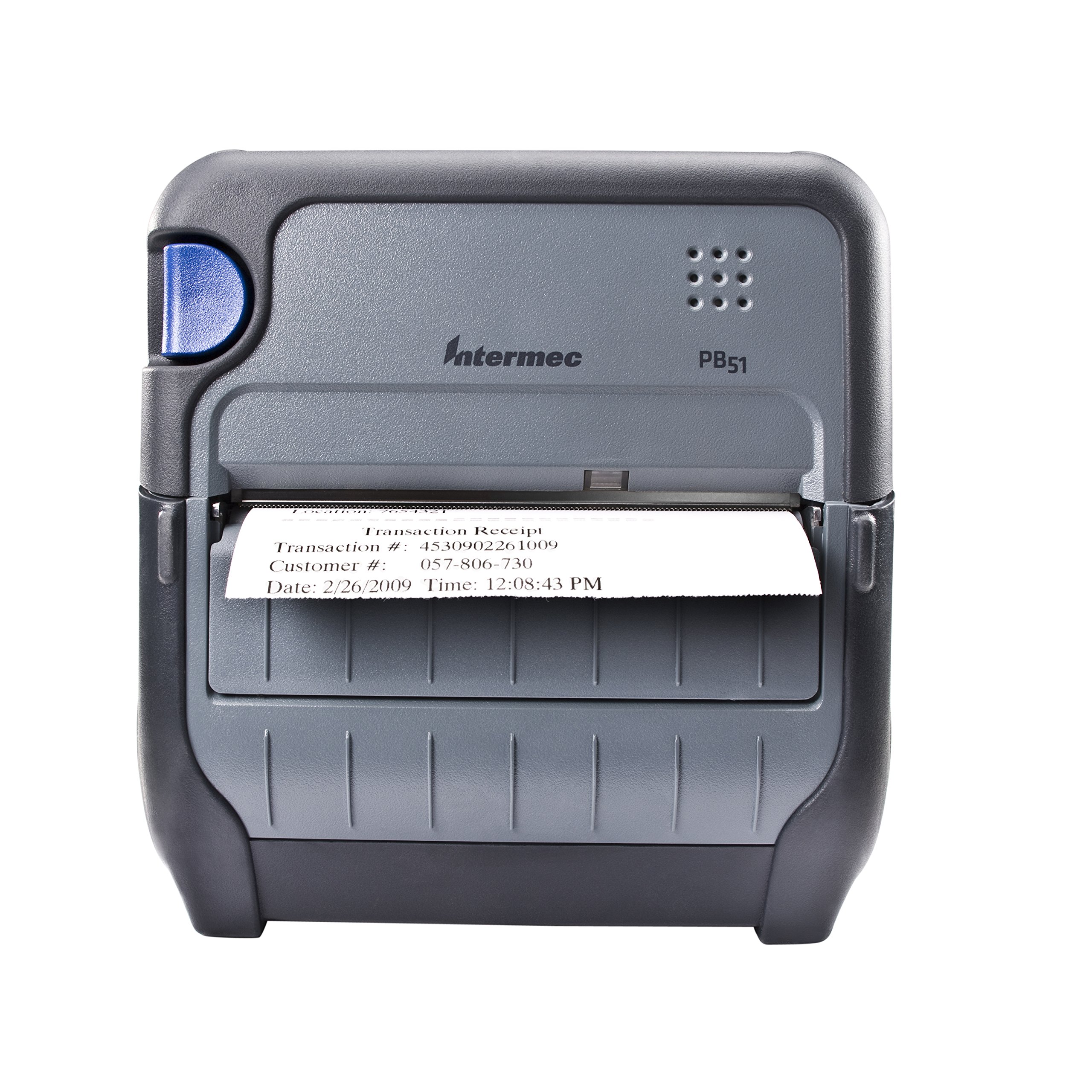
Figi 1: Devan view of the Intermec PB51 mobile receipt printer. A receipt is partially ejected from the front slot, displaying "Transaction Receipt", "Transaction #: 4530902261009", "Customer #: 057-806-730", and "Date: 2/26/2009 Time: 12:08:43 PM". The printer features a dark gray casing with a blue button on the left side and the "Intermec PB51" logo on the top panel.
Enstalasyon
1. Debalaj ak Enspeksyon
- Retire enprimant lan ak tout akseswa yo nan anbalaj la avèk prekosyon.
- Verifye ke tout konpozan ki nan lis nan fich anbalaj la prezan.
- Inspect the printer for any visible damage. If damage is found, contact your supplier immediately.
2. Enstalasyon ak Chaje Batri
- Asire w ke enprimant lan etenn.
- Locate the battery compartment on the printer.
- Insert the battery, ensuring proper alignment with the contacts.
- Fèmen lòj batri a byen.
- Connect the AC adapter to the printer and a power outlet. The battery indicator light will show charging status. Allow the battery to fully charge before first use.
3. Chaje Papye Tèmik la
- Louvri kouvèti lòj papye a.
- Insert the thermal paper roll with the print-side facing the print head.
- Pull a small amount of paper out past the print mechanism.
- Close the paper compartment cover firmly until it latches.
- The printer's paper sensors will detect the paper, minimizing lost transactions.
4. Connectivity Setup (Bluetooth / USB / Serial)
- Bluetooth: Turn on the printer and enable Bluetooth on your host device (e.g., smartphone, tablet, or computer). Chèche pou available devices and select the PB51. Pair using the default PIN (refer to the printer's display or documentation for the specific PIN).
- USB: Connect the printer to your host device using a standard USB cable. Install the necessary printer drivers on your host device if prompted.
- Serial: Connect the printer to your host device using a serial cable. Configure the serial port settings (baud rate, data bits, parity, stop bits) on both the printer and the host device to match.
Enstriksyon Operasyon
1. Powering On / Off
- Pou limen, peze epi kenbe bouton pouvwa a jiskaske ekran an limen.
- To power off, press and hold the power button until the display indicates shutdown, then release.
2. Printing a Receipt
- Ensure the printer is powered on and connected to your host device.
- Open the application on your host device that generates receipts or invoices.
- Initiate the print command from your application. The PB51 is designed for 20-30% faster time-to-receipt printing.
- The printer will automatically feed and print the receipt.
- Tear off the receipt along the serrated edge.
3. Itilizasyon ekran LCD a
The standard LCD display provides important information about the printer's status, battery level, connectivity, and error messages. Use the navigation buttons (if present) to scroll through menu options and settings.
Antretyen
1. Netwaye tèt enpresyon an
- Etenn enprimant lan epi dekonekte li nan nenpòt sous kouran.
- Louvri lòj papye a.
- Gently wipe the print head surface with a lint-free cloth dampfini ak alkòl izopropilik.
- Kite tèt enprime a seche nèt anvan ou fèmen kouvèti a epi limen enprimant lan.
- Perform this cleaning regularly, especially if print quality degrades.
2. Swen batri
- Pou maksimize dire lavi batri a, evite dechaje batri a nèt souvan.
- Sere enprimant lan ak batri a nan yon kote ki fre epi sèk lè w pa itilize li pou yon bon bout tan.
- Use only genuine Intermec replacement batteries.
3. Netwayaj jeneral
Siye deyò enprimant lan ak yon twal mou.amp cloth. Do not use harsh chemicals or abrasive cleaners. Ensure no liquid enters the printer's openings.
Depanaj
| Pwoblèm | Kòz posib | Solisyon |
|---|---|---|
| Enprimant lan pa limen | Low or dead battery; faulty power adapter; loose battery connection. | Charge the battery; check power adapter connection; re-seat the battery. |
| Pa gen okenn rezilta enprime | No paper; paper loaded incorrectly; connectivity issue; print head dirty. | Load paper correctly; check Bluetooth/USB/Serial connection; clean print head. |
| Move kalite enprime | Dirty print head; incorrect paper type; low battery. | Clean print head; ensure thermal paper is used; charge battery. |
| Pwoblèm koneksyon | Incorrect pairing; driver issues; out of range. | Re-pair Bluetooth; reinstall drivers; move closer to host device. |
If the problem persists after attempting these solutions, please contact Intermec customer support.
Espesifikasyon
| Karakteristik | Detay |
|---|---|
| Non modèl | PB51B33004100 |
| Teknoloji Enpresyon | Dirèk tèmik |
| Sòti enprimant | Monokrom |
| Gwosè Maksimòm Medya | 4 pous |
| Koneksyon Teknoloji | USB, Serial, Bluetooth |
| Pwa atik | 42 Ounces (approx. 2.63 lbs) |
| Dimansyon pake | 10.2 x 10 x 5 pous |
| Kalite kontwolè | Android (konpatib) |
| Manifakti | Intermec |
Garanti ak sipò
Specific warranty information for the Intermec PB51 printer is not available in this document. Please refer to the warranty card included with your product or visit the official Intermec (now Honeywell) websit la pou wè tèm ak kondisyon garanti detaye yo.
For technical support, service, or to purchase accessories, please contact your authorized Intermec/Honeywell dealer or visit their official support portal.
Ask a question about this manual
Ask about setup, troubleshooting, compatibility, parts, safety, or missing instructions. Manuals+ will review the question and use this page’s manual context to help answer it.