
1. Entwodiksyon
The AVerMedia AW330 Wireless Voice Amplifier is a portable audio system designed to enhance vocal clarity and projection in various settings such as classrooms, training sessions, meetings, and public speaking events. Its lightweight design, wireless microphone, and powerful speaker ensure your voice is heard clearly and effortlessly.
Karakteristik kle:
- Konsepsyon pòtab: Lightweight and compact for easy transport and use.
- Mikwofòn san fil: 2.4 GHz wireless lavalier microphone for stable 360° transmission.
- Son pwisan: Built-in 20W speaker delivers loud, clear audio.
- Long lavi batri: Rechargeable lithium polymer battery provides 4 to 5 hours of use, or up to 8 hours of continuous use (depending on volume and usage).
- Multimedia Connectivity: Audio input port for connecting smartphones, tablets, or laptops.
- Quick Smart Pairing: Automatic microphone-to-speaker pairing for simple setup.
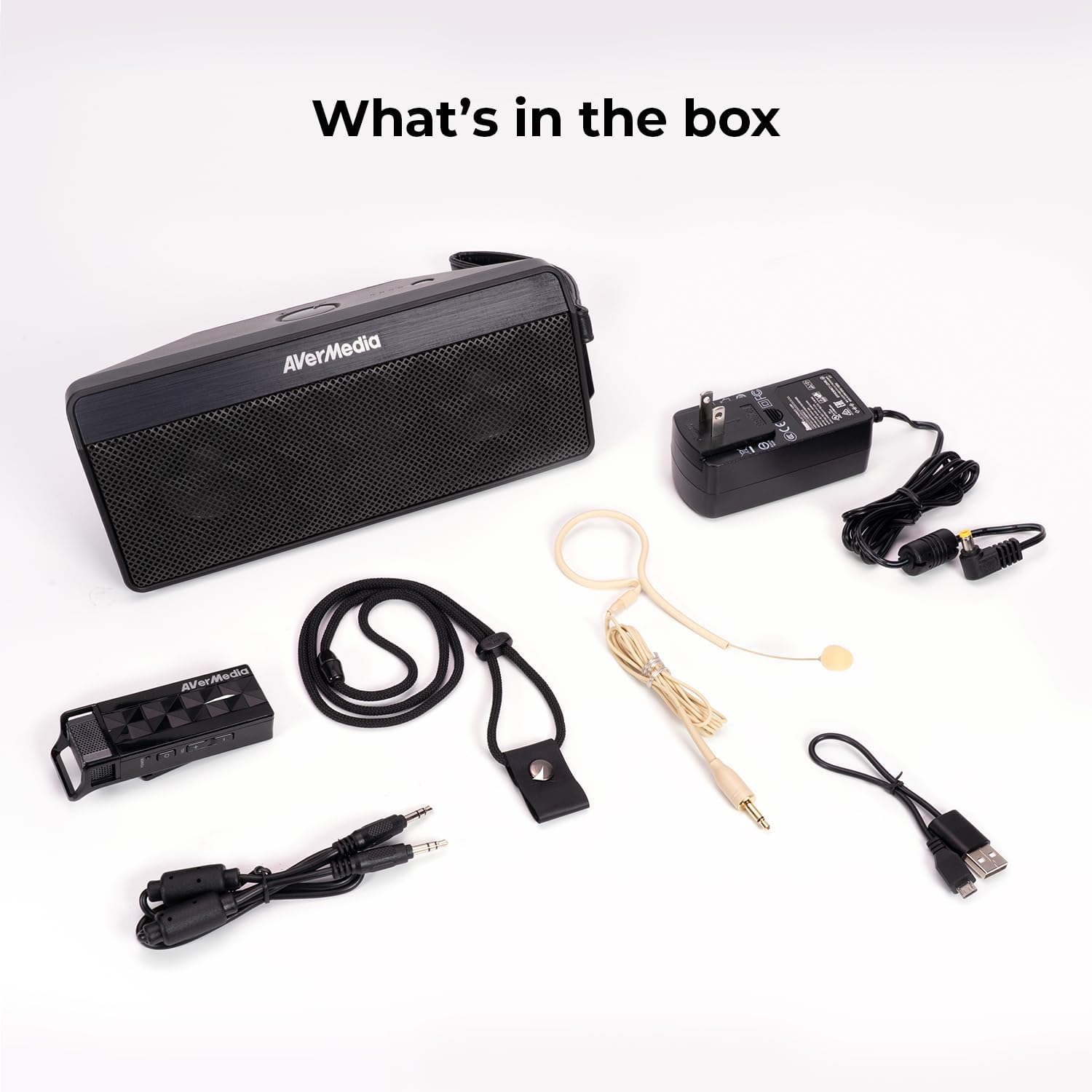
2. Ki sa ki nan bwat la
- Microphone & Headset Mic
- Oratè
- AC Power Adapter & USB Power Cable
- 3.5 mm kab odyo
- Lanyard & Buckle
3. Pwodwi souview
Inite Oratè

The main speaker unit features a power button, volume controls, and an audio input port for connecting external devices. It also includes a clip for attaching to clothing or a strap.
Mikwofòn san fil
The wireless microphone includes a flexible gooseneck boom with a windscreen, volume controls, and a power button. It can be worn as a headset or clipped onto clothing.

4. Enstalasyon
- Chaje Aparèy yo: Before first use, fully charge both the speaker unit and the wireless microphone using the provided AC power adapter and USB power cable. The microphone uses a USB-C connection.
- Konekte Mikwofòn nan: Plug the headset microphone into the wireless microphone unit.
- Pouvwa sou: Turn on the speaker unit by pressing its power button. Turn on the wireless microphone unit by pressing its power button.
- Peyaj: The speaker microphone system features automatic microphone-to-speaker pairing for hassle-free setup. They should pair automatically upon powering on.
- Ajiste Volim: Adjust the volume on both the speaker and the microphone to your desired level.
5. Operasyon Enstriksyon
- Vwa Amplifikasyon: Once paired, speak into the microphone. Your voice will be amplified through the speaker. Adjust volume as needed.
- External Audio Input: To play multimedia audio alongside your voice, connect your smartphone, tablet, or laptop to the speaker unit's Audio In port using the 3.5 mm audio cable.
- Opsyon pou mete: Utilize the clip on the speaker to attach it to your clothing, or use the lanyard and buckle for hands-free operation. The microphone can be worn as a headset or clipped directly.
- Ekonomize pouvwa: If the microphone is turned off, the speaker will automatically turn off after five minutes to conserve battery.

6. Antretyen
- Netwayaj: Use a soft, dry cloth to clean the surfaces of the speaker and microphone. Do not use liquid cleaners or aerosols.
- Depo: Sere aparèy la nan yon kote ki fre epi sèk, lwen limyè solèy dirèk ak tanperati ekstrèm.
- Swen batri: Pou pwolonje lavi batri a, evite dechaje batri a nèt souvan. Rechaje aparèy la regilyèman, menm si ou pa itilize li pandan yon bon bout tan.
- Evite dlo: Aparèy la pa enpèmeyab. Kenbe l lwen dlo ak imidite.
NAN. Depanaj
- Pa gen son:
- Ensure both the speaker and microphone are powered on and fully charged.
- Check that the microphone and speaker are successfully paired.
- Increase the volume on both the speaker and the microphone.
- Feedback/Squealing Sound:
- Reduce the volume on the speaker or microphone.
- Ogmante distans ki genyen ant mikwofòn la ak oratè a.
- Ensure the microphone is not pointing directly at the speaker.
- Kalite son pòv:
- Check for obstructions between the microphone and speaker.
- Asire w mikwofòn nan byen plase toupre bouch ou.
- Verify that the microphone windscreen is properly attached.
- Aparèy pa chaje:
- Ensure the charging cables are securely connected to both the device and the power source.
- Eseye yon lòt priz kouran oswa yon lòt pò USB.
8. Espesifikasyon
| Karakteristik | Spesifikasyon |
|---|---|
| Mak | AVerMedia |
| Nimewo Modèl | AW330 |
| Oratè maksimòm pwodiksyon pouvwa | 20 Watts |
| Koneksyon Teknoloji | Bluetooth, fil |
| Audio Sòti Mode | Mono |
| Kalite aliye | Tabletop mòn |
| Karakteristik adisyonèl | Kontwòl Volim |
| Kalite kontwolè | Batri mache |
| Lavi Mwayèn Batri | 4 Hours (up to 8 hours continuous use) |
| Maksimòm Range | 60 pye |
| Metòd kontwòl | Manyen |
| Pwa atik | 2.6 liv |
| Itilizasyon espesifik pou pwodwi | Educational/Classroom |
9. Garanti ak sipò
The AVerMedia AW330 Wireless Voice Amplifier vini ak yon Garanti manifakti 3 zan. For technical support, troubleshooting, or warranty claims, please contact AVerMedia customer service.
10. Videyo pwodwi yo
AVerMedia AW330 Sistèm odyo nan salklas san fil
Video: An official product video from AVerMedia showcasing the AW330 Wireless Classroom Audio System. It highlights its features and benefits in a classroom environment, demonstrating how teachers can use it to project their voice clearly and effectively to students.